
Agentforce is generating real momentum across the Salesforce ecosystem. Autonomous AI agents that handle donor inquiries, grant recommendations, and volunteer coordination sound like a breakthrough for resource-strapped nonprofits. However, there’s a gap between what Agentforce can do and whether a nonprofit organization is ready for it, and that gap is governance.
Unlike commercial deployments, nonprofit Agentforce implementations face a specific set of organizational constraints: board oversight requirements, funder transparency obligations, restricted fund compliance, and donor trust protections. These are governance problems that need to be solved before the first agent is configured.
After 12 years of implementing Salesforce for nonprofits, I’ve watched this pattern repeat with every major platform release. The technology arrives before the organizational readiness. The difference with Agentforce is that the stakes are higher because AI agents don’t just display data. They act on it. Before requesting board approval, nonprofit admins and consultants need to answer three governance questions. Here’s what those questions are and how to build the documentation your board will expect.
Question 1: Who Owns Our AI Training Data, and What Bias Lives There?
This is the question that stops most conversations cold. Boards are reading about AI bias in the news. They want to know: if we turn on Agentforce, will it perpetuate patterns we’ve been trying to correct?
The honest answer for most nonprofits: yes, unless you audit first.
Here’s what that looks like in practice. At the Environmental Defense Fund in 2014, our donor segmentation criteria were built on giving patterns from 1992 through 2005. The “high-value donor” flags weighted corporate executive titles and Fortune 500 employment. The engagement scoring formulas prioritized direct mail response rates over digital interactions.
None of that was malicious. It reflected the donor base of the early 2000s. If an AI agent used those same criteria to recommend outreach strategies in 2026, it would systematically deprioritize younger donors, social enterprise founders, and community organizers – exactly the demographics most nonprofits are trying to reach.
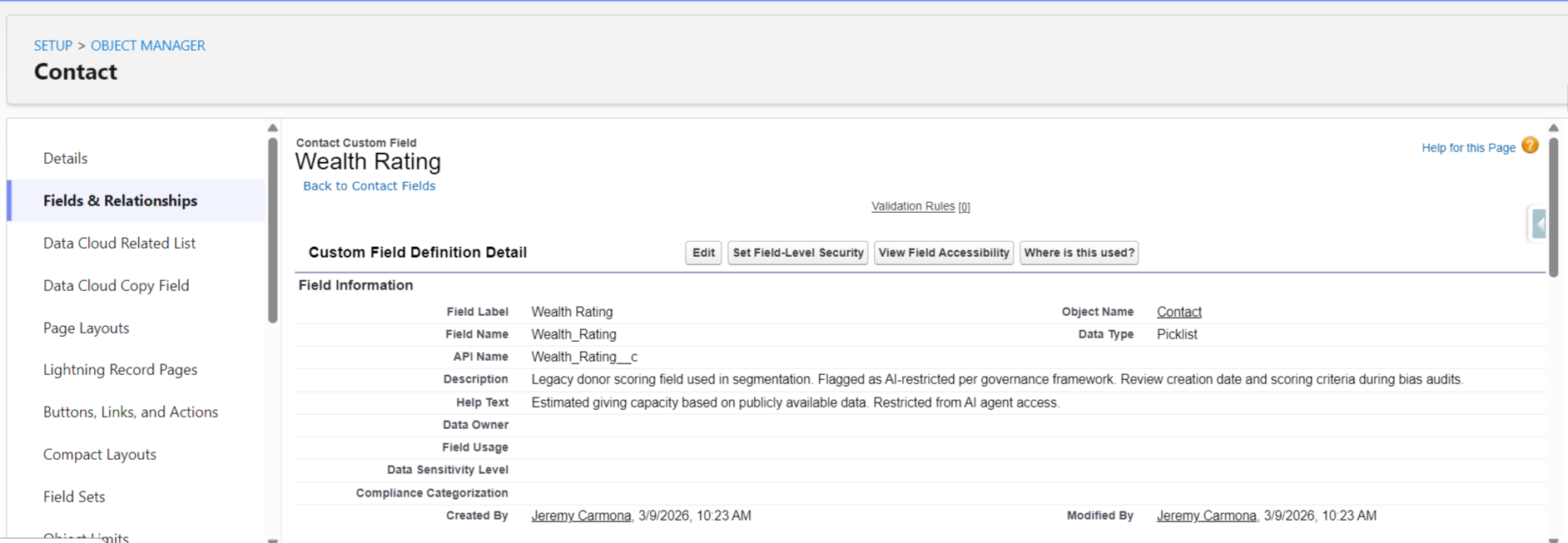
The audit takes 30 minutes. Navigate to Setup, then Object Manager, then Contact, then Fields. List every field used to identify or score high-value donors. Click into each one and scroll to the bottom of the detail page: the “Created By” and “Last Modified By” dates tell you when scoring criteria were last reviewed. If your wealth rating formula hasn’t been modified since before 2020, it needs review before any AI touches it.
Then pull a Campaign Report grouped by Fiscal Year. Compare which response channels worked in 2015 versus 2024. If your engagement scoring still weights direct mail at 3x and digital at 1x, your AI will inherit that bias.
Board Answer Template: “We completed a data bias audit on [date]. We identified [X] scoring criteria that reflected outdated donor demographics. We updated [specific fields] to reflect current engagement patterns. Our AI agent only accesses fields that passed our bias review.”
Question 2: What Happens When Our AI Recommends a $50K Mistake?
This is the fiduciary question. Board members are personally liable for organizational decisions. They need to know that AI recommendations go through human review before action.
Picture this scenario: Agentforce reviews your grants pipeline and recommends approving a $50,000 grant to an organization based on Salesforce data alone. The data looks clean. The applicant’s history in your system shows consistent reporting and positive outcomes.
What the AI cannot access: Candid’s updated rating showing a recent leadership change. The organization’s latest Form 990 reveals a 40% drop in program spending. A conversation your program director had last week about concerns from a shared funder.
For nonprofits managing restricted donor funds, a bad recommendation isn’t just an operational error. It’s a trust violation with funders, a compliance risk with grant agreements, and a potential audit finding.
The fix is a tiered approval matrix. Not every AI recommendation needs the same level of review.
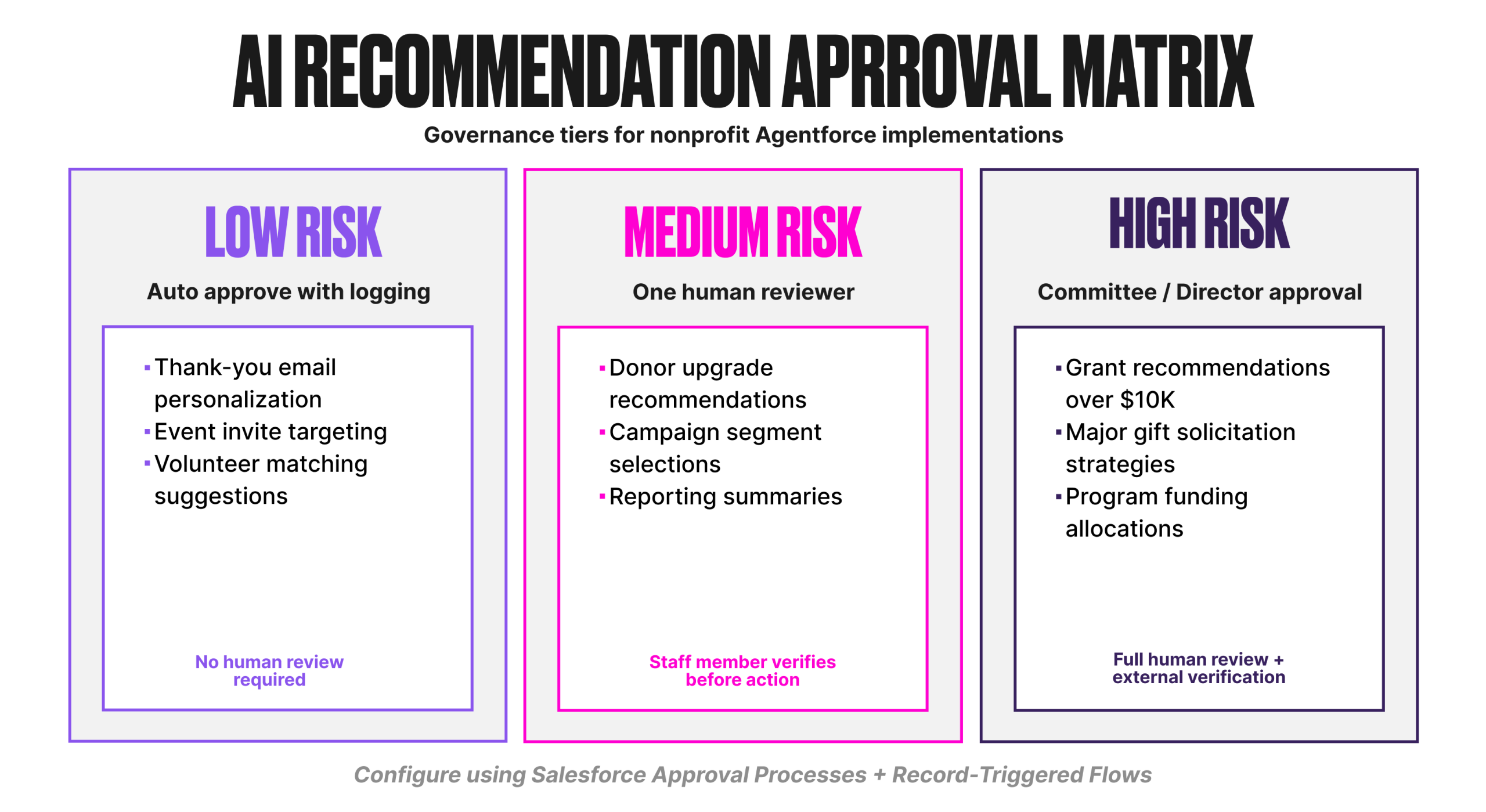
Build this in Salesforce using approval processes and Flows. Each tier triggers a different approval path. The AI recommends. Humans decide. The audit trail shows who approved what and when.
Board Answer Template: “Every AI recommendation is classified by risk level. [High-risk category] requires [approval process]. No AI action involving donor funds or grants above $[threshold] proceeds without human verification and documented approval.”
Question 3: How Do We Explain AI Decisions to Our Funders?
Corporate organizations can say “proprietary algorithm.” Nonprofits cannot. When the MacArthur Foundation asks how you selected grant recipients, “our AI recommended it” is not an acceptable answer.
Funder transparency requires reconstructable decision trails. You need to show not just what the AI recommended, but what data it used, what factors it weighted, and what human review occurred before action.
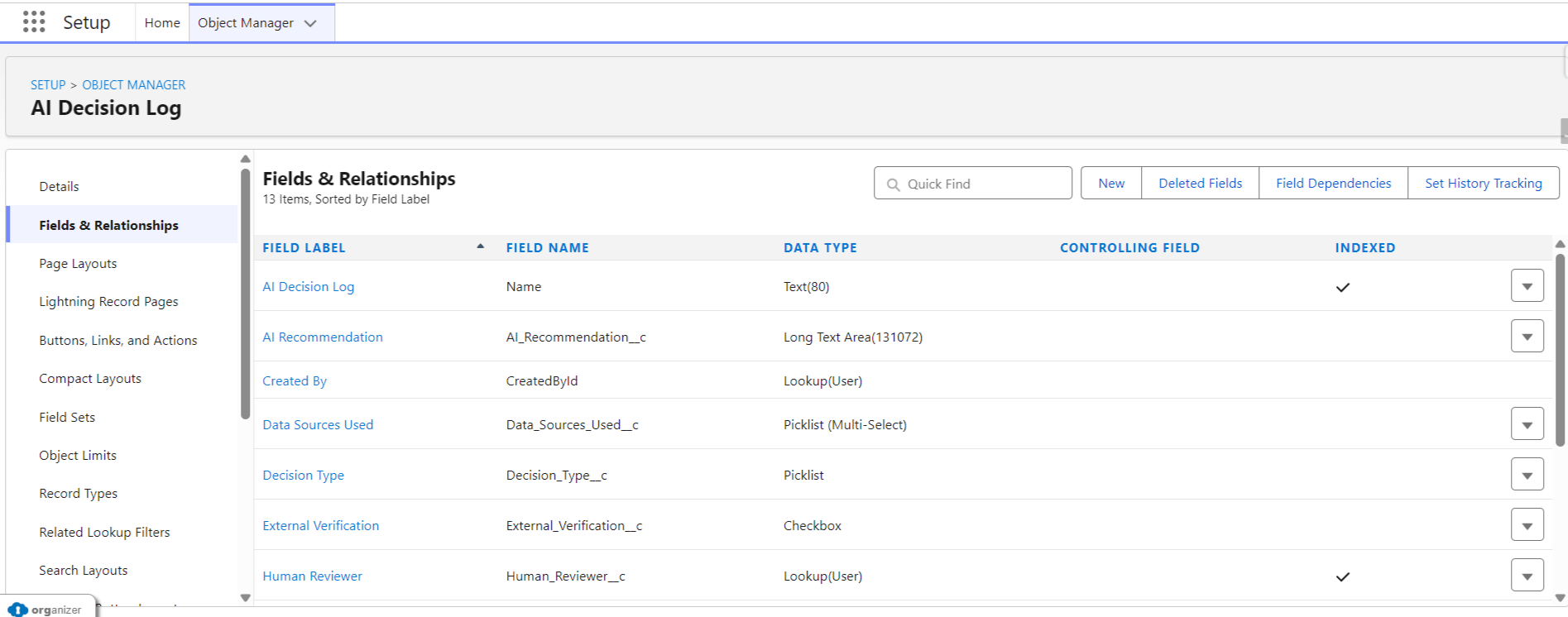
This is where most nonprofits need a new custom object: AI_Decision_Log__c.
Field definitions for the AI Decision Log:
| Field Name | Type | Value |
| Decision_Type | (Picklist | Grant Recommendation, Donor Communication, Program Allocation, Volunteer Match |
| AI_Recommendation | Long Text | What the agent recommended |
| Data_Sources_Used | Multi-Select Picklist | Contact Record, Giving History, Campaign Response, External Verified, Program Outcomes |
| External_Verification | Checkbox | Whether external sources (Candid, GuideStar, Form 990) were consulted |
| Risk_Level | Picklist | Low, Medium, High |
| Human_Reviewer | Lookup to User | Who reviewed the recommendation |
| Review_Date | Date | When human review occurred |
| Outcome | Picklist | Approved, Modified, Rejected |
| Modification_Notes | Long Text | What was changed from the AI recommendation and why |
Every AI action is logged. Every human decision is documented. Every funder question is answerable.
Pair this with Event Monitoring and Data Cloud to capture the full picture: what the agent queried, what it returned, and what happened next. Create custom reports on the AI Decision Log object so your program team can pull audit-ready documentation in minutes, not days.
Board Answer Template: “Every AI-assisted decision is logged with full documentation: what data the AI used, what it recommended, who reviewed it, and what action was taken. We can reconstruct any AI decision chain for funder reports within [X] minutes.”
Real Implementation: What Almost Went Wrong
A mid-size nonprofit with a $750K fundraising budget came to us ready to launch Agentforce for donor communications. They’d seen the Dreamforce demo. They wanted AI-generated thank-you emails, donation follow-ups, and lapsed donor re-engagement.
We ran a test before going live. The AI-generated email for their first test donor referenced the donor’s deceased spouse by name, included their wealth rating in the greeting personalization, and suggested a giving upgrade based on estimated household income.
That single test email would have violated donor trust, potentially triggered a complaint to their state attorney general’s office, and damaged relationships their development team had spent years building.
What we built instead took three days:
- Day 1: Data audit. We flagged every field as “AI-safe” or “restricted.” Wealth ratings, relationship notes, personal circumstances: all restricted. Giving history, event attendance, and communication preferences: AI-safe.
- Day 2: Prompt template rebuild. We limited Agentforce prompt templates to AI-safe fields only. We added human review checkpoints for any communication referencing amounts above $1,000.
- Day 3: Permission sets and monitoring. We configured permission sets (not profiles) to control which data the AI agent could access. We enabled conversation logging and set up weekly review dashboards.
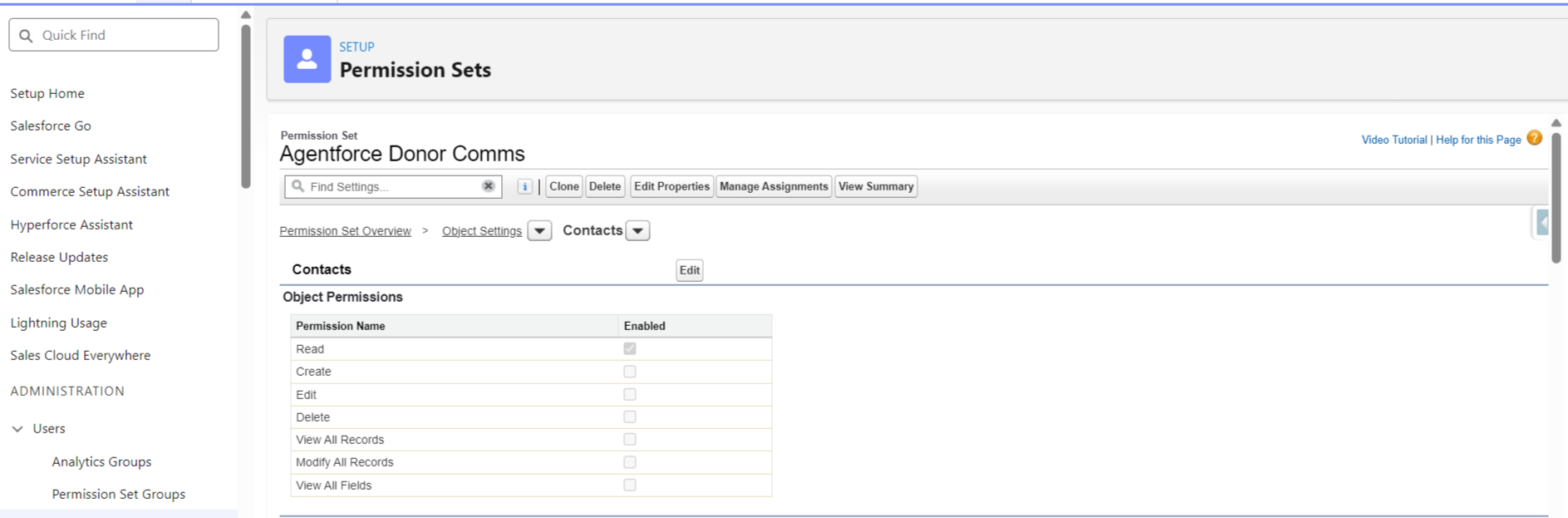
Results after six months: 340 AI-assisted emails generated. Zero incidents. Six hours per week saved for the development team. Board confidence high enough to approve expanding to grant communications.
The governance work took three days. The trust it built has lasted six months and counting.
Checklist: Before You Request Board Approval
Run through this. If you can’t answer “yes” to every item, you’re not ready for Agentforce:
Data Governance Foundation:
- Field-level security configured for donor and grant data
- Historical bias audit completed (reviewed segmentation criteria from past 5+ years)
- Documented which external data sources AI cannot access
Board Transparency Requirements:
- Created AI Decision Log custom object
- Established approval thresholds (what requires human review)
- Documented integration gaps and manual verification processes
Error Accountability Protocols:
- Built tiered approval processes (low, medium, high risk decisions)
- Defined who has authority to override AI recommendations
- Created rollback procedure (tested in sandbox)
Donor Trust Protection:
- Limited prompt templates to “AI-safe” fields only
- Enabled conversation logging
- Established human review checkpoints for external communications
Audit Trail Capabilities:
- Can reconstruct AI decision-making for funder reports
- Event logs enabled and flowing to Data Cloud
- Created custom reports on AI Decision Log object
Governance Maintenance Plan:
- Quarterly review of AI-safe field list
- Annual audit of AI decision patterns
- Regular board reporting on AI usage and effectiveness
Final Thoughts: What This Really Means
AI governance for nonprofits isn’t about saying “no” to innovation. It’s about building the foundations that let you say “yes” confidently.
The ED who asked about Agentforce? We didn’t implement it that year. We spent four months documenting their data governance, building approval workflows, and training staff on AI oversight. When they were ready, when their board could confidently answer funder questions about methodology, Agentforce worked exactly as promised.
Good governance doesn’t slow you down. It lets you move faster because your board, your donors, and your staff trust the system.
Your board won’t ask, “Can we afford Agentforce?” They’ll ask, “Are we ready for it?” Now you can answer yes.