

State management in Lightning Web Components is Salesforce’s latest (in beta) approach to sharing data and managing your application state, typically when you have apps with oozing complexity.
In such applications, coordinating component interactions while preserving a predictable data flow becomes increasingly difficult.
What Is State Management?
The concept of state management in web applications is not new in the world of web development. At its core, it’s a way of handling and updating an application’s data (the state) consistently across the application.
In web development, Redux is one of the most popular JavaScript libraries for state management. Technically, it’s very much feasible to build your own generic state manager LWC module, which can then be reused across multiple apps. And interestingly, there exists an open source repo which sort of does the same – not reviewed, but claims to do so.
Thankfully, Salesforce has also introduced state management in LWC (better late than never, I guess). Now, Salesforce developers can build their own state managers to effectively manage their application’s state. A state manager is just a dedicated JavaScript module that stores app data and actions to manipulate it.
Another great feature is that state managers hook directly into the LWC’s reactivity system, so a change in application state automatically triggers an update (and possibly re-rendering) in the components that consume that data.
Why Use State Management in LWC?
One might be curious why we need an additional solution when we already have options to share data between components, for example, passing data by setting child component properties from parent or using events to pass data from child to parent, or Lightning Messaging Service for communication between unrelated LWCs, Visualforce, and Aura components.
Having dealt with very complex nested LWCs myself, I can definitely agree that the passing of data through multiple nested components leads to a lot of redundant boilerplate code, also making it harder to maintain. LWC state management also addresses challenges like separation between data and UI layer, reusability, improved performance, managing complex interactions effectively.
Syntax Introduction: A Simplified Form State Manager
Let’s build a minimal proof of concept to understand how state managers work.
Use Case
We have a custom survey form built with multiple nested LWCs. The child components are used for gathering different types of user info, showing header-footer, etc. To keep it simple, we will demonstrate how using formStateManager LWC, we can show a “Unsaved Changes Banner” when a user changes any input in one of the input-gathering child LWCs.
The LWCs hierarchy is as follows. The same is also depicted in the screenshot below.
- Survey
formStateManagerbannerUnsavedChangesinputName- …other input LWCs
surveyFooter(containing Save button)
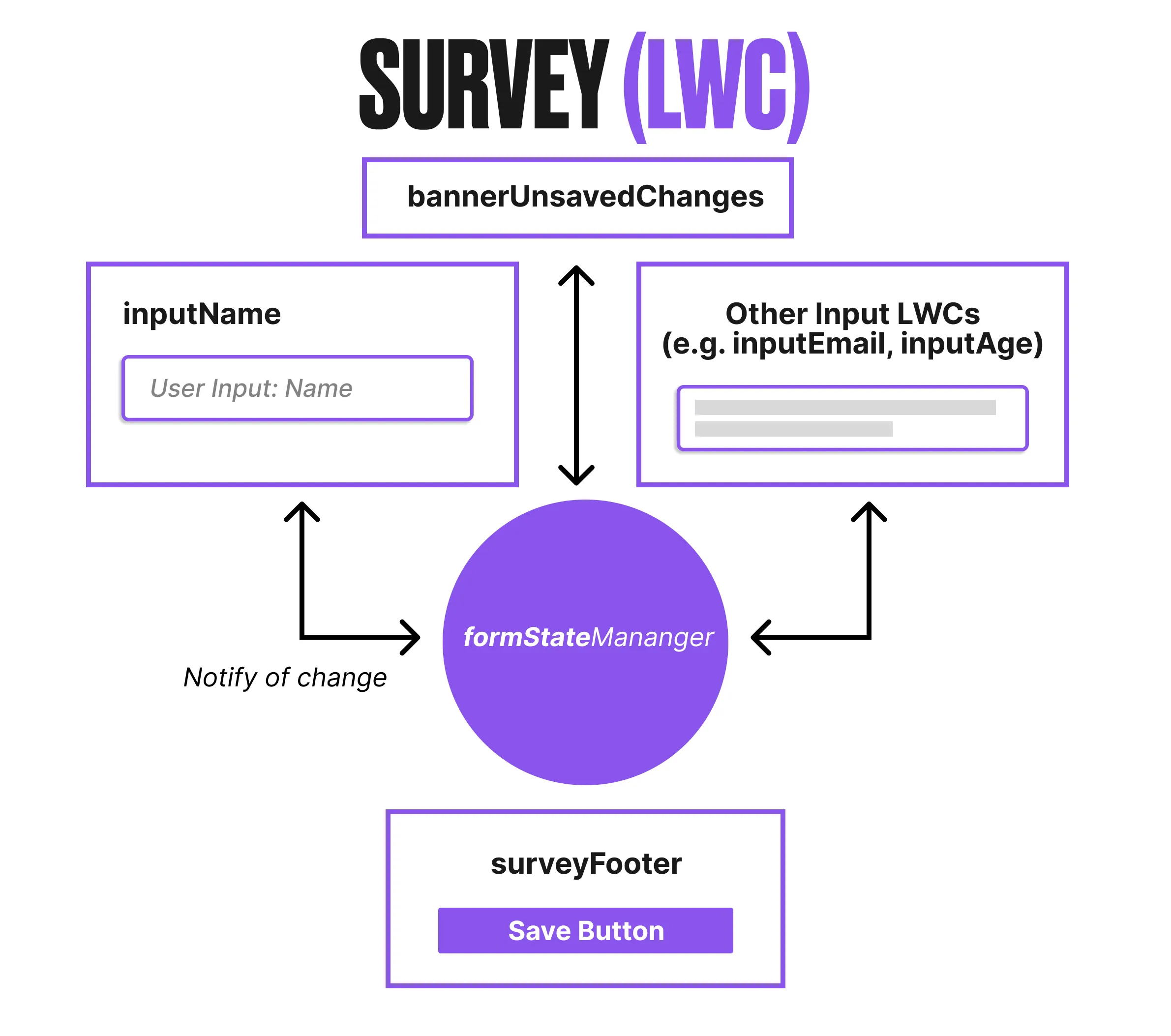
Components of a State Manager
1. The State Factory (defineState)
Everything starts with defineState. This function is used to create the definition of your state manager. It takes a callback function that receives the core primitives (atom, computed, and setAtom) you need to build your state.
- Purpose: It isolates the state logic from the UI components.
- Output: It returns a function that you call to create actual instances of that state.
const stateManager = defineState(({ atom, computed, setAtom }) => {
  // Implementation of the state manager
});
2. Atoms (atom)
An atom is the most basic building block of a state. It is a wrapper around a single, reactive piece of data.
- Role: It acts as the “Source of Truth” for a specific variable (e.g., a user object, a list of items, or a status flag).
- Reactivity: When an atom’s value changes, any component or computed value observing it automatically updates.
3. Computed Values (computed)
Computed values are “derived state(s)”. They are values that depend on one or more atoms.
- Optimization: They only re-calculate when their dependencies (atoms) change.
- Logic: Use these for things like filtering a list, calculating a total, or formatting data for the UI without modifying the original state. For example, in survey form, a “name” attribute can be a computed value derived by concatenating the first name and the last name.
4. Actions
Actions are standard JavaScript functions defined within the state manager. They are the only way to modify atoms.
- State Mutation: You use the
setAtomprimitive inside these functions to update the value of an atom. - Encapsulation: By keeping logic inside actions, you ensure the state is always modified in a predictable way.
5. The Public API
The state manager must return an object. This object defines exactly what a component can “see” or “do”.
- Access Control: You can choose to expose atoms and computed values (for reading) and actions (for writing).
- Consistency: This ensures every component interacts with the state through a uniform interface.
Sharing State Manager Across Components
The core of sharing state in LWC lies in the fromContext function, which is part of the standard @lwc/state library. This utility allows a component to “reach up” the DOM tree and grab an existing instance of a state manager provided by an ancestor.
The “Provider” Component
To share state, an ancestor component (typically, a container or a shell component) must first initialize the state manager. By simply instantiating the state manager in its class, that component becomes the Provider for its entire component hierarchy. The initialization of the state manager component requires importing and initializing components, as shown in the example below.
import stateManager from 'c/stateManager';

export default class Provider extends LightningElement {
    obj = stateManager();
}
The “Consumer” Component
Any descendant component, no matter how deep, can access that same instance using the fromContext function.
- Discovery: fromContext, the function starts to search within the component’s hierarchy, beginning with the component itself and moving upward, to locate the nearest instance of the specified state manager type.
- Efficiency: If multiple components call fromContext for the same state manager, they all receive a reference to the same instance of the state manager, ensuring data remains synchronized across the application.
import { fromContext } from '@lwc/state';
import stateManager from 'c/stateManager';

export default class Consumer extends LightningElement {
    state = fromContext(stateManager);
}
Instance Resolution
It is important to understand that fromContext is proximity-based. If you have two different branches of your DOM tree, each with its own initialized instance of the state manager, components will only “see” the instance provided by their closest ancestor. This allows for powerful “scoped” state management where different parts of a page can have independent data sets.
Survey State Management Example Code
Survey
The survey LWC is the provider component and initializes the formStateManager component which is then available to consume for all the nested components in the component hierarchy.
<template>
    <lightning-card title="Survey">
        <c-banner-unsaved-changes></c-banner-unsaved-changes>
        <div class="slds-p-around_medium">
            <c-input-name></c-input-name>
            <!-- other input LWCs would be included similarly -->
        </div>
        <div slot="footer">
            <c-survey-footer></c-survey-footer>
        </div>
    </lightning-card>
</template>
JavaScript controller:
import { LightningElement } from 'lwc';
import formStateManager from 'c/formStateManager';

export default class Survey extends LightningElement {
    form = formStateManager();
}
formStateManager
This component contains all the implementation for the state management. This component calls the defineState method to initialize formData and hasUnsavedChanges using atom function. It also defines a couple of “Actions”:
handleChangeto allow consumer component(s) to modify the state of the form.saveto allow consumer component(s) to save the state of the form.
And finally, returns an object, the “Public API”, for the defineState method to specify exactly what a consumer component can “see” or “do”.
import { defineState } from "@lwc/state";

const stateManager = defineState(({ atom, computed, setAtom }) => {
    const formData = atom({});
    const hasUnsavedChanges = atom(false);

    const handleChange = (newFormData) => {
        // update formData with the new changes using setAtom function
        setAtom(hasUnsavedChanges, true);
    };
    const save = () => setAtom(hasUnsavedChanges, false);


    return {
        hasUnsavedChanges,
        handleChange,
        save
    };
});
export default stateManager;
bannerUnsavedChanges
The bannerUnsavedChanges LWC is a consumer component that checks if the form has any unsaved changes by checking the hasUnsavedChanges attribute in the form state and accordingly displays a banner to inform the user about unsaved changes.
<template>
    <template lwc:if={show}>
        <div class="slds-notify slds-notify_alert slds-theme_alert-texture slds-theme_warning" role="status">
            <span class="slds-assistive-text">Warning</span>
            <h2 class="slds-text-heading_small">You have unsaved changes</h2>
        </div>
    </template>
</template>
import { LightningElement } from 'lwc';
import { fromContext } from '@lwc/state';
import formStateManager from 'c/formStateManager';

export default class BannerUnsavedChanges extends LightningElement {
    form = fromContext(formStateManager);

    get show() {
        return this.form.value.hasUnsavedChanges;
    }
}
inputName
This component is used to get “Name” as input and calls the state manager to handle the input change. This is also a consumer component.
<template>
    <lightning-input label="Name" onchange={handleChange}></lightning-input>
</template>
import { LightningElement } from 'lwc';
import { fromContext } from '@lwc/state';
import formStateManager from 'c/formStateManager';

export default class InputName extends LightningElement {
    form = fromContext(formStateManager);

    handleChange() {
        this.form.value.handleChange();
    }
}
surveyFooter
The footer component is also a consumer component that contains a Save button. When Save is clicked, the component calls the state manager to save the current state of the form data.
<template>
    <lightning-button label="Save" variant="brand" onclick={handleSave}>
    </lightning-button>
</template>
import { LightningElement } from 'lwc';
import { fromContext } from '@lwc/state';
import formStateManager from 'c/formStateManager';

export default class SurveyFooter extends LightningElement {
    form = fromContext(formStateManager);

    handleSave() {
        this.form.value.save();
    }
}
When to Use a State Manager
Traditional data sharing techniques in LWC are adequate for simple hierarchies.
| Feature | Use case |
|---|---|
| Property Drilling (using @api decorator) | Parent to Child communication |
| Custom Events | Child to Parent communication |
| Lightning Messaging Service | Cross-DOM communication between unrelated components |
However, these patterns become unwieldy in large apps.
State Management excels when:
- You have deeply nested components (avoids prop drilling).
- Multiple, disparate components need the same shared data.
- State must persist across views/pages.
- You want a centralized single source of truth.
- You want computed values that automatically update when dependencies change.
- You want a clean separation of state logic from UI rendering.
In essence, if your app has low complexity, native LWC mechanisms work fine. But as your app grows, grouping your state logic into dedicated state managers really pays off.
Does LWC State Management Replace Lightning Message Service (LMS)?
No, they serve different problems. LMS is a publish/subscribe messaging system designed for loosely connected components for example, communicating between components in different DOM parts, or between Aura, LWC, and Visualforce.
While LWC state management is for managing state within a connected component tree, not for broadcasting messages across the application structure.
Final Thoughts
LWC State Management is Salesforce’s modern solution to share reactive state and encapsulate logic across multiple Lightning Web Components. It’s not a replacement for Lightning Message Service – rather, it solves a different class of problems.
Use state management for complex shared state with reactive computed values, avoiding deep property chains or brittle event systems.
For more Salesforce conversations and industry insights, check out the latest episode of the Picklist podcast below.