








There’s always an ongoing debate between being reactive vs. proactive with Salesforce Flow. Debugging alone sits on the “reactive” side of things, but it’s important to be paired with proactive testing.
I’d like to focus on how to start having a proactive mindset. And even if it seems like it, taking action doesn’t start after you’re done building your flow. It starts even while you build. Every element you add to your flow should be intentional and with testing in mind, long before you hit Activate.
Debugging With Intention
When I first started with Flows, I had no testing strategy at all. To me, it was simple enough to build, activate, and hope for the best. And sometimes, after activating, I’d even test the flow behavior using dummy records in production. (I know, I know – definitely don’t do this!)
When things broke, I couldn’t figure out what part of my complex flow went wrong. That experience taught me an important lesson: the earlier you realize “it works on my machine” isn’t good enough when you’re building for an entire org, the better.
You know how they say “prevention is better than cure” when it comes to health? That absolutely applies here, too. I consider debugging as medicine, while testing and being intentional are prevention. Even if both of them are important, the latter saves you a lot more headaches in the long run.
A Testing Mindset
The first shift you need to make is in your mind. When you finish building a flow, you never know for sure whether or not it will work unless you’ve done some testing throughout the build. While you add in your elements, try asking yourself:
- What assumptions am I making about the data?
- What happens if those assumptions are wrong?
- What’s the worst-case scenario?
That last one might sound generic, but it’s key. Once I started always having the worst-case scenario in mind, I’ve learned to think like a pessimist when testing, because there are countless ways a flow can fall out of rhythm. It may sound dramatic, but real-world scenarios are messy, and your automation needs to be ready for that.
When data doesn’t follow the rules, or when integrations fail, testing with intention means preparing for that chaos before your users ever experience it.
The Three Layers of Intentional Testing
Testing can be divided into three layers. Each layer catches different types of problems, and you need all three to feel confident your flow will hold up.
Layer 1: The Happy Path
Ah, everyone’s favorite! And it’s also where most people stop.
The happy path is the ideal scenario where everything goes right. Meaning, the data is clean, the user has all the right permissions, and every element in your flow executes exactly as you designed it. Sure, testing the happy path is important, but it’s not enough.
“Why? Isn’t this already proof that it works?”, you might ask.
Here we could use a metaphor, say, shopping for your first car. You can take different cars for a test drive while hunting for the perfect one, but what are you really testing if you only drive them on straight, smooth, empty roads? What happens when you hit a pothole, get stuck in traffic, drive in the rain, or take it up to the mountains with those outrageous inclines?
Obviously, we couldn’t ask all car dealerships to provide test-driving scenarios with such outrageous conditions, but you get my drift. With flows, though, you actually do have a bit more control. You might not be able to simulate every possible error, but you can definitely create scenarios that push your flow beyond the happy path.
When testing the happy path, think in sections. Break your flow into smaller chunks and identify checkpoints where you can use the Debug button to confirm that:
- Your data elements are actually pulling in the correct records.
- Formulas return the expected values.
- Variables are getting populated accurately.
- Your flow is going toward the correct decision outcome.
If your flow can’t pass the happy path test, you’ll want to address those issues first before moving on to more complex scenarios.
Layer 2: The Edge Cases
This is where intentional testing really begins. Edge cases are the scenarios you didn’t design for but will absolutely happen in production.
It’s not enough to test that your flow works as expected, because you also need to confirm that what shouldn’t happen, doesn’t happen. In software development, this is referred to as negative testing, where one deliberately exposes the automation to unwanted conditions to see how it handles errors and makes sure it doesn’t yield unintended results.
Here are some common scenarios you should keep in mind, and some questions you might want to ask yourself while you build:
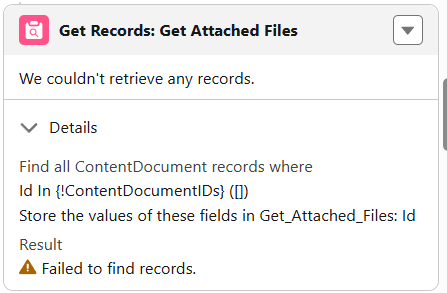
- Missing or null data: What if a field your flow relies on is blank? What if a Get Records element returns zero records? Test your flow with incomplete data, and counter that with your best friends: ISBLANK, ISNULL, or ISEMPTY.
- Data Volume or Bulk Behavior: What if your flow triggers on ten records at once instead of just one? What if hundreds or thousands of records match the criteria? Make sure your flow handles “bulk” volumes appropriately or keep your entry criteria strict. Every org grows over time, so always build with the future in mind.
- Permissions or User Access Issues: What happens if the user running the flow doesn’t have the same permissions you do as an admin? Maybe they don’t have access to certain objects, fields, or record types? What if the flow tries to update a record that the user can’t edit? Keeping this in mind or testing with reduced privileges helps reveal these permission-related issues.
- Integration Failures: What if your flow depends on a callout to an external system and that step fails or returns an unexpected result? What if a subflow fails, or there is an error that stops the transaction?
- Environment Differences: What works in a sandbox may fail in production because of differences in data or other org-specific metadata. Part of your test plan should be to ask, “Does the flow function in the target environment with its data and metadata?”.
Layer 3: The User Experience
This layer is about testing your flow from the perspective of the people who’ll actually use it. This is worth its own layer because most of the time, your users don’t think like you do as an admin/builder. They don’t know what you intended, and when they click those buttons, they expect things to work.
First consideration is always the users’ permissions. A flow that works perfectly when you run it as an admin might fail when a standard user tries it. Since admins have the usual “View All” and “Modify All” on most objects, it can be easy to overlook this. Debug’s “Run automation as another user” option can be used to test this.
When you’re building a Screen Flow, pretend you’re the user. Make sure it’s clear what’s supposed to be done, and the field labels are obvious enough. Is the flow too long? Does it feel intuitive? Flows can be perfect in the technical sense, but end up confusing for the end user.
If you’ve set up fault paths (and you should have!), actually trigger them. I used to always make sure it hit a validation rule, just to see if it shows the expected error. Check if your error messages make sense to someone who isn’t you: a good error message tells the user what went wrong and what they can do about it, or at least provides context.
Using Debug Mode Effectively
Even with all three testing layers covered, the Debug tool is your best friend for validating how your flow behaves behind the scenes. Here are a few habits to make the most out of it:
Rollback Mode
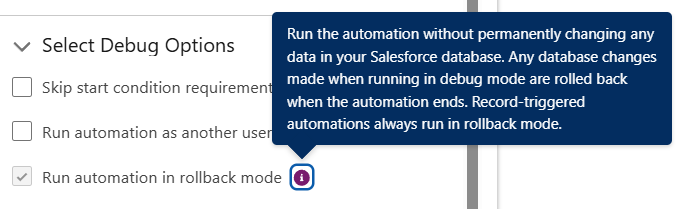
When you’re testing, enable rollback mode. This undoes any changes your flow makes, so nothing is permanent. You can test freely without worrying about cleaning up afterward or messing up any important records!
Check Variable Values at Every Step
Don’t always assume your variables hold what you think they do. Click through the debug results and verify. Is that collection actually populated? Does that formula return the value you expected? Is that Get Records element finding the right records?
Pay Attention to Execution Paths
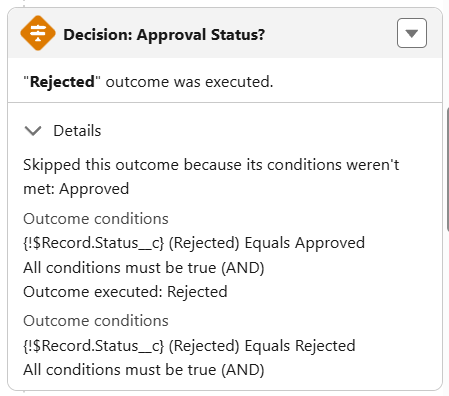
When your flow goes through a Decision element, Debug mode shows you which path it took and why. If it’s not following the path you expected, you can see exactly which condition failed.
Watch for Performance Issues
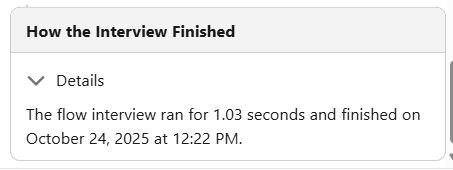
Debug mode doesn’t show exact execution times per element, but it shows how long the flow took to finish. Pay attention to how your flow behaves during testing, because if it feels slow or takes noticeably longer to complete, that’s a sign to check for inefficient loops or overly broad Get Records elements.
Final Thoughts
Testing with intention might look like paranoia, but it really is just about being prepared.
The inevitable truth is that flows will encounter unexpected scenarios, and data can be messy. Users may do things you didn’t anticipate. It’s just the reality of things, and something as seemingly small as changing your mindset is the key to not seeing a broken flow as failure.
What separates a good flow builder from a great one isn’t avoiding problems altogether – though that does sound ideal! It’s anticipating them, testing for them, and handling them before they ever become problems at all.