

✕
Skip to content
Join SF Ben Dreamforce Events
Salesforce Ben
  • Events
  • Career
  • AppAssessor
  • Salesforce News
  • Articles by Role
    • Admins
    • DevOps
    • Developers
    • Marketers
    • Consultants
    • Architects
    • Business Analysts
  • Resources
  • Where to Start
  • Salesforce Certification List
  • How to Get Certified
  • Free Salesforce Practice Exams
    • Admin Practice Exam
    • Platform App Builder Practice Exam
    • Platform Developer 1 Practice Exam
  • How to Get a Job in Salesforce

Find us on:

Salesforce Ben
  • Events
  • Career
  • AppAssessor
  • Salesforce News
  • Articles by Role

      Articles by role:

    • Admins
    • DevOps
    • Developers
    • Marketers
    • Consultants
    • Architects
    • Business Analysts
    • Featured

      The Great Salesforce Job Market Reset

      By Sasha Semjonova

      December 09, 2024
      How to Avoid Bad Salesforce Partners: The Three-Question Test

      By Jon Cline

      January 08, 2025
  • Resources
Email
LinkedIn
Facebook
Twitter
  • Newsletter
Join SF Ben Dreamforce Events
  • Newsletter
  • Events
  • Career
  • AppAssessor
  • Salesforce News
  • Articles by Role

      Articles by role:

    • Admins
    • DevOps
    • Developers
    • Marketers
    • Consultants
    • Architects
    • Business Analysts
    • Featured

      The Great Salesforce Job Market Reset

      By Sasha Semjonova

      December 09, 2024
      How to Avoid Bad Salesforce Partners: The Three-Question Test

      By Jon Cline

      January 08, 2025
  • Resources

What's trending

Which Salesforce Users Need Passkeys? A Quick Guide for Admins
5 Days to Go: Your Last-Minute Salesforce MFA Enforcement Checklist
SF Ben Salesforce Architect Survey Results 2026: Download Now!
How Much Does the Salesforce Community Trust Salesforce Right Now?
Why Salesforce Is Still the Dream Career in 2026

UPCOMING EVENTS

The Enterprise Agentforce Playbook: Real Lessons from a Production Deployment

21
Jul

Virtual

SF Ben Webinar

Virtual Summit: Taking Control of Complex Orgs

21
Jul

Virtual

Webinar

WITness Success 2026

22
Jul

Indianapolis, IN

Community

Kiwi Dreaming 2026

23
Jul

Auckland, New Zealand

Community

Buckeye Dreamin’ 2026

28
Jul

Columbus, OH

Community
See more
Share
Email
LinkedIn
Facebook
Twitter
Marketers / Account Engagement (Pardot)

How to Add Pause Steps in Pardot Engagement Studio

Lucy Mazalon

By Lucy Mazalon

Published December 08, 2019
Updated March 25, 2025

When using Engagement Studio in Pardot (Account Engagement), it’s a common requirement to ‘pause’ prospects at a certain stage of your automated flow. You may want to hold a prospect at one particular step, without pausing the whole program (which would result in halting every other prospect’s progress through the program).

Think about it this way: any wait step in Engagement Studio causes prospects to wait. By reimagining the ‘wait’ functionality, it’s so simple to implement a ‘pause tag’. If you are using Engagement Studio and want more control over the automation, this is a great hack for you to have up your sleeve!

Why Pause?

The pause is designed to be a temporary step that you plan to remove at some point – perhaps you are waiting for the final few details for the next email, or you want to assess the campaign performance thus far, to make a decision whether you will continue altogether.

Secondly, there’s the importance of keeping prospects in the Engagement Studio flow, preventing them from reaching an ‘End’ step. Once a prospect reaches the ‘End’, they cannot re-enter the program (unless your Engagement Studio is set to repeat, then the prospect would re-enter when they are eligible to do so).

How to Create a Pause Step

As I mentioned, I will be showing you a pause tag. It’s simply an ‘Apply Tags’ action step in the Engagement Flow, that adds a tag ‘pause’ (or whatever you wish). You can create this straight from within Engagement Studio, there’s no need to create beforehand.

Important: under ‘When?’ select ‘wait’, and enter a number of days. I always choose 365 days, as this is the maximum you can input.

This is what it will look like in the program as a whole:
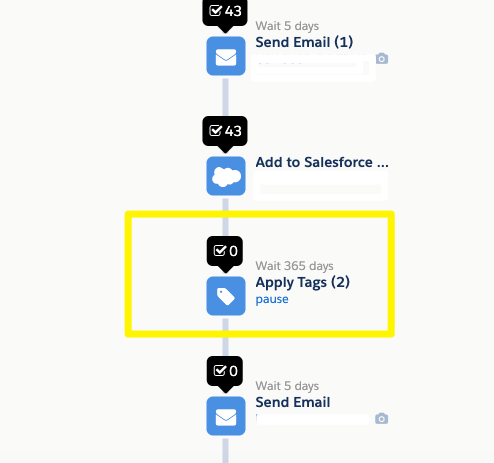
I chose ‘Apply Tags’ because it is the least dramatic action to happen should the pause time expire.

When prospects reach your pause tag, they will sit there in a ‘waiting status’, as shown below:

How to Remove a Pause Step

If you no longer want your pause step, simply pause the whole program for editing, go to the pause tag step, and click the ‘Delete’ button. Upon resuming the Engagement Studio program, prospects that were waiting will continue to flow through to the next step.

Summary

Pausing prospects at a certain stage of your automated Engagement Studio flow is a common requirement, especially as other marketing automation tools offer this built-in to their tools.

If you are using Engagement Studio and want more control over the automation, this is a great hack for you to have up your sleeve!


The Author

Lucy Mazalon

Lucy Mazalon

Lucy is the Finance Director at Salesforce Ben. She is a 10x certified Marketing Champion and founder of The DRIP.

More like this:

Marketers

Why Marketing Cloud Next Forces Us All to Rethink Our MarTech Identity

By Kenny Van Beeck

July 10, 2026
Marketers

How Many AI Agents Is Too Many? Salesforce Adds Four More at Connections

By Sasha Semjonova

June 03, 2026
Marketers

5 Best Practices for Effective Personalization in Salesforce Marketing Cloud Engagement

By Tim Ziter

May 22, 2026

Leave a Reply Cancel reply

Comments:

    Catherine
    December 19, 2019 3:06 pm
    I've been adding to a static list with long wait times. This tag idea is great!
    Reply
    Lucy Mazalon
    December 20, 2019 9:12 am
    Thanks for sharing, glad you like it!
    Reply

Newsletter:

By signing up you agree to our Terms of Use and Privacy Policy.

Find us on:

Salesforce Ben

Salesforce Ben
Unit G.01
189-190 Shoreditch High Street
London
United Kingdom
E1 6HU

  • Where to Start
  • Salesforce Certification List
  • How to Get Certified
  • Free Salesforce Practice Exams
    • Admin Practice Exam
    • Platform App Builder Practice Exam
    • Platform Developer 1 Practice Exam
  • How to Get a Job in Salesforce
  • Events
  • Career
  • AppAssessor
  • Salesforce News
  • Articles by Role
  • Resources
  • Admins
  • DevOps
  • Developers
  • Marketers
  • Consultants
  • Architects
  • Business Analysts
  • About Us
  • Contact Us
  • Write For Us
  • Influencer Program
  • Advertise With Us
  • Pledge 1%
  • Privacy Policy
  • Change Cookie Preferences

© 2014-2026 SalesforceBen.com