

A Salesforce implementation impacts far more than technology. It influences workflows, decision-making, customer engagement, reporting, and the day-to-day operations of the entire organization. While many organizations invest heavily in CRM technology, success is rarely determined by configuration alone. The most successful implementations balance business objectives, technical architecture, data quality, user enablement, and long-term governance.
Many implementation teams focus heavily on preparing for go-live. Requirements are gathered, processes are mapped, data is migrated, and users are trained. However, the biggest challenges often emerge after go-live.
Picture this scenario: a new field is added, workflows change, and processes are refined. Almost immediately, your training materials start to fall behind. This is the “Day 2 Trap”, a common challenge where organizations successfully go live, but struggle to keep training and documentation aligned as the system evolves. While the platform continues to change through updates and improvements, enablement of content often remains static, quickly becoming outdated and unreliable for end users.
Picture another scenario, a Salesforce project launches, stakeholders sign off, users complete training, and the implementation is deemed a success. Yet six months later, support tickets are rising, data quality is inconsistent, and teams have reverted to inefficient workarounds. The challenge is not the technology – rather, it is focused on efficient user adoption.
This blog explores the key phases of a successful Salesforce implementation, common challenges to avoid, deployment best practices, and practical strategies for driving lasting adoption and measurable business value.
Common Challenges With Salesforce Implementations
1. Lack of Effective User Adoption and Training
Even when implementations are technically successful, they can still fail if users do not properly adopt the system. Training that focuses only on generic features instead of real job workflows often leaves users unsupported in their day-to-day tasks.
2. Outdated Training and Documentation After Go-Live
A major but often overlooked issue is failing to keep training materials and documentation up to date after go-live, known as the “Day 2 Trap”. As Salesforce evolves with new processes, fields, and automations, static training quickly becomes outdated, leading to confusion and inconsistent usage.
3. Salesforce Doesn’t Stand Still
Salesforce is constantly evolving with new fields, workflows, automations, and platform updates. As processes change, training materials often struggle to keep pace, creating gaps between how users are trained and how Salesforce works.
4. The Real Cost of Outdated Documentation
Outdated documentation doesn’t just create confusion – it impacts productivity. Users spend more time searching for answers, asking colleagues for help, or following incorrect processes, which can lead to inconsistent data and reduced efficiency.
5. Why Traditional Training Stops Working
Training delivered at go-live is rarely enough to support long-term adoption. Users often forget infrequently used processes and struggle to recall information when needed, leading to support requests and process workarounds.
6. The Hidden Burden on Salesforce Admins
When users can’t easily find guidance, Salesforce Admins become the default support team. Instead of focusing on optimization and innovation, they spend valuable time answering repetitive questions and troubleshooting adoption issues.
7. The Onboarding Challenge
Every new hire needs to learn Salesforce, but onboarding experiences are often inconsistent and heavily dependent on managers or experienced colleagues. Without standardized guidance, productivity and process consistency can suffer.
8. Why Change Management Never Ends
Many organizations view change management as a project milestone, but Salesforce adoption requires ongoing reinforcement. Every new release, process update, or enhancement introduces changes that users must understand and adopt to realize business value.
Key Actions Required for Successful Salesforce Adoption
Phase 1: Build the Foundation for Adoption
Successful Salesforce adoption starts long before users log in for the first time. Organizations must establish clear business objectives, success metrics, and stakeholder alignment before configuration begins.
Rather than focusing solely on technical requirements, this phase should define how Salesforce will help employees work more effectively and how adoption will be measured.
Stakeholder alignment is equally critical. Executive sponsors, business leaders, administrators, implementation partners, and power users should collaborate early to establish priorities, identify potential points of resistance, and create a shared vision for success.
Phase 2: Documentation Decay and the “Day 2” Trap
A technically flawless Salesforce deployment can still fail if user adoption stalls. Traditional training programs rely heavily on static screenshots, lengthy PDF guides, or one-off classroom sessions. However, Salesforce is dynamic – seasonal releases and continuous internal optimizations mean your system changes constantly.
To address these challenges, organizations are moving beyond traditional training approaches and adopting Digital Adoption Platforms (DAPs). Rather than requiring users to leave their workflow to search for documentation, training materials, or support resources, DAPs provide contextual, role-based guidance directly within the application.
By automatically capturing processes and keeping learning resources synchronized as systems evolve, DAPs help ensure that user enablement keeps pace with ongoing development and change. This approach accelerates onboarding, improves user adoption, and helps organizations realize value from their CRM investment faster while reducing the burden of maintaining training content.
Phase 3: Validate Adoption Through Testing and UAT (Modify)
Testing should validate more than technical functionality; it should validate usability. User Acceptance Testing provides an opportunity to confirm that Salesforce supports real-world business processes and enables users to complete their tasks efficiently.
User Acceptance Testing (UAT) is especially important because it brings real users into the system to validate end-to-end business processes based on how work is done. Testing validates both technical execution and real-world usability.
However, running manual UAT often creates a secondary challenge: capturing clean, repeatable bug reports from business users who are not conducting technical tests.
Phase 4: Training and Continuous Enablement
Effective enablement must focus on role-based, task-centered learning rather than generic feature tours. A service agent does not need to understand your entire pipeline architecture; they just need to know how to log into a case efficiently under pressure. Training should not end at go-live. The most successful organizations replace traditional one-time training events with continuous enablement strategies that support users throughout their Salesforce journey. Effective learning focuses on role-based tasks and real-world workflows rather than generic product features.
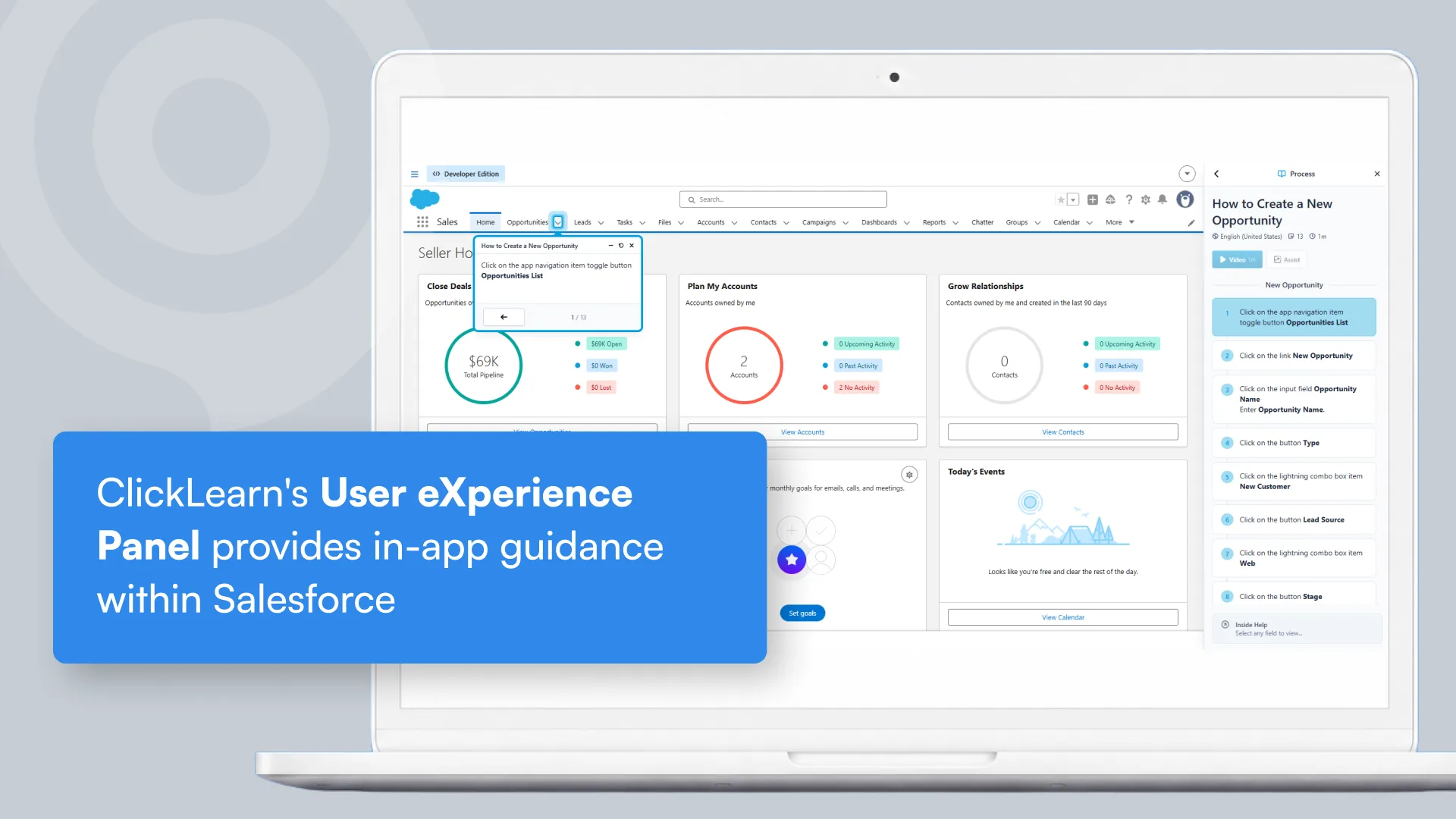
The hurdle here is content creation. Manually producing step-by-step guides, videos, and live assistance for complex, multi-cloud environments is an enormous operational drain. Our UXP (User Experience Panel) is built as a digital companion that operates inside Salesforce, along with an AI-powered chat and the ability to auto-update learning content. By recording a process once, the platform automatically generates in-app guidance, step-by-step videos, and virtual portals in over 45 languages.
Phase 5: Reinforce Adoption During Go-Live and Hypercare
Go-live is where adoption habits begin to form. The first few weeks after launch often have the greatest impact on long-term user engagement. Organizations should establish dedicated hypercare teams to provide rapid support, address user concerns, and reinforce new processes.
Organizations should develop detailed cutover plans that outline deployment timelines, communication schedules, contingency procedures, and system transition activities. High-priority business processes should be monitored closely to identify performance issues or workflow bottlenecks early. The first few weeks after deployment often have the greatest impact on long-term user confidence and adoption.
Phase 6: Sustain Adoption Through Continuous Improvement
The most successful organizations continuously monitor adoption metrics, user engagement, workflow efficiency, support trends, and business outcomes to identify opportunities for improvement. User feedback should inform future enhancements, while governance teams ensure the platform remains aligned with evolving business needs. As Salesforce grows, organizations should continue refining automations, optimizing processes, improving reporting, and enhancing the user experience.
The Ultimate Salesforce Deployment Checklist
Use this structured checklist to ensure critical milestones are achieved across every phase of your implementation lifecycle:
- Strategy: Business outcomes, measurable KPIs, and RACI matrix approved.
- Architecture: Integration architecture, data model, and security frameworks are finalized.
- Data: Source data audited, deduplicated, and test migrations validated.
- Build: Declarative low-code tools prioritized; custom code minimized and documented.
- Testing: UAT successfully executed by business users with formal sign-off.
- Enablement: In-app guidance, contextual support paths, and training portals published.
- Go-Live: Detailed cutover timeline established and hypercare teams scheduled.
- Governance: Post-launch adoption metrics configured, and optimization roadmap planned.
Final Thoughts
To become both successful and future-proof means continuously aligning the platform with changing business goals, customer expectations, and operational realities rather than letting it stagnate after launch. That means designing scalability from the start, keeping processes flexible, and avoiding unnecessary complexity that becomes harder to maintain over time.
A successful Salesforce implementation is not defined by the day the system launches. It is measured by what happens in the months and years that follow. The organizations that achieve the highest return on their Salesforce investment understand that implementation is only the beginning of a much larger adoption journey. ClickLearn x Salesforce takes this approach even further by enabling organizations to automatically capture business processes and generate training materials, documentation, videos, simulations, and in-app guidance from a single recording.
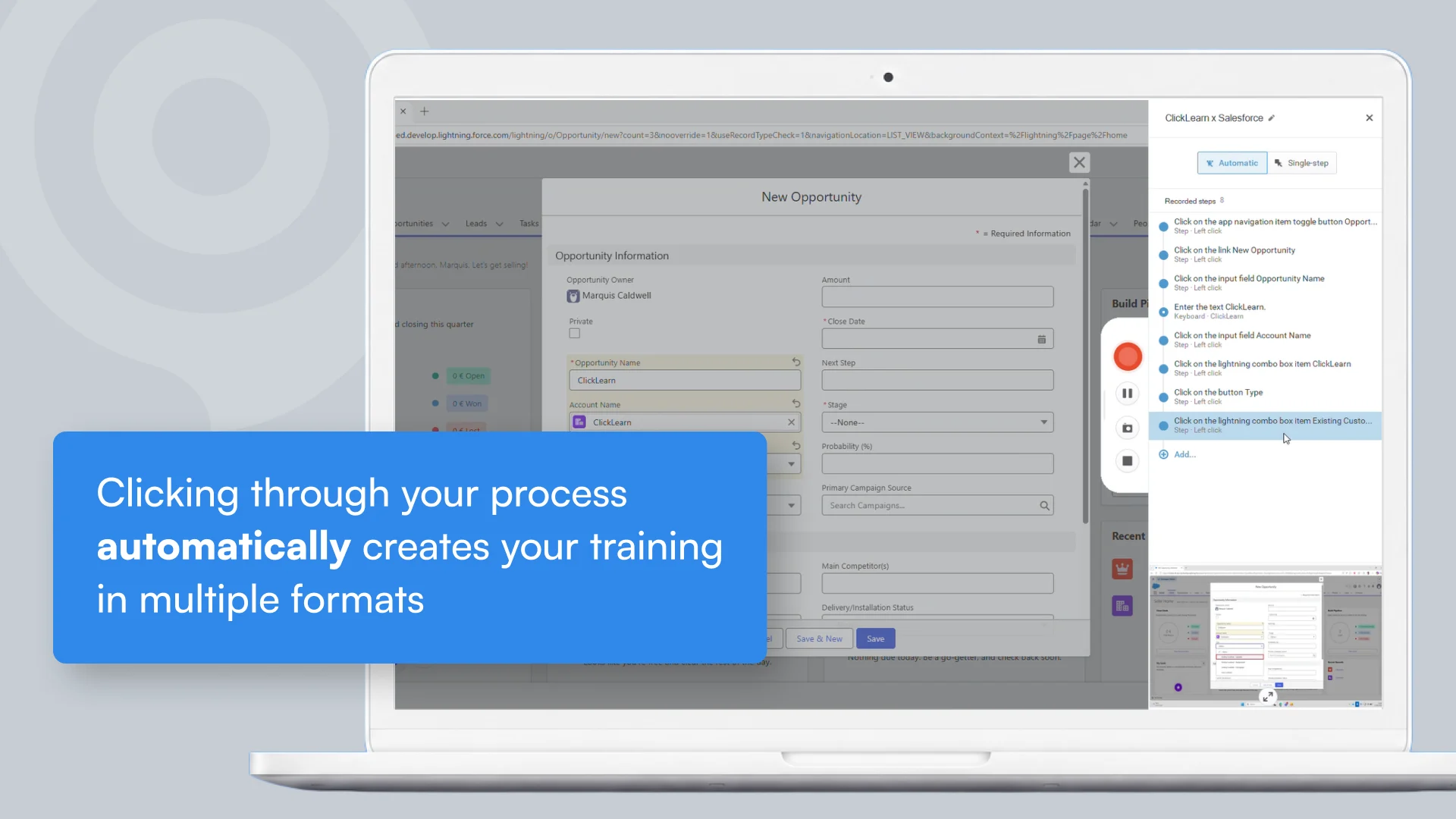
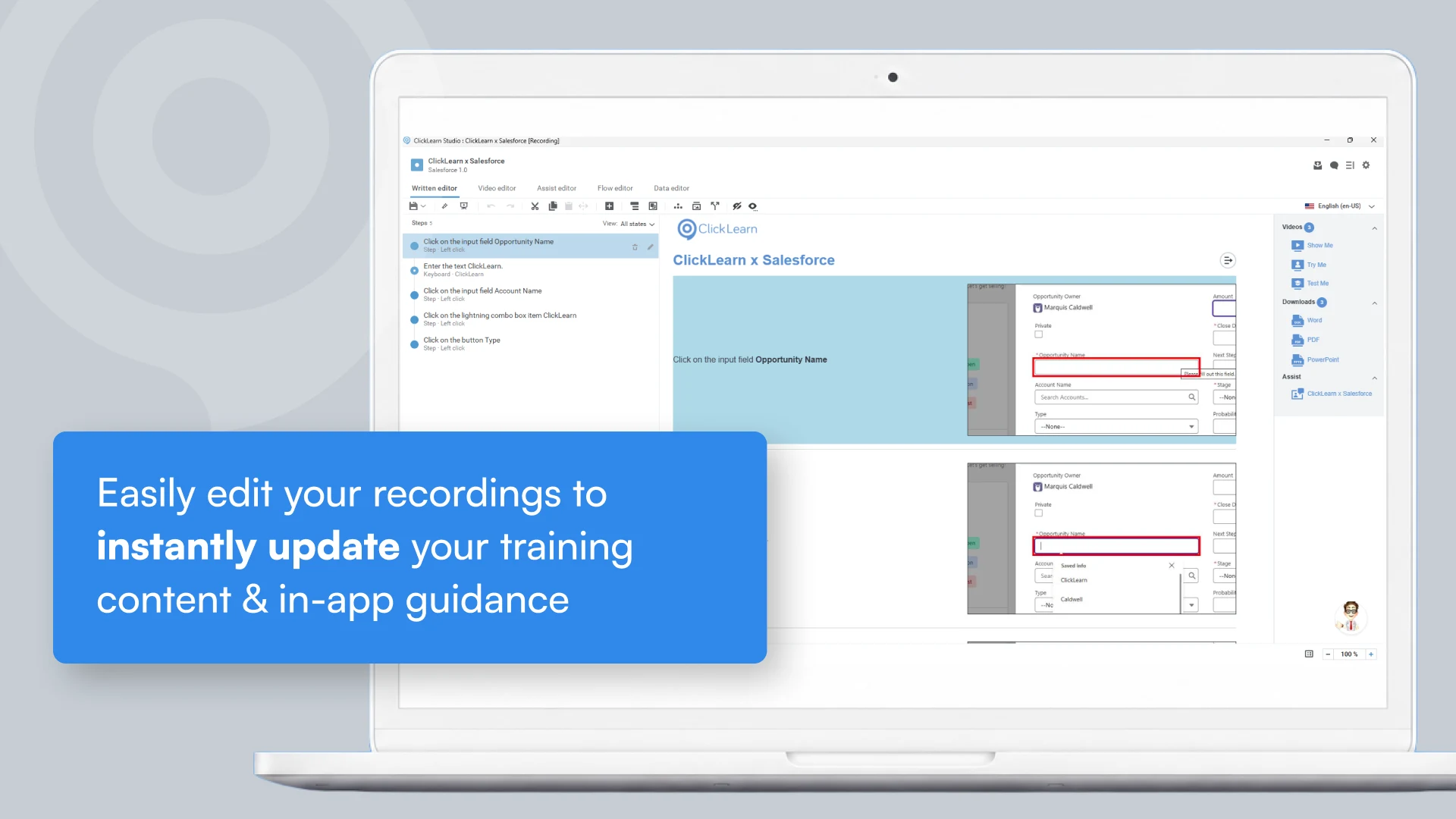
Solving the most common Salesforce adoption challenges starts with addressing the core issue: the struggle of keeping users consistently aligned with a system that is constantly changing. ClickLearn removes this friction by enabling organizations to capture a Salesforce process once and automatically generate multiple learning formats, including step-by-step guides, videos, simulations, and in-app guidance, all from a single source.
Organizations using Salesforce can also leverage ClickLearn’s dedicated Salesforce integration to provide role-based guidance, contextual learning, and continuously updated training experiences directly within the platform. This ensures users remain productive and confident regardless of how frequently Salesforce evolves.
The most successful organizations do not measure Salesforce success by the code deployment date. They measure it by long-term data purity, sustained platform utilization, and an agile enablement strategy that ensures users evolve alongside the software. To explore how ClickLearn can support your organization in driving stronger adoption and simplifying training at scale, visit our pricing page to find the right option for your team: ClickLearn Pricing.
To learn more about enhancing Salesforce adoption across your users, reach out to the ClickLearn team to schedule a demo.