








Working with dynamic documents and sending them out for signature doesn’t have to be difficult or counterintuitive. Whether it’s for your sales, legal, or marketing teams, docgen and eSignature can both be a breeze.
Highlights
- Create, edit, and sign any document within an intuitive and secure experience.
- Bring any Salesforce information within generated documents automatically.
- Leverage built-in AI capabilities to generate professional documents in seconds.
- Make the experience your own with readily available invocable actions.
One of the most common requirements that Salesforce Admins encounter is the need to create and send documents for signature. Regardless of the document’s complexity, it’s not supported end-to-end out of the box by Salesforce alone. Between weighing your options, pondering what can or should be custom built, and potential cost, how do you ensure that the option you choose can scale with the business?
Lumin answers this question, covering everything from document generation to secure eSignatures. While the solution integrates with Salesforce right from the get-go and can automatically fill in the data you need, it also functions as a standalone, independent platform for all of your business needs. From AI-generated templates and identity-verified signing to seamless cross-team collaboration and PDF editing, tailoring an end-to-end process your team and customers will enjoy has never been easier.
This in-depth overview will showcase the main Lumin features, ideal use cases, and setup effort, as well as how fast your users can start using this new tool.
Features
Chances are that your team already uses templates, especially when it comes to customer interactions. Even if you are using an eSignature tool that covers the signing process, if documents are manually created and data is copied and pasted from Salesforce, human error will creep in sooner or later. Wouldn’t it be better to prevent it, while also giving the time back to your team?
Documents and Templates
At the core of Lumin’s processes are documents, templates, and agreements. While agreements are ultimately a type of document, these refer to documents that will be sent out for signature, which we’ll cover later on.
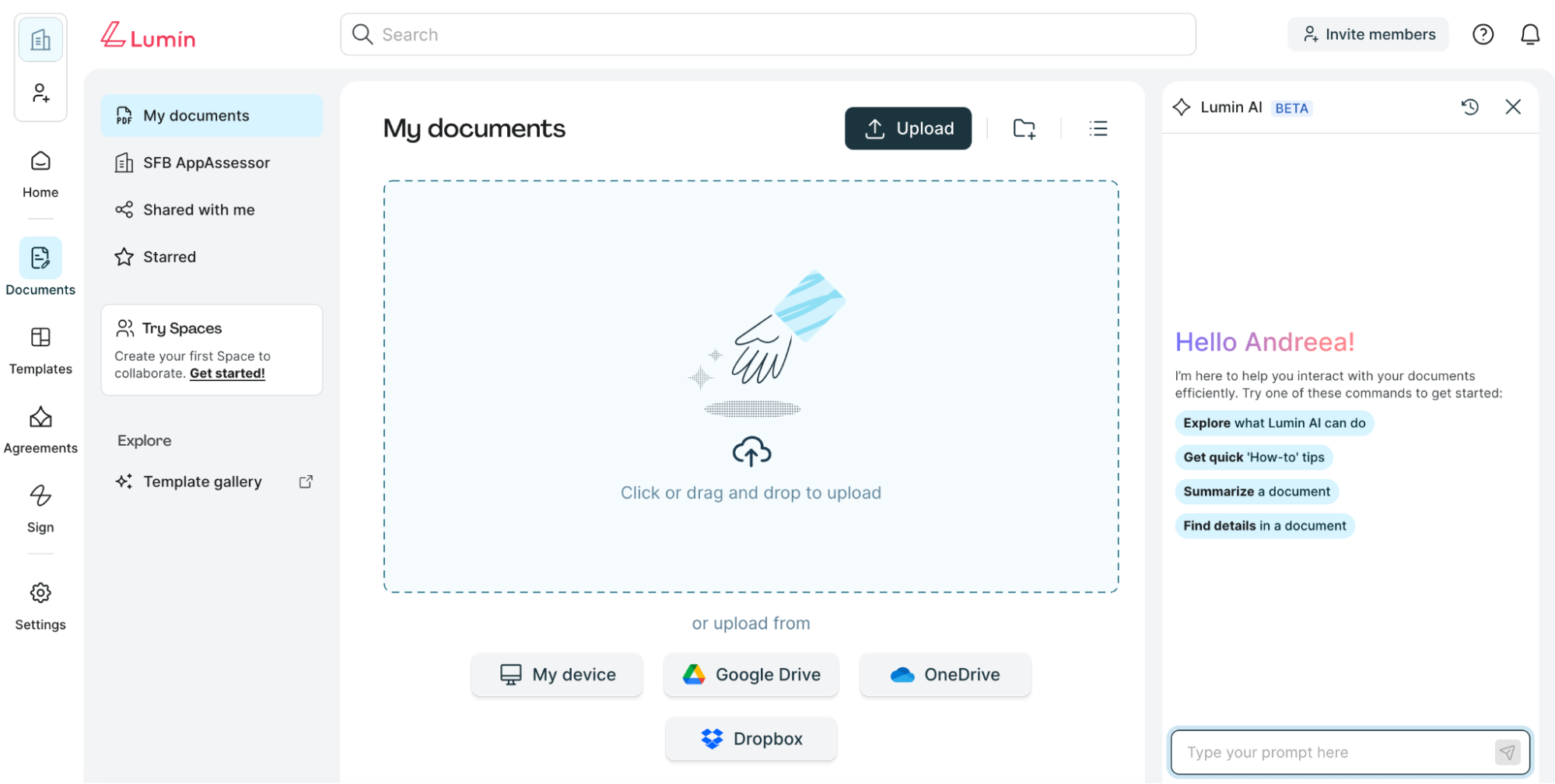
Adding your first document is a good place to start. You can upload one from your device, or link your account to Google Drive, Dropbox, or OneDrive directly. Alternatively, you can explore the available templates within the Lumin template gallery, which you can then make your own.
Agreements can also be manually created, but it’s not great to start with a blank page.
AgreementGen AI

To help your team iterate faster, Lumin introduced a readily available AI agent that can assist with generating any type of document in a matter of seconds – then continue to help you make changes with natural language prompts.

In this example, I asked the agent to generate an NDA that the sales team can use, with minimal detail. This was ready for review in less than 30 seconds.
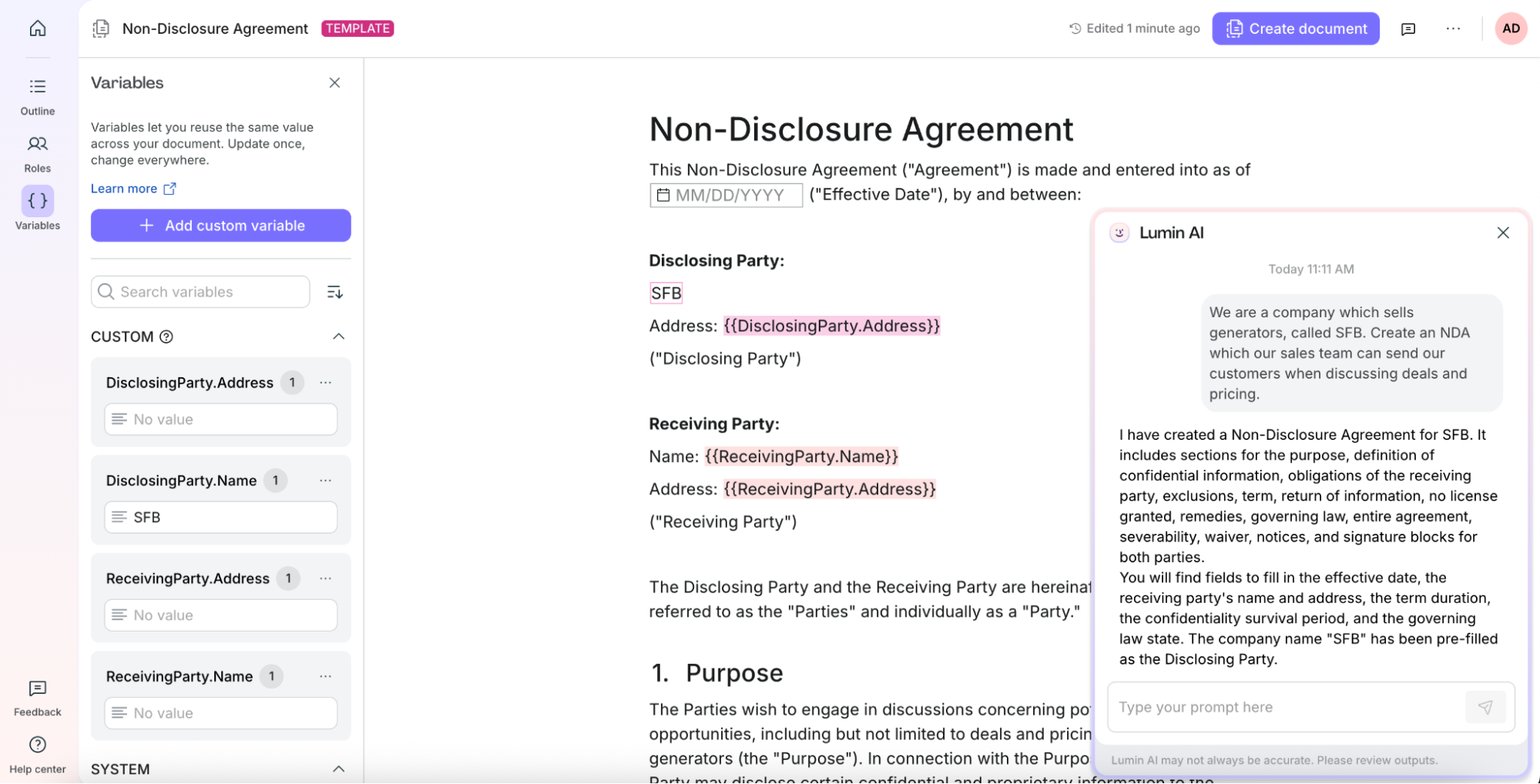
Lumin templates make use of mail merge syntax, and these placeholders can be controlled in the interface just like variables would be in any other tool. They can either have default values or be set depending on the signer(s) later on in the process.
If asked, the agent can also set the default values for you – in this example, since the initial simple prompt used the company name, “SFB” is already the default value for the DisclosingParty.Name variable, which can be reused. If needed, more custom variables can be introduced either manually or by asking the agent.
Salesforce Objects and Field Mapping

Once the template sync is ready, you can switch from the Lumin workspace to Salesforce and map your custom variables to Salesforce data. A single template can be used across multiple Salesforce objects, with each object having its own mapping and configuration settings.
When choosing which Salesforce fields are to be used, you can either choose a field from the main object or information from related records as needed. Based on your use cases and how you will be organizing the templates, it may make sense to have some information defaulted right in the template instead of mapping to Salesforce.

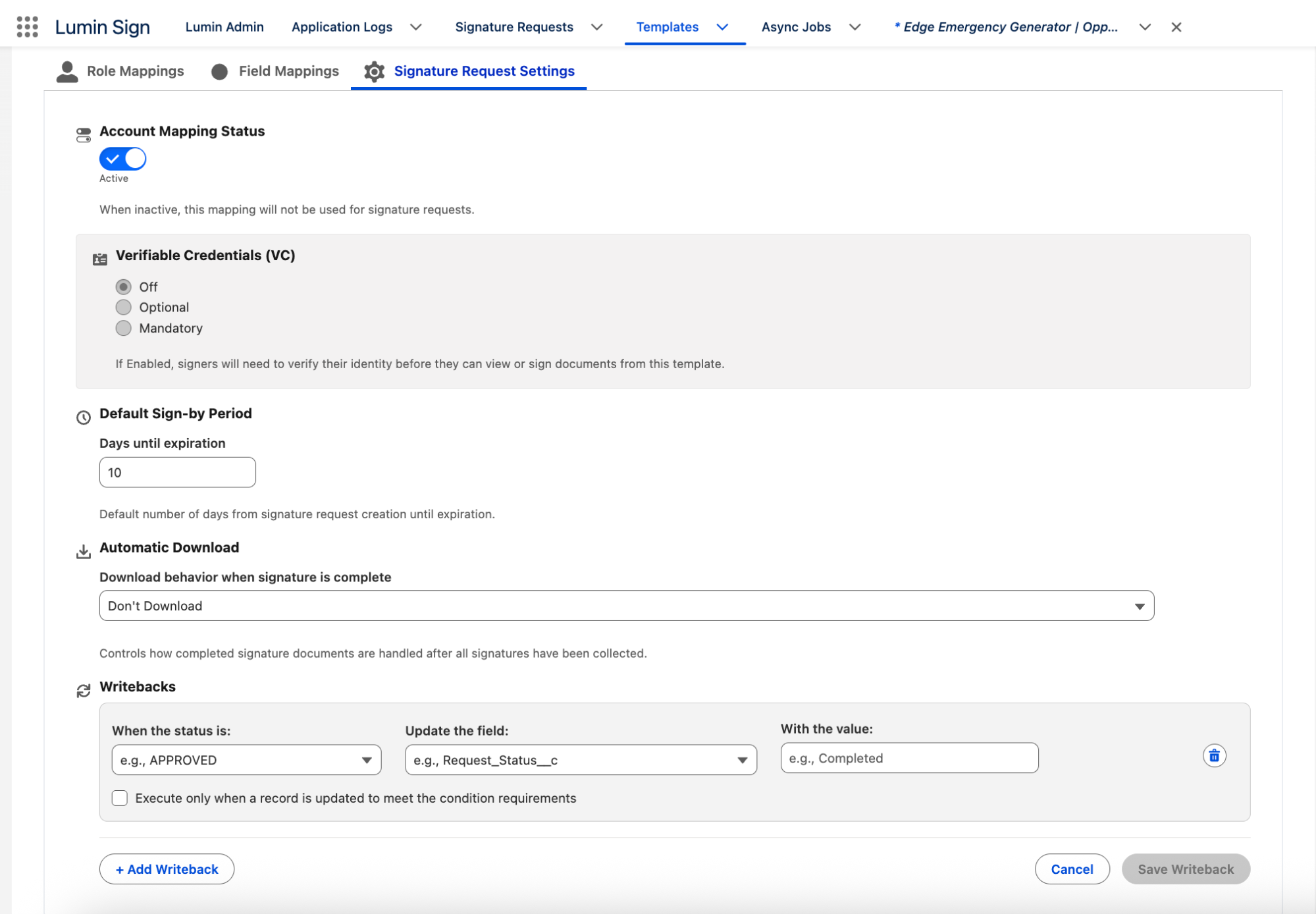
Once the mapping is ready for testing, the signature request settings should be reviewed next. If you try to activate the mapping and an error is triggered (in this case, the null check on the expiration), then the mapping is deactivated and has to be manually reactivated.
Additionally, each mapping allows for writebacks – these are rule-based automations which can update fields on the main object the mapping is related to, based on the status of the signature request. For example, the Opportunity Stage could be updated accordingly when the NDA is signed.
Make Lumin Available for Your Team
With the template ready, synced to Salesforce, and the mapping activated, it’s time for users to start enjoying the new way of requesting signatures.
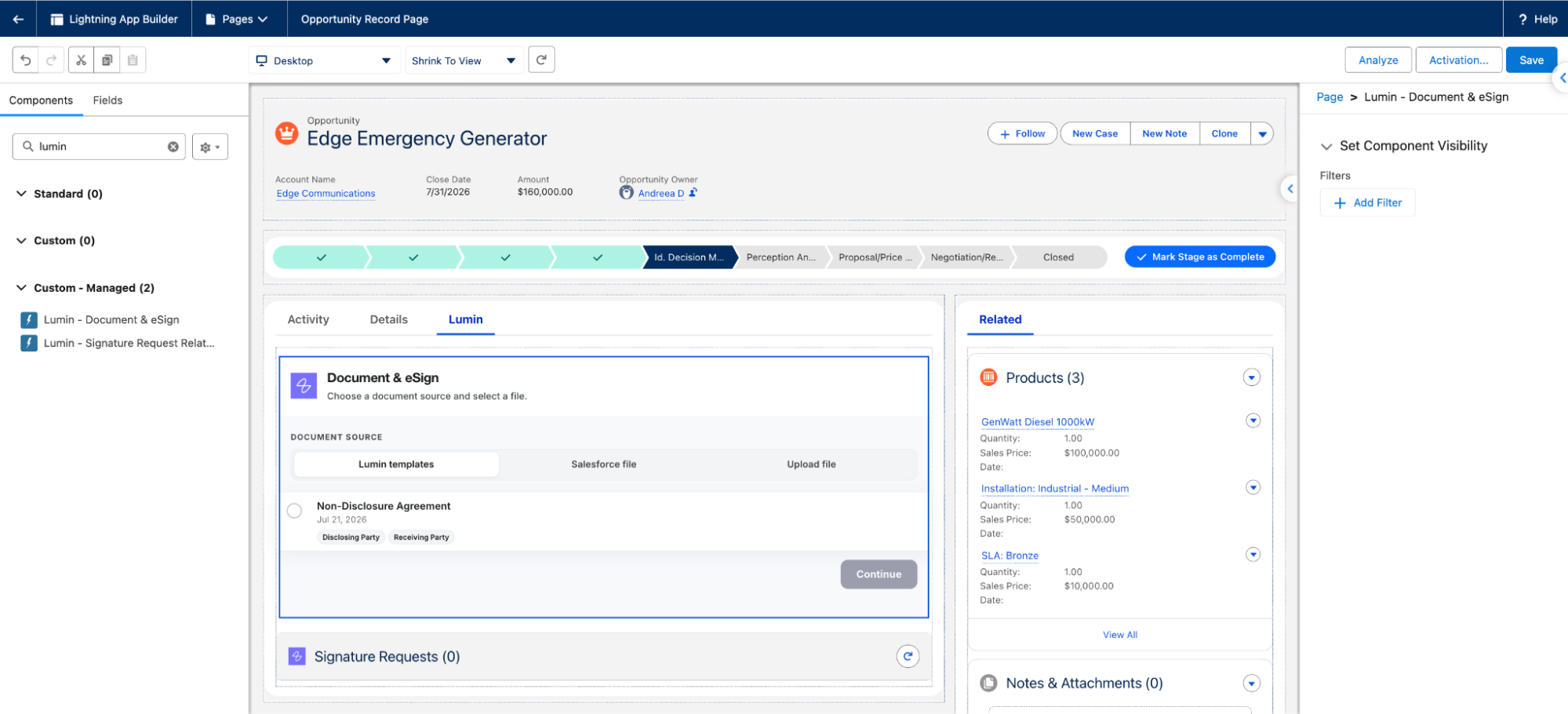
Lumin provides two custom Lightning Web Components out of the box – the Document & eSign experience, as well as a custom related list for the team to manage Signature Requests. Similar to other components on the Record Page, these can be filtered if signature requests should only happen at certain stages of a process.
Lumin Experience
Before sending a document for signature, let’s take a closer look at the template. When it comes to Lumin, each template and document can have multiple roles – these are color-coded and have their respective fields mapped accordingly as well.
Roles are also relevant for the signing order. While some documents can be sent out for signature at the same time, perhaps you’d like your customers to receive the document already signed by your team instead of them having to wait afterwards.
Either way, be it simultaneous signatures, in a certain order, or even by groups if multiple roles are involved, all three mechanisms are fully supported for you to orchestrate the experience.
Back in Salesforce, make sure any changes to your template have been synced. You can sync templates individually using the sync button or in bulk through the Lumin Admin tab.

The component itself, which we embedded on the Opportunity Record Page in this example, can be used and will display all available templates that have an active mapping for the Opportunity object. In this example, I will choose a Lumin template, but especially during the transition, if there are templates available in Salesforce or locally, users can choose these too or import.
When choosing the Lumin template, this can be directly sent for signature, previewed and downloaded, or even edited before being sent out within Lumin’s AgreementGen module. Additionally, when proceeding with the signature process directly, changes can still be made – the file name, replacing the automatically mapped signers, setting another due date, or a custom email message. Once ready, sending it is one button away!
Once sent, the Signature Request record(s) will be automatically created, so that the sales team can track progress on the record directly, but also within Salesforce reports if needed.

Be it for internal or external users, on desktop or mobile, the signing process is a breeze! An email is sent to every signer (or viewer if added), and each document has a transparent audit trail for the process and steps.
When signing, each signer can choose their signature: upload one, create one directly, or choose an already saved one if you have used Lumin before.
Flow and Agentforce Actions
As you might expect, generating or sending documents out for signature manually is not the only way! The Lumin managed package also includes a growing list of invocable actions which you can leverage to automate your processes.
Continuing with the Opportunity example above, a sales manager could spend a few minutes manually sending the NDA. However, it may be more efficient to automate the process so that the document is sent for signature when the Opportunity Stage changes to a specified value. Any potential exceptions would also need to be considered.

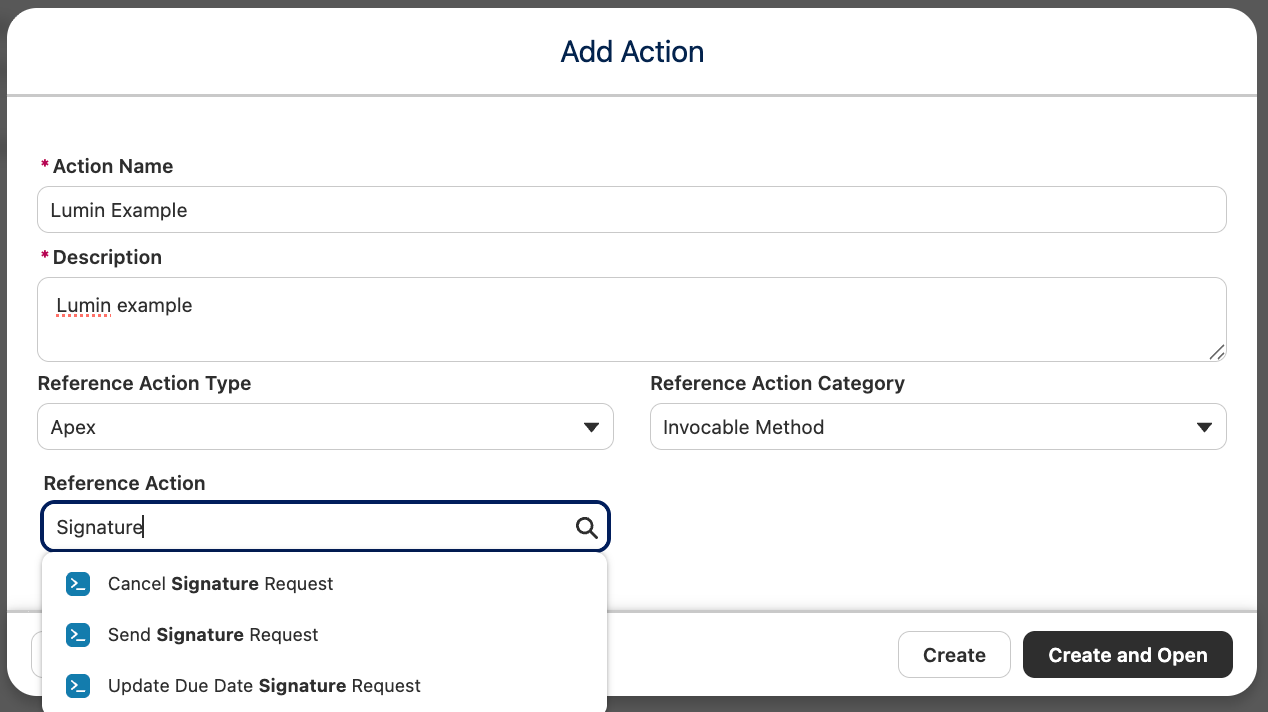
Given that these are invocable Apex methods, Salesforce Flows are not the only place these can be used. If you’re already using Agentforce agents for processes where documents and signatures are needed, or would like to create a new one for this, then these can be reused as custom actions to further enhance your team’s experience.
Roadmap
Speaking of Agentforce, Lumin’s work in this regard doesn’t stop at the reusable invocable actions. The team is currently working on readily available sub-agents and agent actions for you to leverage even faster, right from AgentExchange.
Soon, you will also have the option to upload a document, and Lumin AI detects the form fields, creates the signer roles, and assigns fields to roles in a single click. This way, the initial blank setup becomes a near-ready agreement. You and your users will be able to fine-tune or revert the result before sending, and it’s free on every tier.
Use Cases
Generating and signing documents is not a process specific to one team or industry, so it should come as no surprise that Lumin is both process- and industry-agnostic. Regardless of whether your company operates in a highly regulated industry or doesn’t need signatures on all documents that are to be generated, there is something that every team and organization can use from day one.
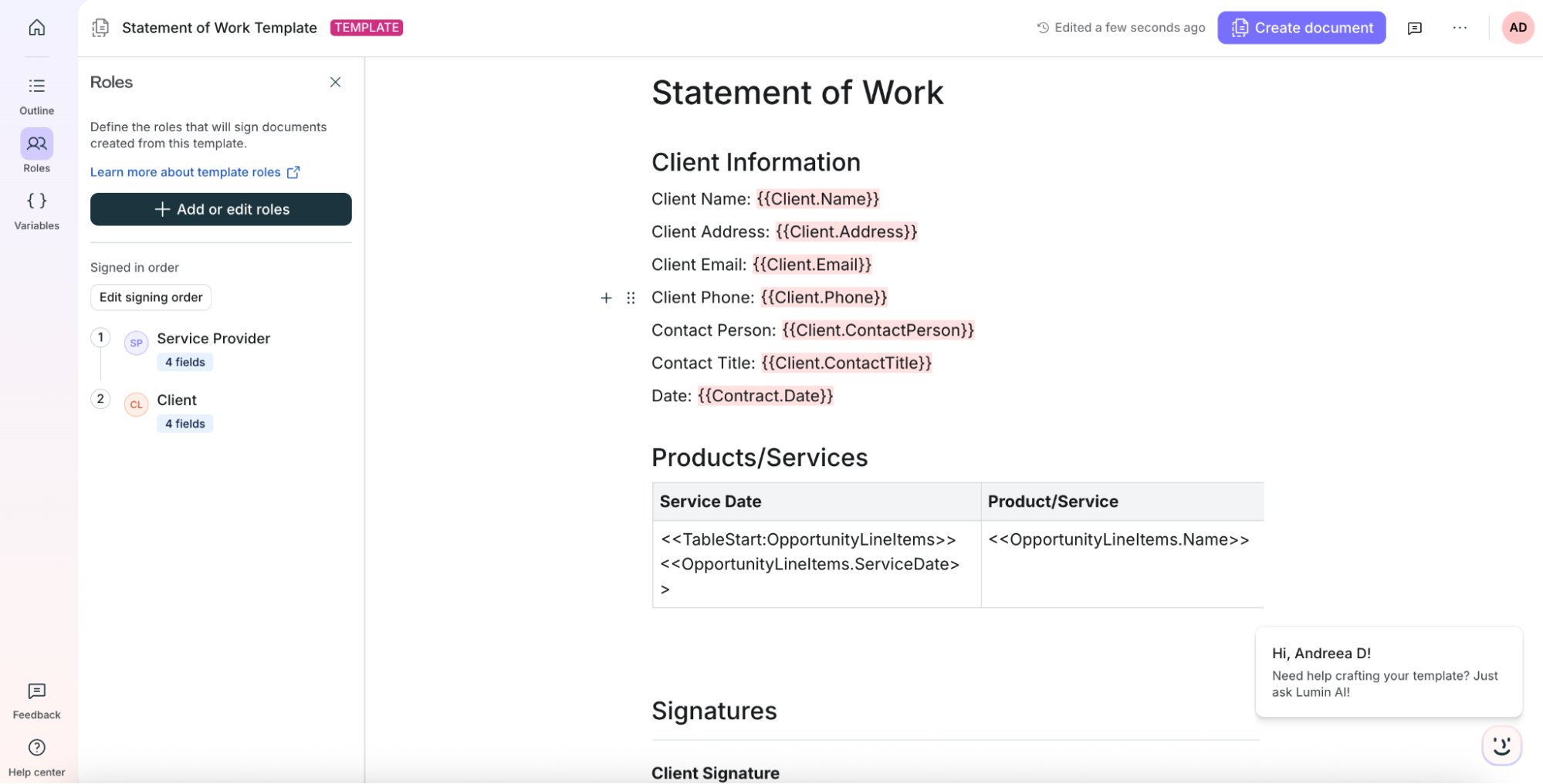
In Sales, the next document after an NDA is usually a Statement of Work or a Quote. These documents generally include a table, so that all products or bundles are displayed accordingly, along with their price. On top of simple fields, Lumin also allows for collection variables and provides a way for you to quickly copy what you need from the Lumin Admin tab in Salesforce, before pasting into your template within the Lumin Workspace.

The start and end Table tags are to be placed in the first and last column, respectively, and the data will be dynamically populated once the document is generated. Of course, you can add as many columns as the customer needs to see, and for any of the available related records based on the main object you chose for the mapping.

For added security, especially for legal, government-related, or otherwise sensitive or high-value documents, Lumin now offers Verified Digital Signing. This is an added layer of security that ensures each signature is confirmed against a verified digital identity, not just an email address.
This process is thought out from the get-go on both the desktop and the mobile experience, so that any such documents coming your way can be signed without hassle, wherever you are.
Setup
If you have implemented docgen and signature solutions that took ages to set up before, you’ll be in for a treat! Lumin is focused on ensuring the entire experience is streamlined, and that includes the initial install and setup.
Of course, the implementation time itself might vary depending on the number of templates, but you can get your first template set up, integrated with Salesforce, and sent for signature in a matter of minutes.
After creating your Lumin account and installing the managed package from AgentExchange, it’s only a matter of minutes to establish the connection and start creating your very own templates to then map with Salesforce data.
Support
The team at Lumin makes extensive documentation available, right within their help center, where everything from built-in functionality, Lumin AI, and integrations is covered.
If you do have a specific question though, you can always reach out via the built-in chat to either open a ticket or chat with an AI agent to begin with as well.
Pricing

Regardless of which option and features you choose to explore, Lumin offers multiple plans to choose from, varying in price, for both Lumin Agreements and Lumin Workspace – from no cost to try out the experience yourself, and up to customized pricing for enterprise organizations looking to scale.
Summary
Be it simple Terms and Conditions that don’t require a signature, or complex Statements of Work for multi-year deals, Lumin can help your business cover all document and signature needs.
From generating and iterating any document type with the built-in AI capabilities to Salesforce mapping and a bespoke signature experience, your team can forget about manually creating documents, working with offline files, or having to copy and paste data.
Ready to see for yourself how seamless your agreement processes can become? Take Lumin for a spin for free in your sandbox, at your own pace.