







Salesforce introduced the Lightning Experience in 2015 after what is now known as the Classic UI had aged quite significantly. Now, a decade on, Salesforce is changing its UI once more. This time, things are different – and I mean different from person to person.
The new AIforce unites Claudeforce, Slackforce, and Agentforce Coworker, and one major feature in this new suite is the ability to build your own agentic UI. This is a new concept for Salesforce, and will completely overhaul how business users interact with Salesforce into the future.
Surfaces Are the New UIs
You’re going to see the term ‘surface’ thrown around a lot soon – a pattern that we started to see occur at Dreamforce ‘26. Trying to simplify it way beyond what I’ve seen done, the term ‘surface’ simply means somewhere that you can interact with the application.
Today’s surfaces are Lightning Experience and the Salesforce Mobile App. In the future, thanks to AIforce, it will also extend to Claude (or your supported AI tool of choice), Slack, Microsoft Copilot, Microsoft Teams, and more.
Surfaces are basically any interface or channel where a user encounters an application or tool. The whole premise of AIforce is that people don’t have to go to Salesforce to do their Salesforce work. Salesforce will come to them instead. It’s being pitched essentially as the next evolution of the Salesforce platform, where instead of seeking out your data, it meets you where you are.
This is all powered by the Headless Experience Layer, which extends Salesforce’s metadata-driven platform to external tools. The ‘surfaces’ that you’ll read about are any front-end interface that you can interact with Salesforce data from.
Uniform Data, Uniform Metadata, Totally Personalized UI
The software of the current day and prior has built the user interface tightly coupled as part of the application. I’ve tried to figure out exactly how to word that prior statement, because it seems like such a foreign concept.
The fact is that things are changing, and they’re changing fast. The days of looking at the same application through the same UI are behind us. The future will be everyone logging into Salesforce through their own personalized UI, and collaborating on the same underlying platform through their own eyes.
One thing is that there’s always been some degree of personalization available in the Salesforce offering, or at least as long as I can remember. Think back to Salesforce Classic, where users could customize the tabs that appeared in the navigation bar. This extends to the Lightning Experience as well, where users can also choose their display density in either compact or condensed.
So, yes, there has always been some personalization available, but it’s not the same as what we’re talking about with AIforce, specifically the Headless Experience Layer (HXL).
In fact, before I proceed further, I want to make sure I call out the incredible work that the Headless Experience Layer is doing to expose Salesforce on various other surfaces. Back at TDX ‘26, you may remember Salesforce’s big Headless 360 push, which also announced the Agentforce Experience Layer. This has evolved today, with Headless 360 becoming the Headless Toolkit that is part of AIforce, and the Agentforce Experience Layer becoming the Headless Experience Layer.
These tools together expose the logic and data layers of Salesforce to supported external applications and tools. This means that instead of the Lightning Experience being required to access and use Salesforce, users can interact with the functionality of Salesforce through their UI of choice (to some degree).
In the future, you’ll access your Salesforce org’s data through your own personalized UI. You’ll be granted access to that data through Salesforce’s standard metadata-driven permissions model. You’ll take action using Salesforce’s standard automations, all managed through metadata. It’s just the UI that you’ll be responsible for. It’ll be a UI that you have built for yourself and displayable either in an AI tool like Claude, or through Slack, on your mobile device, or directly in your browser.
Salesforce professionals can begin working with Claude to build their own custom UIs today, as it is in open beta.
Why Salesforce’s Metadata-Driven Platform Is Crucial
Salesforce is a lot more than just the visual UI that users interact with. Marc Benioff was very clear about this in the Dreamforce keynote as well, and highlighted why Salesforce was perfectly positioned for this new future.
Salesforce is a metadata-driven platform. This means that while the UI is important, it’s not directly tied to the application itself. Salesforce uses metadata to describe the data and relationships within the system, and control the security and sharing settings surrounding that data.
This ensures that Salesforce users can only access the data they are allowed to see, and only perform actions they are allowed to perform. That data and those actions are described in the metadata, and the UI sits on top of, but very separate from, that metadata platform.
When Salesforce says that we can now create our own UIs, we’re not also being instructed to define our own security model or automation architecture. All of this comes packaged with the platform. The UI is the only thing that needs to be built if users want to access it in a personalized way.
Before you dive in, there’s something you should be very aware of. This change is about to expose how many Salesforce orgs have been using the UI layer as their de facto security model.
In other words, instead of a carefully curated security model (leveraging Field Level Security to restrict access to sensitive fields), Salesforce orgs have had some form of UI-locking in place that hides fields from end users. The problem with this is that when the UI is the only thing stopping someone from accessing data, and Salesforce is now allowing users to build their own UIs, that data is now fully exposed.
This is why cleaning up your security, metadata, and data is critical before you start building with AI.
‘I Am Iron Man’
I’ve found it really difficult to avoid the Iron Man themes while having this discussion, and I’ve decided instead to lean into it as hard as possible.
When the first Iron Man film came out back in 2008, one thing that stood out to many (myself included) was the high-tech, futuristic UI that Tony controls his suit from. That same year, the App Store was released on iPhone, and we’d all gotten used to seeing totally different UIs for different apps.
A single, unified UI for multiple different applications seemed like a foreign concept. Software had the brand of the company it was representing baked into it, whether we liked it or not.
Sometimes, and particularly with business tools, the UI fell significantly short in terms of quality. There was a powerful backend, but an extremely poor frontend. I’m not trying to say Salesforce is one of those companies (in fact, I personally didn’t mind a lot of the Salesforce UIs), but it has chosen to decouple the frontend UI from its extremely powerful backend.
Through its new AIforce offering, Salesforce and Anthropic are empowering end users to construct their own personalized UIs directly in Claude and access that UI on their surface of preference.
The demo we saw on stage at the Dreamforce 2026 keynote showed a satirical CRM UI with Parker Harris in his Lightning suit as a Clippy-like assistant. This was a totally custom UI, built entirely by prompting Claude.
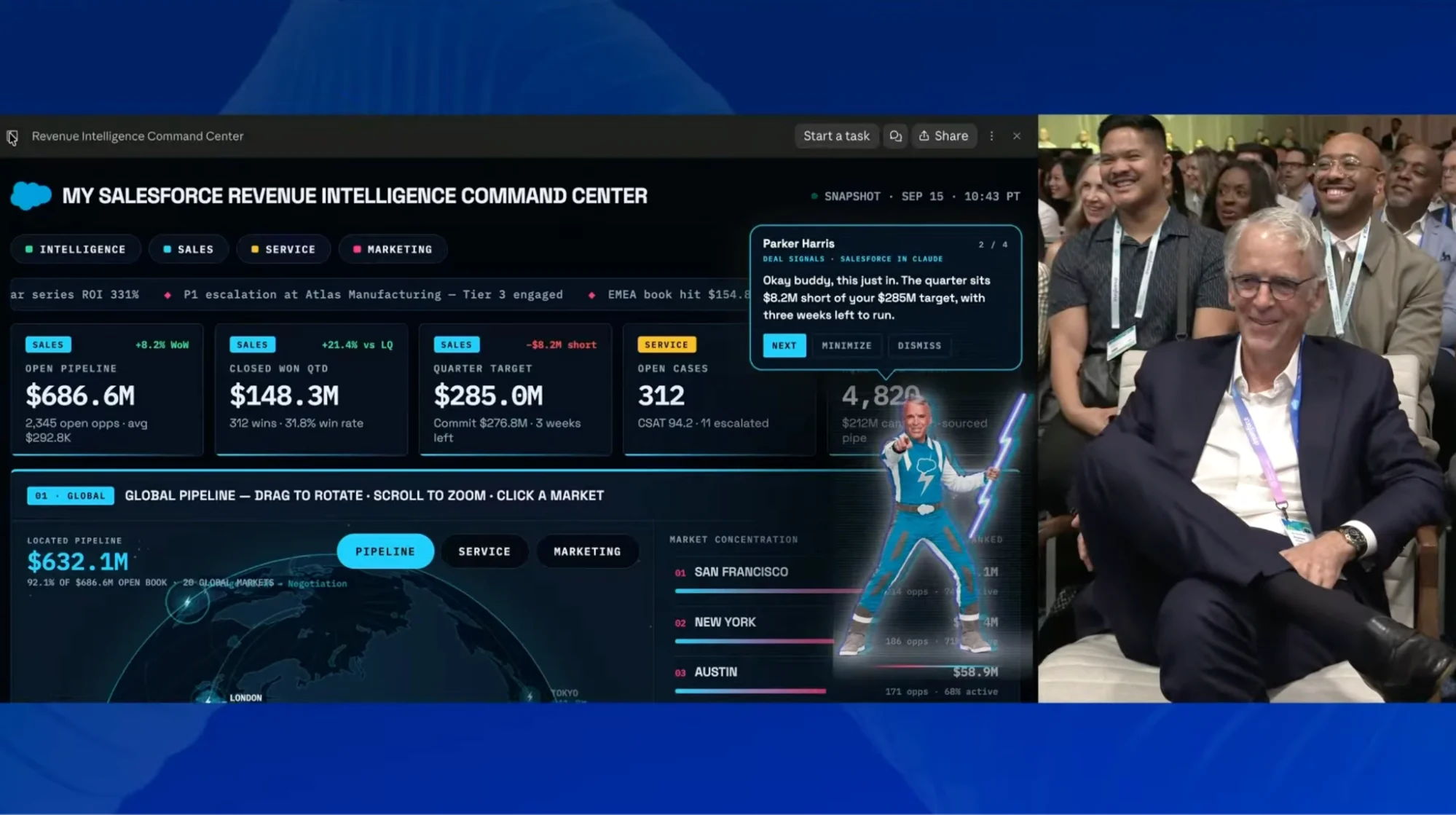
While this was a comedic example, it shows just how flexible UI will be in the future. There’s no need for brands like Salesforce to push its own design language onto their users. It can focus simply on offering a powerful backend and allow the users to access it in their own way.
What Changes for Admins, Architects and Developers?
This is a totally different concept to what we have come to know over decades of software development. The UI and the application were the same – you didn’t really get one without the other. If you were accessing data from one application in another interface, it was likely through an API integration, and you were then simply accessing that data in another application’s UI.
Personal UI means that training users on new functionality is going to be a lot more difficult. Standard Operating Procedures (SOPs) and user training will have new variables that have never existed before.
Something else to note here is the governance aspect. Marc was clear during the keynote that AIforce had zero data retention with model providers. This is one way the new tool protects your business data. However, this doesn’t mean that governance can be ignored. In fact, as I’ve alluded to above, there will be new challenges that Salesforce professionals will need to overcome.
Final Thoughts
The future of Salesforce will look very different, but underneath it’ll be much the same. The same metadata-driven platform that we’ve come to know and love over the past two decades will still be there, in an evolved form. It’s the interface that we used to access it that is changing dramatically.
This is the first major step toward the future of Salesforce UI. Your Salesforce org, your way, driven by a powerful metadata-driven platform. Automation, security, and governance are all still there. Your data is still safe and secure. You can now choose how you want to see and interact with it.