







Users

Top 5 Salesforce Chrome Extensions

Ben McCarthy

By Ben McCarthy

Updated January 28, 2025

chromeicon

There are a huge amount of Apps on the AppExchange, almost one for every possible use you could ever need inside Salesforce. What a lot of Salesforce Users/Admins/Consultants don’t know is that Developers have actually designed some really cool Google Chrome Extensions that are designed to have very simple uses but can be extremely effective and save people a lot of time. I’ve spent the time looking through a few of these and have come up with my Top 5 Salesforce Chrome Extensions.

1. Salesforce Navigator

Screen Shot 2014-09-03 at 17.15.50

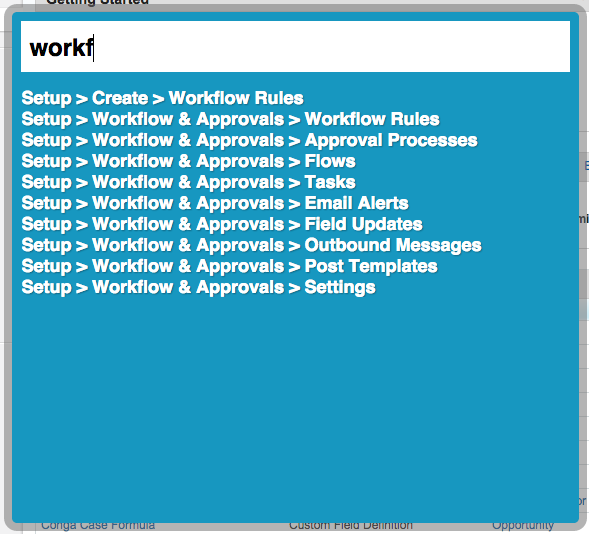
Salesforce Navigator is extremely simple and will save Consultants, Developers and Administrators a massive amount of time when trying to navigate through Salesforce. Once installed into Chrome Salesforce navigator will sit dormant in the background until you press the magic key combo, Shift + Space. What this will do is launch a mini floating search bar in the middle of your page that allows you to search the whole of Salesforce. When I say the whole of Salesforce I actually mean more of the backend stuff as apposed to records (As we have the Salesforce search for that, right?!). You can search through any area in the backend of Salesforce which is crazy helpful when you need to get to a particular place that is buried deep away that requires about 7 clicks to get there. You can also change the key combo to get there if required. An indispensable tool when you start using it.
Grab It here

Screen Shot 2014-09-03 at 17.05.39

2. Sandbox Favicon

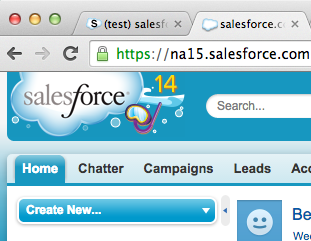
Screen Shot 2014-09-03 at 17.18.43The best ideas are the simplest right? This little extension will change the Favicon (The little logo next to browser tabs) on Salesforce Sandboxes to an S. This is very useful for Consultants, Administrators and Developers that work between sandboxes and production a lot. I’ve personally fallen victim to searching a sandbox for a particular Production record that I need to get hold of…Hopefully this little App would have prevented that!
Grab It here

Screen Shot 2014-09-03 at 17.19.36

3. Ebsta

Screen Shot 2014-09-03 at 18.18.48

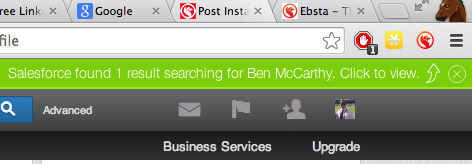
I’ve actually reviewed Ebsta before in a dedicated post as its a really cool App so check it out here, I thought it definitely deserved a place in this post as well though as its a very well thought out App. Essentially Ebsta allows you to make sense of data you have in Salesforce and LinkedIn. While browsing LinkedIn you have a little bar that sits at the top of your browser, if data is found on the current profile you are viewing on LinkedIn inside of Salesforce, it will let you know and show relevant data. Ebsta also allows you to update information inside of Salesforce while browsing LinkedIn. A must have for users of Salesforce and LinkedIn.
Grab It here

ebsta

4. Brisk

Screen Shot 2014-09-03 at 18.18.56

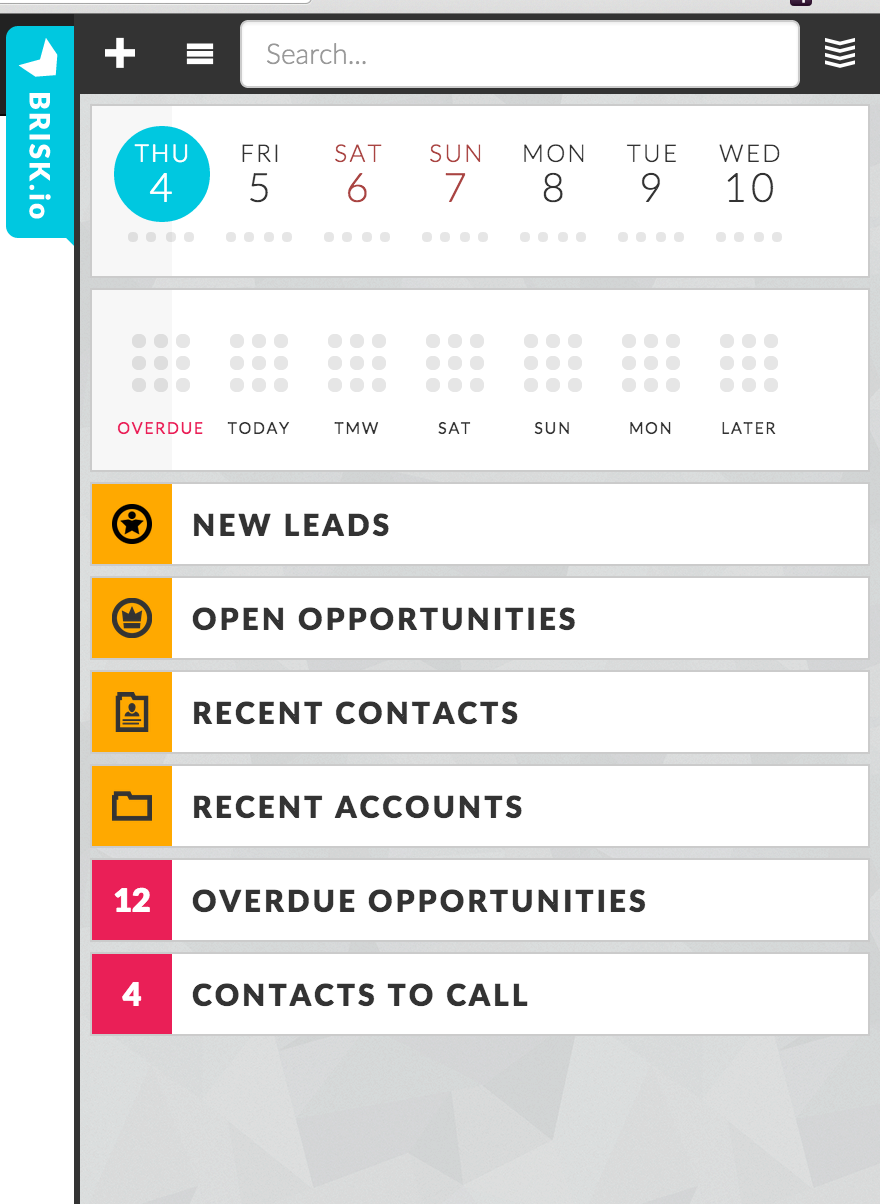
Brisk is a really simple App that I think a lot of Users will get massive benefit from using. Consultants, Administrators and Developers may also find this useful for testing purposes. Brisk gives you a nicely laid out sidebar that contains a ‘mini’ Salesforce where you can access your Leads, Accounts, Opportunities etc. You can also add new records as well as log calls. Think of it as a bit like the Salesforce1 App for mobiles but in your browser. It can be easily hidden by clicking on the icon and then enabled again.
brisk.io-screenshot

5. Salesforce ID Paster

Screen Shot 2014-09-03 at 18.10.49

Salesforce ID Paster has a pretty unique use case but personally saves me a lot of time. If you find yourself copy and pasting Salesforce IDs into your URL bar a lot then this might be for you. By this I mean highlighting the ID part of the Salesforce URL, deleting it and then copying in the ID you have saved.

Screen Shot 2014-09-03 at 18.12.22

What this App will actually do is copy the URL you have saved in your clipboard directly into your browser and then navigate to this record for you! The default for this is Ctrl+Shift+Y but this can be changed. Essentially eliminating the need to select, delete, paste and press enter.

Grab It here

Bonus – Salesforce Colored Favicons

Screen Shot 2014-09-03 at 18.16.03

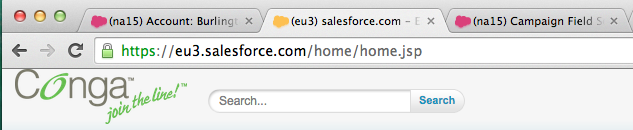
So heres an App that could actually be really helpful for Consultants and Developers that work with a lot of different Orgs. Especially if they are global. What this extension will do is apply a different cloud favicon icon to different instances of Salesforce depending on the server they are attached to. Here is an example, a pretty unique idea that I’m sure a lot of people can find very helpful!
Grab It here

Screen Shot 2014-09-03 at 18.17.38

The Author

Ben McCarthy

Ben McCarthy

Ben is the Founder of Salesforce Ben. He also works as a Non-Exec Director & Advisor for various companies within the Salesforce Ecosystem.

Leave a Reply

Comments:

    Yozza
    September 05, 2014 12:07 am
    Thanks Ben. 3 of these are new to me, so thanks for sharing. I was specifically thinking of writing a greasemonkey script to get records to autosave - any knowledge on something like that? Best, A
    Andrew
    September 11, 2014 12:02 pm
    I also really like this SOQL extractor and analyzer. https://chrome.google.com/webstore/detail/soql-extractor-and-analyz/deihalhihjdilndoidoclmhmgllebkfj
    Andreas Gerogiannis
    October 18, 2014 3:18 pm
    Search for multiple links opener, extension tool... Can't recall it's real name now. But I am using it 10000 times a day as admin. Can't live without.
    Brian S.
    January 16, 2015 3:03 pm
    Here is a pretty simple extension I made after using SalesForce for a little while. It adds some hover effects to some of the elements in SF. I found it difficult sometimes to track across large reports and the like so I made this extension to help with that. I've added a few more subtle effects (slight shading in Chatter posts) as I've continued to use SF. It's completely free and I hope some of you find it helpful. :) https://chrome.google.com/webstore/detail/salesforce-hover/fpbdfkkbjdhcllaakddahbfnclofodia?hl=en-US
    ben@ben-mccarthy.com
    January 16, 2015 3:14 pm
    Thanks Brian. I'll be sure to check it out!
    Philip
    February 23, 2015 11:18 pm
    Check this one out https://chrome.google.com/webstore/detail/apex-debugger/mpckkbblhbfngaininanfjpdfjhbncjo?hl=en
    Derek
    March 04, 2015 3:10 pm
    Nice post! For SF Navigator I needed Ctrl-Shift-Space to work in Chrome 41. Also I found that Favicon apps will conflict with each other so picking one works best :)
    ben@ben-mccarthy.com
    March 04, 2015 3:31 pm
    Hi Derek, thanks for the tip!
    Chirag Mehta
    March 23, 2015 6:27 pm
    Ben – Thank you for sharing, Don't forget to checkout following 2 chrome extensions: Enhance Salesforce Dashboard – http://goo.gl/xn5Nff – Do you need real-time information from your Salesforce Dashboards and additional (up to 7) columns of Dashboard components? With this amazing Chrome Extension, now you can! Download Visualforce Code – http://goo.gl/L1Su6i – Do you want to download Visualforce page/component code? With this amazing Chrome Extension, now you can! Thank you Ben! Chirag
    ben@ben-mccarthy.com
    March 23, 2015 8:06 pm
    I'm going to have to check out that Enhance Salesforce Dashboards! Almost seems to good to be true. I think I will need an update 2015 post with all these new apps! Thanks for sharing Chirag.
    Chirag Mehta
    March 26, 2015 6:35 pm
    Thank you, will be waiting for feedback. Suggestions/Feedback is always welcome :) Chirag
    Chirag Mehta
    April 10, 2015 5:08 am
    Ben - Add one more to your list :) Enhance Salesforce Header - http://goo.gl/xG3Drq This extension displays logged in org name, current time and Logout, Dev Console, My Settings and My Profile as separate links. Chirag
    Iryna
    May 04, 2015 9:26 am
    Thank you for the great article. I'm also using 3rd party solution that sync SF and Outlook, it’s called Contact Monkey (http://www.contactmonkey.com/salesforce-for-outlook). This tool helps me to connect with my customers more effectively than ever before. Knowing when proposals and e-mails are being reviewed has helped me to shorten the sales cycle. But the biggest benefit that it saves over copying and pasting email conversations from Outlook into Salesforce.
    Vishesh
    May 20, 2015 7:44 am
    I have created one chrome extension to export salesforce list data to CSV. Please check it out - https://chrome.google.com/webstore/detail/salesforce-data-exporter/fimhgbeiaffioifgjfcfjnphifipknao
    Matthew Wade
    June 04, 2015 7:41 am
    Ben, The Force.com logins is also a hugely helpful plugin for Chrome for Consultants. With this plugin you can save all of your different logins for various prod/sandbox orgs to create a one click login. It even remembers security tokens too for use of the Apex Data Loader. An incredible powerful, yet simple plugin. Located here: https://chrome.google.com/webstore/detail/forcecom-logins/ldjbglicecgnpkpdhpbogkednmmbebec?hl=en Navigator sounds very useful, thanks for the heads up! Matt
    Ben McCarthy
    June 04, 2015 8:42 am
    Hey Matt, Thanks for that. In fact I'm planning to do a new updated post on Chrome Extension, as there seem to be many that I have missed off and also a whole bunch more since I wrote this less than a year ago!
    Kathy
    July 01, 2015 8:31 pm
    Ben- I can't wait to try some of these apps. This comment caught my eye. Have you had a chance to check out the Enhance Salesforce Dashboards app?
    Chirag Mehta
    July 03, 2015 6:46 am
    Thanks Kathy! Don't forget to try out and leave your valuable feedback! Ps: The extension is now on AppExchange too - https://appexchange.salesforce.com/listingDetail?listingId=a0N30000000q4pAEAQ Chirag
    Diéffrei T. de Quadros
    January 17, 2017 9:54 pm
    Building your own salesforce chrome extension http://dieffrei.com/en_US/building-salesforce-chrome-extension-angularjs/
    Abhishek Verma
    February 13, 2017 12:31 pm
    I have developed a chrome extension "VFWIZARD" for salesforce developer which is the first chrome extension which allows you to create your HTML/Visualforce code using Drag n Drop. Please download by clicking below link and share your feedback https://chrome.google.com/webstore/detail/vfwizard/jhcbdmncpnkagblokfplcfhjgeobeeih Thanks and regards Abhishek Verma
    Enrico Murru
    March 13, 2017 4:42 pm
    Hi Ben, have a look at my ORGanizer Chrome Extension...lots of dev/admin releated features http://organizer.enree.co
    Ben McCarthy
    March 13, 2017 6:30 pm
    Hey Enrico, I'm very aware of your chrome extension app and am imminently planning an updated post, you will most definitely be featured :)
    Prem Chauhan
    July 02, 2018 6:58 pm
    Hi Ben McCarthy, Wow, all your posts are very informative for me as a SALESFORCE DEVELOPER AS WELL AS A ADMIN to visit your site. Thanks for sharing such a wonderful post with us. And especially after reading this above post (Top 5 Salesforce Chrome Extensions) now I can able to understand the thing very easy with the help of the above 5 Extension. ( I am 1-year experienced Salesforce developer) I want to learn more things about salesforce. Yout blog is just awesome. Many Thanks, Ben :) Keep Sharing…