
I may not have mentioned it yet, but 1 is my favorite number. 1 is usually at the top of lists, 1 denotes being first, and 1 is all you need to start something great. 1 is a good number! But if it’s used to count the number of admins a Salesforce org has, that’s another story.
There’s a concept in software development called the bus factor, which is a slightly morbid way of asking: how many people on your team could get hit by a bus before your project falls apart?
In this article, we’ll break down what the bus factor is, why a bus factor of 1 in Salesforce puts your org at risk, and what you can do to change that.
The Bus Factor (in Salesforce Context)
The bus factor is a risk assessment metric that measures how many team members could suddenly be hit by a bus or “disappear” before a project completely fails or stalls. It’s pretty dark, I know, so it’s also sometimes called the “lottery factor” because winning the lottery and quitting your job is just as disruptive!
In Salesforce orgs, having a one-person team is pretty common. In fact, our latest Admin Survey shows that 19.47% of respondents belong to teams of one. While that isn’t the highest number or percentage, it’s still a significant slice of the community and one where the bus factor risk is very real.
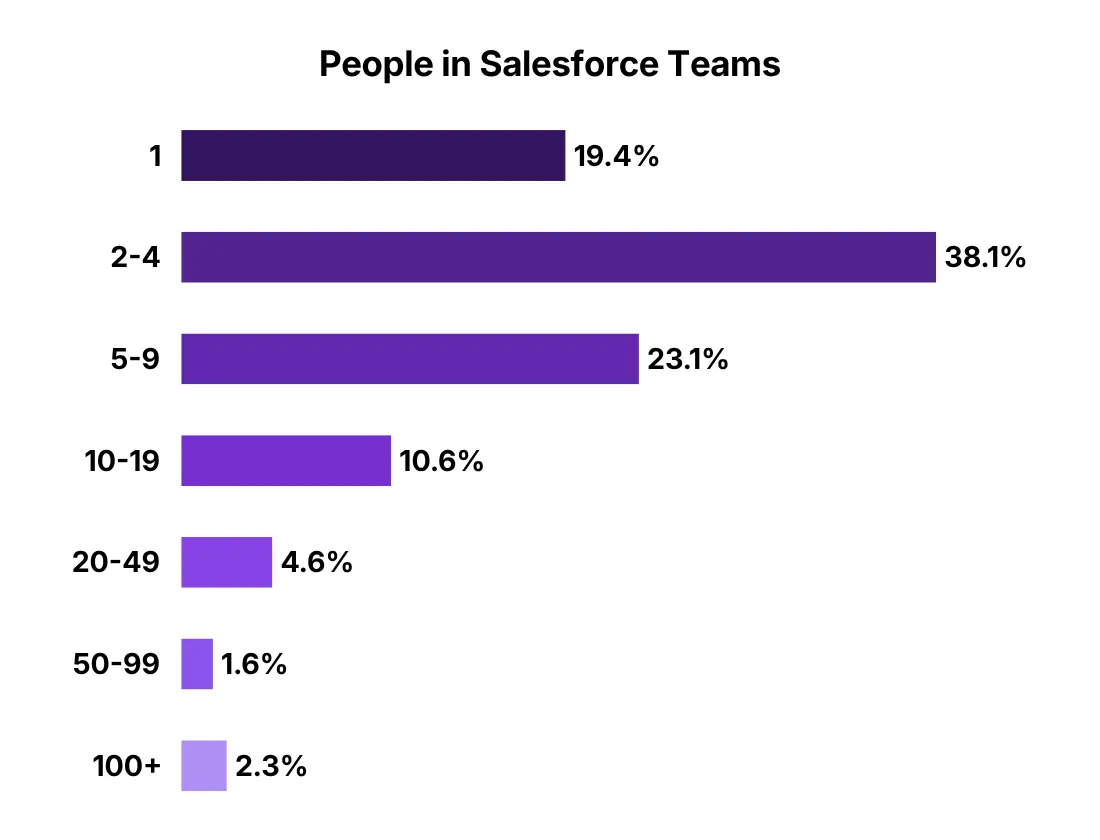
So if you’re a solo admin (or the one admin who actually knows things in your org like the back of their hand), then your org has a bus factor of one. That means if something unplanned happens, like getting sick, changing jobs, or just going offline for a long weekend… things will most probably start breaking.
Now, this isn’t a knock on you. After all, if you know everything in your org and everyone depends on you, it’s actually a sign you’re good at your job. The problem is that good admins can become single points of failure…and that’s a risk to the business, whether your org has 20 users or 2,000.
Here are sample risks for orgs that operate like this:
- Only one person knows how the automation works. Flows, approval processes, and automations all live in someone’s head.
- Documentation is sparse or nonexistent, or it exists, but it’s out of date. Maybe only the admin knows where it is, and they’ve been using it for personal reference.
- Critical configurations are tied to a single user. Scheduled jobs and integration credentials are all running “as” or “owned by” the admin who’s about to leave.
- There’s no backup admin. No one else has System Administrator access, or someone technically has it but has never used it.
The Cost of a One-Admin Org
Most orgs don’t discover their bus factor until it’s too late. The trigger is usually one of a few things: the admin leaves. Hopefully, with notice, and hopefully on good terms with proper handovers, but by the time offboarding starts, half the institutional knowledge has already walked out the door. I’ve had former colleagues who inherited an org as a solo admin due to the previous one suddenly leaving, and it wasn’t pretty. Imagine the org suddenly running without its main support system – overwhelming!
At this point, burnout becomes a real bus factor too.
Obviously, this becomes a business risk, but aside from it being operational, it can also get expensive fast. When automations break, and nobody knows how to fix them, a new admin gets hired and spends their first three months reverse-engineering what the previous person built. Or maybe a consultant gets called in for something that should have been a 20-minute fix.
If any of this feels like it describes your org in any way, then you might be the admin who created the problem (yes, even with the best of intentions).
Signs Your Org Has a Low Bus Factor
Before you can fix it, you need to know how bad it is. Use this checklist and ask yourself the following questions:
- If you were unavailable for a week, would anyone else know how to handle urgent tickets?
- Are there active Flows or automations where only you know the logic?
- Are your integration usernames or API credentials tied to your personal admin account?
- Do dashboards or scheduled reports run “as you”?
- Is there documentation that a new admin could actually use to understand your org?
- Does anyone else have System Administrator access?
- Are any approval processes or assignment rules tied to your user record?
If you answered “no” or “I’m not sure” to most of these, your bus factor is most probably low.
How to Start Increasing Your Bus Factor
The main goal is to make your org resilient. It’s not about making yourself replaceable, or urging higher-ups to just hire a co-admin. Good admins build systems that work without them, and here’s where to start.
1. Document As You Go (Not All at Once)
Boring? Yes. But is it important? 100%!
I’ve once spiraled into a full-blown procrastination crisis and bought a book on productivity as self-help. I read about the Pomodoro technique, which basically means you break work into small, focused intervals – usually 25 minutes – instead of trying to tackle everything in one go. I think documenting as you go is a nice example of the Pomodoro technique in the SF context.
A full org documentation project sounds great in theory (and you should have it), but it never really happens in practice. Plus, catching up on documentation all at once sounds like tedious and hard work. Instead, build the habit of documenting as you work. Fixed a weird Flow issue? Write down what caused it and how you resolved it. Did you build a new flow approval process? Make sure to fill out the description fields!
Salesforce has out-of-the-box Description fields on almost everything. If you prefer higher-level third-party solutions, tools like Notion, Confluence, or even a well-maintained Google Doc can work. At the end of the day, any format works as long as you’ve embraced the habit.
2. Detach Critical Configurations From Your User Account
This is one of the most practical but also most overlooked steps. Check your:
- Automations. For example, only the last person to edit a Flow gets error notifications when it breaks. If that’s you, and you’re suddenly unavailable, those errors go nowhere. This can be updated in Process Automation Settings and by setting up new Apex Exception Email Recipients. Also, check your Default Workflow User.
- Dashboards and Scheduled Reports. If these are running “as you”, they break the moment your account is deactivated. Check the running user on all scheduled reports and dashboards, and move them to a shared admin or a manager’s user account.
- Lead and Support Settings. Your Lead and Case Assignment Rules may have your name as the default owner or even as an assignee. Check even the old, inactive rules that may have been forgotten.
- Integrations. If any third-party tools like connected apps are authenticating via your personal admin credentials, that’s a ticking clock. You can check active OAuth tokens in Setup > Connected Apps OAuth Usage. Also, check out scheduled jobs for any scheduled Apex.
3. Build a Backup Admin
Someone in your org should have System Administrator access and actually know how to use it. This doesn’t mean you need a full-time second admin (though that’s ideal for larger orgs). This could be a senior power user, a developer, or even a manager with the right training.
Now, I get it – handing out System Admin access isn’t something you do lightly. It’s one of the most powerful permissions in your org, and the wrong hands can do real damage. But the thing to understand is that access without knowledge is useless in a crisis anyway. What you’re really looking for is someone who understands the org well enough to act when you can’t, and not just someone who technically has the keys!
4. Create a Runbook for Your Most Critical Processes
You know those “break glass in case of emergency” prints you see on fire extinguisher boxes? A runbook works the same way, in the sense that it’s a simple document that explains what to do if something breaks. Don’t worry, as it doesn’t need to cover every possible scenario or edge case. Focus on:
- The five most important automations in your org and what they do.
- What to do if a scheduled job fails.
- Where to find credentials or who to call if an API integration breaks.
- The org’s data backup and recovery approach.
This runbook will be super valuable, especially for stakeholders or users who might need to take action before you’re reachable.
5. Conduct a “Hit by a Bus” Audit
Actually sit down and walk through the question: if I left tomorrow with no handover, what would break and what would a new admin struggle to understand?
It would make sense to map out your top ten highest-risk areas, and then systematically work through them by documenting, reassigning, and then cleaning up. This audit alone can take up a lot of time, especially for more mature or complex orgs, but you don’t have to do it all at once. Even just doing it bit by bit, but consistently, makes a huge difference. Again, another opportunity to apply the Pomodoro technique or work in intervals!
6. Advocate for More Admin Resources
I know, at the start of this section, I mentioned it isn’t about urging higher-ups to just hire a co-admin. But if your org genuinely has a bus factor of one, that’s worth surfacing to leadership. Don’t think of it as a complaint, but more like a business risk conversation. Frame it around continuity, and you can ask questions like “what happens to X process if I’m unavailable?”
This is also a legitimate case for getting a junior admin, a super user, or at minimum, exploring Delegated Administration, which lets you grant a subset of admin permissions to non-admin users. Granted, it isn’t a substitute for a true backup admin, but it can help keep the lights on for some user management tasks.
Final Thoughts: Good Admins Build Orgs That Don’t Need Them
Reducing your org’s bus factor is one of the best things you can do for your org, and honestly, even for your own career. Admins who build well-documented and resilient systems are far more valuable than admins who are the only person who understands how anything works. While the latter doesn’t mean you aren’t a good admin, it’s still stressful and unsustainable, and you deserve better than being the single point of failure in a system you built.