

More Salesforce Architects are being asked to make complex design decisions across a growing number of clouds, technologies, and architectural patterns. From choosing between Flow and Apex to designing integration strategies, architects spend a significant amount of time researching options, evaluating trade-offs, and validating approaches.
This makes architecture an interesting opportunity for AI assistance. The challenge is that good architecture is not just about finding information. It requires understanding context, questioning assumptions, and balancing competing priorities. Salesforce’s new Agentforce-powered assistant for the Salesforce Architecture Center aims to support architects in this process, but can it provide the kind of guidance and reasoning that experienced architects expect?
What Is Agentforce for Architects?
Salesforce has introduced a new Agentforce-powered assistant within the Salesforce Architecture Center, designed specifically to help architects navigate platform guidance and architectural decisions.
Unlike the broader Salesforce Help assistant – which is designed to answer questions across a wide range of Salesforce topics – Agentforce for Architects has a much narrower focus. It is intended to help users explore architecture patterns, understand recommended approaches, and find relevant guidance from Salesforce’s existing architecture resources.
Salesforce highlights example prompts such as:
- “Show me agentic patterns”
- “When should I use Apex instead of Flow?”
- “Explore Data Cloud designs”

This narrower purpose could be one of its biggest strengths. Building an AI assistant that can answer every possible Salesforce question is a significant challenge. However, architecture guidance already has a more structured foundation, with resources such as the Salesforce Well-Architected Framework, reference architectures, and established design patterns.
The opportunity is compelling: instead of manually searching documentation, architects could use a conversational interface to quickly explore options, compare approaches, and find relevant guidance.
However, architecture is not just about finding information. Good architects need to understand context, challenge assumptions, and make decisions based on trade-offs. The quality of the assistant will ultimately depend on whether it can move beyond retrieving documentation and provide genuinely useful architectural guidance.
How I Tested It
To evaluate Agentforce for Architects, I tested it with various architecture scenarios covering automation, integrations, and design decisions.
Rather than only checking whether the answers were technically correct, I evaluated the assistant across four areas:
- Accuracy: Does it provide reliable Salesforce guidance and reference trusted sources?
- Context: Does it understand the scenario before recommending a solution?
- Trade-offs: Does it explain the benefits, limitations, and risks of different approaches?
- Architectural reasoning: Does it challenge assumptions and demonstrate the decision-making process expected from an architect?
Prompt 1:
“What architectural guidance has changed in the last 12 months?”
The response covers some of the key themes in Salesforce architecture, but it feels closer to a summary of Salesforce messaging than advice from an experienced architect. It highlights areas like resilience, composability, and compliance, but doesn’t go far enough into the questions architects actually need to answer: Why has this changed? What decisions should we make differently? What are the risks and trade-offs?
It also lacks strong references and doesn’t demonstrate the architectural reasoning expected at this level. In particular, it misses deeper discussion around newer patterns such as AI agents, Data Cloud, and modern integration approaches, where architects need to balance innovation with governance, scalability, and long-term maintainability.
Score: 6/10
“Salesforce architectural guidance has evolved in several key areas over the last 12 months, with notable updates across the Well-Architected Framework and platform-specific practices:
- Well-Architected Guidance Update Cadence
- The Salesforce Well-Architected documentation is now updated twice yearly, reflecting ongoing changes in best practices, compliance, and technical strategy. Contributors are encouraged to provide feedback and participate in the update cycle.1
- Focus Areas for Modern Architecture
- Intentional: Emphasis on solutions that are strategically planned, maintainable, and readable – prioritizing clear roadmaps, governance, and business impact assessment for automation and process design.
- Reliable: Increased focus on designing for availability, performance, and scalability from the outset. Architects are expected to plan for service disruptions and use tools like Salesforce Scale Test to validate production readiness.2
- Adaptable: Guidance now stresses building systems that are resilient (quick recovery, strong ALM, continuity planning) and composable (loose coupling, interoperability, modularity) to support rapid business change.3
- Compliant: Updates reinforce proactive legal, ethical, and accessibility considerations, especially data privacy, localization, and automation policies to minimize compliance risks.4
- Platform-Specific Architectural Shifts
- Commerce Cloud: The x86 architecture is scheduled for retirement (January 2027). All new projects default to ARM architecture, and existing x86 environments must be migrated to ARM to avoid deployment disruptions. Most migrations require minimal code changes, but architecture-specific native modules should be tested before production cutover.5
- Knowledge-Driven Service and Automation
- Knowledge libraries and grounding practices for Service Assistant are now more dynamic. Maintenance libraries update automatically when knowledge articles change, and the system can propose ungrounded steps when content is insufficient.6
- Data Privacy and Compliance
- There is heightened guidance on embedding data privacy controls, auditability, and legal adherence into architectural design, including field-level encryption, log monitoring, and automation for data export/deletion.4
“These updates reflect Salesforce’s shift toward more intentional, resilient, and compliant architectures, with clear migration paths and operational guardrails for evolving platform capabilities. If you have a specific domain or product area in mind, I can provide a deeper breakdown of recent changes. What aspect would you like to explore further?”
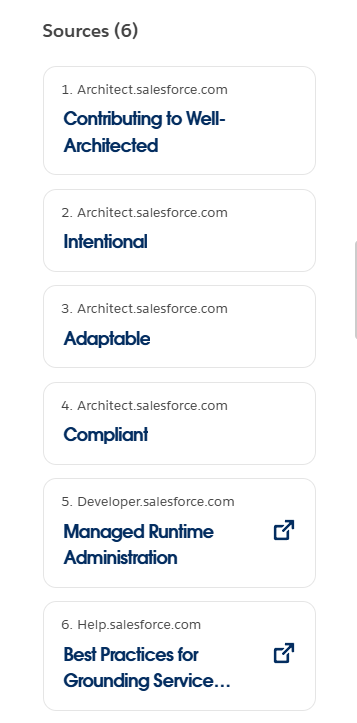
I really like that the assistant cites its sources and numbers them to correspond with the clickable sources shown underneath the response:
Prompt 2:
“I have a process involving Flows, Apex triggers, Platform Events, and external APIs. How would you identify the optimal orchestration point to minimise governor limits and improve maintainability?”
The response provides a strong overview of Salesforce orchestration patterns and demonstrates a good understanding of the challenges involved when combining Flows, Apex, Platform Events, and external integrations. It correctly highlights important architectural considerations such as reducing unnecessary automation overlap, moving complex processing asynchronously, and separating orchestration from reusable business logic.
The recommendations are practical and broadly aligned with Salesforce architectural guidance, although some areas would benefit from more precise platform detail. Overall, it shows a good grasp of the available patterns and provides useful direction for someone designing or reviewing a Salesforce solution.
Where the response could be improved is in the depth of architectural reasoning behind the recommendations. It moves quickly from the problem statement to suggested patterns without fully exploring the factors that should drive the decision, such as transaction boundaries, process ownership, integration reliability, scale, and operational support.
A seasoned architect would not simply choose an orchestration pattern based on the technologies involved, but would first understand the constraints and trade-offs before deciding where responsibility should sit. The response is a strong technical answer, but it would become more valuable by showing the decision-making process that leads to the recommendation, rather than focusing primarily on the patterns themselves.
Score: 7.5/10
“To identify the optimal orchestration point for a process involving Flows, Apex triggers, Platform Events, and external APIs – with the goals of minimizing governor limits and maximizing maintainability – Salesforce architecture guidance recommends the following approach:
Entry Point Consolidation
Use a single orchestration entry point per Salesforce Object. Avoid mixing Flows and Apex triggers as entry points for the same object, as this leads to unpredictable execution order and increased maintenance burden. For new automation, choose between Flow and Apex based on automation density: use Flow for low to moderate density and Apex for high-density or highly complex logic.
Decouple Heavy Processing Asynchronously
Offload complex, long-running, or high-volume work from the synchronous transaction using asynchronous patterns (Platform Events, Queueable Apex, or Scheduled Flows). Platform Events are effective for loosely coupling Salesforce with external systems, invoking off-platform processes, and bulk-processing records in a separate transaction context.
However, event triggers and flows enforce synchronous governor limits, so batch size selection is critical. For operations requiring external API callouts, use Apex Continuation or queueable Apex, as callouts are not supported directly in Platform Event triggers or Flows.
Hybrid Pattern for Maintainability
Use Flows for declarative orchestration and visibility, invoking invocable Apex only for complex, bulk-safe, or reusable logic units. This improves modularity and centralizes orchestration logic for easier debugging and governance. Keep the business logic in Apex functional utilities, consumed by Flows, to maximize code reuse and testability.
Step-Based Async Framework
For high-volume, complex workloads, decompose the process into modular, independently executable steps. Use a step-based async framework (Queueable Apex with Finalizer, Platform Events) to maintain observability and modularity, and to avoid governor limit breaches.
Trade-Offs and Risk Awareness
Multiple entry points (Flows + Apex) increase operational complexity, risk of hitting governor limits, and make debugging harder. Platform Events provide loose coupling and scalability but require careful consideration of batch size and event volume to avoid synchronous limit breaches. The hybrid pattern (Flow + Invocable Apex) balances maintainability and performance but is not suitable for all scenarios.
Recommended Next Steps:
Audit your automation density (number and complexity of automations per object). Refactor to a single orchestration entry point per object. Use asynchronous patterns to offload heavy processing. Modularize logic and favor declarative orchestration for transparency and maintainability.
For detailed decision matrices and step-based orchestration patterns, review the Salesforce architecture guides on record-triggered automation, asynchronous processing, and step-based async frameworks at architect.salesforce.com. What is the primary object or process you are automating? I can help tailor orchestration and async patterns for your specific scenario.”
Prompt 3:
“This org has over 400 Flows and frequent record-locking issues. How would you approach rationalising the automation landscape?”
The response provides a solid and practical approach to tackling automation sprawl, particularly by recognising that 400+ Flows and record-locking issues are symptoms of broader maintainability and scalability challenges. It demonstrates good awareness of Salesforce automation patterns, including inventorying automation, reducing unnecessary transactions, improving bulk behaviour, and introducing governance.
The answer is particularly strong in its practical recommendations and avoids some common pitfalls, such as simply suggesting a move to Apex or creating oversized “mega-Flows”.
Where it could be strengthened is by adding more architectural discovery before prescribing solutions. An experienced architect would typically spend more time understanding the specific causes of locking, the affected data model, transaction volumes, and existing design constraints before deciding whether consolidation, orchestration frameworks, or asynchronous approaches are appropriate.
Overall, this is a thoughtful and useful response that provides credible Salesforce guidance, but it could demonstrate more of the reasoning and trade-off analysis expected from a senior architect.
Score: 8/10
“With 400+ Flows and frequent record-locking, your org is experiencing automation density and orchestration sprawl, both major contributors to scale, reliability, and maintainability risks.1 Here’s a direct, Salesforce-aligned approach to rationalization:
Assess and Map Automation Density
Inventory all Flows by object, trigger type, and entry criteria. Identify objects with the highest automation density (number of automations per DML event). Use automation density as a guide: >30 automations per object is considered high and warrants Apex-trigger-driven orchestration.
Consolidate Entry Points
For each object, consolidate to a single automation entry point. Do not mix Flows and Apex triggers as entry points for the same object. Avoid “mega-Flows” (one giant Flow per object); instead, use multiple, well-conditioned Flows with clear, non-overlapping entry criteria. For high-density objects, implement an Apex Trigger Metadata Framework to orchestrate logic modularly and maintainably.
Refactor Flows for Bulkification and Lock Avoidance
Eliminate DML or SOQL inside loops. Aggregate record operations and execute them outside of loops. Use before-save Flows for same-record field updates to reduce DML and locking. Where possible, offload heavy or non-critical processing to asynchronous patterns (Scheduled Flows, Platform Events, Queueable Apex). Review and optimize Flow conditions to prevent unnecessary executions.
Address Record-Locking Specifically
Analyze lock contention patterns: Are multiple Flows/automations trying to update the same parent/child records in parallel? Minimize updates to parent records, especially in high-volume transactions. Distribute ownership and avoid ownership/data skew (no single user or parent with excessive child records). For bulk data loads, pre-sort data by parent record to minimize concurrent lock attempts.
Governance and Bypass Patterns
Implement bypass mechanisms (custom permissions or metadata flags) to allow selective disabling of Flows/Apex during bulk operations or data loads. Enable detailed logging and monitoring to identify bottlenecks and recursion issues.
Iterative Rationalization
Start with the highest-impact objects and automations. Refactor, consolidate, and test in sandbox before production rollout. Document all changes and establish governance for future automation development.
Trade-Offs and Cautions
Over-consolidation (mega-Flows) creates maintainability and performance bottlenecks. Excessive fragmentation leads to unpredictable execution order and debugging complexity. Always favor clear entry criteria, modular logic, and asynchronous processing for non-critical tasks.
This approach will reduce lock contention, improve system reliability, and make ongoing maintenance feasible. Challenge any design that does not address orchestration density and lock root causes directly. If you need a step-by-step blueprint for a specific object or automation area, provide details, and I can break down the optimal refactoring sequence.
Prompt 4:
“An external ERP can only process 50 API calls per second, but Salesforce batches 20,000 updates every hour. How would you design around this constraint?”
The response shows a good understanding of Salesforce integration patterns and correctly identifies the need to decouple Salesforce’s data volume from the ERP’s processing limits. The recommendation of asynchronous processing, middleware-based throttling, retries, idempotency, and monitoring reflects solid integration practice.
However, it moves quickly to a middleware and Platform Events solution without first challenging the assumptions behind the requirement. A stronger architectural response would explore whether all 20,000 updates need to be processed individually, whether the ERP supports bulk processing, and whether alternatives such as scheduled synchronisation, aggregation, or ERP-led polling could be more appropriate.
Overall, the answer is technically strong and would provide useful implementation guidance, but it feels more like a pattern recommendation than an architect’s decision-making process. It explains how to build the solution well, but gives less consideration to why this approach is the right choice, what trade-offs are being accepted, and when a simpler design may be sufficient.
Score: 7.5/10
“To handle 20,000 hourly updates from Salesforce to an external ERP with a strict 50 API calls/sec limit, use a decoupled, asynchronous integration pattern with middleware-based throttling. Key considerations and design steps:
Pattern Recommendation
Use a middleware (e.g., MuleSoft, custom API gateway, or similar) to act as a buffer and rate limiter between Salesforce and the ERP. Publish updates from Salesforce as Platform Events or via an outbound message queue, not direct API callouts. The middleware subscribes to the event stream, persists incoming messages, and manages outbound calls to the ERP at no more than 50 calls/sec.
Design Rationale and Constraints
Direct callouts (synchronous or asynchronous Apex) are not scalable for high-volume, rate-limited integrations due to thread and governor limits. Middleware can implement robust retry, batching, error handling, and monitoring – none of which are natively available at scale in Salesforce callout patterns. Platform Events support reliable, decoupled, and scalable event-driven outbound integrations. The middleware can process events as capacity allows, smoothing spikes and maintaining ERP compliance.
Trade-Offs and Risk Awareness
Middleware introduces additional infrastructure and operational cost but is essential for volume, reliability, and SLA management. Salesforce Platform Event and API limits must be sized appropriately; monitor event publishing and consumption to avoid loss or backlog. Ensure idempotency and error handling in middleware to avoid duplicate or lost updates if failures occur. If the ERP cannot process events out-of-order, the middleware must also implement ordering logic.
Implementation Steps
Define and publish Platform Events for each update from Salesforce. Configure middleware to subscribe to the event bus and persist events reliably. Middleware enforces a strict 50 calls/sec rate limit when invoking the ERP API. Implement monitoring, dead-letter queues, and retry logic for failures. Validate end-to-end throughput and latency under peak and failure scenarios.
Alternatives (if middleware is not available)
Scheduled Pull: ERP or a lightweight integration layer periodically pulls updates from Salesforce using Bulk API, then processes at its own pace. Outbound Messaging: Use Salesforce outbound messaging to a message queue, with the same rate-limited processing downstream.
Do not use direct Apex callouts or synchronous integration for this scenario – they cannot reliably enforce external rate limits or handle spikes at this scale.
If you need a reference architecture or specific middleware configuration guidance, provide your tech stack or middleware preference.
What Do Other Agents Think?
I decided to ask some other agents what they thought of the response to one of my prompts.
I asked ChatGPT and Claude what they thought of the response to: “An external ERP can only process 50 API calls per second, but Salesforce batches 20,000 updates every hour. How would you design around this constraint?”
Their responses were very similar, and they both flagged issues. I asked both Agents to summarise what was good and what wasn’t in a short paragraph and bullet points (I also had to ask ChatGPT to remove the emojis from its reply).
Claude
Good: The response correctly rejects synchronous Apex callouts, proposes a sound decouple-then-throttle pattern, and flags real operational concerns (idempotency, dead-letter queues, ordering, monitoring). It’s architecturally sound and shows appropriate risk awareness.
Not so good:
- Never does the basic math: 20,000/hour ≈ 5.6 calls/sec average, and even at the full 50 calls/sec cap, draining the batch takes under 7 minutes of the hour – the constraint is far looser than the proposed solution implies.
- Likely over-engineered as a result – jumps straight to Platform Events + middleware (MuleSoft, etc.) when a much simpler staging-table-plus-drip-feed queue would satisfy the requirement without new infrastructure.
- Doesn’t distinguish rate (calls/sec) from concurrency (simultaneous open connections), which need different throttling mechanisms.
- Says “enforce 50 calls/sec” without naming a concrete mechanism (token bucket, leaky bucket, sliding window).
- Doesn’t raise the possibility of batch/bulk ERP endpoints, which could cut 20,000 calls down to a couple hundred and largely dissolve the problem.
Bottom line: directionally solid but skips the arithmetic that should drive the design decision, and defaults to a heavier solution than the numbers justify.
ChatGPT
The response demonstrates strong knowledge of common Salesforce integration patterns and enterprise design principles, but it moves too quickly into a solution without fully analysing the scenario. It reads like a good implementation recommendation, but less like the reasoning process of a seasoned Salesforce Architect who would first validate assumptions, quantify constraints, and explore alternative approaches.
What’s good:
- Recommends the right high-level pattern: asynchronous, decoupled integration with buffering and rate limiting.
- Correctly avoids direct Apex callouts as the primary solution.
- Shows awareness of enterprise concerns: retries, monitoring, dead-letter queues, idempotency, and error handling.
- Recognises middleware’s role in managing complexity and protecting downstream systems.
- Considers alternatives if middleware is unavailable.
What could be improved:
- Does not challenge the assumptions in the scenario or ask clarifying questions.
- Misses the opportunity to calculate the actual throughput: 20,000 updates/hour is only around 5.6 updates/sec, well below a 50 API calls/sec limit unless updates arrive in a burst.
- Assumes one Salesforce record equals one ERP API call without exploring batching or bulk APIs.
- Defaults to Platform Events without explaining why they are the best fit versus CDC, Bulk API, scheduled extraction, or other patterns.
- Does not discuss acceptable latency, SLAs, back-pressure, or whether eventual consistency is acceptable.
- Feels more like a generic integration best-practice answer than a tailored architecture recommendation.
Give Feedback
Salesforce is also actively looking for feedback from the community. If you try the new assistant, you’ll find a short survey where you can share your experience and help shape future improvements. Given how quickly Agentforce has evolved over the past year, there’s a good chance community feedback will have a meaningful impact on where this goes next.
Final Thoughts
Agentforce for Architects is a promising direction because architecture is one of the areas where AI assistance could genuinely provide value. Architects spend a significant amount of time searching documentation, comparing patterns, and validating approaches.
However, the bar is much higher than answering Salesforce questions. A useful architecture assistant needs to do what good architects do: challenge assumptions, identify trade-offs, ask clarifying questions, and explain why one approach is better than another.
Based on these tests, Agentforce for Architects is a useful starting point, but the opportunity is much bigger. The next evolution is moving from an AI that knows Salesforce architecture guidance to an AI that can reason like a Salesforce Architect.