

Highlights
- Technical debt is everyone’s problem, and automation technical debt is an issue faced by a majority of Salesforce Admins.
- Salesforce Flow is relatively easy to build, but if building for maintenance is ignored, then issues abound.
- This is not typically a Flow Builder issue, but rather an architecture issue (or a failure to properly architect before building).
- While it is impossible to totally eliminate technical debt, there are things that Salesforce customers should consider to help reduce it. These rules are not universal, but there are a handful (in this article) that are more universal than others.#
One thing is clear across a multitude of survey data that we’ve collected: technical debt is a problem for EVERYONE. In fact, when we asked what the most challenging task is that faces Salesforce Admins in our 2026 SF Ben Admin Survey, the most common answer by a long shot was “technical debt”. More than half of our respondents agreed with this!
It’s something that any Salesforce org will face eventually, and as such, it’s something that you should know how to deal with. In fact, with only 2.4% of respondents considering their org to be well-maintained, it’s clearly a universal issue.
Automations in the Salesforce platform can help to alleviate the burden from your end users, but they can also create a lot of technical debt. In fact, automations themselves can BE the technical debt. That’s what I intend to address in this article, and provide you with a practical solution for.
The Problem: Flow Sprawl
When we asked Salesforce Admins how old their orgs were, 60.7% said they were five years or older. This means that most businesses are operating on platforms approaching, or already past, a decade of use.
One of the key contributors to technical debt is the age of the org itself. One of the benefits of Salesforce is that it can evolve as your business does, but the flip side of that is that sometimes it carries configuration, metadata, and automation that the business no longer needs. This is known as technical debt.
One such example of technical debt that may go unnoticed is Flow sprawl. This is essentially what happens as new automations are added without reviewing what already exists. As it doesn’t typically take too long to create a new flow, they’re often built in a rush as a new requirement comes in. Pair that with an automated Flow Migration plan, and you’ve suddenly got 40+ Flows on the Opportunity object, no uniform naming conventions, and no one knows which flows are doing what.
Flow sprawl is a form of automation technical debt that comes about not because of negligence, but due to the organic growth and adaptation of a Salesforce org. Each flow was built for a reason – it was built to solve a problem. The only issue with that is that over time, the issues change or disappear entirely, and the solutions that were built can cause friction in what replaces them.
Performance slows, debugging a problem takes hours, and further innovations come with inflated estimates due to the complexity that lies dormant and ready to strike. It’s like how a lawn eventually needs to be scarified so that water, air, and nutrients can reach it, instead of it being strangled by many years of building roots.
Poor Architecture Is To Blame
One thing I need to make very clear is that Flow as a tool isn’t the problem in most cases: the absence of design intent is. There are absolutely cases where the Flow tool has evolved and what was historically built wouldn’t be required if it were rebuilt today, but proper design and planning would also solve this in many cases.
One thing I’ve seen a lot in my consulting days is Salesforce orgs where the flows and automations that have been built have been done as one-off solutions. Many flows, many design patterns, many naming conventions, and little to no consistency across the board. The worst part is when there’s no review process in place to review older automations and see if they’re still needed, or if they could be done better.
This is why it is critical for any business that wants to achieve long-term success on the Salesforce platform needs to build Flow design patterns that they stick to as an organization.
Modular Design Patterns
Our 2026 Admin Survey data showed that 76% of advanced admins were confident with Flow, but this number dropped to 36% for intermediate and 20% for juniors. This highlights that maybe it’s not building flows that need to be considered, but building them for maintainability. This was backed up by the fact that the biggest Flow Builder challenges were debugging errors (34.1%), understanding complex logic (32.2%), and ensuring maintainability (30.5%). The message is clear: Building maintainable flows is the biggest challenge.
When it comes to building your business’s Flow design patterns, there are a number of things you should consider. Not all of them should be universal, as there is nuance across Salesforce customers. That said, there are a few that make sense to be adopted by a majority of Salesforce orgs.
Subflows
If there is logic that you use across multiple flows, or even multiple times inside a single flow, you should consider breaking it out into its own subflow. Think of it as its own business rule that you can apply anywhere that is required. You standardize how data is processed, and create an Autolaunched Flow to handle it once. Then you call that flow wherever you require that method of processing.
As a general rule of thumb, you should consider using a subflow if the logic you’re using is used in more than one place, or is complex enough to warrant its own isolation during development and/or testing.
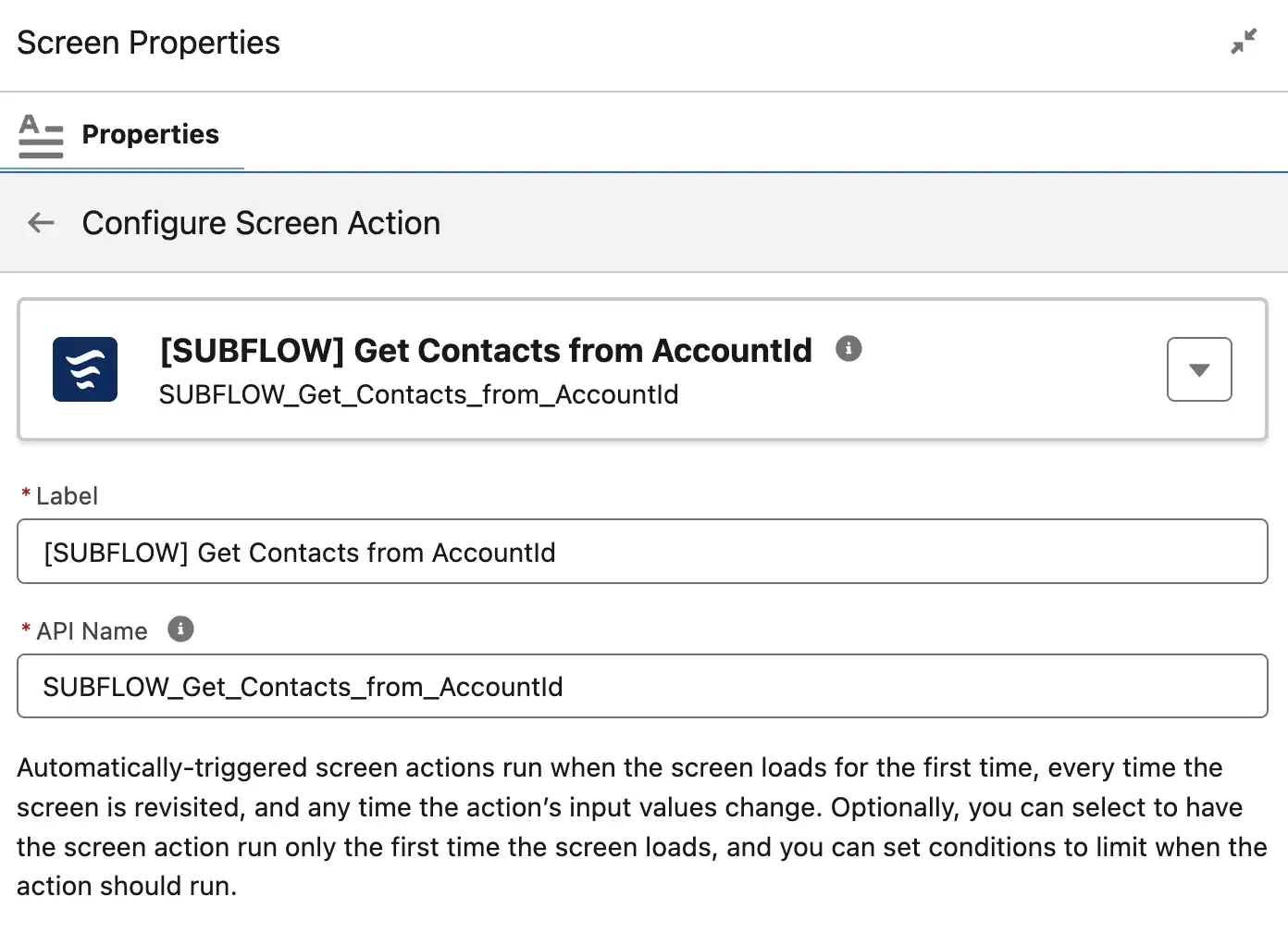
There are instances where you should avoid using subflows altogether, and the biggest reason is if you’re operating a Professional Edition of Salesforce that has a governor limit of only five active flows at once. In this case, using a subflow is a waste of limited resources.
The downside of using subflows is that there is additional overhead in creating and managing a secondary flow, and it may be a bit more difficult for junior admins to follow. Tracing execution can also be slightly more difficult as a result of leveraging subflows.
Naming Conventions and Version Management
Ensuring that your automations are named in a structured, uniform way across the board can help to make them easier to build, debug, and even scope. This, and understanding what was changed between each version of a Flow, can mean the difference between a few minutes of debugging and a few hours or days of chasing issues.
Standardizing your naming convention across the board will result in different naming structures per org, but as a general rule, you can consider something like the below:
{Object} – {Type} – {Purpose} – {Version}
So, for example, if you had a Record-Triggered Flow that ran on the Lead object to automatically send an email to a shared mailbox when it was submitted, you could name it Lead – RT – Email Finance Mailbox When Lead Submitted – V2.
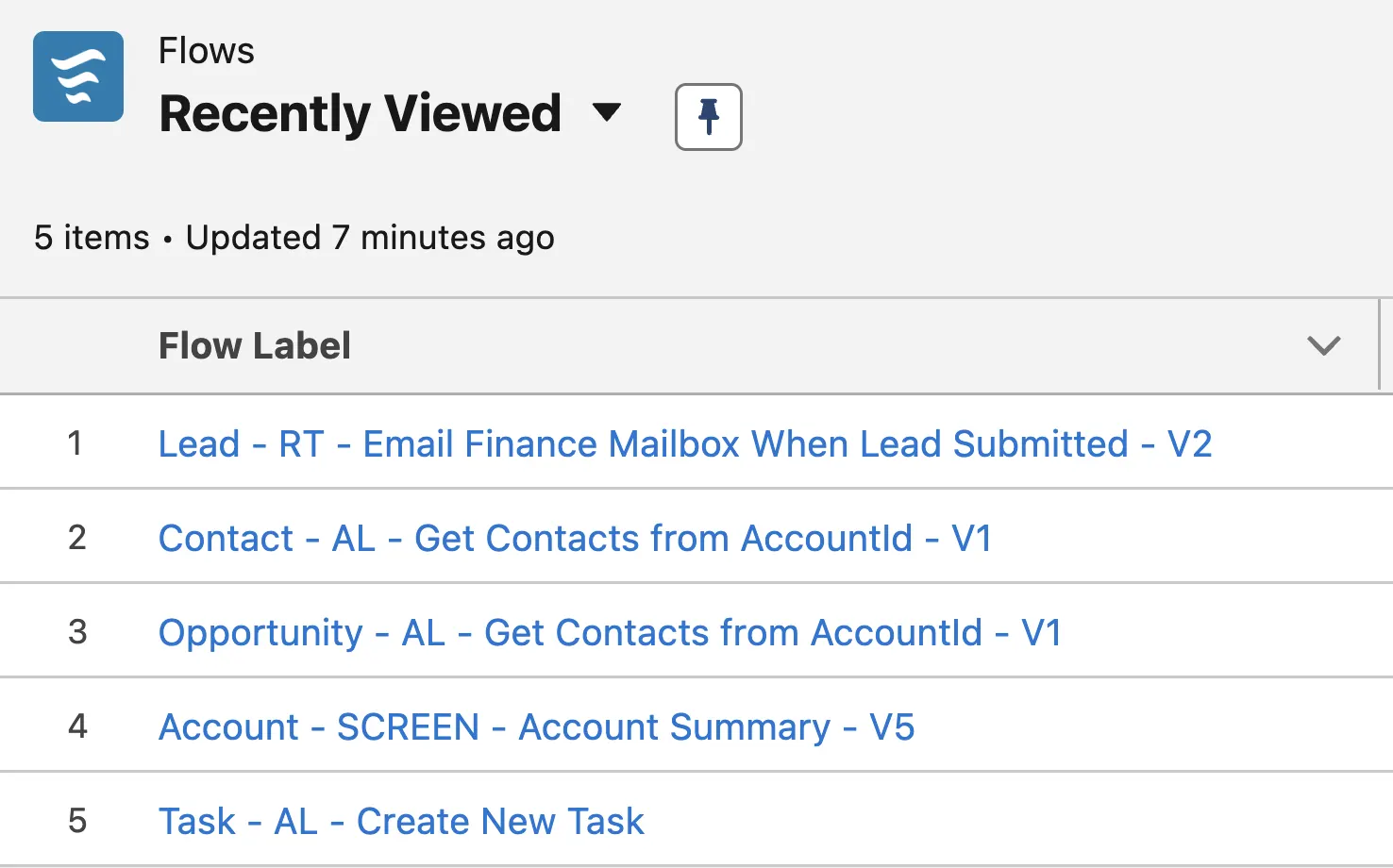
In terms of version management, there are many tools that you could use to achieve this – but it may be better to not overthink it. Keeping a register either inside Salesforce, or even in a spreadsheet as a starting point, is better than not keeping any record at all!
The Right Tool For The Job
Flow is great, but it is not the only tool for the job, nor is it the only tool. While the go-to for most solutions is Flow Builder, there are other tools you should consider using. For example, if you want to build a collection of fields that display on a record and pull from related records, Lightning App Builder may be a better tool for you, as you can achieve this with a Dynamic Form.
The Salesforce Architects site even points to when Flow should be used vs when Apex is a better solution, or a hybrid of both. Depending on the type of org you are in, and the load placed on each object, you should reconsider your use of Flow.
Final Thoughts
Technical debt can manifest in many ways, but there are things that you can do to minimize the problems that they cause. When working with Flow Builder, it’s important to think about what you’re going to build before you build it. As you build, make sure you’re following whatever rules you intend to follow throughout the entire business. Uniformity, structure, and good architecture are all great ways to reduce your automation technical debt as much as you can.
You can kickstart by reviewing the rules your business already has, filling in the gaps, and then performing an org-wide audit to ensure that all current automations conform to these rules. Knowing your enemy is the first step to defeating it.
Have you experienced automation technical debt in your org, and was it specifically Flow Builder that was the source of it? How did your business go about recovering from the issues it caused? Let us know in the comments.