

Have you ever wanted to ask Salesforce in natural language instead of querying or accessing the instance, searching for the object?
Imagine typing “Which accounts haven’t been contacted in 90 days?” and receiving an instant, accurate answer, without writing a single line of SOQL, navigating Setup menus, or building a report. This is no longer a futuristic concept.
With the combination of LangChain’s agent framework, Groq’s ultra-fast LLM inference, and the official langchain-salesforce integration, you can build a conversational AI agent that bridges the gap between human language and Salesforce data.
This article presents a complete, production-aware implementation of a Salesforce AI agent running in Google Colab. The agent interprets natural language questions, converts them into valid SOQL queries, executes them against your Salesforce org, validates results through iterative reasoning, and returns human-readable answers with structured data visualizations.
The Problem with Programmatic Salesforce Access
Traditional Salesforce integrations require developers to write SOQL manually, understand the org’s object model and namespace prefixes, and handle pagination, governor limits, and error recovery.
This creates a technical wall that excludes business analysts, sales operations teams, and executives from direct data access.
A LangChain agent changes this dynamic entirely. By providing the agent with a set of Salesforce tools, it can:
- Accept a question in plain English.
- Reason about which objects and fields are relevant.
- Lookup the correct API names, including namespace resolution.
- Estimate query code before execution.
- Return the answer as a formatted table.
The user sees only the final answer. The complexity is handled entirely by the agent.
This article aims to:
- Demonstrate how to build a production-ready Salesforce AI agent using the langchain-salesforce package.
- Explain the architecture and design patterns for handling Salesforce-specific challenges like namespace prefixes, governor limits, and SOQL syntax validation.
- Provide a complete, copy-paste-ready Google Colab notebook that can be deployed and used in under 10 minutes.
- Illustrate best practices for error handling, rate limit management, and conversational memory in agent-based systems.
- Showcase how Groq’s LPU-powered inference achieves sub-second latency for interactive agent loops.
- Enable both technical developers and business users to query Salesforce data without writing SOQL.
By the end of this article, you will have a fully functional Salesforce AI agent capable of answering complex questions like:
- “Show me the top five accounts by created date”
- “How many open opportunities were created this month?”
Scope
The scope of this solution covers only standard SOQL data queries against the Salesforce REST API.
This implementation does not cover:
- DML operations (INSERT/UPDATE/DELETE).
- Bulk API, streaming API, tooling API, GraphQL API, Apex execution, or Salesforce Flow automation.
Architecture Overview: How Does the Agent Work?
Before diving into the code, it’s helpful to understand the system’s architecture. The agent follows a ReAct (Reasoning + Acting) pattern, where it iteratively reasons about your question, decides which tool to use, and acts by calling that tool until it can formulate a final answer.
The diagram below illustrates the flow:
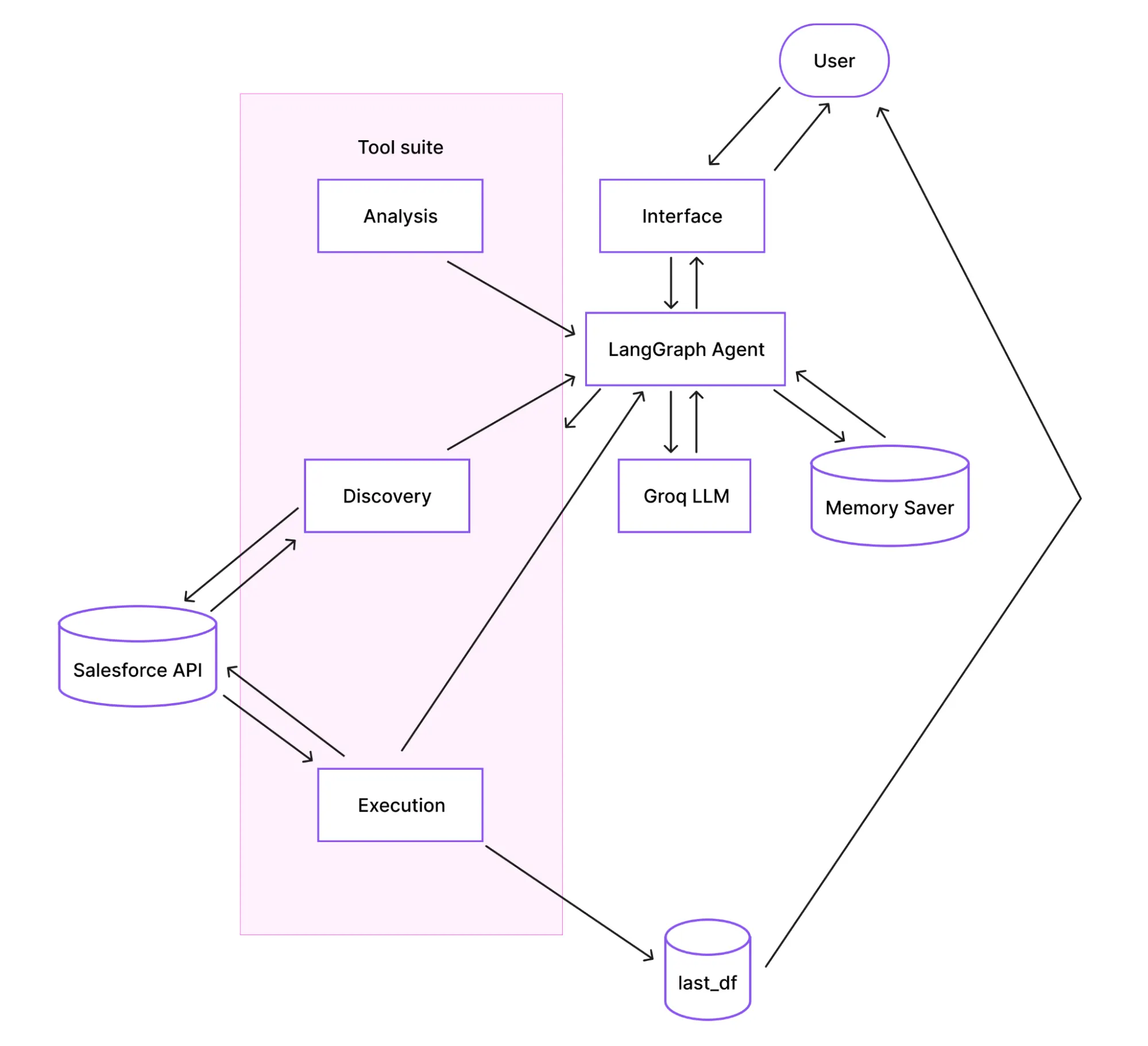
How does the flow work?
- Interface: You interact with the agent by calling the ask() function in a Colab cell or through an optional Gradio web UI.
- Agent and Memory: The LangGraph agent receives your question. It uses MemorySaver to retain conversation history (keyed by a thread_id), enabling natural follow-up questions.
- Reasoning (LLM): The agent prompts the Groq LLM with your question, the conversation history, and a list of available tools. The LLM decides which tool to use next.
- Tool Execution: The agent calls the selected tool (e.g., find_object_api_name, execute_soql), which interacts with the Salesforce API.
- Result Processing: The tool’s result is passed back to the LLM. The LLM assesses if the question is answered. If not, it may call another tool. If yes, it formulates a final answer.
- Output: The final answer is displayed, and any data returned from Salesforce is automatically stored in a global pandas DataFrame called last_df for further analysis.
Implementation Procedure
Prerequisites
Before implementing the Salesforce AI agent, ensure you have:
- Google Account for Colab access.
- Salesforce Credentials:
- Username.
- Password.
- Security token (obtain from Setup → My Personal Information → Reset Security Token).
- Groq API Key (free tier available at https://console.groq.com/keys).
- Salesforce Permissions:
- “API Enabled” permission.
- Read access to objects you want to query.
- Access to Tooling API (for metadata queries).
Step-by-Step Implementation
Step 1 – Environment Setup (Cell 1)
Install the required packages and verify imports:
!pip install -q langchain langchain_groq langgraph langchain-core langchain-salesforce pandas gradio

import sys
print(f"Python {sys.version.split()[0]}")

try:
	from langchain_salesforce import SalesforceTool
	print("langchain-salesforce imported successfully")
except ImportError as e:
	print(f"langchain-salesforce import failed: {e}")

Understanding the Key Libraries:
| Library | Description |
|---|---|
| Langchain | Core agent orchestration framework. |
| langchain_groq | LangChain adapter for Groq fast inference API. |
| Langgraph | Graph-based agent executor that runs the ReAct loop and manages state. |
| langchain-salesforce | Official Salesforce integration that wraps the REST API and handles authentication. |
| Pandas | Converts Salesforce records into DataFrames for structured display and analysis. |
| Gradio | An optional web UI for sharing the agent with non-technical users. |
Step 2 – Establishing a Salesforce Connection (Cell 2)
This block establishes a single SalesforceTool connection that will be used by all the agent tools. It connects to a Salesforce org and runs a minimal query to validate the connection.
The SalesforceTool from langchain-salesforce wraps the simple-salesforce library internally. The authentication uses username, password, and security_token against Salesforce’s OAuth endpoint.
Critical Security Warning: This notebook is designed to use Google Colab’s Secrets feature:
- Open the Secrets panel in Colab (the key icon in the left sidebar).
- Define the following credentials.
| Name | Description | Notebook Access |
|---|---|---|
| src_username | Your Salesforce username. | True |
| src_password | Your Salesforce password. | True |
| src_token | Your Salesforce security token. | True |
| COLAB_GROK_API_KEY | Your API key from console.grok.com | True |
- The code will securely fetch these credentials from there. This prevents accidental exposure if you share your notebook.
from langchain_salesforce import SalesforceTool
from google.colab import userdata
import json, pandas as pd

def init_salesforce() -> SalesforceTool:
	"""Initialise SalesforceTool and verify connectivity with a test query."""
	print("Connecting to Salesforce...")
	try:
    	sf_tool = SalesforceTool(
        	username=userdata.get('src_username'),
        	password=userdata.get('src_password'),
        	security_token=userdata.get('src_token'),
        	domain="test"	# Change to "" for production
    	)

    	# Minimal connectivity check
    	test = sf_tool.invoke({"operation": "query",
                          	"query": "SELECT Id, Name FROM Account LIMIT 1"})
    	records = test.get("records", [])
    	print(f"Connected → {len(records)} test record(s) fetched")
    	return sf_tool

	except Exception as e:
    	msg = str(e)
    	print(f"\n Connection failed: {type(e).__name__}")
    	if "INVALID_LOGIN" in msg:
        	print("  Fix: wrong username/password/token combination")
    	elif "INVALID_SESSION_ID" in msg:
        	print("  Fix: regenerate security token in Salesforce Setup")
    	elif "INSUFFICIENT_ACCESS" in msg:
        	print("  Fix: grant 'API Enabled' permission to your user")
    	else:
        	print(f" Debug: {msg}")
    	raise

sf = init_salesforce()

Step 3 – LLM Initialization (Cell 3)
Instantiate the language model that powers the agent’s reasoning.
For the sake of maintaining continuous service, we configured two models: a primary and a fallback. The agent will automatically switch to the fallback if the primary model hits its daily rate limit.
| Category | Name | Properties |
|---|---|---|
| Primary model | llama-3.3-70b-versatile, 100k tokens/day free tier | 100k tokens/day free tier |
| Fallback model | meta-llama/llama-4-scout-17b-16e-instruct | 1M tokens/day free tier |
The LLM is configured with three critical parameters to ensure a reliable behavior:
| Parameter | Why critical? |
|---|---|
| temperature=0 | Ensure deterministic output. The same question will always generate the same SOQL and produce the same query. |
| max_tokens=2048 | Prevents tool-call JSON from being truncated mid-generation. |
| max_retries=2 | Handles transient network errors gracefully without excessive delays. |
from langchain_core.tools import tool
from langchain_groq import ChatGroq
import os, re, json

os.environ["GROQ_API_KEY"] = userdata.get('COLAB_GROK_API_KEY')

GROQ_MODEL_PRIMARY  = "llama-3.3-70b-versatile"
GROQ_MODEL_FALLBACK = "meta-llama/llama-4-scout-17b-16e-instruct"
GROQ_MODEL_ACTIVE      = GROQ_MODEL_PRIMARY   # updated by ask() on rate-limit switch

def make_llm(model: str) -> ChatGroq:
	"""Create a ChatGroq instance. Called at init and when switching fallback model."""
	return ChatGroq(
    	model=model,
    	temperature=0,   # deterministic — same question always generates same SOQL
    	max_tokens=2048, # cap output to prevent mid-JSON truncation → tool_use_failed
    	max_retries=2,   # retry transient HTTP errors (rate limits handled separately)
	)
llm = make_llm(GROQ_MODEL_PRIMARY)
print(f"  LLM initialised: {llm.model_name}")
print(f"  temperature=0 | max_tokens=2048")
print(f"  Fallback model: {GROQ_MODEL_FALLBACK}")

Step 4 – Agent Tools Definition (Cell 4)
The agent’s capabilities are defined as Python functions decorated with @tool.
Here’s an example of one of the @tool functions so you can understand its structure:
This tool retrieves all fields of a Salesforce object via the standard describe endpoint.
# ══════════════════════════════════════════════════════════════════════════════
# TOOL 2 — get_object_fields
# ══════════════════════════════════════════════════════════════════════════════
# Returns ALL fields for a given sObject via the standard describe endpoint.
# For each field it returns:
#   name, label, type, nillable, calculated (formula), length, updateable
@tool
def get_object_fields(object_name: str) -> str:
	"""Get ALL fields for a Salesforce object using the standard describe endpoint.
	Use when the user asks 'what fields does X have' or 'show me the columns of X'.
	Returns a DataFrame displayed inline and stored in last_df."""
	global last_df
	try:
    	# Regex guard: Salesforce API names are alphanumeric + underscores only.
    	# Rejects anything that could be used for injection via crafted names.
    	if not re.match(r'^[A-Za-z][A-Za-z0-9_]*$', object_name):
        	return "ERROR_INVALID_NAME: Use API names (e.g. Account)"

    	result = sf.invoke({"operation": "describe", "object_name": object_name})
    	raw_fields = result.get("fields", [])

    	if not raw_fields:
        	return f"NO_FIELDS: describe returned no fields for '{object_name}'."

    	# Extract the most useful attributes for each field.
    	# 'calculated' == True means formula field — cannot be set via DML.
    	# 'updateable' == False means read-only (system field, auto-number, etc.).
    	fields = [
        	{
            	"name":   	f["name"],
            	"label":  	f["label"],
            	"type":   	f["type"],
            	"nillable":   f["nillable"],
            	"calculated": f.get("calculated", False),
            	"length": 	f.get("length"),
            	"updateable": f.get("updateable", True),
        	}
        	for f in raw_fields
    	]

    	last_df = pd.DataFrame(fields)
    	print(f"\n📋 {len(last_df)} fields for '{object_name}' — stored in `last_df`")
    	display(last_df)

    	# Return markdown summary to LLM (show first 40 fields to stay within context)
    	md = last_df.head(40).to_markdown(index=False)
    	suffix = f"\n\n… {len(last_df) - 40} more fields in last_df" if len(last_df) > 40 else ""
    	return f"FIELDS_OK | {len(last_df)} field(s) for '{object_name}'\n\n{md}{suffix}"

	except Exception as e:
    	el = str(e).lower()
    	if   "not found" in el or "no such"     	in el: return f"ERROR_OBJECT_NOT_FOUND: '{object_name}' not found. Run list_queryable_objects."
    	elif "insufficient access"               	in el: return f"ERROR_PERMISSIONS: No access to '{object_name}'."
    	elif "invalid type"                      	in el: return f"ERROR_INVALID_TYPE: '{object_name}' is not valid. Run find_object_api_name."
    	else:                                    return f"ERROR_DESCRIBE: {str(e)}"
LangGraph automatically generates a JSON schema from each function’s signature and docstring. This schema is passed to the LLM, which decides which tool to call at each reasoning step. The tools can be grouped into three logical categories:
| Category | Tool/Function Name | Description |
|---|---|---|
| Discovery | list_queryable_objects | Discovers all queryable sObjects in the org. |
| get_object_fields | Retrieves the complete field schema for an object. | |
| find_object_api_name | Resolves the namespace-prefixed object name. | |
| Analysis | estimate_query_cost | Analyzes query selectivity and governor limit impact before execution. |
| validate_soql_syntax | Performs a Regex-based pre-flight syntax check. | |
| explain_soql_query | Breaks down a SOQL query into plain English. | |
| Execution | execute_soql | The core data-retrieval method with built-in safety checks. |
Here’s the full script to define agent tools:
# AGENT TOOLS

from langchain_core.tools import tool
import os, re, json, pandas as pd

# ── Shared helpers ────────────────────────────────────────────────────────────

def records_to_df(records: list) -> pd.DataFrame:
	"""Strip Salesforce 'attributes' metadata key and return a clean DataFrame."""
	clean = [{k: v for k, v in r.items() if k != "attributes"} for r in records]
	return pd.DataFrame(clean)

# Module-level store — always holds the last tool result as a DataFrame.
# Access in any notebook cell after ask() returns:
#   last_df.head() | last_df.to_csv("export.csv") | last_df["Name"].unique()
last_df: pd.DataFrame = pd.DataFrame()


# ══════════════════════════════════════════════════════════════════════════════
# TOOL 1 — list_queryable_objects
# ══════════════════════════════════════════════════════════════════════════════
# Calls the "list_objects" operation which hits /services/data/vXX.0/sobjects.
# Returns up to 15 standard + 20 custom queryable objects.
# Used when the user asks "what objects exist?" or when find_object_api_name
# returns no match and a broader browse is needed.
@tool
def list_queryable_objects() -> str:
	"""List Salesforce objects available for SOQL queries. Returns name, label, keyPrefix."""
	try:
    	result  = sf.invoke({"operation": "list_objects"})
    	objects = [
        	{"name": obj["name"], "label": obj["label"],
         	"keyPrefix": obj.get("keyPrefix", ""), "custom": obj.get("custom", False)}
        	for obj in result.get("sobjects", [])
        	if obj.get("queryable") and not obj.get("customSetting")
    	]
    	standard = [o for o in objects if not o["custom"]][:15]
    	custom   = [o for o in objects if 	o["custom"]][:20]
    	return json.dumps({"standard": standard, "custom": custom}, indent=2)
	except Exception as e:
    	return f"ERROR_LIST_OBJECTS: {str(e)} | Action: use find_object_api_name with a known label."


# ══════════════════════════════════════════════════════════════════════════════
# TOOL 2 — get_object_fields
# ══════════════════════════════════════════════════════════════════════════════
# Returns ALL fields for a given sObject via the standard describe endpoint.
# For each field it returns:
#   name, label, type, nillable, calculated (formula), length, updateable
@tool
def get_object_fields(object_name: str) -> str:
	"""Get ALL fields for a Salesforce object using the standard describe endpoint.
	Use when the user asks 'what fields does X have' or 'show me the columns of X'.
	Returns a DataFrame displayed inline and stored in last_df."""
	global last_df
	try:
    	# Regex guard: Salesforce API names are alphanumeric + underscores only.
    	# Rejects anything that could be used for injection via crafted names.
    	if not re.match(r'^[A-Za-z][A-Za-z0-9_]*$', object_name):
        	return "ERROR_INVALID_NAME: Use API names (e.g. Account)"

    	result = sf.invoke({"operation": "describe", "object_name": object_name})
    	raw_fields = result.get("fields", [])

    	if not raw_fields:
        	return f"NO_FIELDS: describe returned no fields for '{object_name}'."

    	# Extract the most useful attributes for each field.
    	# 'calculated' == True means formula field — cannot be set via DML.
    	# 'updateable' == False means read-only (system field, auto-number, etc.).
    	fields = [
        	{
            	"name":   	f["name"],
            	"label":  	f["label"],
            	"type":   	f["type"],
            	"nillable":   f["nillable"],
            	"calculated": f.get("calculated", False),
            	"length": 	f.get("length"),
            	"updateable": f.get("updateable", True),
        	}
        	for f in raw_fields
    	]

    	last_df = pd.DataFrame(fields)
    	print(f"\n📋 {len(last_df)} fields for '{object_name}' — stored in `last_df`")
    	display(last_df)

    	# Return markdown summary to LLM (show first 40 fields to stay within context)
    	md = last_df.head(40).to_markdown(index=False)
    	suffix = f"\n\n… {len(last_df) - 40} more fields in last_df" if len(last_df) > 40 else ""
    	return f"FIELDS_OK | {len(last_df)} field(s) for '{object_name}'\n\n{md}{suffix}"

	except Exception as e:
    	el = str(e).lower()
    	if   "not found" in el or "no such"     	in el: return f"ERROR_OBJECT_NOT_FOUND: '{object_name}' not found. Run list_queryable_objects."
    	elif "insufficient access"               	in el: return f"ERROR_PERMISSIONS: No access to '{object_name}'."
    	elif "invalid type"                      	in el: return f"ERROR_INVALID_TYPE: '{object_name}' is not valid. Run find_object_api_name."
    	else:                                           	return f"ERROR_DESCRIBE: {str(e)}"


# ══════════════════════════════════════════════════════════════════════════════
# TOOL 3 — execute_soql
# ══════════════════════════════════════════════════════════════════════════════
# Core data-retrieval tool. Runs any SOQL SELECT via the standard REST endpoint.
#
# SAFETY
# ------
# • READ-ONLY: blocks INSERT / UPDATE / DELETE / UPSERT / MERGE
# • NO JOINs: SOQL uses relationship traversal, not SQL-style JOINs
# • AUTO-LIMIT: appends LIMIT 10 if missing (prevents API exhaustion)
#
# OUTPUT
# ------
# 1. Displays a pandas DataFrame inline (display() renders in Colab)
# 2. Stores result in last_df for post-agent use
# 3. Returns markdown table to LLM for narration
@tool
def execute_soql(query: str) -> str:
	"""Execute a read-only SOQL query. Results stored in last_df and returned as markdown."""
	global last_df
	try:
    	query_clean = query.strip().rstrip(";")
    	query_upper = query_clean.upper()

    	# ── Safety validation ────────────────────────────────────────────────
    	errors = []
    	if not query_upper.startswith("SELECT"):
        	errors.append("Query must start with SELECT")
    	if " JOIN " in query_upper:
        	errors.append("SOQL has no JOINs — use traversal: Account.Name FROM Contact")
    	if any(k in query_upper for k in ["INSERT", "UPDATE", "DELETE", "UPSERT", "MERGE"]):
        	errors.append("Agent is READ-ONLY. SELECT queries only.")
    	if errors:
        	return "VALIDATION_BLOCKED:\n- " + "\n- ".join(errors)

    	# ── Auto-add LIMIT ───────────────────────────────────────────────────
    	if " LIMIT " not in query_upper:
        	query_clean += " LIMIT 10"
        	print("ℹ️ Auto-added LIMIT 10")

    	# ── Execute ──────────────────────────────────────────────────────────
    	result  = sf.invoke({"operation": "query", "query": query_clean})
    	parsed  = result if isinstance(result, dict) else json.loads(result)
    	records = parsed.get("records", [])

    	if not records:
        	last_df = pd.DataFrame()
        	return "NO_RESULTS: Query returned 0 records. Try widening filters or checking field names."

    	last_df = records_to_df(records)
    	print(f"\n📊 DataFrame stored in `last_df`  ({len(last_df)} rows × {len(last_df.columns)} cols)")
    	display(last_df)

    	md = last_df.to_markdown(index=False)
    	return f"QUERY_OK | {len(last_df)} record(s)\n\n{md}"

	except Exception as e:
    	es = str(e)
    	if   "MALFORMED_QUERY" in es: return f"SOQL_SYNTAX_ERROR: {es} | Fix: verify field names and date literals"
    	elif "INVALID_FIELD"   in es: return f"INVALID_FIELD: {es} | Fix: run get_object_fields to check names"
    	elif "INVALID_TYPE"	in es: return f"INVALID_OBJECT: {es} | Fix: run find_object_api_name"
    	elif "REQUEST_LIMIT"   in es: return "API_LIMIT_REACHED: wait 60 s before retrying"
    	else:                     	return f"UNEXPECTED_ERROR: {es}"


# ══════════════════════════════════════════════════════════════════════════════
# TOOL 4 — validate_soql_syntax
# ══════════════════════════════════════════════════════════════════════════════
# Lightweight client-side check before hitting the Salesforce API.
# Catches structural mistakes that would always fail, saving an API round-trip:
#   • Missing SELECT ... FROM pattern
#   • GROUP BY without HAVING
#   • ORDER BY without LIMIT (risk of returning millions of rows)
#   • SQL-style date literals instead of SOQL ISO format

@tool
def validate_soql_syntax(query: str) -> str:
	"""Lightweight SOQL syntax check. Use before execute_soql for complex queries."""
	try:
    	q = query.strip().upper()
    	if not re.match(r'^SELECT[\s]+[\w\.\,\s\*\(\)]+\s+FROM\s+[A-Za-z_]\w*', query, re.IGNORECASE):
        	return "❌ Invalid SOQL: must be SELECT <fields> FROM <ObjectName>"
    	warns = []
    	if " GROUP BY " in q and " HAVING " not in q:
        	warns.append("⚠️ GROUP BY without HAVING")
    	if " ORDER BY " in q and " LIMIT " not in q:
        	warns.append("⚠️ ORDER BY without LIMIT — may hit row limits")
    	if re.search(r"'\d{4}-\d{2}-\d{2}'", query) and "T" not in query:
        	# SOQL requires ISO datetime or date literals, not plain YYYY-MM-DD
        	warns.append("⚠️ Use YYYY-MM-DDTHH:MM:SSZ or LAST_N_DAYS:30 for dates")
    	if warns:
        	return "⚠️ Query structure valid but note:\n- " + "\n- ".join(warns) + "\n✓ Proceed to execute_soql"
    	return "✓ Syntax valid. Safe to execute."
	except Exception as e:
    	return f"VALIDATION_ERROR: {str(e)}"


# ══════════════════════════════════════════════════════════════════════════════
# TOOL 5 — find_object_api_name
# ══════════════════════════════════════════════════════════════════════════════
# Resolves a human-readable label or partial name to the full Salesforce API
# name, including managed-package namespace prefixes.

@tool
def find_object_api_name(label_or_partial_name: str) -> str:
	"""Resolve a human label or partial name to the full Salesforce API
          Name including namespace prefix."""
	try:
    	# Spaces → underscores for LIKE pattern matching
    	partial = label_or_partial_name.replace(" ", "_")
    	soql = (
        	"SELECT QualifiedApiName, Label, KeyPrefix "
        	"FROM EntityDefinition "
        	f"WHERE Label = '{label_or_partial_name}' "
        	f"OR QualifiedApiName LIKE '%{partial}%' "
        	"ORDER BY QualifiedApiName LIMIT 10"
    	)
    	result  = sf.invoke({"operation": "query", "query": soql})
    	parsed  = result if isinstance(result, dict) else json.loads(result)
    	records = parsed.get("records", [])

    	if not records:
        	return f"NO_MATCH: No object found for '{label_or_partial_name}'. Try list_queryable_objects."

    	return json.dumps([
        	{"api_name": r["QualifiedApiName"], "label": r["Label"], "keyPrefix": r.get("KeyPrefix")}
        	for r in records if "attributes" not in r.get("QualifiedApiName", "")
    	], indent=2)
	except Exception as e:
    	return f"ERROR_ENTITY_LOOKUP: {str(e)}"


# ══════════════════════════════════════════════════════════════════════════════
# TOOL 6 — estimate_query_cost  (NEW)
# ══════════════════════════════════════════════════════════════════════════════
# Analyses a SOQL query BEFORE execution and estimates:
#   • selectivity  — HIGH (indexed WHERE clause) vs LOW (full table scan)
#   • field_count  — number of fields projected in SELECT
#   • governor_impact — LOW / MEDIUM / HIGH relative to Salesforce limits
#   • recommendations — concrete suggestions to improve the query

@tool
def estimate_query_cost(soql: str) -> str:
	"""Estimate query selectivity and governor limit impact before execution.

	Parses the SOQL string client-side — no API call made.
	Returns: selectivity (HIGH/LOW), field_count, governor_impact, recommendations.

	Use this before execute_soql on large objects or complex queries to catch
	performance issues before they hit the Salesforce API."""
	try:
    	# ── Parse SELECT fields ──────────────────────────────────────────────
    	fields_match = re.search(r'SELECT\s+(.*?)\s+FROM', soql, re.I | re.S)
    	field_count  = len(fields_match.group(1).split(",")) if fields_match else 0

    	# ── Parse WHERE clause ───────────────────────────────────────────────
    	where_match  = re.search(r'WHERE\s+(.*?)(?:\s+ORDER|\s+LIMIT|\s+GROUP|$)', soql, re.I | re.S)
    	where_clause = where_match.group(1).upper() if where_match else ""

    	# Indexed fields that make a WHERE clause selective in Salesforce
    	INDEXED_FIELDS = ["ID", "NAME", "CREATEDDATE", "LASTMODIFIEDDATE", "OWNERID",
                      	"RECORDTYPEID", "PARENTID", "ACCOUNTID", "CONTACTID"]
    	has_indexed_filter = any(f in where_clause for f in INDEXED_FIELDS)

    	# ── LIMIT check ──────────────────────────────────────────────────────
    	limit_match = re.search(r'LIMIT\s+(\d+)', soql, re.I)
    	limit_value = int(limit_match.group(1)) if limit_match else None
    	no_limit	= limit_value is None

    	# ── Build recommendations ────────────────────────────────────────────
    	recommendations = []
    	if not has_indexed_filter:
        	recommendations.append("⚠️ No indexed field in WHERE — add Id/Name/CreatedDate for selectivity")
    	if field_count > 15:
        	recommendations.append(f"⚠️ Selecting {field_count} fields; query only what you need to reduce heap usage")
    	if no_limit:
        	recommendations.append("⚠️ No LIMIT clause — add LIMIT to cap rows and protect API quota")
    	if limit_value and limit_value > 1000:
        	recommendations.append(f"⚠️ LIMIT {limit_value} is large; consider paginating with OFFSET or reducing")
    	if not recommendations:
        	recommendations.append("✓ Query looks optimised — selective filter, reasonable field count")

    	# ── Governor impact heuristic ────────────────────────────────────────
    	if   has_indexed_filter and field_count <= 10 and not no_limit: impact = "LOW"
    	elif has_indexed_filter or field_count <= 10:               	impact = "MEDIUM"
    	else:                                                       	impact = "HIGH"

    	return json.dumps({
        	"selectivity": 	"HIGH" if has_indexed_filter else "LOW",
        	"field_count": 	field_count,
        	"limit":       	limit_value if limit_value else "none",
        	"governor_impact": impact,
        	"recommendations": recommendations,
    	}, indent=2)

	except Exception as e:
    	return f"COST_ESTIMATE_ERROR: {str(e)}"


# ── Register tools ────────────────────────────────────────────────────────────
# ══════════════════════════════════════════════════════════════════════════════
# TOOL 7 — explain_soql_query  (NEW)
# ══════════════════════════════════════════════════════════════════════════════
# Parses a SOQL string client-side and returns a plain-English breakdown of
# each clause. No API call is made.

@tool
def explain_soql_query(soql: str) -> str:
	"""Break down a SOQL query into plain English, clause by clause.
	Use when the user asks 'what does this query do?' or before executing
	a complex query to confirm it targets the right object and fields."""
	try:
    	parts = {
        	"select": re.search(r'SELECT\s+(.*?)\s+FROM', soql, re.I | re.S),
        	"from":   re.search(r'FROM\s+(\w+)',      	soql, re.I),
        	"where":  re.search(r'WHERE\s+(.*?)(?:\s+ORDER|\s+GROUP|\s+LIMIT|$)', soql, re.I | re.S),
        	"order":  re.search(r'ORDER\s+BY\s+(.*?)(?:\s+LIMIT|$)', soql, re.I | re.S),
        	"limit":  re.search(r'LIMIT\s+(\d+)',      	soql, re.I),
    	}

    	obj = parts["from"].group(1) if parts["from"] else "?"
    	lines = [f"📋 Object queried: {obj}"]

    	if parts["select"]:
        	raw_fields = [f.strip() for f in parts["select"].group(1).split(",")]
        	# Show first 5 fields; note if there are more
        	preview	= ", ".join(raw_fields[:5])
        	suffix 	= f" (+ {len(raw_fields) - 5} more)" if len(raw_fields) > 5 else ""
        	lines.append(f"🔍 Fields selected: {preview}{suffix}")

    	if parts["where"]:
        	# Truncate very long WHERE clauses for readability
        	clause = parts["where"].group(1).strip()[:120]
        	lines.append(f"🎯 Filter: {clause}")
    	else:
        	lines.append("🎯 Filter: none (full table scan — consider adding a WHERE clause)")

    	if parts["order"]:
        	lines.append(f"📊 Sort: {parts['order'].group(1).strip()}")

    	lines.append(
        	f"🔢 Row limit: {parts['limit'].group(1)} records"
        	if parts["limit"] else
        	"🔢 Row limit: none ⚠️ — auto-LIMIT will be applied by execute_soql"
    	)

    	return "\n".join(lines)

	except Exception as e:
    	return f"EXPLAIN_ERROR: {str(e)}"


# ── Register tools ────────────────────────────────────────────────────────────
tools = [
	list_queryable_objects,   # 1. Browse all objects
	get_object_fields,    	# 2. Full field list via standard describe
	execute_soql,         	# 3. Run SOQL query → DataFrame
	validate_soql_syntax, 	# 4. Client-side syntax check
	find_object_api_name, 	# 5. Namespace-aware name resolver
	estimate_query_cost,  	# 6. Selectivity & governor limit analysis
	explain_soql_query,   	# 7. Plain-English SOQL breakdown
]

print(f"Loaded {len(tools)} tools (standard SOQL only — no Tooling API dependency)")

Step 5 – Agent Creation (Cell 5)
Create the agent with LangGraph and MemorySaver:
from langchain.agents import create_agent
from langgraph.checkpoint.memory import MemorySaver

checkpointer = MemorySaver()

system_prompt_str = """You are a Salesforce SOQL agent. Rules:

Always use full API names.

TOOL SELECTION — first matching rule wins:
- "what does this query do" / explain a query → explain_soql_query
- custom object named by label → find_object_api_name FIRST, then query
- "what fields / columns does X have" → get_object_fields
- query data records → estimate_query_cost first, then execute_soql
- unknown object API name → find_object_api_name
- list all objects → list_queryable_objects
- validate complex query → validate_soql_syntax before execute_soql

SOQL RULES:
- No JOINs; use traversal: Account.Name FROM Contact
- Always include LIMIT
- Dates: LAST_N_DAYS:30 or YYYY-MM-DDTHH:MM:SSZ
- No SELECT *; verify field names with get_object_fields first

ERROR RECOVERY:
- INVALID_TYPE/INVALID_OBJECT → find_object_api_name → retry
- INVALID_FIELD → get_object_fields → retry
- Always retry at least once before giving up

OUTPUT: Results display as DataFrames in the notebook (stored in last_df).
Summarise in plain English. No raw JSON."""

agent = create_agent(
   llm,
   tools=tools,
   system_prompt=system_prompt_str,
   checkpointer=checkpointer,
)

print("✅ Agent created")
print(f" → Model : {llm.model_name}")
print(f" → Tools : {[t.name for t in tools]}")
print(f" → Prompt: ~{len(system_prompt_str.split())} words")

Step 6 – Agent Runner
# AGENT RUNNER  (ask() + example queries)                      	║

import time, re, json
from langchain_core.messages import AIMessage, ToolMessage
from groq import RateLimitError as GroqRateLimitError
from groq import BadRequestError as GroqBadRequestError

MAX_RETRIES = 3

def _parse_retry_seconds(error_message: str) -> float:
	"""Extract the suggested wait time from a Groq rate-limit error string.
	Groq includes hints like 'try again in 12m19.584s' or '45.2s'.
	Returns 60.0 as a safe default when nothing can be parsed."""
	hours   = re.search(r'(\d+)h',      	error_message)
	minutes = re.search(r'(\d+)m',      	error_message)
	seconds = re.search(r'(\d+(?:\.\d+)?)s', error_message)
	total = 0.0
	if hours:   total += float(hours.group(1))   * 3600
	if minutes: total += float(minutes.group(1)) * 60
	if seconds: total += float(seconds.group(1))
	return total if total > 0 else 60.0


def _switch_to_fallback() -> bool:
	"""Re-create llm and agent using the fallback model.
	Returns True if switched, False if already on fallback."""
	global llm, agent, GROQ_MODEL_ACTIVE
	if GROQ_MODEL_ACTIVE == GROQ_MODEL_FALLBACK:
    	return False
	print(f"\n🔄 Switching: {GROQ_MODEL_PRIMARY} → {GROQ_MODEL_FALLBACK}")
	print(f"   Daily token cap reached on primary model")
	GROQ_MODEL_ACTIVE = GROQ_MODEL_FALLBACK
	llm           	= make_llm(GROQ_MODEL_FALLBACK)
	agent         	= create_agent(llm, tools=tools,
                                 	system_prompt=system_prompt_str,
                                 	checkpointer=checkpointer)
	return True


def ask(question: str, thread_id: str = "sf-session-1"):
	"""Ask the agent a Salesforce question and stream its reasoning.

	Args:
    	question:   Natural language question, e.g.:
                  	"What is the latest added health plan?"
                  	"What fields does the Health Plan object have?"
                  	"Show me the top 5 accounts by created date"
    	thread_id:  MemorySaver key. Reuse for follow-up questions;
                	change to start a fresh conversation.
	"""
	config = {"configurable": {"thread_id": thread_id}}
	inputs = {"messages": [("human", question)]}
	print(f"\n🧠 {question}")
	print("=" * 60)

	attempt = 0
	while attempt < MAX_RETRIES:
    	attempt += 1
    	try:
        	events = list(agent.stream(inputs, config, stream_mode="values"))
        	break   # ✅ success

    	except GroqRateLimitError as e:
        	msg = str(e)
        	if '"type": "tokens"' in msg or "'type': 'tokens'" in msg:
            	# Daily token cap — switch model
            	if _switch_to_fallback():
                	attempt = 0
                	continue
            	print("\n❌ Daily token cap on both models.")
            	print("💡 Wait until midnight UTC or upgrade: https://console.groq.com/settings/billing")
            	return
        	else:
            	# Per-minute rate limit — sleep the suggested duration
            	wait_s = _parse_retry_seconds(msg) + 2
            	print(f"\n⏳ Rate limit — waiting {wait_s:.0f}s...")
            	time.sleep(wait_s)
            	continue

    	except GroqBadRequestError as e:
        	msg = str(e)
        	if "tool_use_failed" not in msg and "tool_calls" not in msg:
            	print(f"\n❌ Bad request (not retryable): {msg}")
            	return
        	if attempt >= MAX_RETRIES:
            	print(f"\n❌ tool_use_failed after {MAX_RETRIES} attempts.")
            	print("💡 Try: model='meta-llama/llama-4-scout-17b-16e-instruct' | max_tokens=1024")
            	print("   Or check: https://status.groq.com")
            	return
        	wait_s = 2 ** attempt
        	print(f"⚠️  tool_use_failed ({attempt}/{MAX_RETRIES}) — retrying in {wait_s}s...")
        	time.sleep(wait_s)

    	except Exception as e:
        	print(f"\n❌ Unexpected error: {type(e).__name__}: {e}")
        	return

	# ── Render stream ──────────────────────────────
	for event in events:
    	msg  	= event["messages"][-1]
    	msg_type = type(msg).__name__

    	if msg_type == "AIMessage":
        	if getattr(msg, "tool_calls", None):
            	for tc in msg.tool_calls:
                	args = json.dumps(tc.get("args", {}), ensure_ascii=False)
                	print(f"\n🔧 {tc['name']}({args[:100]}{'...' if len(args) > 100 else ''})")
        	elif msg.content:
            	print(f"\n💬 {msg.content}")

    	elif msg_type == "ToolMessage":
        	c = str(msg.content)
        	print(f"\n↩️  {c[:200]}{'...' if len(c) > 200 else ''}")

	print("\n" + "=" * 60)
	if not last_df.empty:
    	print(f"💾 last_df: {last_df.shape[0]} rows × {last_df.shape[1]} cols")
    	print(f"   Model: {GROQ_MODEL_ACTIVE}")


# ── Example queries ──────────────────────────────
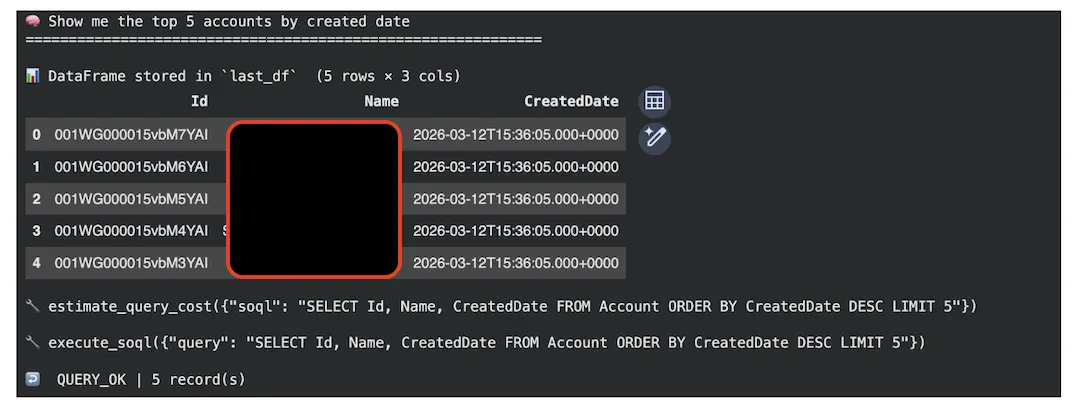
ask("Show me the top 5 accounts by created date")
Step 7: Optional Gradio Web UI (Cell 7)
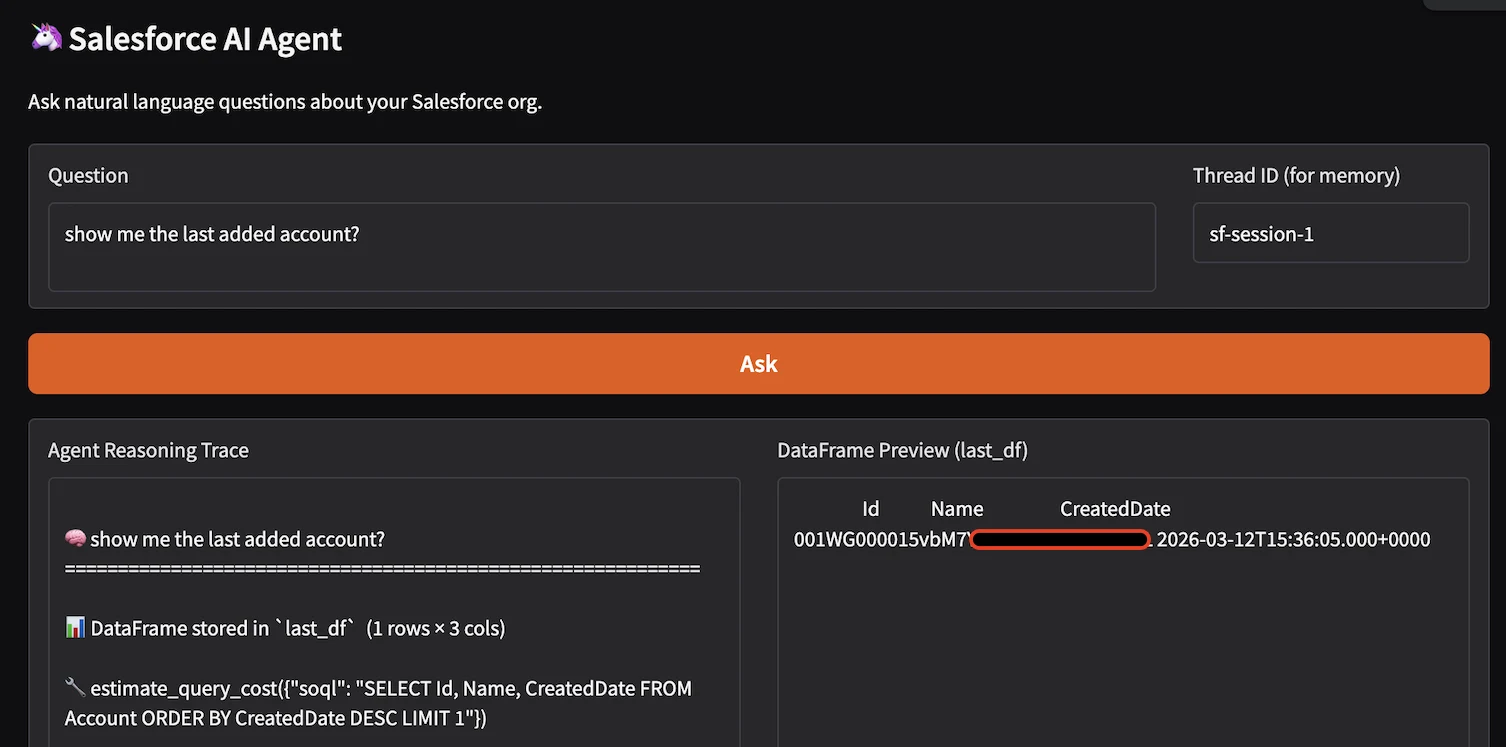
Provides a browser-based chat interface as an alternative to calling ask directly in the notebook.
#GRADIO WEB UI  (optional)                                    	║
try:
	import gradio as gr
	import io, sys
	def gradio_ask(question: str, thread_id: str) -> tuple[str, str]:
    	"""Wrapper that captures ask() stdout for Gradio's text outputs.
    	Returns:
        	agent_log: Full reasoning trace (tool calls + final answer)
        	df_preview: First 10 rows of last_df as a plain-text table,
                    	or a message if no data was returned
    	"""
    	# Redirect stdout so we capture print() output from ask()
    	buffer = io.StringIO()
    	sys.stdout = buffer
    	try:
        	ask(question, thread_id=thread_id or "gradio-session")
    	finally:
        	sys.stdout = sys.__stdout__
    	agent_log  = buffer.getvalue()
    	df_preview = (
        	last_df.head(10).to_string(index=False)
        	if not last_df.empty
        	else "No DataFrame result — query may have returned no records."
    	)
    	return agent_log, df_preview
	# ── Build the interface ───────────────────────────────
	with gr.Blocks(title="Salesforce AI Agent") as demo:
    	gr.Markdown("## 🦄 Salesforce AI Agent\nAsk natural language questions about your Salesforce org.")
    	with gr.Row():
        	question_box  = gr.Textbox(label="Question",
                                   	placeholder="What is the latest added health plan?",
                                   	lines=2, scale=4)
        	thread_box	= gr.Textbox(label="Thread ID (for memory)",
                                   	value="sf-session-1", scale=1)
    	submit_btn = gr.Button("Ask", variant="primary")
    	with gr.Row():
        	log_out = gr.Textbox(label="Agent Reasoning Trace", lines=20, scale=2)
        	df_out  = gr.Textbox(label="DataFrame Preview (last_df)", lines=20, scale=2)
     	submit_btn.click(fn=gradio_ask,
                     	inputs=[question_box, thread_box],
                     	outputs=[log_out, df_out])
	print("Gradio UI built. Uncomment demo.launch() to start.")
	print("   share=True  → temporary public URL (valid 72 hours)")
	print("   share=False → Colab proxy URL only")
	demo.launch(share=True)   # ← uncomment to launch
except ImportError:
	print(" Gradio not installed. ")
Use Cases
The agent handles three broad categories of requests: data retrieval queries, schema exploration, and SOQL assistance. The examples below demystify these use cases:
Data Retrieval
A Question like: “Show me opportunities created this month with an amount greater than $50,000?” translates into the following agent flow:
- Calls find_object_api_name(“Opportunity”) → confirms “Opportunity” (standard object).
- Calls get_object_fields(“Opportunity”) → verifies fields: Amount, CreatedDate, StageName.
- Calls estimate_query_cost() → validates selectivity (LOW impact with CreatedDate filter).
- Calls execute_soql():
SELECT Id, Name, Amount, CreatedDate, StageName
  FROM Opportunity
WHERE CreatedDate = LAST_N_DAYS:30 AND Amount > 50000
ORDER BY CreatedDate DESC
LIMIT 10
Schema Exploration
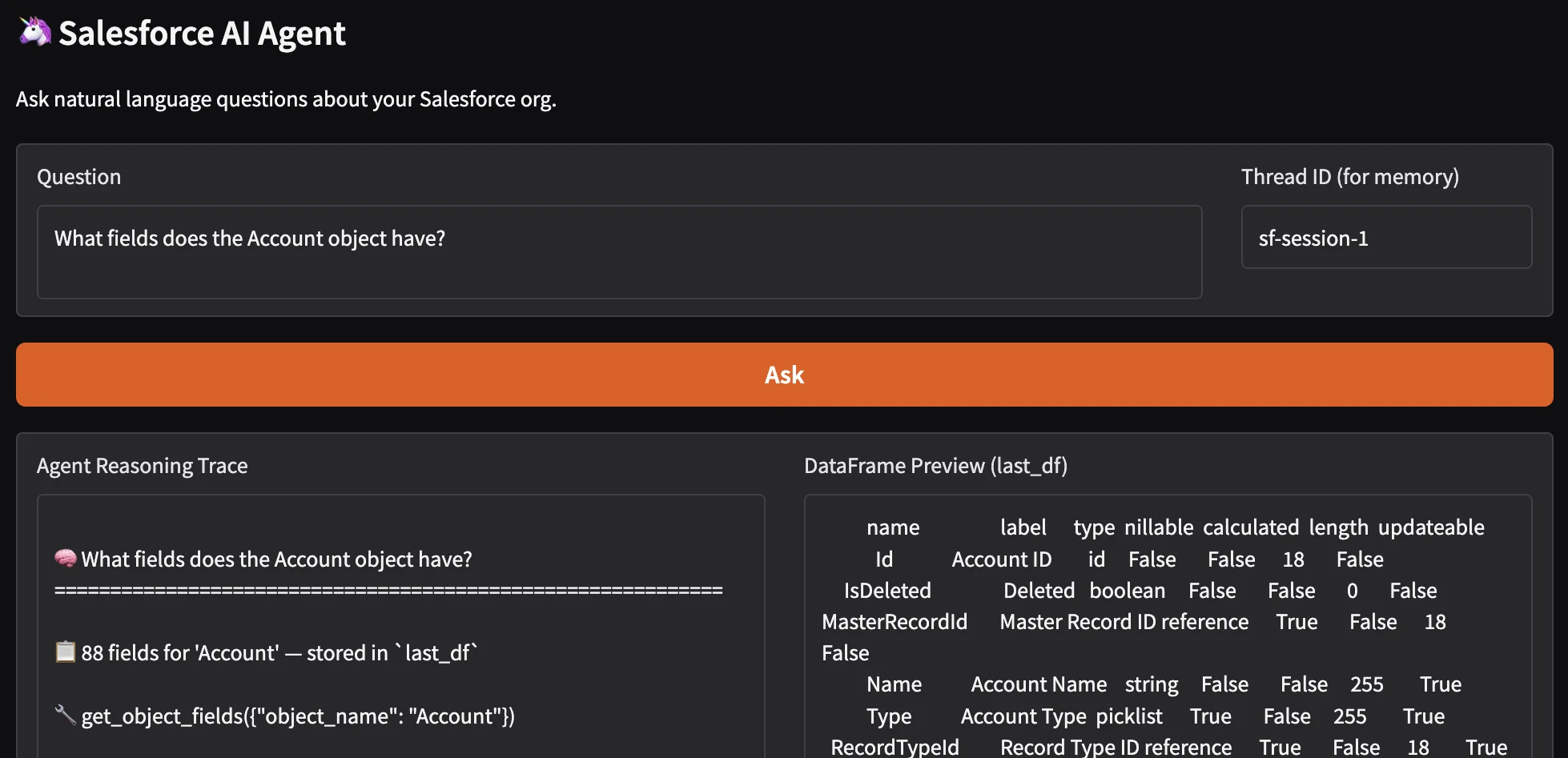
Business analysts frequently need to understand what data is available before writing a report. The agent’s get_object_fields tool returns a complete field inventory for any object, displayed as a sortable DataFrame with columns for field name, label, data type, whether the field is nillable, whether it is calculated (formula), and its updatability.
Example: A user asks: “What fields does the Account object have?”
The Agent calls:
- find_object_api_name → Account then get_object_fields → displays a DataFrame including custom fields.
Multi-Turn Conversations (Iterative Refinement)
Because the agent uses MemorySaver with thread_id, users can ask follow-up questions that reference earlier context without repeating themselves. Example:
# Turn 1: broad query
ask("Which accounts have been created in the last 30 days?")

# Turn 2: follow-up using context from turn 1
ask("Which of those are in the Technology industry?")

# Turn 3: deeper drill-down
ask("Show me the open opportunities for those accounts")
Advantages and Limitations
The following analysis weighs the advantages of the LLM-agent approach against its limitations.
Advantages
- Natural language interface eliminates SOQL syntax barrier for business users.
- Automatic namespace resolution handles managed-package complexity transparently.
- Self-correcting error recovery reduces analyst intervention for common failures.
- Multi-turn memory enables natural investigation workflows without context loss.
- DataFrame output integrates cleanly into pandas/matplotlib notebook workflows.
- Composable tools can be extended without modifying the agent architecture.
- Gradio UI allows sharing with non-technical stakeholders in under five minutes.
- Zero Salesforce configuration required: pure API, no managed packages.
Limitations
While the AI agent provides powerful natural language querying capabilities, several limitations exist:
- Read-Only Access: The agent is strictly read-only and cannot perform DML operations (INSERT, UPDATE, DELETE, UPSERT). This Safety measure prevents accidental data modification via natural language commands.
- No JOIN Support: SOQL does not support SQL-style JOINs; the agent must use relationship traversal or subqueries.
- Governor Limits: Salesforce enforces strict governor limits that can interrupt agent execution:
| Limit | Value | Impact |
|---|---|---|
| Total SOQL queries | 100 per transaction | Agent may hit limit on complex multi-tool calls |
| Query rows returned | 50,000 per query | Large result sets require LIMIT clauses |
| Heap size | 6 MB (sync) / 12 MB (async) | Querying many fields may exceed limit |
| API calls per day | 15,000 (free org) / varies by edition | High-frequency usage may exhaust quota. |
- Groq Free Tier Constraints: Groq’s free tier imposes daily and per-minute token limits.
- Namespace Resolution Complexity: Managed packages add namespace prefixes that complicate object/field references.
- Tooling API Not Available: The pure langchain-salesforce implementation does not expose Tooling API endpoints.
- Context Window Constraints: Groq models have finite context windows (131,072 tokens for llama-3.3-70b). Long conversations may exceed the context window.
- No Bulk Operations: Each query executes individually; no support for bulk SOQL or Batch API.
- Field-Level Security (FLS) Enforcement: Agent respects Salesforce FLS; users only see fields they have permission to read.
Where This Solution Fits
The Salesforce ecosystem offers multiple paths for data access, each with distinct architectural trade-offs:
- Direct SOQL (via simple-salesforce): Provides a low-level interface for programmatic data access. Ideal for developers requiring full control over query logic and execution. However, it demands deep familiarity with the Salesforce Object Model and places the full burden of query optimization and metadata management on the developer.
- Salesforce Reports and Dashboards: An abstraction layer built on the Salesforce Analytics API. It offers a no-code interface for business users, but operates within the constraints of predefined report types and sharing rules. It is unsuitable for queries requiring joins across disparate objects or complex aggregations not supported by the UI.
- CRM Analytics (formerly Einstein Analytics / Tableau CRM): A dedicated analytics platform that ingests Salesforce data into its own engine. It enables complex visualizations and multi-source data blending, but introduces significant licensing costs, infrastructure overhead, and a separate learning curve for its proprietary query language (SAQL).
- Agentforce: An agentic framework with reasoning, memory, and tool-calling capabilities embedded within the Salesforce UI. It handles natural language queries and automated workflows against platform data, but its behavior is constrained by Salesforce’s action frameworks. Customization is possible through custom actions and flows, but it incurs per-user or per-conversation license fees.
- External BI Tools (Power BI, Tableau): Enterprise-grade visualization layers that typically consume data via JDBC/ODBC connectors or ETL pipelines. They offer rich presentation capabilities but introduce data latency, require maintaining synchronization logic, and depend on the stability of Salesforce API limits.
- Our LangChain/Groq Agent: A lightweight abstraction layer that sits between the user and the Salesforce REST/SOAP APIs. It translates natural language into dynamically generated, optimized SOQL queries. It is framework-agnostic, works across all org types, and can be embedded directly into Python-based ETL pipelines or data science workflows without licensing overhead.
Final Thoughts
This solution eliminates the traditional barrier between business questions and the Salesforce Object Model.
By combining LangChain’s agent framework, Groq’s inference speed, and the official Salesforce integration, we have created a tool that puts the power of SOQL, without its complexity, into the hands of anyone who can ask a question.
That’s not just automation – that’s augmentation.