

Many people in the Salesforce ecosystem have a love-hate relationship with Einstein Activity Capture. It brings the ability to automatically log emails, events, and sync contacts, but with the drawback of not being able to view records in standard reports and target with automations.
Over the years, Salesforce has tried to address this via features like the Activity Dashboard, Activity Metrics, and Activity 360 Reporting. In this article, we will take a closer look at the Sync Email as a Salesforce Activity feature that was introduced in the Summer ‘25 release to see how this stacks up to the rest.
A Brief History of Einstein Activity Capture
Einstein Activity Capture was introduced as ‘Automated Activity Capture’ in the Spring ‘17 release and initially supported automatic sync of Emails and Events. In Summer ‘17, it became Einstein Activity Capture, and over future releases, it got various new features such as the ability to sync Contacts, Email Insights, and some reporting abilities.

It has always been positioned as a Sales Cloud Feature and only supports standard Sales Cloud Objects such as Accounts, Contacts, Leads, and Opportunities. This was great for those who used those objects, but tough luck for those who used Custom Objects or wanted to run automation on an email being logged.
Einstein Activity Capture stores Events and Contacts as Salesforce Records, and as such, you can see those records in reports and target records with automations. Emails were historically stored off-platform, and so you couldn’t see these in reports or target these with automation.
The Activity Dashboard was one of the first attempts to allow Sales Managers to have a bird’s eye view of their activities. This ran on CRM Analytics and was not customizable for the majority of license types, and so was limited.

Activity Metrics came in Spring ‘19 and provided fields at the Account, Contact, Contract, Lead, and Opportunity level to give visibility into metrics such as Last Event and Last 30 Days Activities. These fields were visible at a record level and in reports and list views. These fields were also supported in Flow, so you could run automations based on these values.
In Winter ‘24, Salesforce brought us Activity 360 Reporting, which enabled emails captured by Einstein Activity Capture to be visible in reports for the first time. However, other platform features, such as automation, were still not supported as the records were stored off-platform.
Sync Email as Salesforce Activity
From Summer ‘25, you can enable Sync Email as Salesforce Activity in Einstein Activity Capture Settings during setup. This is available in Starter, Professional, Enterprise, Unlimited, and Einstein 1 Sales Edition editions. This also works with Einstein for Sales, Sales Engagement, or Revenue Intelligence in Lightning Experience.
Once enabled, emails captured via Einstein Activity Capture become native Task and Email Message records, which are visible in reports, automations, and via APIs. This feature uses Enhanced Email and changes how emails are shared. Email sharing follows activity sharing once this is enabled, versus the old settings for emails captured with Einstein. Internal or excluded emails aren’t stored in Salesforce, and users choose whether to capture all email details or just the header (sender, recipient, date, and time).
As you’d expect, you can use emails within Agentforce and Prompt Builder to draft a reply, understand sentiment, or suggest next steps. Emails stored as Salesforce Activity consume data storage, so project data volumes to ensure you have enough storage and consider an archiving strategy if the standard options are not suitable (see: Work with Archived Activities).
This feature is turned on if you sync emails in Einstein Activity Capture for the first time.

Customize Flows to Match Emails to Record
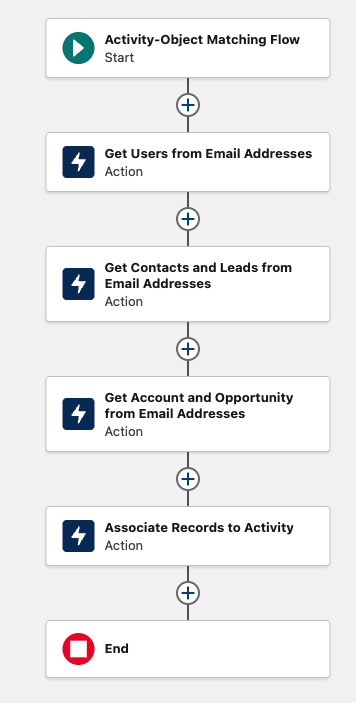
Alongside this functionality, Salesforce provides a standard flow that manages the association between emails, Users, Accounts, Contacts, Leads, and Opportunities.
This uses the standard email fields to match things up out of the box; however, the flexibility of Salesforce Flow means you can customize this to meet your requirements.
In addition, if you wanted to sync to additional objects, this is possible with the flow-based matching logic, too; you can extend based on your specific needs.
It’s worth noting that if you override the default flow and activate your own version, then the default flow will not run.
Summary
To make way for the latest generation of Einstein Activity Capture features, Salesforce plans to retire Activity 360 Reporting, Activity Metrics, and the Activities Dashboard in Summer ‘26.
While there isn’t a migration path for anyone who has set up Einstein Activity Capture historically, I’m sure this will change in the near future!
What are you most looking forward to about this generation of Einstein Activity Capture? Let us know in the comments!
Other Resources
- Guidelines for Using Sync Email as Salesforce Activity (Salesforce Help)
- Match Email Activity with Salesforce Records Using Flow (Salesforce Help)
- Header-Only Email Capture with Sync Email as Salesforce Activity (Salesforce Help)
- Considerations for Sync Email as Salesforce Activity (Salesforce Help)