

Salesforce Quote Sync sounds like it should be simple: keep the Quote and Opportunity aligned so sales can work in one place and report in another. In practice, once you rely on real-world custom fields – ARR, implementation dates, internal handoff dates, custom amounts – the records rarely stay aligned in the way teams expect.
Over the past implementations I’ve worked on, I’ve seen teams try to solve this with layers of Flows, validation rules, and tactical fixes. Recently, I had the opportunity to work with the Custom Quote Sync tool from Candybox CRM. This article reflects my experience using that tool in client orgs, and the broader lessons it reinforced about how quote syncing actually breaks – and how to design it more predictably.
This is not a Candybox CRM article. It’s a practitioner’s perspective on common Quote Sync pitfalls and a practical pattern for closing the gaps.
Where Native Quote Sync Usually Breaks Down
The pain isn’t that syncing exists, it’s that syncing gets messy when:
- Your most important fields are custom.
- You need clarity on which record “wins” (Quote or Opportunity).
- You’ve got enough automation that sync becomes a timing/conflict problem.
Most teams end up patching these with tactical automation. It works… until it doesn’t. And when it doesn’t, you inherit the long-term cost: troubleshooting, recursion, “why did it overwrite that,” and brittle logic that’s different in every org.
Two Ways Fields Should Sync
The Custom Quote Sync tool is built around two ideas that make a lot of sense in day-to-day admin life.
1. Name and Type Match (Dynamic Sync)
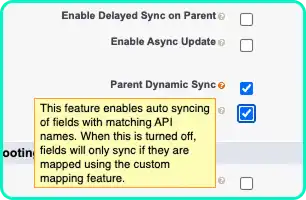
If the Quote field and Opportunity field share the same API name (and compatible types), they can sync automatically. This is a “twin fields” style concept: less configuration, fewer missed fields.
2. Varying Names
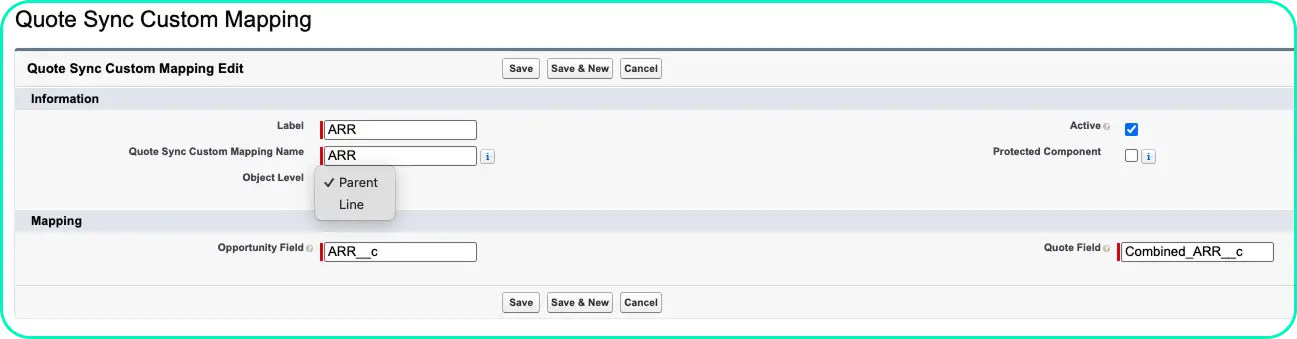
When API names differ (common in older orgs or after refactors), you create an explicit mapping: this Opportunity field → that Quote field.
These two rules cover the majority of real implementations.
Direction Matters
No two orgs are equal, and not everyone shares the same philosophy on Salesforce Opportunities and Quotes.
Sometimes sales teams treat the Quote as final once it’s approved. Other times, RevOps insists the Opportunity is the reporting anchor. And sometimes you genuinely need bi-directional behavior – until you don’t.
This tool makes direction a deliberate choice, and it lets you set it separately for:
- Opportunity ↔ Quote
- Opportunity Products ↔ Quote Lines
Options include:
- Quote → Opportunity
- Opportunity → Quote
- Bi-directional
- Do not sync
Most sync issues don’t happen at the header level. Instead, they show up in the relationship between Opportunity Products and Quote Line Items.
When the sync direction isn’t explicit, or when totals change after edits, teams often see:
- Totals that don’t reflect what was actually quoted.
- Reporting discrepancies for ARR, uplift, or product family rollups.
That one capability – being explicit about direction – removes a surprising amount of confusion.
Exclusions Prevent Automation Chaos
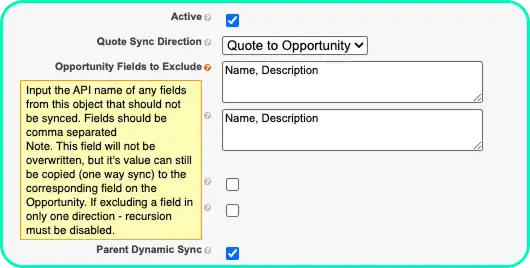
Any time you enable “automatic” syncing, you need a way to say: except those fields.
Exclusions solve two common problems:
- You have fields with matching names that shouldn’t sync (especially standard-ish fields or legacy overlaps).
- You want mostly bi-directional behavior, but one field should only go one way.
This is the difference between a sync tool that feels trustworthy and one that feels like it might rewrite your data when you’re not looking.
Async and Delayed Sync
Two settings exist for a reality most admins know well:
- Some orgs have so much automation that doing everything “right now” causes conflicts.
- Some values (especially rollups/calculated totals) don’t settle instantly after line edits.
So the tool includes:
- Async updates (reduces save-time friction in busy orgs).
- Delayed parent sync (wait a short configurable time after line edits so totals/rollups have time to update).
You don’t always need these – but when you do, you really do.
A Simple Setup Pattern
If you’re implementing this (or evaluating any quote sync strategy), here’s the least-complicated way to get value quickly:
- Turn on Dynamic Sync first (it covers the bulk of normal custom fields with consistent naming).
- Add Exclusions for fields you don’t want touched (or that should only move one direction).
- Create Mappings only for the handful of fields where names don’t match.
- If your org is automation-heavy or totals don’t settle immediately, consider Async and/or a small Delay.
This keeps the setup minimal and avoids over-engineering.
Final Thoughts
I’m cautious about anything that touches core revenue objects. The reason this tool’s approach stood out to me is that it focuses on practical, configurable controls: how fields map, when sync happens, and which direction data moves – without trying to “rebuild Quotes.”
And for many orgs, that’s exactly what Quote Sync needs: not more complexity, just fewer surprises.
Tool referenced: Candybox CRM Custom Quote Sync available on the Salesforce AppExchange.