
Where should I import Marketing Data – Salesforce or Pardot?
Tricky, as the answer is up for debate; you only have to ask around to soon discover there’s a difference in opinion. This what happened when we both got talking about the topic, winding up as this three-part series, which weighs up each viewpoint, to ultimately help you decide what’s best for your business.
I often meet clients who are using both Pardot and Salesforce for their marketing, but are using the two back to front. When new unqualified prospect data is obtained via events, purchased data, paid ads, form completions etc. the prospect is often pushed into Salesforce first, assigned and then synced back towards Pardot. There are a few good reasons why this should be avoided.
The obvious flaw with this approach is Salesforce becomes very busy with unqualified and incomplete lead records. This makes life for a salesperson much harder because they then have to sift through the data trying to distinguish between the quick wins and the untouched data. Bad habits can be formed here as it breeds a bad culture within the organisation where sales might not trust marketing qualified leads as much as they should. The point here is that Salesforce should only contain leads qualified by Pardot and subsequently ready for sales to work their magic on.
A lesser-known issue with this approach is how it impacts reporting stats in the Pardot lifecycle report and the velocity chart. These reports are incredibly valuable to the marketing team as they enable data-driven decisions so it’s important to get this right. By uploading data into Salesforce first as an assigned lead, this causes Pardot to believe that the prospect has already achieved MQL status. As a result, the lifecycle report will increase the number of MQL’s and the velocity chart will show an untrue Prospect > MQL time.

Above: If it doesn’t look right, it probably isn’t.
So, how is it supposed to work?
As a rule of thumb, all prospects should begin their journey in Pardot. Of course, there will be leads that come in off the back of offline marketing and organic inquiries so it’s up to you if you want these to go straight into Salesforce for a quick follow up from sales because these leads would have already qualified themselves. In this blog, we’re focussing on unqualified, unnurtured marketing data.
By beginning the journey in Pardot, it ensures Salesforce is clean with only qualified data for sales and subsequently, the reporting within Pardot will work as it should. Furthermore, you’ll also be able to easily remove dead data in Pardot that never had any chance of converting, prior to reaching Salesforce, keeping you on good terms with your sales team.
Pardot Forms
When adopting this approach, Pardot forms come into their own and should be used instead of web-to-lead Salesforce forms. Besides being a crucial part of the above strategy we’re looking at, there are numerous other benefits to Pardot forms which are covered in detail here.
The New Data Journey
The below diagram helps illustrate the journey new data should go through, with new prospect data always going straight into Pardot. Through the use of the Engagement Studio and other automation tools, you should segment your prospect database and start nurturing them with intelligent and highly targeted marketing campaigns that provoke engagement and help you to build out a clearer picture of the prospect via progressive profiling on forms/landing pages. This then changes the score and grade of the prospect until eventually, they tip over the lead qualification threshold and then are assigned to a salesperson (triggering the MQL status). The prospect is then automatically pushed to Salesforce.
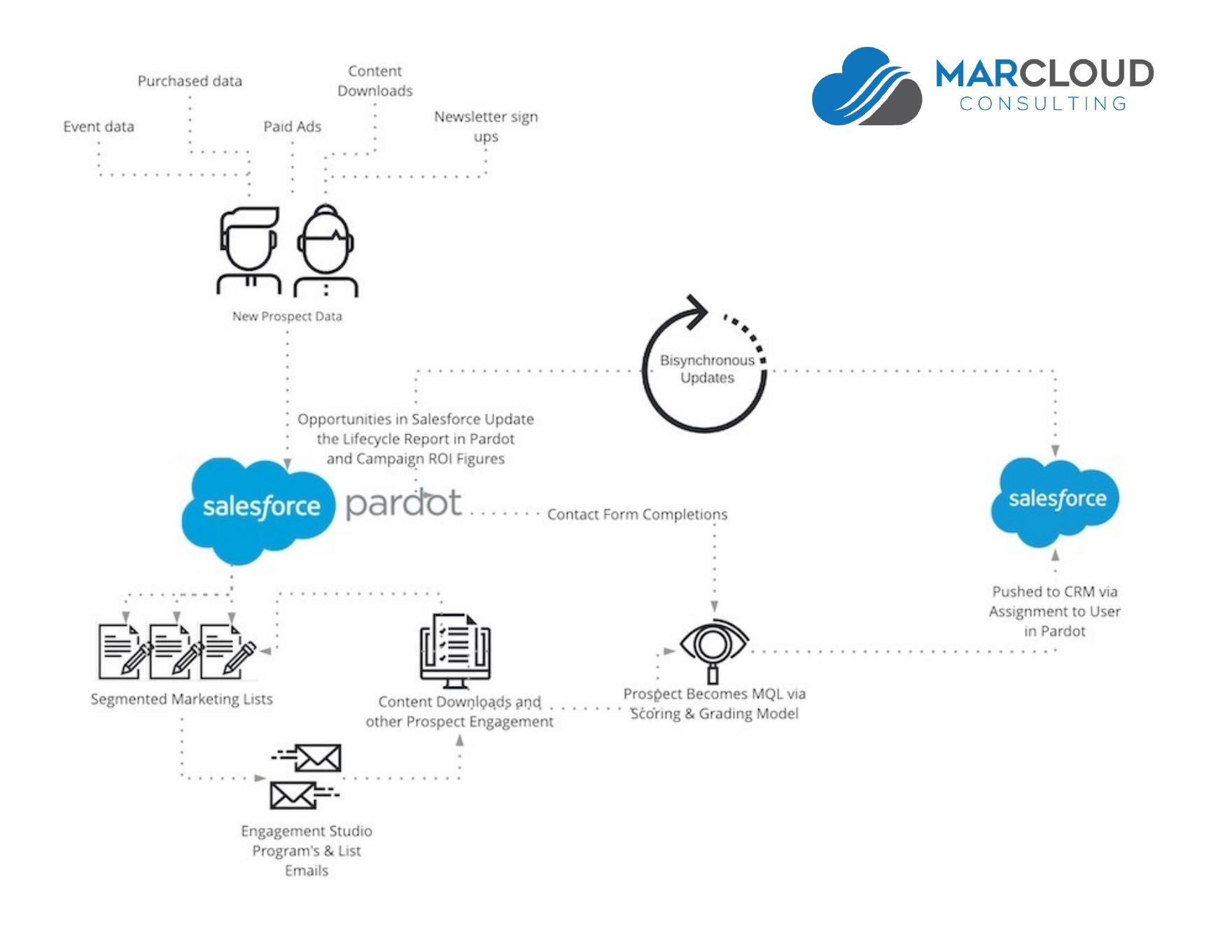 Following this, the qualified lead can then be worked by sales. Marketing can keep track of what’s going on with the prospect because of the bi-synchronous relationship between Pardot and Salesforce. Once sales eventually link an opportunity to the prospect (via contact roles in Salesforce), this triggers the SQL status in Pardot. When the opportunity is closed won, the revenue can be traced back to the original marketing campaign in Pardot which means marketing can easily convey to the business the positive impact their efforts are having. These reports enable the marketing team to become more transparent and accountable for marketing campaigns, making it much easier to justify bigger budgets for new campaigns as ROI will have clearly been demonstrated.
Look out for Part II, where Lucy will put forward reasons why some companies are opting to push new data into Salesforce instead.
Any questions?
If you have any questions on what’s been written in the article above, connect with me on LinkedIn or drop me a message here.