







Highlights
- Salesforce Agentforce Voice is a way for customers to talk directly to an AI agent over the phone. Instead of navigating phone menus or waiting for a human support agent, customers can have a natural, spoken conversation with an AI-powered assistant.
- It understands what customers say and responds in real time. Rather than relying on rigid scripts or pressing buttons to select options, customers can speak naturally, ask questions, and explain what they need.
- It connects to your Salesforce data. Agentforce Voice can use information stored in Salesforce, such as customer records, order details, and case history, to give more relevant and personalized responses.
- It can take action, not just answer questions. Depending on how it has been configured, an AI agent can look up information, update records, create cases, or help customers complete tasks without needing a human to step in.
- It works alongside human service teams. More straightforward enquiries can be handled by AI, while conversations that need human judgment or additional support can be passed to a person, with the relevant context available to help them pick up where the AI left off.
Salesforce Agentforce Voice has reached its first year of availability, and there’s quite a bit to get your head around. It’s now generally available globally, supports a growing list of languages, and comes with a naming convention that could easily leave you scratching your head. Agentforce Voice, Salesforce Voice, voice-enabled agents… aren’t they all the same thing? (Spoiler: no.)
So, whether you’re a Salesforce Admin exploring what’s possible or trying to work out whether it’s ready for your organization, let’s cut through the noise. We’ll explain what Salesforce Agentforce Voice actually is, how much it costs, where it falls short, and what you should check before putting it in front of customers.
What Is Agentforce Voice?
Agentforce Voice allows customers to have natural, spoken conversations with AI-powered service agents, rather than typing into a chatbot or navigating automated phone menus. Behind the scenes, it converts speech into text, interprets what the customer is asking, and generates an appropriate response, which is then converted back into speech.
From the customer’s perspective, it’s simply a conversation. They don’t need to know what’s happening behind the scenes. There are two ways to set up Agentforce Voice, depending on your telephony requirements: use Salesforce’s native telephony through Salesforce Voice, or integrate with a third-party telephony provider.
To keep conversations useful, natural, and safe, Agentforce Voice comes with built-in guardrails. These include word limits to keep responses concise and focused, pauses to make conversations feel more natural, and safeguards designed to prevent offensive language and protect sensitive information.
The benefits aren’t just for customers. Agentforce Voice also includes AI-powered features such as call transcription, sentiment analysis, conversation summaries, and recommendations, giving service teams useful insights without having to listen back to every call.
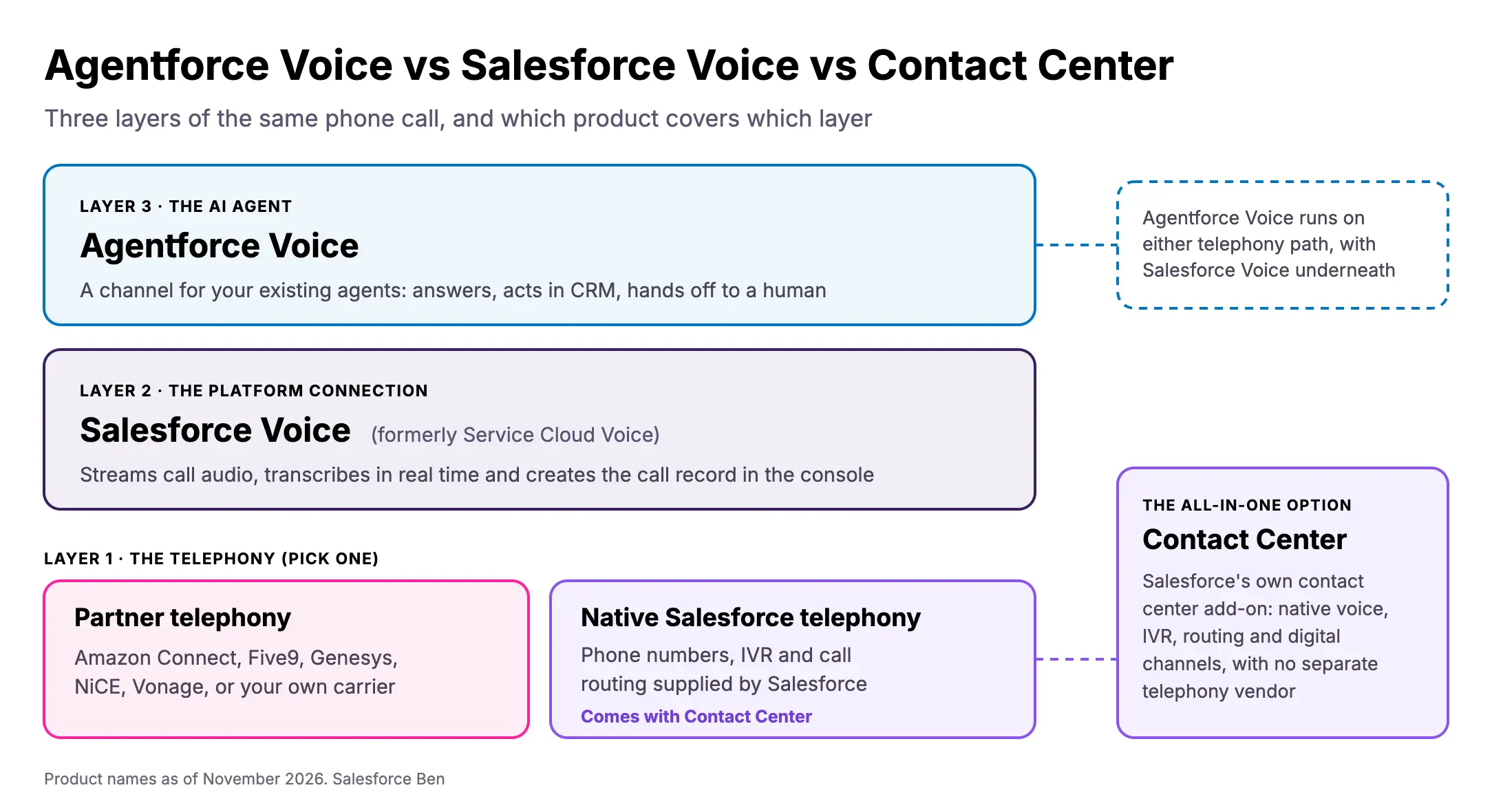
Agentforce Voice vs. Salesforce Voice vs. Agentforce Contact Center
Keeping up with the latest Agentforce news, features, products, and frequently changing names is tough! If you’re feeling confused about where Agentforce Voice fits in, or how it differs from Salesforce Voice or Agentforce Contact Center, then you are not alone. Let’s break down what each does.
| Agentforce Voice | Salesforce Voice | Contact Center | |
|---|---|---|---|
| What it is | The voice channel for your Agentforce agents: answers calls, takes action in CRM, and hands off to a human. | The layer that connects telephony to Salesforce: call audio, real-time transcription, and the call record in the console. | Salesforce’s own contact center add-on: native voice, IVR, routing and digital channels in one package. |
| Who buys it | Service leaders who want AI to handle routine call volume. Admins build and maintain it. | Teams keeping their existing telephony or contact center vendor but wanting calls inside Salesforce. | Teams moving their whole contact center onto Salesforce and dropping a separate vendor. |
| What it requires | Salesforce Voice working underneath, a telephony path, and an Agentforce agent. | A Service Cloud edition plus a telephony provider (partner or Amazon Connect). | Service Cloud Core or Advanced (Max edition uses a separate voice add-on). |
Which Calls Should Agentforce Voice Take?
Long story short, Agentforce Voice is best suited to calls where the information needed to answer the customer already exists in Salesforce.
Many customer service calls are fairly straightforward, with people looking for answers to frequently asked questions, clarification on company policies, or updates on an existing order. This information might come from a Salesforce record, such as an order’s status or expected delivery date, or a Knowledge Article explaining the company’s returns policy.
Because Agentforce can access this information and take action within the same conversation, it can handle many routine enquiries without involving a human representative.
Some good use cases for Agentforce Voice include:
- Frequently asked questions: Answering common questions about products, services, opening hours, and processes.
- Policy enquiries: Explaining returns, refunds, warranties, and other company policies using Salesforce Knowledge.
- Order queries: Checking order status, confirming delivery dates, or processing cancellations.
- Scheduling and appointments: Booking, changing, or cancelling appointments.
- Account access and support: Helping customers with common account issues, including password resets.
How Agentforce Voice Works
Agentforce Voice brings together all the technology needed to handle a phone conversation with AI, rather than relying on lots of separate tools stitched together with custom integrations.
When a customer calls, their audio enters through one of two routes: the Public Switched Telephone Network (PSTN), which supports traditional phone calls, or Session Initiation Protocol (SIP) from an existing Contact Centre as a Service (CCaaS) platform, such as Amazon Connect, Genesys, NICE, or Vonage. Calls can also come through a browser or mobile app using WebRTC. Salesforce then uses Einstein Speech Foundations, powered by Deepgram, to convert speech into text in real time.
This means the AI can start processing what the customer is saying before they’ve even finished their sentence. The Salesforce Contact and Routing Technology (SCRT) platform manages the conversation, deciding whether the AI can handle the request or whether it needs to be passed to a human representative.
If a handover is needed, the representative receives the full conversation history, including what the customer has said, what the AI has tried, and any information it has retrieved. They can pick up where the AI left off, rather than asking the customer to explain everything again.
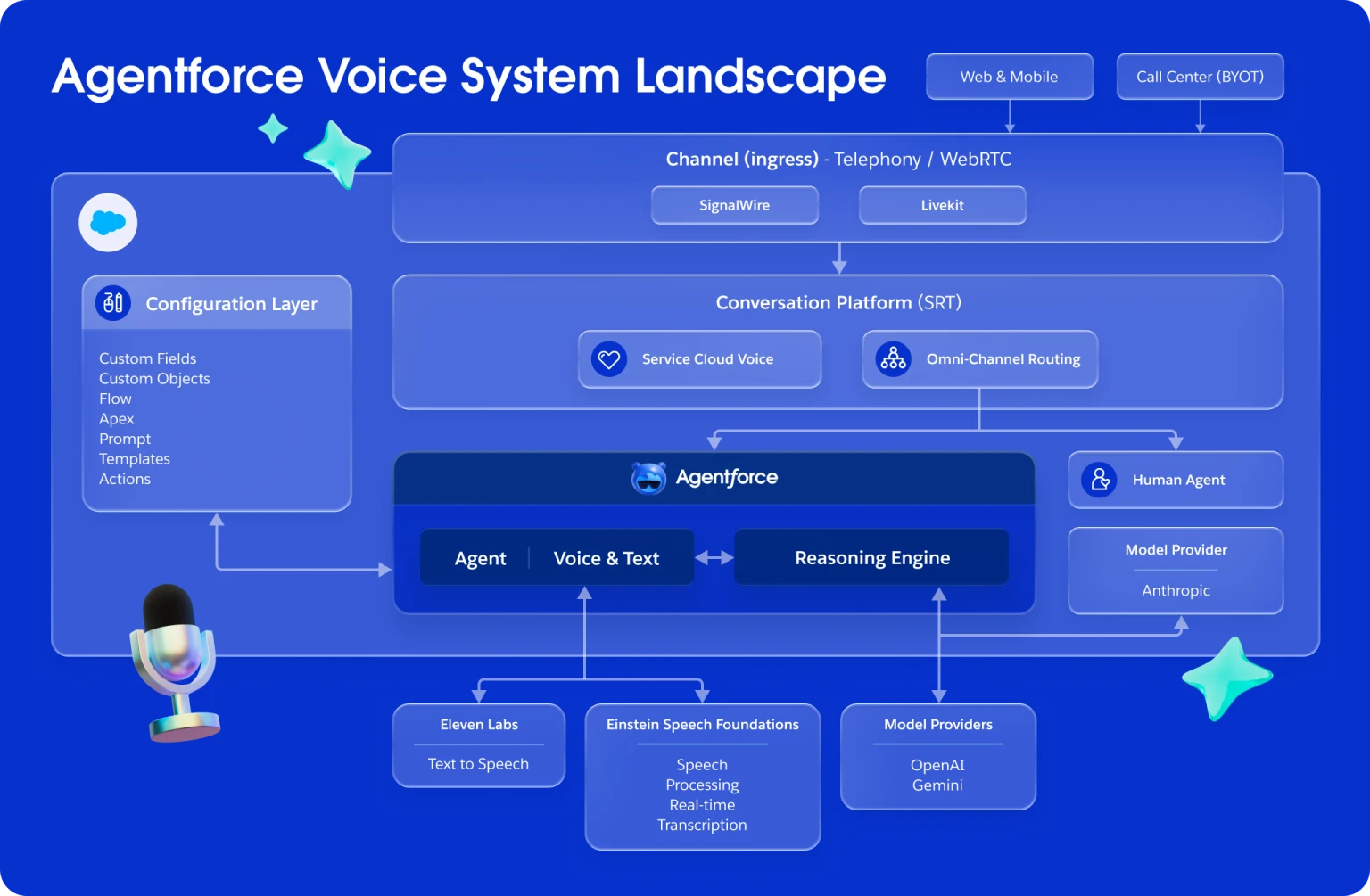
Behind the scenes, the Agentforce reasoning engine (Atlas) works out what the customer wants, decides which actions to take, and retrieves relevant information from Salesforce and connected external systems through Data 360.
This uses a zero-copy approach, meaning data can be accessed without having to move or duplicate it into Salesforce. For example, the AI could check an order, look up warranty details, and direct the customer to the right team, all within the same conversation.
Salesforce’s Agentforce Trust Layer checks responses before they reach the customer, helps ensure answers are grounded in trusted information, and keeps an audit trail of what the AI has accessed and done. Organizations can also choose between different large language model (LLM) providers, such as OpenAI, Anthropic, and Google Gemini, without having to rebuild these security controls each time.
Once a response has passed these checks, ElevenLabs converts the text into natural-sounding speech, with more than 40 voices and controls over tone, speed, and pronunciation. The result is a connected system that can listen, understand, take action, and speak back to customers, while keeping the conversation and its context together throughout the call.
How to Configure Agentforce Voice
There are three main areas to configure when setting up an Agentforce agent. Think of these as defining who your agent is, what it can do, and which systems it needs to connect to.
- Agent Settings define the basics, including your agent’s identity, role, instructions, and expected behavior.
- Subagents and Actions determine what your agent can actually do. These provide the skills, instructions, and capabilities it needs to handle specific tasks and respond to different customer requests.
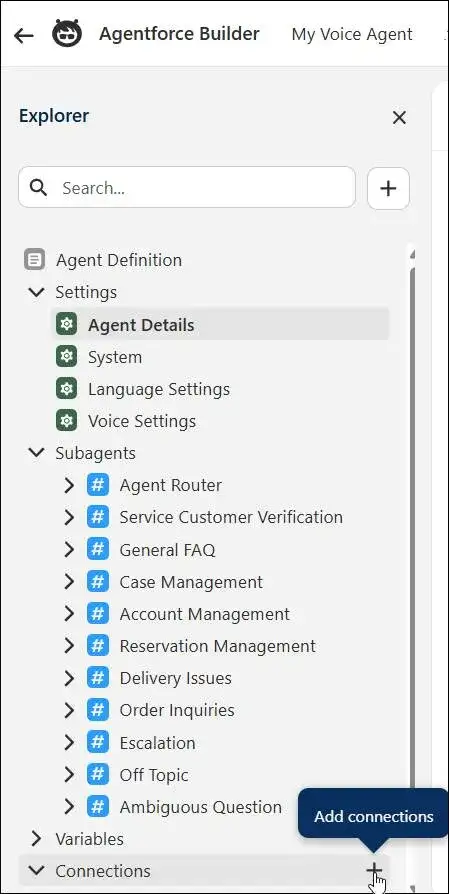
- Connection Settings manage the technical connections that allow your agent to operate in your chosen environment, including connecting to your phone system for voice interactions.
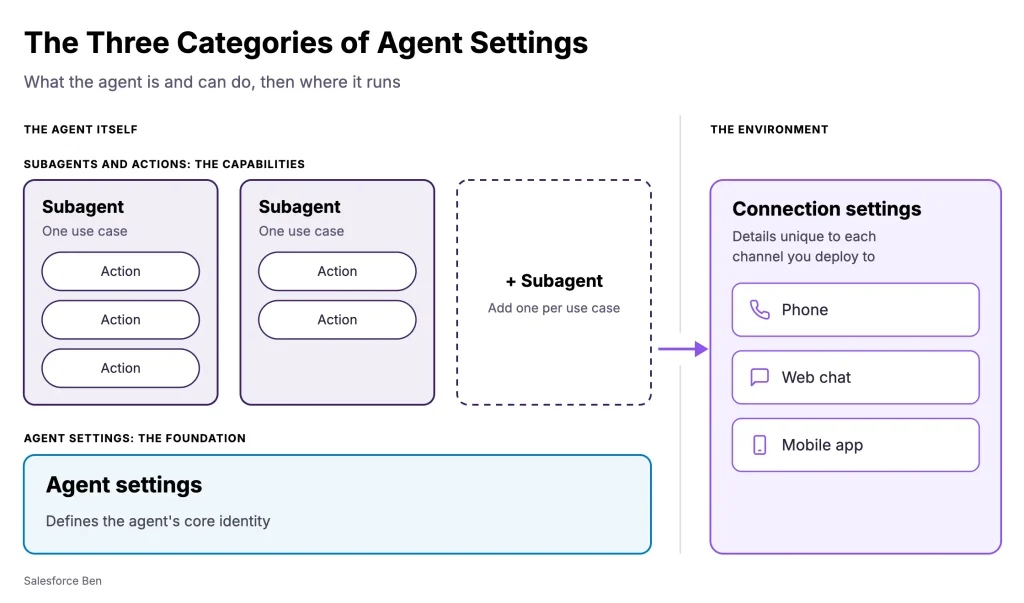
The setup process involves several steps. First, create an agent using the Agentforce Service Agent template, which is designed to handle inbound customer interactions. You’ll then configure its Subagents and Actions before adding a Telephony Connection to connect it to your phone system.
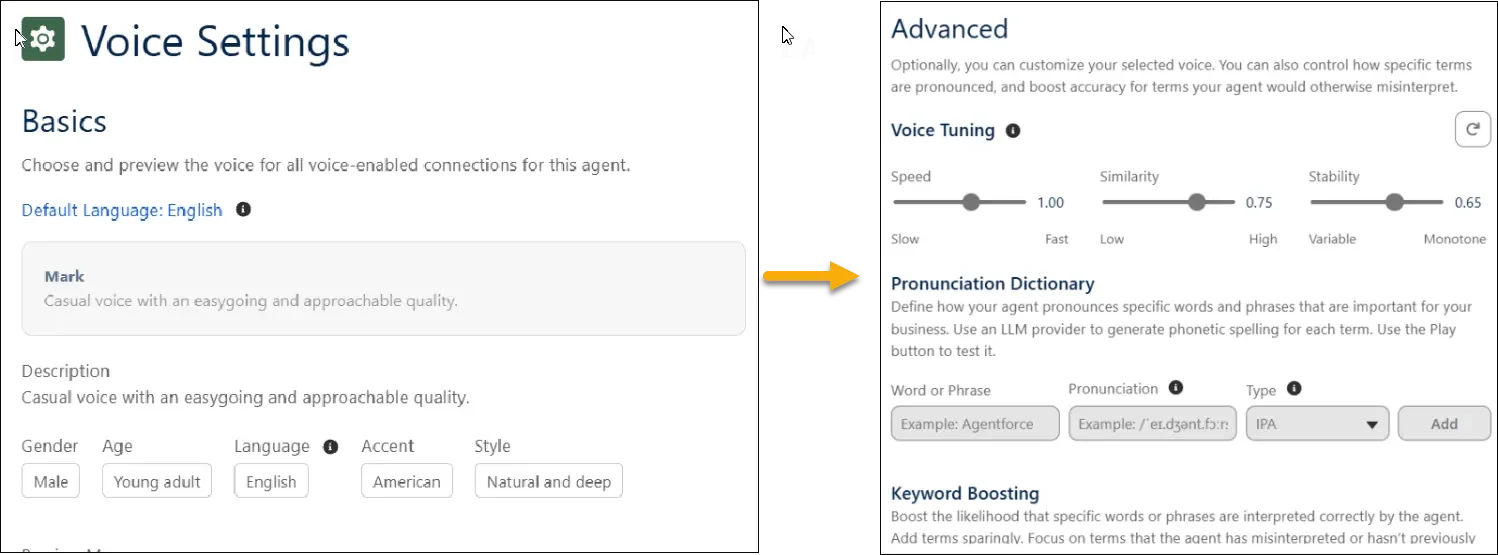
Once the core agent is configured, you can customize how it sounds to customers. In Voice Settings, you can select a voice persona and adjust its characteristics to better reflect your company’s brand.
You can also create a pronunciation dictionary, which lets you define how the agent should pronounce industry-specific terminology, product names, and acronyms. This is particularly useful for businesses with specialist vocabulary, helping conversations sound more natural and avoiding some potentially awkward mispronunciations.
Creating and configuring your voice agent is only part of the setup. You also need to tell Salesforce how incoming calls should reach it. This is where Omni-Channel Flow comes in. When a customer calls, Salesforce uses the relevant flow to determine which agent should handle the interaction and route the call accordingly.
Using Flow Builder, create an Omni-Channel Flow and add a Route Work component to direct incoming calls to your chosen Agentforce Service Agent. You can also configure a fallback queue to handle calls if the agent is unavailable or unable to accept the interaction. Finally, link the flow to your voice channel in Salesforce Setup. This ensures incoming calls are routed through the correct flow and reach your AI agent, with a fallback option available when needed.
Where You Can Deploy Agentforce Voice
You can deploy Agentforce Voice across six surfaces:
Agentforce Voice
It means you can connect an AI agent to the phone system your business already uses, without having to change your phone numbers, call routing, or telecoms provider.
For example, if your business already uses Amazon Connect, Genesys or Vonage to manage customer calls, you can plug an AI agent into that existing setup. Importantly, everything on the phone-system side stays the same. Your customers still call the same numbers, calls follow the same routing rules, and you keep your existing providers.
The difference is what happens when someone answers – instead of speaking to a human agent, they could be speaking to an AI agent. In other words, you don’t need to replace your phone system to introduce AI-powered conversations.
Contact Center
This option is for businesses that want Salesforce to handle both their phone system and AI-powered customer conversations. Rather than connecting Agentforce to an existing provider, Salesforce provides the telephony infrastructure too.
This includes phone numbers, call routing, and the AI agent. It’s particularly relevant if you’re already considering moving away from your current contact centre provider and want to bring everything together on one platform. Salesforce provides both the phone system and the AI agent, removing the need for a separate telephony provider.
Voice Mobile SDK
This gives developers the tools to build AI voice conversations directly into their own mobile apps. Imagine a retailer with its own shopping app. Instead of making customers call a support number, the business could let them tap a button and speak directly to an AI agent within the app.
The Voice Mobile SDK supports iOS, Android, and React Native, giving development teams flexibility over how they build the experience.
Voice for Employee Mobile Apps
This brings Agentforce Voice into Salesforce’s own mobile apps, including the Salesforce Mobile App and Field Service App. For example, a field technician visiting a customer could speak to an AI agent using their phone, rather than having to stop and type information into Salesforce. Sales representatives could also use voice to interact with Salesforce while travelling between meetings.
Voice on Web Chat
This lets customers switch between typing and speaking when interacting with an AI agent on a website. For example, a customer might start by typing a question into a website’s chat window. If they decide it would be easier to explain their problem verbally, they can switch to speaking instead. The conversation continues in the same session, so the AI agent retains the context of what they’ve already discussed.
Voice Notes on WhatsApp
This brings Agentforce Voice into WhatsApp, allowing customers to communicate with AI agents using voice notes. Rather than typing a long message explaining a problem, a customer could simply record a voice note and send it through WhatsApp. The AI agent can then respond within that existing conversation.
Unlike a traditional phone call, this doesn’t require both parties to be available at the same time. Customers can send and receive voice notes whenever it’s convenient.
Agentforce Voice Pricing and Licensing
Salesforce Agentforce Voice uses a consumption-based pricing model, meaning businesses generally pay for how much their AI agents are used rather than a fixed fee for every customer interaction.
The main pricing option is Flex Credits, where each AI action consumes credits. Salesforce also offers Agentforce Voice Minutes, which charges based on call duration, although this is currently only available to eligible customers. The cost will depend on call volumes, conversation complexity, and how many actions the AI agent performs.
There may also be additional licensing costs for Salesforce Voice, depending on how you connect Agentforce to your phone system. For example, integrating an existing telephony provider can require a separate Salesforce Voice licence, while businesses using their own phone infrastructure will still need to account for carrier and call charges.
The important thing is to look beyond the Agentforce consumption price and consider the full cost of telephony, Salesforce licensing, and AI usage together.
Agentforce Voice Limitations and Considerations
There are several limitations to consider when using Agentforce Voice:
- Sandbox environments have a 200-MB storage limit, and call recordings will quickly hit this limit. Therefore, Salesforce recommends turning off call recording in sandbox environments.
- Salesforce recommends testing Agentforce Voice in a Partial or Full Copy sandbox.
- The default limit is 500 concurrent calls per org; this limit can be increased by speaking with Salesforce Customer Support.
- Agentforce Voice is designed to keep voice processing within Salesforce’s secure environment wherever possible. It uses Deepgram to convert speech into text, and ElevenLabs or Kotoba to turn responses back into speech. However, if a provider reaches its regional capacity or usage limits, processing can temporarily move to that provider’s external infrastructure to keep calls running.
- This fallback operates under a zero-data-retention policy, meaning the provider should not store the data after processing. The important distinction is that data may leave Salesforce’s environment during failover, even though it is not intended to be retained by the provider.
- When a call is transferred to Agentforce Voice, Salesforce needs to see the original caller’s phone number on both parts of the call to connect the two VoiceCall records and recognize them as the same conversation. If the caller ID changes during the transfer, Salesforce can’t match the records.
- For example, if an Amazon Connect flow uses its own number as the caller ID when transferring the call, Salesforce sees the AWS Connect number rather than the customer’s original number. The result? The two call records aren’t linked, so Salesforce loses the connection between the original call and the Agentforce Voice interaction.
Agentforce Voice FAQs
1. What Is Agentforce Voice in Salesforce?
Agentforce Voice is Salesforce’s AI-powered voice technology that allows AI agents to have natural, real-time spoken conversations with customers over the phone, through a website, or via a mobile app. Agents can understand customer requests, retrieve information, take action in Salesforce, and transfer conversations to human representatives when needed.
2. Is Agentforce Voice the Same as Service Cloud Voice?
No, they are different technologies that work together. Service Cloud Voice, now referred to as Salesforce Voice with Telephony Providers, provides the underlying telephony infrastructure for handling calls, while Agentforce Voice adds the AI capabilities that allow agents to understand and respond to customers.
3. How Much Does Agentforce Voice Cost?
Agentforce Voice uses Salesforce’s consumption-based Flex Credits pricing, currently listed at $500 per 100,000 credits (USD). Your actual costs will depend on usage, and you should also factor in any additional Salesforce Voice licensing, telephony provider charges, and implementation costs.
4. Is Agentforce Voice a Separate License?
Agentforce Voice isn’t simply a standalone license you purchase independently; it’s a voice capability that extends Agentforce agents into phone conversations. You’ll need the appropriate Agentforce Service licensing and Salesforce Voice or Agentforce Contact Center telephony entitlement, depending on your chosen setup, alongside the relevant consumption credits.
5. How Do I Configure Agentforce Voice?
Start by creating an agent using the Agentforce Service Agent template, then configure its Agent Settings, Subagents and Actions, add a Telephony Connection, and customize its voice persona.
Next, create an Omni-Channel Flow in Flow Builder to route incoming calls to your agent, configure a fallback queue, and connect the flow to your voice channel in Salesforce Setup.
Final Thoughts
I’ve been working in the Salesforce ecosystem for some time now, and I’ve seen various voice capabilities come and go, often without much success. Voice AI is much harder to get right than many people realize. Even the slightest delay in understanding or responding can disrupt the customer experience.
It’s not just about how quickly the AI responds. Voice technology has to deal with the wonderfully unpredictable way humans communicate: random pauses, jumbled thoughts, people talking over one another, background noise, and plenty of other variables.
There’s also the telephony side of things. Phone systems have been around for decades, and many organizations are still working with legacy telephony infrastructure and integrations. Getting all of these moving parts to work together seamlessly is no small feat.
That said, I think voice is absolutely worth persevering with. AI-powered voice has the potential to make customer service genuinely 24/7, ensure incoming calls are captured and routed correctly, and, perhaps most importantly, reduce the number of calls that need a human representative.
Many customer enquiries are relatively straightforward, whether that’s answering a frequently asked question, explaining a company policy, or retrieving information that already exists in Salesforce. These are exactly the kinds of interactions an AI agent should be able to handle.
Salesforce’s Agentforce Voice is an attempt to tackle many of these challenges and deliver its strongest voice capability yet. There are still practical considerations when implementing voice AI, but I think Salesforce is making some promising progress.
Resources
- Trailhead: Agentforce Voice
- What is an AI Voice Agent?
- AI Voice Agents: A Complete Guide
- Everything You Ever Wanted to Know About Agentforce Voice (But Were Afraid to Ask)
- 3 Reasons Why AI Voice Agents Are Harder Than They Seem
- Create a Voice-Enabled Service Agent
- Learn About Agentforce Voice