





✕
Skip to content
SF Ben Con 26: Early Bird Sign-Up
Salesforce Ben
  • Events
  • Career
  • AppAssessor
  • Salesforce News
  • Articles by Role
    • Admins
    • DevOps
    • Developers
    • Marketers
    • Consultants
    • Architects
    • Business Analysts
  • Resources
  • Where to Start
  • Salesforce Certification List
  • How to Get Certified
  • Free Salesforce Practice Exams
    • Admin Practice Exam
    • Platform App Builder Practice Exam
    • Platform Developer 1 Practice Exam
  • How to Get a Job in Salesforce

Find us on:

Salesforce Ben
  • Events
  • Career
  • AppAssessor
  • Salesforce News
  • Articles by Role

      Articles by role:

    • Admins
    • DevOps
    • Developers
    • Marketers
    • Consultants
    • Architects
    • Business Analysts
    • Featured

      The Great Salesforce Job Market Reset

      By Sasha Semjonova

      December 09, 2024
      How to Avoid Bad Salesforce Partners: The Three-Question Test

      By Jon Cline

      January 08, 2025
  • Resources
Email
LinkedIn
Facebook
Twitter
  • Newsletter
SF Ben Con 26: Early Bird Sign-Up
  • Newsletter
  • Events
  • Career
  • AppAssessor
  • Salesforce News
  • Articles by Role

      Articles by role:

    • Admins
    • DevOps
    • Developers
    • Marketers
    • Consultants
    • Architects
    • Business Analysts
    • Featured

      The Great Salesforce Job Market Reset

      By Sasha Semjonova

      December 09, 2024
      How to Avoid Bad Salesforce Partners: The Three-Question Test

      By Jon Cline

      January 08, 2025
  • Resources

What's trending

Salesforce Summer ‘26 Release: Everything You Need to Know Before Go‑Live
Urgent Salesforce Security Update Will Break Your CI/CD Unless You Act Now
Salesforce Announces Agentforce Coworker: AI ‘In Every Search Bar’
50 Most Popular Salesforce Interview Questions & Answers (Updated 2026)
Salesforce Security Roadmap 2026: What’s Changing and How to Prepare

UPCOMING EVENTS

Can You Trust AI With Your Salesforce Data? New Research and Best Practices

02
Jun

Virtual

SF Ben Webinar

Connections 2026

03
Jun

Chicago, IL

Salesforce Official

London’s Calling 2026

05
Jun

London, UK

Community

Resolve Social Media Cases Faster Using Agentforce and Service Cloud

09
Jun

Virtual

SF Ben Webinar

Why You Need a Living, Breathing Salesforce Data Dictionary for AI Success

16
Jun

Virtual

SF Ben Webinar
See more
Share
Email
LinkedIn
Facebook
Twitter
Marketers / Account Engagement (Pardot)

TIL: Vanity URLs & the Pardot Recycle Bin

By Lucy Mazalon

Published August 10, 2017
Updated December 18, 2024

The TIL (Today I Learned) series are short posts about nice tips & tricks that solve little, everyday frustrations – or something remarkable that I have to share.

Today I found I couldn’t reuse a URL for a landing page because the URL already exists. But that’s not possible, all landing pages have been cleared from the account. And then, I realised why.

Note: before we continue, this is applicable for accounts with CNAME set-up, meaning you are able to define your own vanity URLs. There’s a handy intro to the topic if you need it.

I’ve created a landing page with a vanity URL of:
www2.xxx.com/vanity-test

I’ve decided that I don’t want this landing page anymore, and just like burnt toast, it’s probably better to chuck it and start from scratch. So, I delete the landing page.

Note: with a few exceptions, pressing delete in Pardot doesn’t actually delete assets, but sends them to the ‘Recycle Bin’ where they will be available for undeleting forevermore. Great in 99.99% of cases, but not this one.

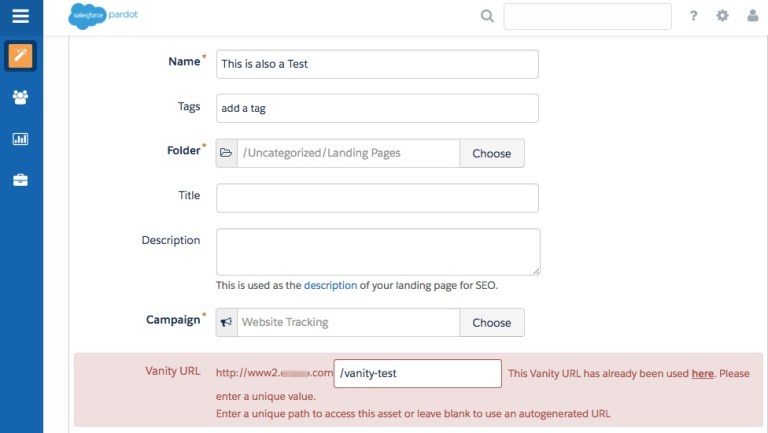
When I create a new landing page and want to have the same URL – it throws an error:
“This vanity URL is already being used here. Please enter a unique value.”
How annoying.

To rectify this, in a new window, head to the Recycle Bin.
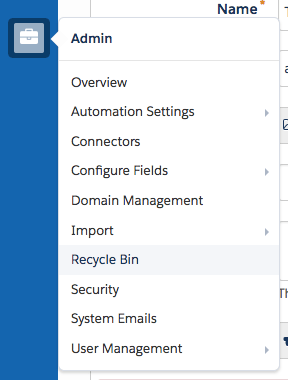
Scroll down the alphabetical list to landing pages, and click to get to the ‘LandingPages: Recycle Bin’ table. Click on the cog next to your landing pages, and ‘Undelete’.
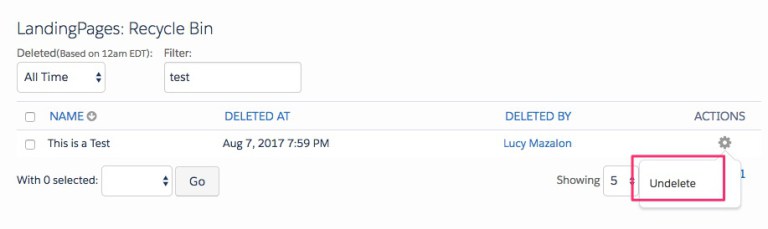
With your restored landing page, edit and change the Vanity URL to any nonsense (or you can just leave blank for an auto-generated URL string), and then delete again.

If you still have the landing page builder open in the other window, you’ll be able to process to the next stage of creation, and eventually save successfully.
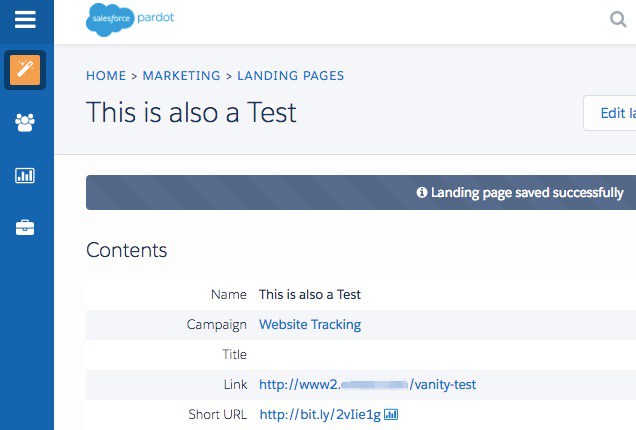
I guess all that’s left to say is yes, it’s annoying, but it’s for the greater good – in case you ever want to undelete a landing page (because it’s impossible to have duplicate URLs in use).

The TIL (Today I Learned) series are short posts about nice tips & tricks that solve little, everyday frustrations – or something remarkable that I have to share.


The Author

Lucy Mazalon

Lucy is the Finance Director at Salesforce Ben. She is a 10x certified Marketing Champion and founder of The DRIP.

More like this:

Marketers

5 Best Practices for Effective Personalization in Salesforce Marketing Cloud Engagement

By Tim Ziter

May 22, 2026
Marketers

Complete Guide to Salesforce Connections 2026

By Lauren Metcalf

May 07, 2026
Marketers

How to Drive Your Marketing Cloud Engagement Use Case to Its Destination

By Alina Makarova

May 01, 2026

Leave a Reply Cancel reply

Comments:

    daniela
    August 24, 2022 8:35 am
    thanks dude! you just saved my day! dope tips ;)
    Reply

Newsletter:

By signing up you agree to our Terms of Use and Privacy Policy.

Find us on:

Salesforce Ben

Salesforce Ben
Unit G.01
189-190 Shoreditch High Street
London
United Kingdom
E1 6HU

  • Where to Start
  • Salesforce Certification List
  • How to Get Certified
  • Free Salesforce Practice Exams
    • Admin Practice Exam
    • Platform App Builder Practice Exam
    • Platform Developer 1 Practice Exam
  • How to Get a Job in Salesforce
  • Events
  • Career
  • AppAssessor
  • Salesforce News
  • Articles by Role
  • Resources
  • Admins
  • DevOps
  • Developers
  • Marketers
  • Consultants
  • Architects
  • Business Analysts
  • About Us
  • Contact Us
  • Write For Us
  • Influencer Program
  • Advertise With Us
  • Pledge 1%
  • Privacy Policy
  • Change Cookie Preferences

© 2014-2026 SalesforceBen.com