






If you look at Salesforce product marketing or visit any of their events, you’ll see AI agents everywhere. Over the course of the past two years, Salesforce has shifted its narrative from what an LLM can generate with your data to how you can run autonomous agents with dynamic business context. When every message promotes the idea of the “agentic enterprise”, there is a risk that we start to treat “agentic” as synonymous with “better”.
I’m just going to say it: Not every AI-powered Salesforce process needs an agent. In fact, I will soon show you why adding an agent where a prompt template would do the job can introduce unnecessary complexity and overhead. Prompt templates aren’t a replacement for Agentforce, or vice versa. They are different tools designed for different problems. Next, we’ll explore the main options for building AI workflows in Salesforce and how to choose between them.
AI in Salesforce Is Bigger Than Agentforce
Rather than treating AI agents as the default, it’s worth weighing your options. Prompt templates are a versatile tool that sits neatly alongside autonomous AI agents. Knowing when to use each approach, or both, is key to unlocking Salesforce as a system of context for AI.
The difference isn’t how “smart” the solution is, but what controls the workflow. Imagine a customer service team wants Salesforce to analyze every newly created case, identify the customer issue, and suggest a response. Does that require an AI agent? Probably not.
A prompt template, invoked from Flow, can handle this workflow with ease. The process is largely deterministic: Salesforce decides when the workflow runs and what happens next. AI comes into play when natural language processing (NLP) is needed. The prompt template evaluates the case, augments it with business context, and generates a grounded response at runtime.
Now, let’s change the requirement. Instead of simply analyzing and summarizing a case, the AI needs to figure out what the customer seeks to accomplish, ask follow-up questions, look up varying sources of information, decide appropriate actions, and execute them. Now we’re getting into Agentforce territory.
It’s tempting to expand the scope towards the latter – but keep in mind that more AI isn’t always better. If customer service is a key value driver and the stakes are high, it may not be wise to delegate the task completely to AI. Depending on which option you choose, the “human in the loop” may become either an active participant or a distant overseer in the process.
Prompt Templates Are More Powerful Than You Think
When prompt templates are discussed in the Salesforce context, the conversation often turns to grounding and RAG. The prompt template takes an input, typically a Salesforce record, adds business context through retrieval augmented generation (RAG), and generates a grounded response.
But that’s not the whole story. A prompt template doesn’t just answer questions. It can classify, extract, transform, evaluate, recommend, generate, or make an informed judgment. Not to mention that its output can become the input to the next step in a workflow. My definition for the prompt template would be as follows: a reusable AI reasoning capability that embeds into a deterministic Salesforce process.
While some might argue otherwise, grounding doesn’t always mean RAG. A prompt template can be grounded in your business context via the use of user prompts, free text, and structured Salesforce data through merge fields without the need for semantic retrieval.
RAG comes into play when you need to incorporate data from Data 360 DMOs, such as fields from external databases or insights from large bodies of unstructured content.
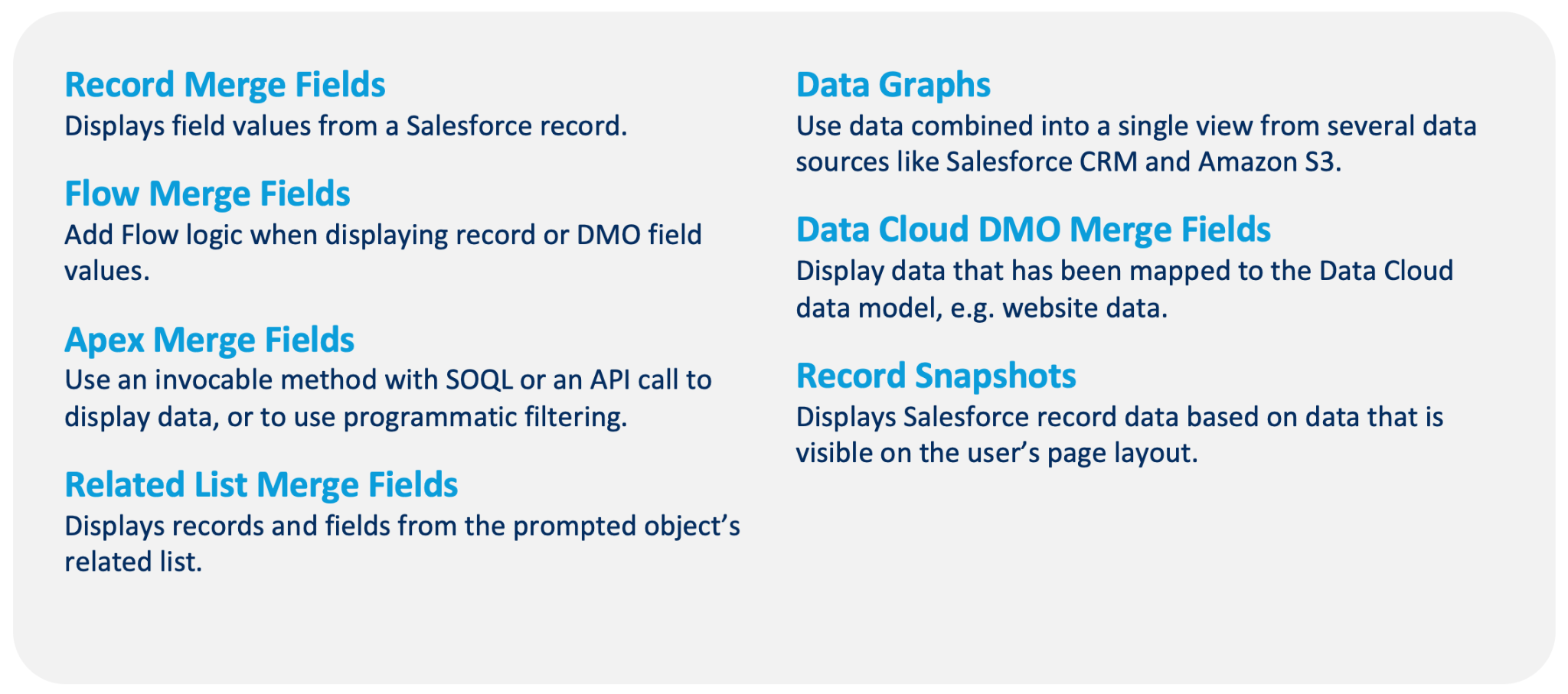
Prompt templates can also be viewed as lightweight “reusable AI functions”. You give it certain inputs: the user prompt, CRM records, instructions, retrieved context, prompt-triggered flows, and invocable Apex classes. The possible outputs then range from recommendations to classifications, evaluations, field values, variables, and so on.
What About Guardrails?
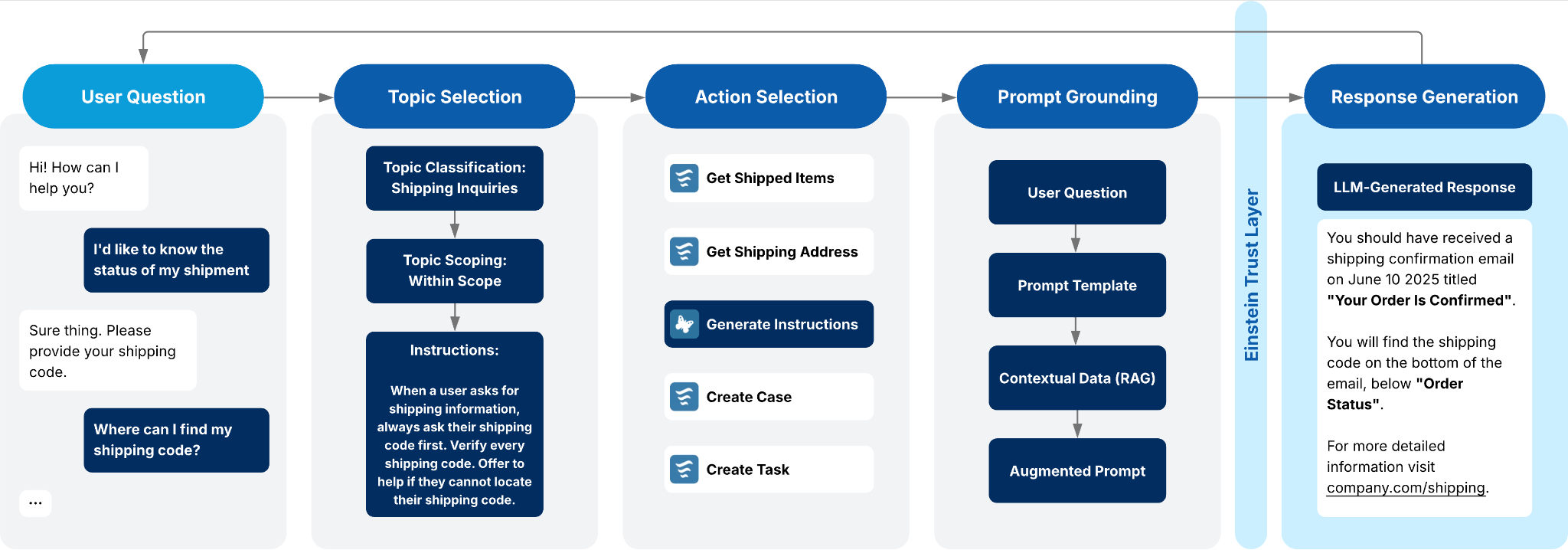
Guardrails are the lifeline that separates promising POCs and successful AI deployments that survive in production. Salesforce provides a range of guardrails to prevent AI from leaking data or generating unsafe or biased responses. Most of these fall under the Einstein Trust Layer umbrella, and both Agentforce agents and prompt templates benefit from it in equal measure.
The difference is that guardrails have a different meaning when we talk about prompt templates vs. autonomous agents. For prompt templates, the focus is on honouring user access to data and generating safe and unbiased responses. Agents require additional guardrails for orchestration and reasoning. You wouldn’t want agents to perform actions relying on sensitive data for unverified customers, for example.
When Should You Actually Build an Agent?
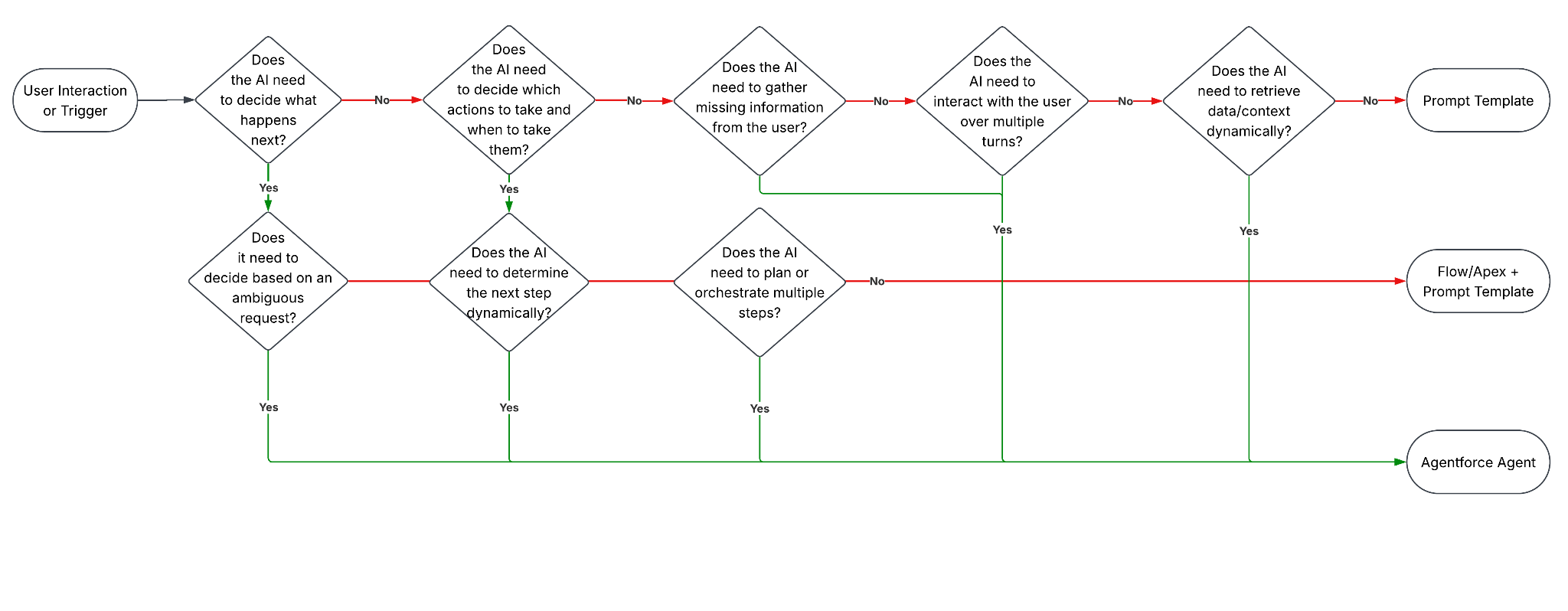
When you plan an AI-powered process, the question you should start with is: How much autonomy does this workflow need? If you already know what needs to happen and simply want AI to perform an intelligent task, prompt template is the way to go.
If the process is open-ended and both inputs and outputs vary, agentic AI may be a better choice. With an agent, you get multi-step reasoning, action orchestration, and the ability to interact with the user.
| Prompt Template + Flow/Apex | Agentforce | |
| Orchestration | Predetermined | Dynamic |
| Decision Making | Developer/system | Agent |
| Steps | Known in advance | Determined at runtime |
| Interaction | Usually one-shot | Often multi-turn |
| AI Role | Intelligent Component | Autonomous Orchestrator |
| Complexity | Lower | Higher |
Some use cases require more than a prompt template. If the process requires the AI to make decisions between multiple possible paths, gather additional information before proceeding, call different actions based on context, or adapt its behavior as new information becomes available, you’re going to need an agent.
A Flow can orchestrate a sequence of steps, and a prompt template can generate intelligent outputs. Neither is ideal when the AI must determine the next step instead of executing a predefined process.
| Prompt Template | Prompt Template + Flow/Apex | Agentforce |
|---|---|---|
Used for:
| Used for:
| Used for:
|
This isn’t always an either-or decision. Many agents rely on prompt templates to summarize information, draft content, extract data, or generate recommendations. The agent provides the reasoning and orchestration layer, while prompt templates handle individual AI tasks. This separation of concerns allows prompts to be reused, tested, and governed independently, making agent behavior more consistent and maintainable.
Final Thoughts
While it’s tempting to go all-in on Agentforce right now, it’s important to remember that not every use case requires an agent. In many scenarios, a prompt template connected to a Flow or Apex class can deliver the required intelligence with less complexity and greater consistency. This distinction becomes even more important as Salesforce moves toward the Headless 360 model, where business logic, metadata, and AI capabilities can be consumed independently of a traditional user interface.
For admins, developers, business analysts, and architects, knowing how to build reliable AI-powered workflows and when to use each approach is becoming less of a differentiator and more of a core skill. The goal should not be to maximize agent autonomy but to choose the simplest approach that meets the business requirement.
Sometimes that means an Agentforce agent. Other times, a prompt template is all you need. The real value comes from understanding the strengths of both and applying each where it fits best.