






The life of a Salesforce Administrator is filled with adrenaline and entertainment – until someone Slacks you with an “Insufficient Privileges” error. Suddenly, it’s time to change hats and play CSI, investigating what went wrong. And if you’re the new kid on the block in that org, I hear you. Some admins (and many devs – I know, totally biased, but still) make some truly creative decisions around record visibility and field access.
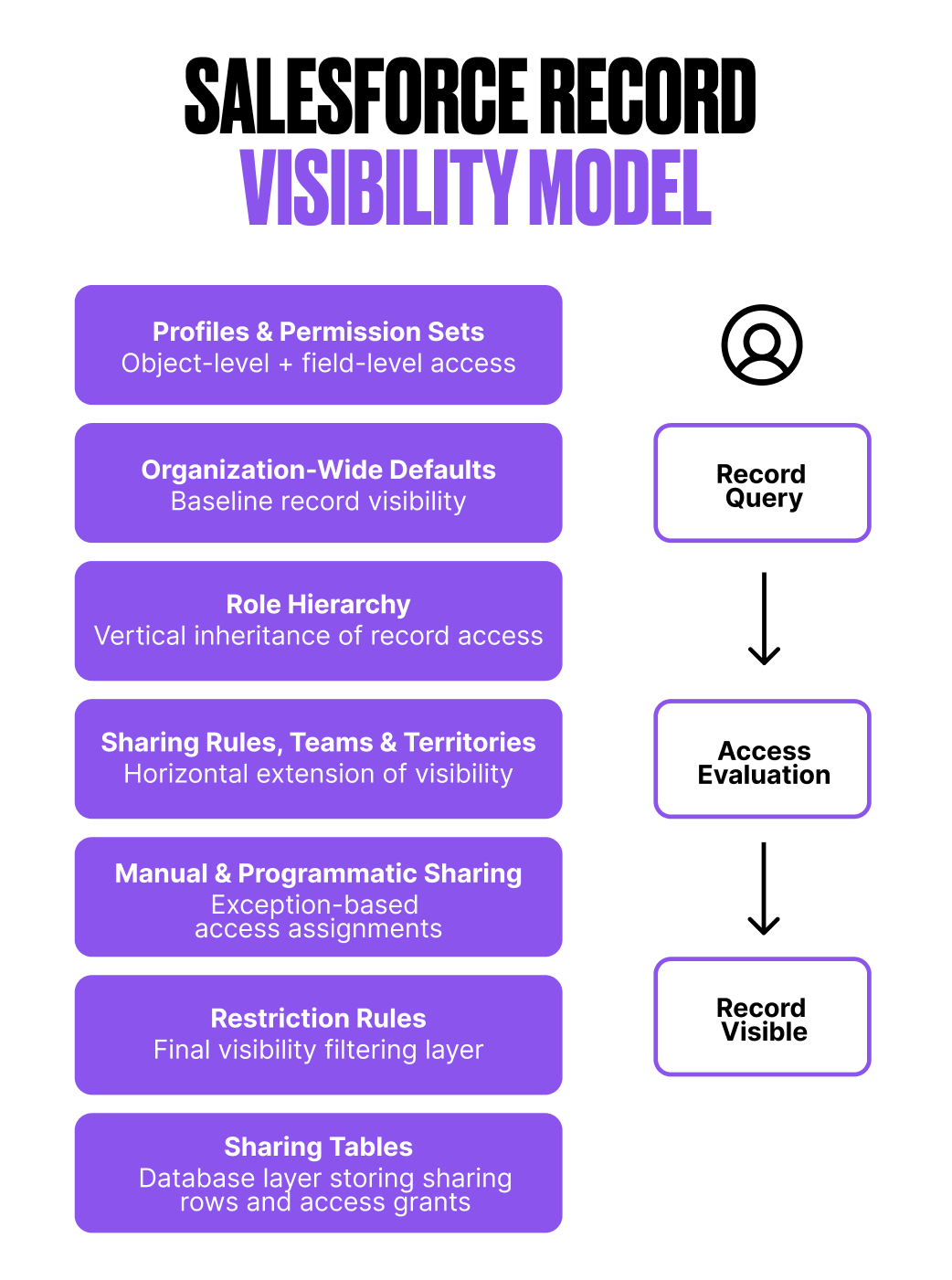
In this article, I break down the many layers behind how visibility and access really work in Salesforce. I realize it’s not everyone’s favorite topic, but it’s one of mine – so I’m hoping to make OWDs, sharing rules, and account teams slightly less painful… and maybe even a little more entertaining. That way, the next time you need to play detective, at least it feels a bit more like solving a mystery than surviving a horror movie.
What Is Salesforce Record Visibility?
After working with the backends of other CRMs, I’ve always thought that the level of granularity Salesforce offers for fine-tuning record access is what makes it stand out. That same granularity, though, is also what makes it complex, and that’s exactly what we’re here to disentangle.
Salesforce record visibility defines who can see and interact with specific records. But because so many layers are involved, it’s easy to overlook some of them, which often leads to bad practices and long-term technical debt.
Visibility is also one of the most sensitive parts of any org. Data is usually what companies care about the most – and at the same time, poor access design can easily become a bottleneck or even a blocker. Personally, I always lean toward being more restrictive when in doubt. If you think about it, managing record access is basically about fine-tuning who gets what… almost like deciding who’s allowed into a party (forgive the comparison, I’m a business analyst – I can’t help myself).
So, let’s lean into it for a second. If you’re organizing a party, you need a guest list – that’s your sharing table. If it’s a fancy party (like a Salesforce org), guests get wristbands defining where they can go: VIP, backstage, or just the dance floor; those are your permissions and object access. Some guests can change the music while others can only listen (Read/Write vs Read). And of course, there’s the bouncer: not everyone gets in. That’s your OWD.
How Salesforce Decides Who Can See a Record
Long story short: the most permissive definition wins. Yes, your OWD narrows the entryway, but that’s just the door.
When you create a user, two big things decide what they can see and do:
- Object permissions: What tables and columns they have access to.
- Record permissions: Which rows they’re allowed to see.
Object permissions are mainly handled through profiles and permission sets. Record permissions, on the other hand, are mostly driven by roles, sharing, and the visibility model.
In this article, I’m focusing on record access, not object access. But it’s important to acknowledge that object permissions can bypass record visibility entirely. Using View All or Modify All grants access to every record of that object, regardless of sharing. For me, that’s a last resort: they’re extremely powerful, and a bit too much of a blunt instrument to use casually.
A classic anti-pattern I see is this: an org gets cautious and strict with OWDs and sharing, but then someone hits an “Insufficient Privileges” wall. Instead of fixing the model, a sneaky admin just slaps Modify All onto the user to make the problem go away. Quick fix, long-term chaos.
Organization-Wide Defaults (OWD): Your Baseline
Who’s holding the door? Your OWDs. Private party or open bar? OWDs define the baseline level of record access for each object, both for internal users and, when applicable, for external users.
The main flavors are:
- Private: Records are only visible to their owner and users above them in the role hierarchy.
- Public Read Only: Everyone can see the records, but only owners can edit them. This is usually a safe default for internal collaboration.
- Public Read/Write: Everyone can see and edit all records. Use this one sparingly, as it’s dependent entirely on your org’s data sensitivity and culture. In party language, this allows anyone to change the music. Sometimes fine, but often a regret.
For external users (partners, Experience Cloud users), OWD is typically set to Private. In most cases, access is better handled through sharing rules. Also note that not every object supports external OWDs.
Additionally, guest users always have Private access by default. They’re not treated as external users – they’re basically standing outside the party, yelling through a door.
Role Hierarchy: Seeing Down the Chain
The manager on the mezzanine can see what everyone on the dance floor does, but not the other way around – that’s role hierarchy magic.
Yes, parts of the role hierarchy might resemble your org chart (especially within Sales), but large portions of it absolutely shouldn’t. I’ve seen far too many orgs with badly designed hierarchies, and in my opinion, this is the heart of record visibility. If it’s strategically planned, it will enable you to keep record access configurations much simpler down the line.
I like to think of roles as a visibility scope, not a job title. For example, if you have someone in Finance who needs visibility into every single account, do yourself a favor and place them at the top of the hierarchy. If the concern is what they’re allowed to do with that data, that can be refined through object and field permissions.
Yes, you could technically achieve the same result using sharing rules – Salesforce always provides you with multiple paths to the same destination – but in my experience, that only adds unnecessary layers of complexity (and record access recalculations) that you could’ve avoided with a clean hierarchy design.
Sharing Rules: Exceptions to the Default
Of course, OWDs and roles alone will never be enough. Every company eventually hits those ‘gotcha’ scenarios where, after setting the foundations, you start opening a few extra doors.
People wear different hats. For example, your Accounts might be set to Public Read Only, but then you have an SDR team running outreach on older accounts. They don’t own them, but they should still be able to update certain fields, log activity, and – let’s say they get lucky – create an Opportunity. That’s where sharing rules come in.
Sharing rules are powerful… and equally confusing when poorly designed.
At the core, every sharing rule answers three quite simple questions:
- What are we sharing? (owner or criteria-based)
- With whom? (roles, roles + subordinates, public groups, or territories — not individual users)
- What level of access are we granting? (Read Only or Read/Write)
In party terms, this is like giving certain guests VIP passes. Not their records, but for business reasons, they need the keys.
And if the criteria get too complex, remember you can also have Apex Sharing Rules. It’s powerful, but should be used carefully, because it adds logic that’s harder to see and debug later. If you’d like to dive deeper into Sharing Rules, Christine Marshall’s article is a must.
Account and Opportunity Teams: Structured Collaboration
The more complex the sales process, the more people get involved.
Since my early days in Sales Operations, I’ve seen an entire zoo of sales roles appear: overlays, solution engineers, success managers, you name it. And today, in most B2B deals, you’re not closing anything with one AE. You need patience, months, and at least two or three people actively collaborating.
That’s exactly where teams come in. If you want to do things properly, you don’t just give everyone Read/Write access and track members through creative lookup fields on the Account. You use Account Teams.
Yes, they need more maintenance. I know the drill. But you’re here for the golden path, aren’t you? Teams exist to grant access so everyone involved can do their job. They’re not meant to manage revenue splits, commissions, or performance tracking — that’s a different problem.
Here’s the key distinction:
- Account Teams grant access to the Account and its related records (Contacts, Opportunities, Cases).
- Opportunity Teams only grant access to the Opportunity level.
Account Team access is constrained by the owner’s own visibility. An owner can’t grant higher access than what they personally have on the Account and its related records. OWD and the role hierarchy set that ceiling.
If your organization also runs with clear regional or account coverage models, then Territory Management becomes another layer in this access puzzle.
And of course, when exceptions occur – because they always do – owners can always invite someone to the party through manual sharing.
Under the Hood: Sharing Tables, Rows, and Row Causes
So, we’re almost there. We’ve just decoded most of the layers behind record access. Until now, we were mostly skating on the surface… but we get a bit nerdier. Is Salesforce recalculating all this every single time a user searches for a record?
Of course not. If the OWD is not defined as Public Read/Write for an object, Salesforce will always, behind the scenes, calculate which records are shared with whom. Instead of recalculating that logic forever, it offloads all that memory and performance pain into a few internal tables – essentially your guest list.
Salesforce enforces record visibility through database-level tables:
- Object Record Table: Stores each record and its owner
- Object Sharing Table: Stores explicit and implicit access grants (sharing rows)
- Group Maintenance Table: Defines group memberships and inherited access
A sharing row grants a user or group access to a specific record. Each row includes:
- Record ID.
- User/Group ID.
- Access level (Read or Read/Write).
- Row Cause (why this access was granted).
If multiple sharing rows apply, the most permissive access wins. So, when you click the Sharing Hierarchy button on a record and see who has access, what you’re really looking at is the sharing table doing its thing behind the scenes.
You can also query this programmatically. For example:
SELECT AccountId, Account.Name, AccountAccessLevel,
 OpportunityAccessLevel, UserOrGroupId, UserOrGroup.Name,
 RowCause
 FROM AccountShare
 WHERE AccountId = ‘yourAccountId’
Almost every object has its own Share object that you can query like this.
Personally, digging into the sharing table – either declaratively or via SOQL – has always been the fastest way I’ve found to debug record access issues. Just make sure to always filter by a specific record ID or a very tight condition.
And one last tip. If you’re about to reshape your role hierarchy, update OWDs, or touch multiple sharing rules, you can defer sharing recalculations. Use it responsibly; otherwise, Salesforce will try to recalculate everything at every step you take. If your org doesn’t have Deferred Sharing Calculations enabled, you might need Salesforce Support to turn it on.
Final Thoughts
Yes, Salesforce security covers more than just record access… but this one is important and deserves some care and love. I know – new business requirements, reports, endless meetings… all of that somehow keeps pushing visibility cleanups to “later”.
But keeping your org under control, reinforcing ownership, responsibilities, and scope, and helping with compliance and data trust will improve your experience massively.
Have I convinced you that record visibility can actually be fun? If so… you might just make it onto the guest list of my next party.





Comments: