

Are you the admin of an org that has already been penetration-tested? If your answer is yes, then that’s all good! But let’s be honest: most of us (especially those in smaller orgs or teams without a dedicated security function) have never had our Salesforce org penetration tested.
First of all, it can get very expensive, plus it usually means bringing in an outside firm or third-party solution, as there is no native out-of-the-box way to do this. So unless you work in a heavily regulated industry where penetration testing is crucial and a compliance requirement, this will more often get pushed to next year’s to-do list.
So when Pete Thurston, Salesforce’s VP of product management and trusted services, announced during the security keynote that an AI agent built to break into your org is coming to Security Center at this year’s Dreamforce, it intrigued me. In this article, I’ll explain what “red teaming” is, why it should be on your radar, what was announced, and what’s still missing from the picture.
What Is Red Teaming?
Red teaming is when you get people (or nowadays, tools) to attack your systems the way a real attacker would, then tell you how far they got. The “red team” will portray the bad guys, and your own security team becomes the “blue team” playing defense.
I used the term “penetration testing” or pentesting in the intro of this article, and that’s because both red teaming and pentesting are often used interchangeably (though they’re not exactly the same thing).
If we’re going to get more technical about it, pentesting is scoped to specific systems where a tester pokes at them and finds weaknesses. Anything and everything that can be exploited is tested, and eventually a prioritized list of what to fix comes up as a result.
Red teaming is the broader and slower version of this, where it targets the whole organization instead of just specific systems (and often without your team knowing it’s even happening). It goes beyond just exploiting weaknesses, in the sense that it hunts for vulnerabilities and can even test whether your security setup notices an attack and responds correctly. That means a red team can even try more “creative” ways like social engineering or physical access.
Either way, the point is the same, and both usually come from an outside firm, which tends to get expensive. This is also the reason why most small and mid-size Salesforce orgs don’t get this done.
Salesforce’s Red Team Agent
The security keynote was interesting, as Pete framed it around three questions:
- What if Salesforce could find things customers haven’t even thought to look for?
- What if it could prove a vulnerability is real, not just theoretical?
- What if it could help you prioritize fixes before an external attacker finds the vulnerabilities first?
His comparison was that typical security tools act like a building inspector. They walk around your house, point at a weak lock, and mention that it’s good you’ve got a spare key under a fake rock. Useful, yes, but passive.
Red Team Agent is meant to act more like a (friendly) burglar. As I mentioned earlier, they portray the “bad guys” by breaking in. If you stuck your password on the back of a sticky note, it can find it and eventually open your safe and steal your valuables. But because it is secretly part of your team, it stops, gives everything back, and tells you exactly how it got in.
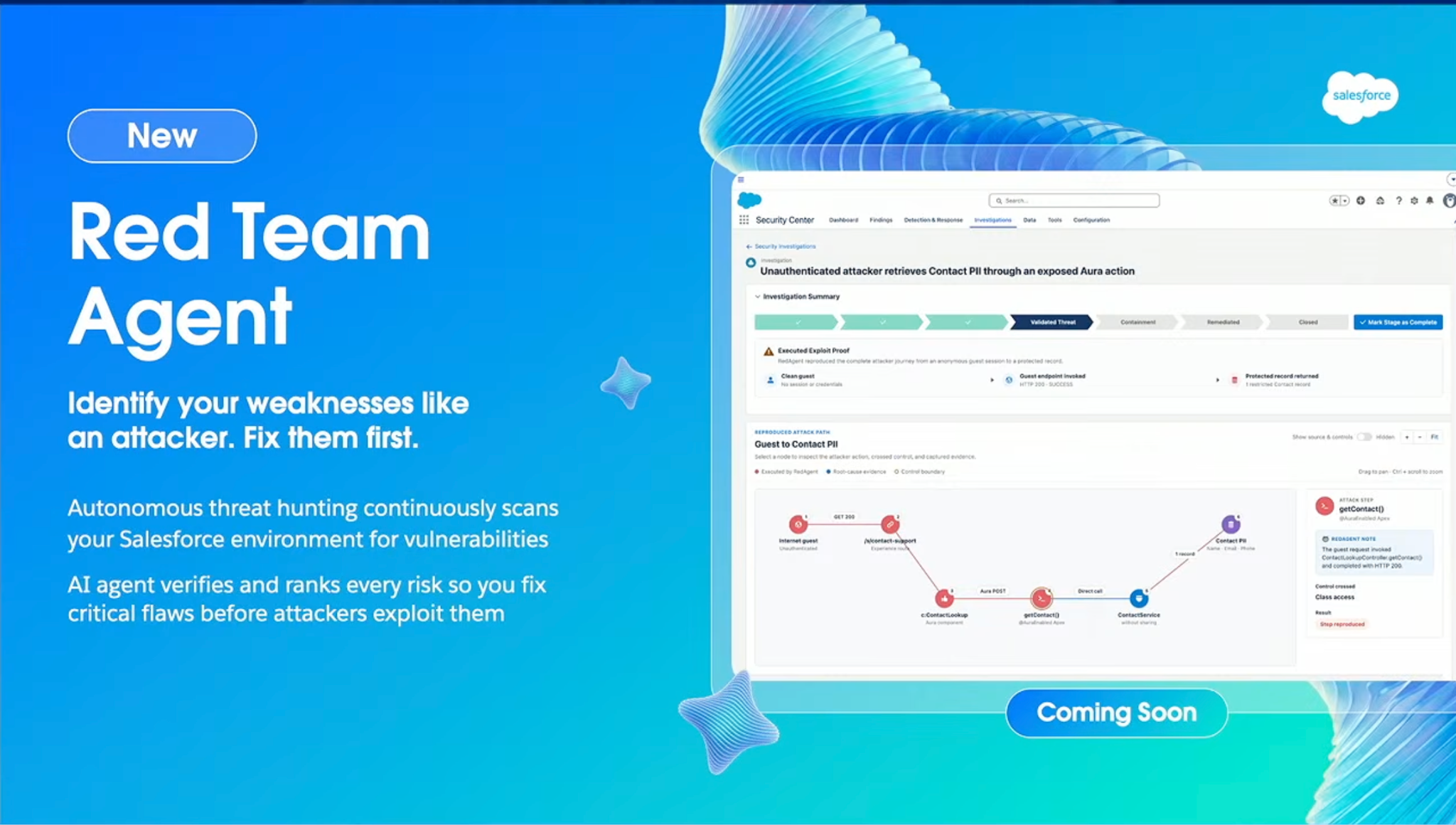
Salesforce says the red team agent was built by their own penetration testing team, who have been using it to cover far more of Salesforce’s footprint than humans could manage alone. This is comforting knowing it isn’t just a concept at this point, but something Salesforce is already running on itself!
Why Should Salesforce Admins Care?
If you remember all the talk about security and new requirements recently, then you’ve most probably already come across the Shared Responsibility Model (check out this article by Christine if not). It basically says Salesforce secures the platform, but you own how it’s configured.
Part of the keynote was spent on this concept, describing a shared responsibility model where Salesforce covers the infrastructure and customers bring the context only they have: which means their users, their processes, and yes, even their AI agents. So if your org’s security is compromised due to overly broad permissions, exposed fields, or risky connected apps, the “fault” is on your side of the line.
We can’t deny AI use is only growing, and its growth is exponential at this point. A prediction was even cited in the security keynote where agents running across enterprise systems will grow ten times by 2027. Imagine expecting your one agent today to grow into 10 agents in just a year! Or your ten agents to become a hundred.
This growth multiplies productivity and convenience, sure, but it also multiplies risk. Treat each one of those agents as a user, with its own permissions and its own way of going wrong. That alone is a lot more surface area than most admins were managing even a year ago.
Tools that flag risky settings already exist, and even Salesforce’s own Health Check score helps. Plenty of orgs use tools that scan for misconfigurations or exposed fields. However, this is significantly different from actually knowing whether someone could get through your system. Answering that question in this day and age usually means paying an outside firm for a proper pentest, which is exactly why most small and mid-size teams have never done one.
The (Human) Problem
Something nags me a bit about all this, though. Before I worked for Salesforce Support, I was a cloud security engineer for an antivirus company. I can tell you firsthand that a big chunk of the security cases I handled every day had one root cause: social engineering. And they got pretty tricky to handle because it’s not really something that can be completely solved by configuring your security setup a different way. After all, even the best security setup can’t save the person behind the keyboard who fell for the trick.
According to Verizon’s 2023 Data Breach Investigations Report, “human element” things like social engineering, human error, and misuse were involved in 74% of breaches. This proves that hacking and malware are real risks, but nothing beats good old-fashioned people-hacking.
Classic social engineering isn’t exploiting code or some complicated technical workaround or hack. It can be something as simple as tricking a receptionist into badging someone in, or even sweet-talking someone on the phone.
Maybe something physical such as scattering infected USB drives in a parking lot and waiting for curiosity to do the rest? And while that last example seems pretty ridiculous, it actually is a well-documented tactic security firms have used for years, because it works embarrassingly often.
Salesforce’s description of the Red Team Agent didn’t tackle these social engineering concerns, and to be fair, that’s a genuinely hard problem for an AI agent. AI-generated phishing and voice phishing calls are already real threats, so I think it’s not unreasonable to wonder whether testing for them is on Salesforce’s roadmap too.
I’m curious to see how they develop this agent further to help against social engineering attacks.
Availability
This is all hype talk for now, as there seems to be no release date yet aside from a vague “coming soon”. Pricing isn’t available yet either, and it isn’t confirmed whether this will be part of the free Security Center Essentials tier or stay behind the paid Security Center. Until Salesforce publishes something official, all of the above is what was shown on stage.
Final Thoughts
The security keynote had mentioned a lot, but Red Team Agent is one of those announcements that stood out to me mostly because it sounds bigger than what was actually shown. I think that’s fine for a keynote stage. There’s plenty of time to refine the feature before the full rollout.
But knowing how there are a lot of small and mid-sized businesses who haven’t had the chance to try out any version of pentesting or red teaming before, I’ll take a tool like this over nothing!
For now, I can only see one layer of the shield, and hopefully the rest comes into focus once Salesforce makes the full announcement. The password is stuck with a sticky note on the monitor, and the stranger on the phone is still someone else’s job to catch, at least for now.