

If you use login.salesforce.com or test.salesforce.com to get into your orgs and are using your username to log in, Salesforce sent out an email in September stating that they will be making email the default login option instead, with production orgs entering the rollout window this October.
This email login experience was released last year, and while it is convenient, the community’s reaction to making it the default has been pretty mixed. A louder part of the reactions has been asking Salesforce not to push through with this, as they see it as a security problem dressed up as a UX update. Both groups who like it and don’t each have a valid point, so let’s look at what’s changing, why Salesforce is doing this, and what to do on your end.
What’s Changing?
Salesforce emailed admins about this on September 11, informing them that on login.salesforce.com and test.salesforce.com, the login page will now ask for your email address first. This was actually a part of the Spring ‘26 release notes. But don’t worry, as username login isn’t going away. You’ll just need to click “Login with Username” to get to it.
Here are the initial rollout dates:
- Sandboxes: August 2026.
- Production: October 2026.
- Mobile apps: Salesforce’s Help article says they are tentatively planned for late 2026.
- Not affected: My Domain login pages and Experience Cloud login pages.
There’s also another login-related change earlier this year, where Salesforce has been rolling out a username-first login experience for My Domain login pages. This is where you enter only your username, then get prompted for your passkey or password.
Why Is Salesforce Doing This?
Salesforce’s reasoning has two parts. The username-first change step is meant to make passkey login smoother, and Salesforce refers to passkeys as the fastest, easiest, and most secure way into the org (this aligns with the recent MFA requirement changes as well).
As for the email login, it was described as a way to create a unified login process. So instead of having to remember unique usernames, you type your email and find all your associated accounts.
To be honest, I couldn’t find a solid security rationale for making email the default, and it might even be doing the opposite. Even at Dreamforce, this topic came up at True to the Core, and their answer focused more on safeguards instead of the main reason. Even the documentation frames this more like a convenience.
What if I Have More Than One Username?
The simplest case is one email, one username. But what if your email is tied to several usernames, which isn’t exactly an uncommon thing?
Logging in with your email usually sends a verification code to your email address, which then leads you to the Environment Switcher upon providing it.
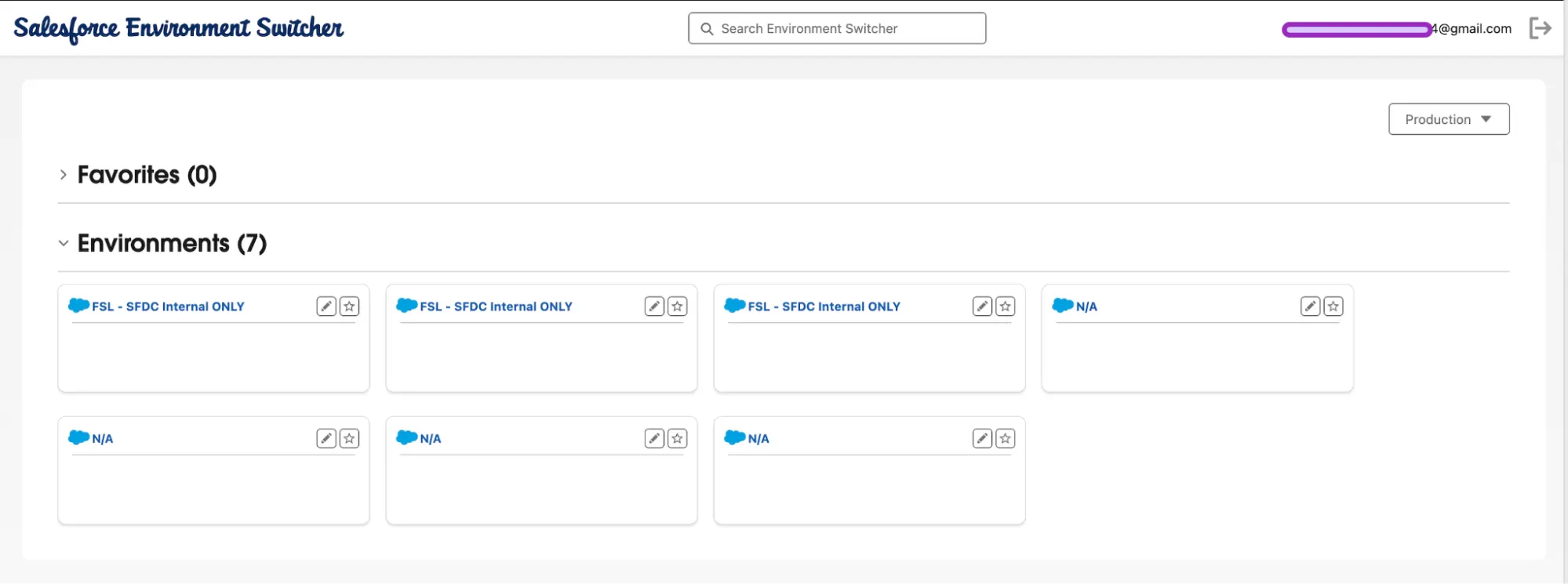
I’ve edited this screenshot to hide org info, but each box contains the username and URL for the org it corresponds to.
More Confusion
Every user has a username and an email address, and the username also has to be formatted like an email. So for some people, the two may be identical, but for plenty of others they aren’t.
So this is where the default login matters. If your login page asks for an email, it’s valid if someone accidentally types what looks like an email but is actually their username. Or the other way around, where they type their real email and get directed somewhere unexpected because they have accounts in more than one org. It’s a tiny bit of friction.
What the Community Thinks
Talk of this change came down on a Reddit thread, and reactions seem to be split almost down the middle.
The people who say “it’s fine” say the email flow is smooth once you’re used to it. And with the environment switcher anyway, it’s as easy as typing your email, seeing every org you have access to, and clicking in. Some even pointed out that if you have passkeys on all your orgs, it actually means fewer clicks.
Others also say it’s not that big of a change since it only touches the default login.salesforce.com and test.salesforce.com pages, not My Domain URLs (which is where most people log in day-to-day anyway).
On the opposite side of the coin, those who see this change as a headache seem to be those people with lots of orgs. For example, consultants and partners juggling production plus multiple sandboxes across clients say an extra selection step for every login adds up fast.
For someone who has about 17 active dev orgs and logs in through username favorites in the browser, this is an extra step. The pushback even reached Dreamforce, where it came up in the True to the Core Q&A.
The Plea from IdeaExchange
What’s interesting is that this change birthed an IdeaExchange request, with the title “Do Not Make Email the Default Login Experience,” asking Salesforce to stop the change. It’s up at 760 points as of this writing, and was submitted by Tom Bassett.
The core argument is that usernames have always required some specific knowledge to discover, while email addresses are widely known, easy to guess, or exposed in unrelated breaches. If an email address can pull up a list of every environment and username tied to it, you’ve essentially handed an attacker a map. Tom says that in their own org, a single email lookup can surface 69 separate environments.
Salesforce’s Answer at True to the Core
The topic came up live at True to the Core at Dreamforce. In Salesforce’s defense, knowing the email isn’t enough – you’d need access to the inbox too because that’s where the verification code will be sent, in addition to protections they say they’re doing behind the scenes to stop bots.
But here’s my take: we all know the issues and complaints that came in with Salesforce’s recent MFA enforcement requirements, and one of the arguments for adapting those changes is that simple email verification isn’t considered enough security. If that’s the case, why lean on email here?
Tom’s ask on the IdeaExchange is to keep username as the default, or at the very least not to show the full list of usernames and environments from an email address alone. They also note that the workaround (using My Domain exclusively and blocking logins through the standard pages) protects only orgs whose admins configure it, which of course isn’t better than actually being secure by default.
As of this writing, Salesforce has not officially responded to the idea, and people’s reactions to Tom’s sentiments can be found on his LinkedIn post. They also shared on True to the Core that for multi-org users, they’re working on auto-favoriting login hints, so picking an org should get faster.
What to Do
The good news is that this change does not affect your passwords, passkeys, and MFA. Registered passkeys also work with both username and email login methods. The only difference is what the login page asks first, so a few quick checks you can do now are:
- Look for shared or unmonitored inboxes. If you’re using a shared email address or can’t receive mail with it, email login is not advisable for you. Make sure users are informed to switch to Login with Username (see image below), or better yet…
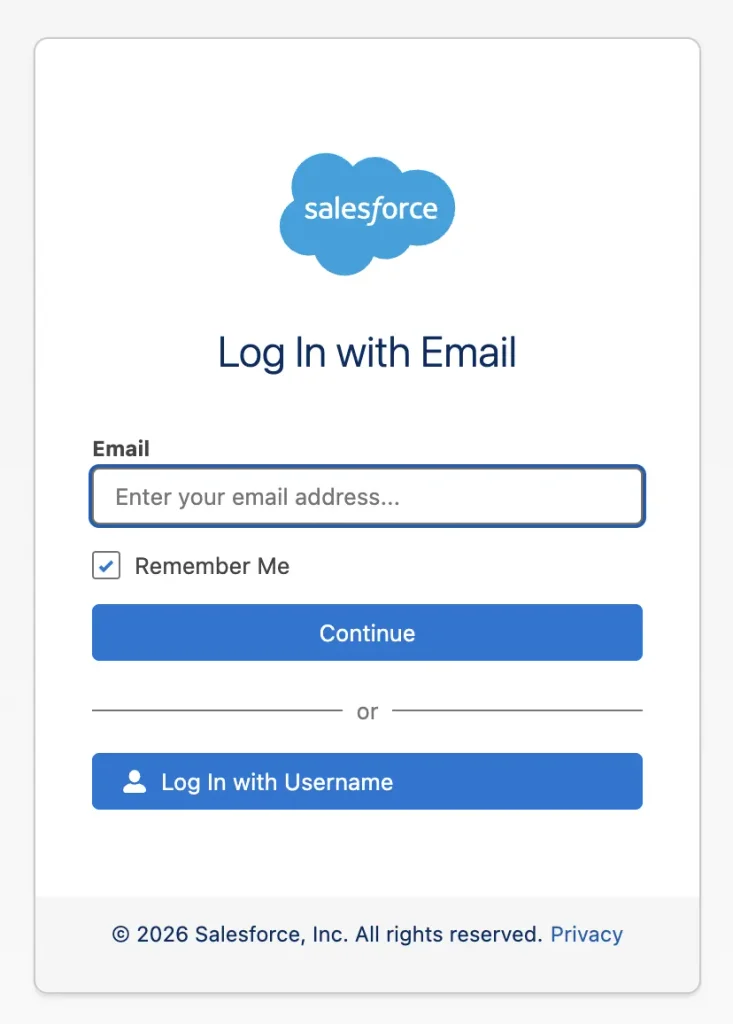
- Inform users to consistently use your My Domain URL instead. Since this is unaffected by the email login default, users who use My Domain anyway will not feel the change. Bookmarking it would be best!
- Check anything that logs in through the affected pages. Automated UI tests and scripts will hit the new email prompt, and Salesforce’s fix is to add ?login=1 to the URL so they land on the username screen.
Final Thoughts
Having email login as the default for pages like login.salesforce.com and test.salesforce.com is not going to break your org, but with that said, I don’t think the people worried about it are overreacting either.
Both sides have valid points, and at this time a verification code sent to your email address works just fine. I’d be happy to hear Salesforce’s true answer to “why email, and why now?”, but until they provide something other than convenience and unification, I’m pro-username login while it lasts.
In the meantime, it would help to double-check your inbox security and treat it as another layer of your org’s security perimeter! How about you? Has this recent change been a positive or negative for your user experience and security? Let us know in the comments!