






The Activities object in Salesforce is where users will log much of their day-to-day work, particularly for Sales and Sales Development teams. These teams are typically calling prospects and trying to drum up new business for your company.
Knowing how many calls are being made and completed, or the number of emails being sent over a given time period, and by a given rep, will help you understand what your team members are working on. These KPIs will also help you to improve in areas that need to be strengthened, or identify when new team members need to be added. In this article, I’m going to share eight examples of important KPIs that might be helpful to you when analyzing your Tasks and Events (Activities) in Salesforce.
1. Current Number of Open Activities
All activities have a Status in Salesforce. Knowing the current number of open activities at any given time gives you a quick window into what kind of volume your team is dealing with.
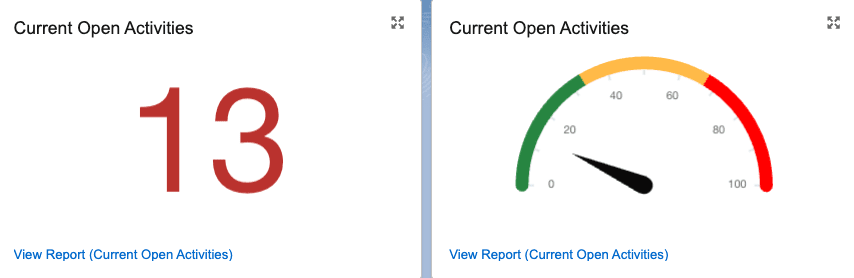
Displaying this component as a speedometer can help your team understand if they’re close to being at capacity or overwhelmed with the number of open activities.
2. Number of Open Activities per Person
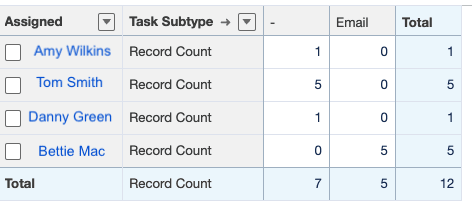
Similarly, keeping an eye on the open activities per person will allow you to identify any reps that might be overloaded, or not completing their activities in a timely manner. Or even find other team members who can share some of the work. Consider adding a subgroup for Type to understand the full balance of each team member’s workload.
3. Number of Completed Activities Weekly
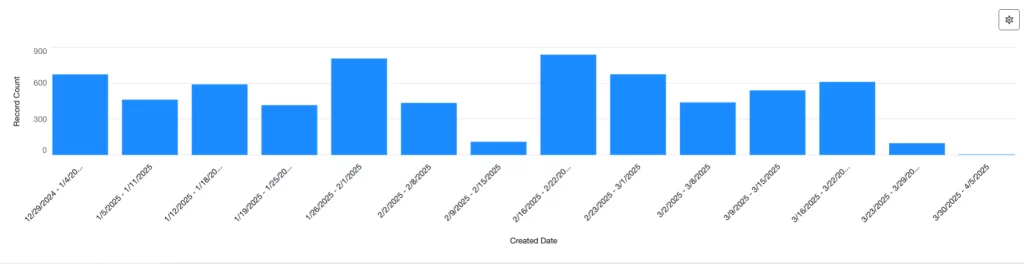
Tracking the number of completed activities weekly (or monthly, quarterly, etc) historically will let you know if you have any peaks or valleys in your business, and prepare for any busy times in the future.
4. Number of Activities by Type
Depending on how your business is using Tasks/Events, you may have only one type of activity to report on, or you may have several. Likewise, your team’s training might require them to do 75% phone calls, 25% emails, or some other metric. Knowing the kind of tasks that are open, along with grouping per person, will help you identify any areas of improvement in the team or where more support may be needed.

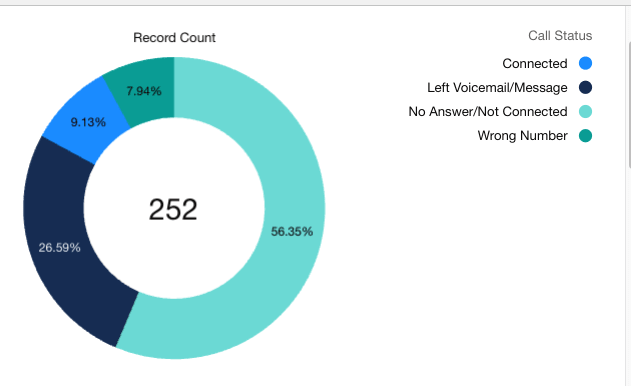
5. Call Completion/Answer Rate
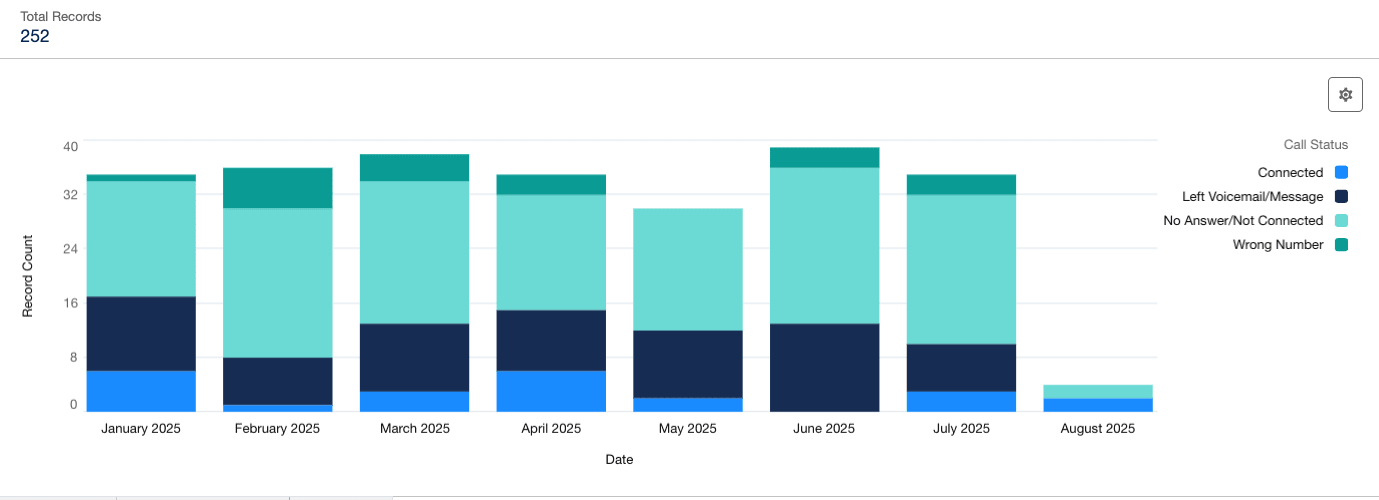
Just dialing a phone number is typically not enough to generate a new Lead! The goal of every dial is to connect with someone and perhaps schedule an introduction or additional selling opportunity. Reviewing your call completion rate will tell you which reps are skilled in this area, and give you insight into who might need more training. It can also create shadowing opportunities where newer, in-training reps can learn from the more experienced members on the team.
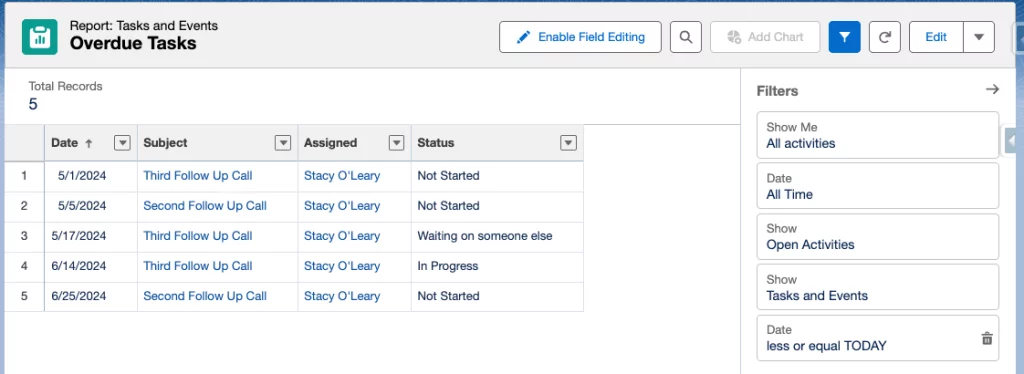
6. Open Past Due Activities
Activities that are in an Open Status, but the due date has come and gone, should be resolved or closed if no longer relevant. This will keep your hygiene clean in your org when users are looking at any related records.
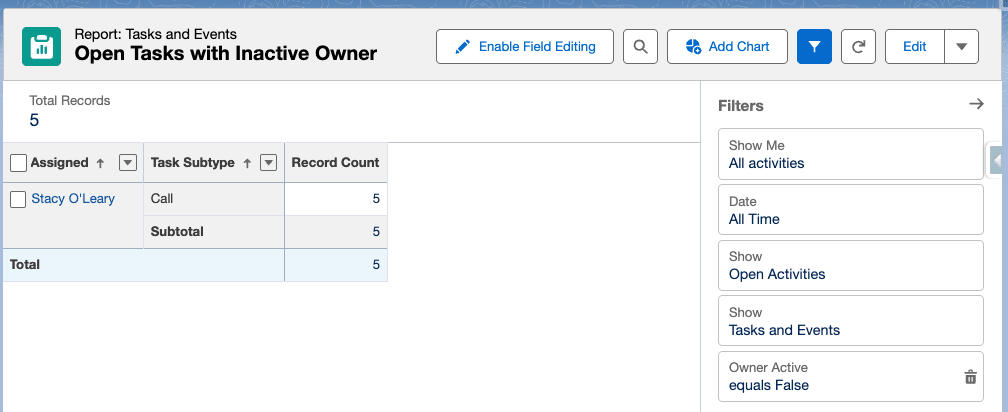
7. Activities Owned by Inactive Users
You may also want to review that there are no Tasks or Events owned by Users that are no longer active. If so, either resolve or reassign those activities. This will require a custom formula field (checkbox) on the Activity Object – fortunately, it’s an easy one: Owner:User.IsActive.
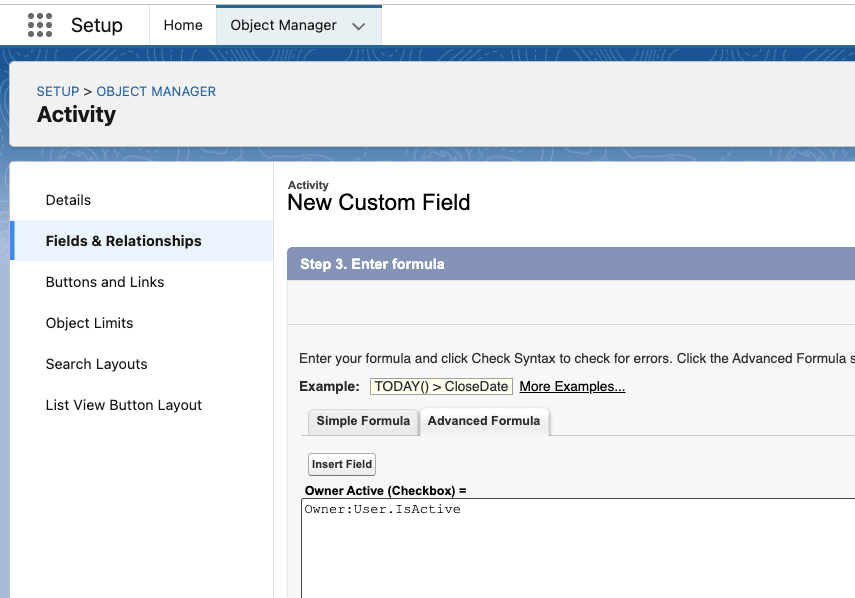
Once that is created, you can use the formula on a report:
8. Third-Party Activities
Many integrations (like Outreach.io, SalesLoft, Marketo, HubSpot) that connect with Salesforce will push records into Tasks or Events – these events can be logged calls, emails, action items, or even just records of things like form fills, sign-ups, imports, whitepaper downloads, etc. Take a look at your database of activities to see what your org has, and see if there are any valuable KPIs to extract from that data.
Summary
While these KPIs are not an exhaustive list, this should be enough to get you started on reporting on Tasks/Events in Salesforce. Knowing what is being worked on, or what needs to be worked on, will help the team become more efficient and successful, which in turn will support revenue generation for your entire business.
If you’d like some ideas of what KPIs to track for Sales, you can check out this article, too. Do you have any suggestions for great KPIs to track for Activities in Salesforce? Let us know in the comments below!





Comments: