







It’s been a year since I asked, “Service Cloud No More?” at Dreamforce 2025’s Service Keynote. That was when Salesforce put Agentforce Service on the Dreamforce stage as the next evolution of Service Cloud. Twelve months later, the answer appears to be: never mind, we’re sticking to Service Cloud!
Naming aside, this year’s Service Keynote had one main idea guiding everything else that was announced, and it’s that the customer doesn’t see your org chart. Kishan Chetan, EVP and GM of Agentforce and Service Cloud, opened by asking who owns the customer, then pointed out that different departments in your company all think they do, while the customer just sees one thing: your company as a whole.
His diagnosis for why customer experience still feels disconnected after years of AI investment is that investments were made by department, and that equates to siloed tools eventually producing siloed experiences for the customer. So, what exactly are these features/tools, and who were they made for? Let’s dive in.
For Customers: Casey, the Help Agent
Annie Weinberger, CMO of Service, introduced Casey as an out-of-the-box Agentforce agent purpose-built for customer service and trained on actual Salesforce docs from Salesforce Help.
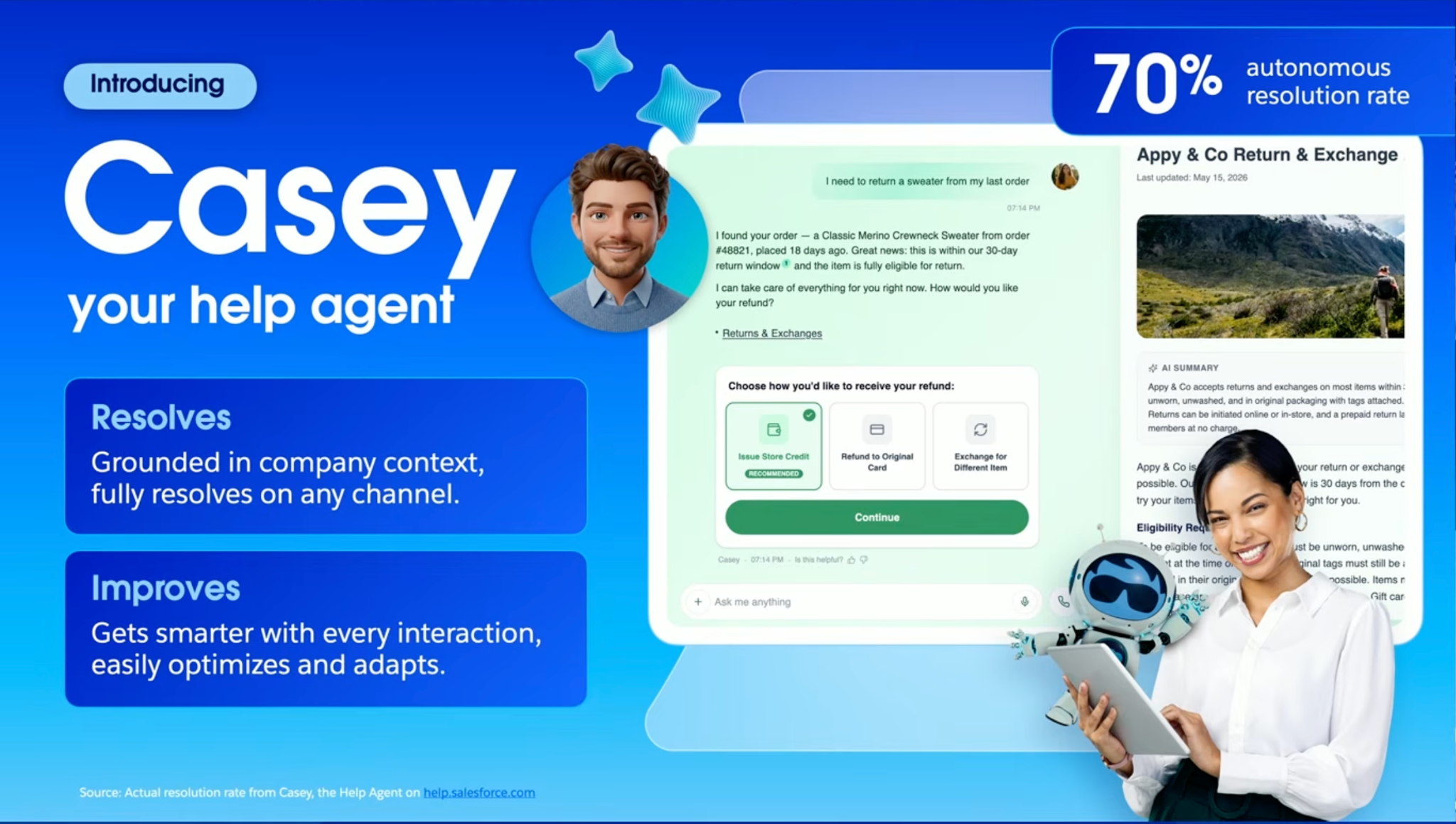
At first I thought Casey was an entirely new agent, but it was actually formerly known simply as “Help Agent”. This was part of the September 11 wave of “friendlier” named agents alongside Paige, Carter, Marshall, Piper, Hunter, and Fin. They are all GA as of this writing (except for Hunter, who’s on pilot and will go GA in November).
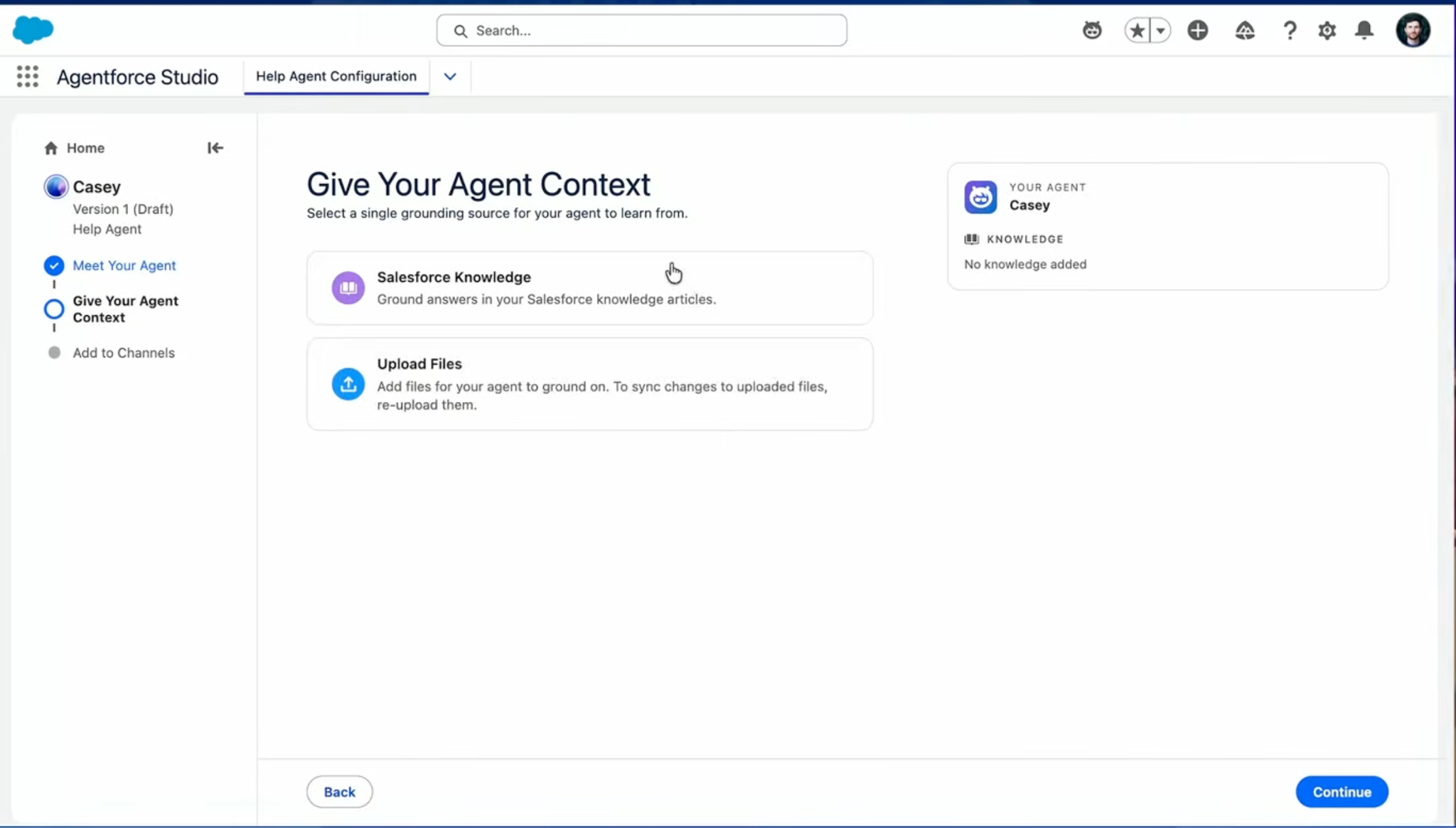
This isn’t just another rename, though, as the keynote provided a setup demo which proved to be useful. The new quick start setup for Casey gives you capabilities like:
- Adding Salesforce Knowledge, then drag and drop articles, PDFs, and URLs for anything unstructured.
- Attaching Casey to channels, including voice, by attaching a phone number.
- Testing it live on the same screen.
Weinberger then called Casey and asked about returning a jacket without a receipt, then followed up asking whether her daughter could return it in Canada instead. Casey reasoned through the return policy and handled the hand-off between the two scenarios without being re-prompted. This may seem like a pretty simple scenario, but most bots would deflect in cases like this, so it was a fair one to run live.
Another example is where Casey’s dashboard flagged rising escalations, and instead of digging manually, Weinberger handed it to the (soon-to-be-launched) Agent Optimizer, described on stage as an “agent improving your agent”. It scanned conversations, ranked contact reasons by volume and automation potential, identified promotions as the biggest opportunity, then wrapped existing Flows and Apex classes into agent-ready actions automatically. Casey could then issue a retroactive discount end to end.
My admin mindset was skeptical for one second, and then I wondered whether existing automation becoming agent actions (without a developer touching it) is the best or the most alarming sentence in the whole keynote. If you are confident in your org’s automation and Flow inventory, then I think that’s fine and can potentially be helpful, but we know that not all orgs are ideally “clean” or free from technical debt. Surely that affects agent performance?
For Service Reps: The New Service Rep Agentic Console
It seems Salesforce has rebuilt the service rep console, and its goal is to give reps everything they need, all in a single experience. One of the things that stood out to me was that work prioritization now factors in customer lifetime value and retention risk. So instead of the oldest case being surfaced, the most valuable or most important work is what rises to the top and becomes more visible.
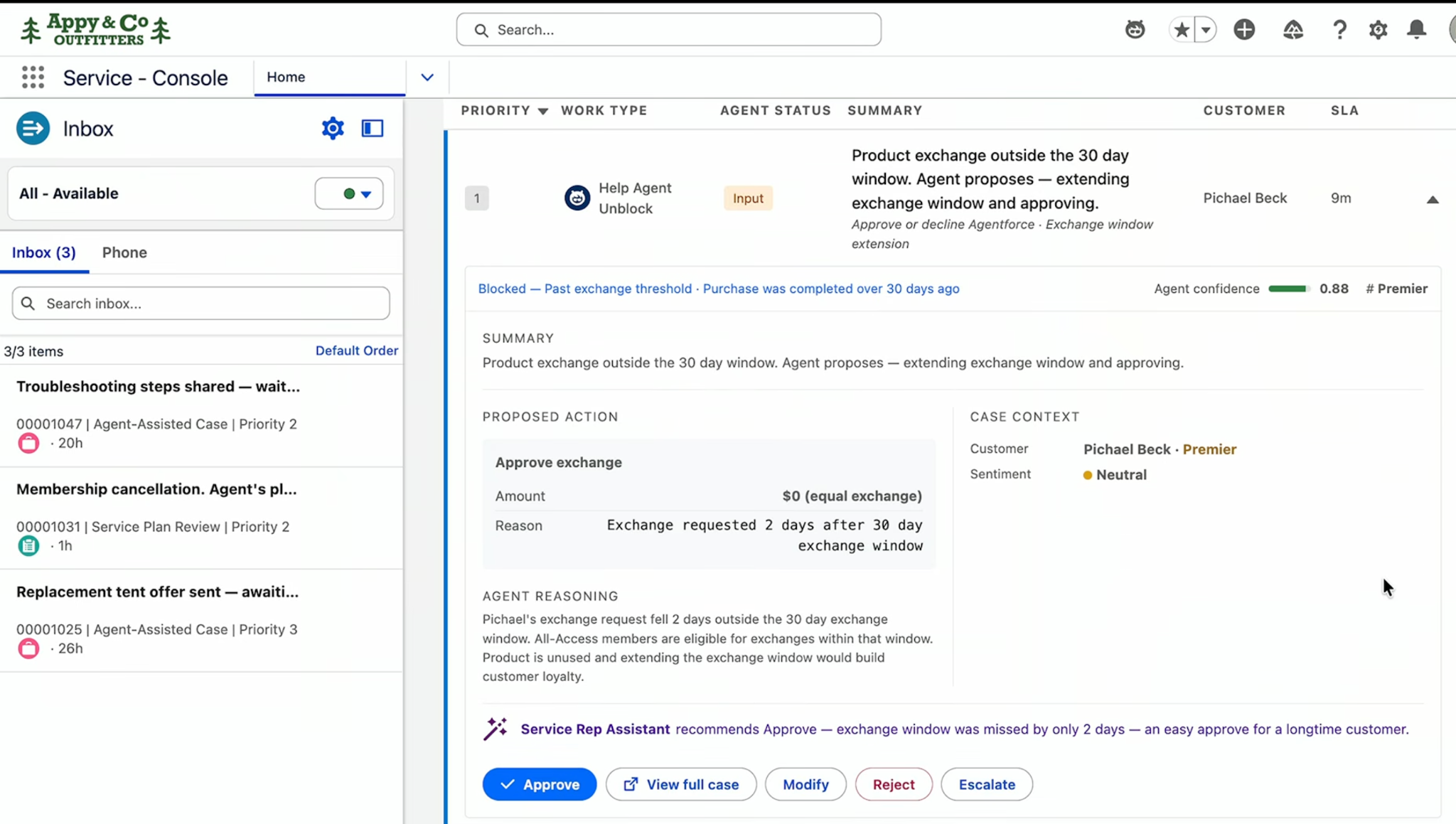
Second, there’s a new type of work in Omni-Channel called agent approvals. When Casey hits a policy boundary, for example, it can’t move to the next step on its own because it needs human approval to do so.
It routes an approval request to a human rep, who reviews and approves it so Casey can finish the job. This happens all within the console! It’s perfect for workflows where AI needs a human person for authorization, and is seamlessly queued and routed like any other work item in Omni-Channel.
Having worked in Salesforce support before, escalation meant the case left my hands and became someone else’s problem. I had to do my documentation well, so as to avoid having so much of the context lost in the transfer and further increasing customer frustration when they have to provide the same information they already gave me.
The second demo solves this pain point, as it covers a live escalation from a voice agent. Everything from conversation summary, order history, and full interaction details is already populated before the rep even says he picked up the conversation; then the Service Rep Assistant helped with the best resolution as the case progressed. Towards the end, the case is automatically summarized and closed.
For Service Leaders: Hybrid Workforce Management
With the continued rise of AI and the increase in usage of AI agents these days, it’s only a matter of time until the workforce becomes a hybrid one, or an equal mix of humans and agents.
Oana Lungu Polanco, Senior Director of Product Management, made the case that reporting still treats humans and agents as separate despite service leaders now managing a hybrid workforce.
Their answer to this is the Command Center for Service, which gives real-time visibility into conversations across both humans and agents, including sentiment, with the ability to click in and monitor a live conversation. On top of that, Salesforce announced new hybrid workforce management capabilities:
- A live intraday view of every team and territory, with Agentforce able to reoptimize activities mid-day.
- Agentic forecasting built on your existing historical demand data in Service Cloud.
- Capacity planning that covers AI agents as well as human reps.
- Shift creation and scheduling, requested in natural language.
Screenshots below show the Intraday view for reps, showing real-time work, and the Schedule Manager. I won’t lie, this reminds me so much of tools from Field Service, wherein the resulting optimized schedules were such a pain to troubleshoot back when AI wasn’t involved, and it was all calculations based on service objectives and scheduling policies.
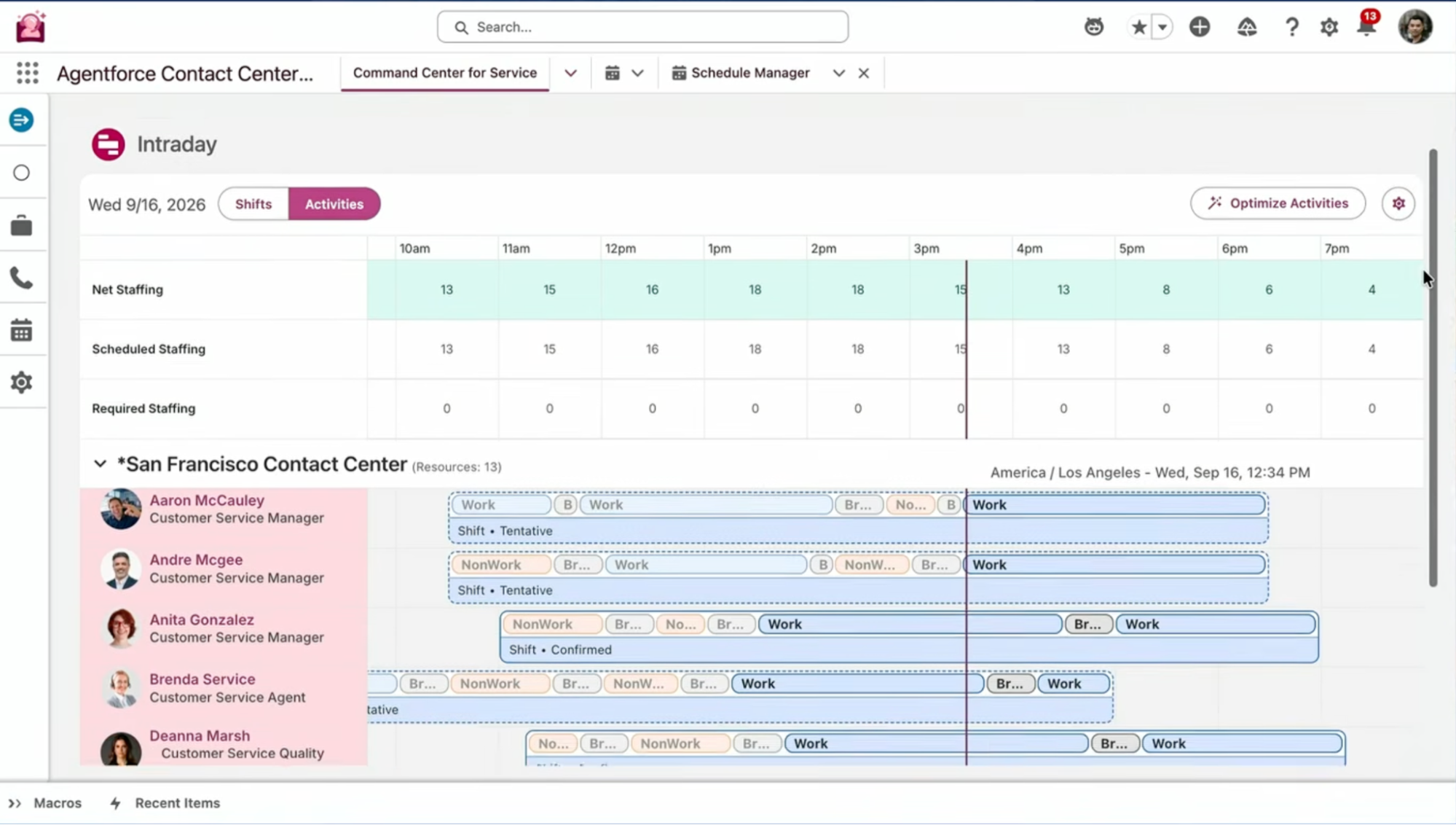
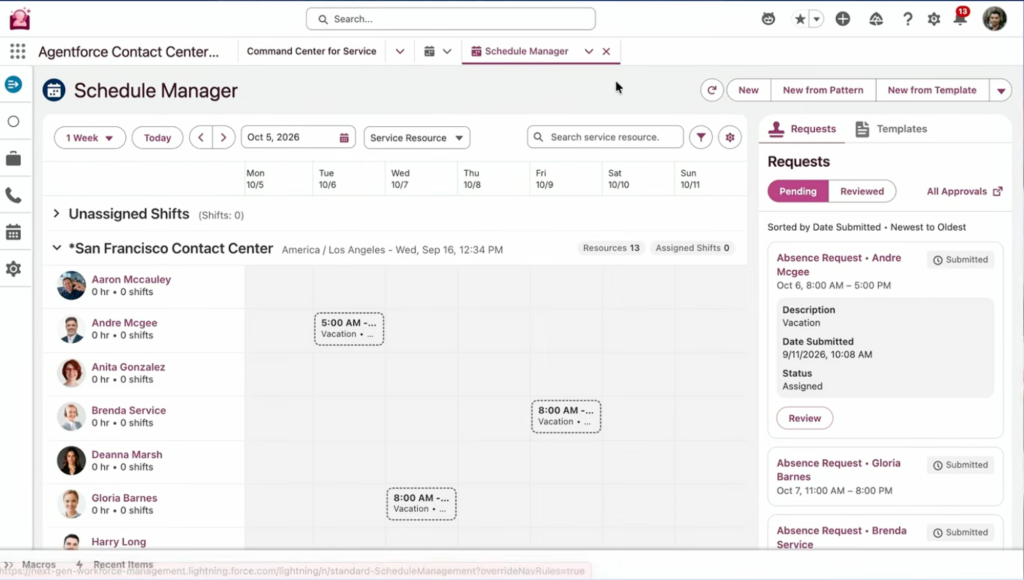
Workforce planning can take hours, and now the whole plan can be built in seconds (bonus that the workforce management happens inside Salesforce as well).
For Admins: Conversational Setup
Prasad Raje, SVP of Product Management, framed AIforce as turning Service Cloud setup into a headless and conversational experience. The mechanics are interesting, as Salesforce took its existing setup processes (yes, including the dependencies, prerequisites, and screen-hopping) and converted them into a set of instructions inside a skill file.
Then they added the actual Metadata API calls alongside those instructions. That package is handed over to a coding agent (Claude Code was used on stage), and it can run the deployment. At first this felt far from the traditional admin territory we’re used to, but if this isn’t a signal that the admin role is evolving, then I don’t know what is.
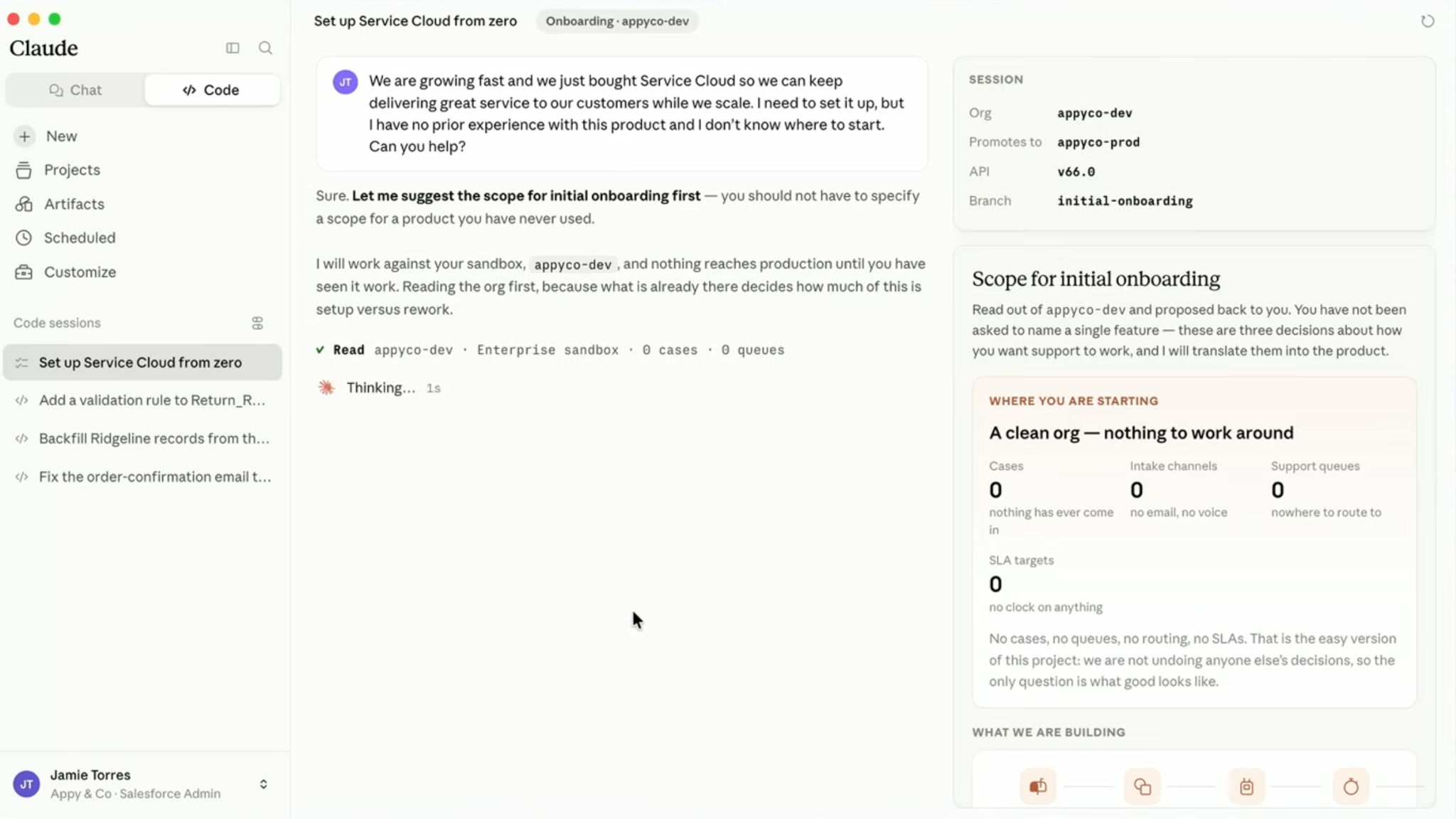
The demo followed a new admin who described what she wanted in business terms. The skill asked her a series of questions about channels, queue structure, and whether she wanted to track average handle time, collected the specifics like support phone number and email, then executed the sequence of steps she’d otherwise have clicked through. The output is a manifest she publishes to a sandbox to check before going live.
Salesforce also pitched this to partners, who can pair their own industry skills with the deployment skill.
My honest reaction is that this is (mostly) a good thing for admins, especially beginners. Even the admin used in the demo (Jamie) was described as one who “doesn’t know what she doesn’t know” and who hasn’t done a lot of deployments in the past. I do have some questions not answered in the demo:
- What exactly is in the skill file, and can you read or modify it before it runs?
- What permissions does the agent run with, and what does the audit trail look like?
- What happens when the conversation misunderstands a requirement, and you don’t catch it in the sandbox?
None of that was covered on stage, which I understand can be too specific for a keynote. But “Jamie can go off and get a cup of coffee” is a much smaller promise than it sounds once you’re the one accountable for the applied configurations.
I feel like it’s worth being precise about why this works for someone like Jamie, as there is a thin line to tread here. Basically, the workflow is being described by Salesforce as “describe what you want conversationally, publish to sandbox, take a look”, which I think works in this scenario because obviously Jamie still knows her business requirements. The skill file isn’t replacing her judgement, just her need to know which screens to click on to execute that judgement.
But if you apply the same mindset somewhere outside of Jamie’s skills, such as a conversational setup for custom Apex or an integration, she won’t have the same judgement and won’t have a way to evaluate or review the output properly.
The workflow that Salesforce is promoting is only as safe as the reviewer’s ability to actually judge what they’re looking at. For declarative admin work (like setting up Service Cloud in this scenario), that bar is usually met. The moment this mindset gets extended to anything where the person driving it can’t read the output, it gets a lot riskier than it sounds, and I think we should ground ourselves and be more mindful of this as features get more and more powerful with AI.
Final Thoughts
What I took away from the keynote is that Dreamforce ’26 was more of a “packaging” year for Service than a big reveal. Casey, Command Center, and conversational setup all existed before, but this time Salesforce assembled them into a single story about humans and AI sharing work.
If anything, the advancements this year feel like they’re all going toward the same goal of the admin or rep doing less “actual” work, and more of deciding and overseeing what the automation/agent is allowed to do or checking whether it did things properly. Last year I asked whether Service Cloud was gone, and this year the name came back, but the job description is drifting further away from what we’re used to.
All images taken from the Service Keynote:





Comments: