

Salesforce is the most powerful CRM ecosystem in the world. But with that power comes breadth, which can introduce friction in day‑to‑day workflows. Large platforms optimize for many teams and many use cases, which means a simple update can involve tab switching, extra clicks, and context spread across multiple views. Think of it less as a flaw and more as the natural tradeoff of an enterprise‑grade system that serves everyone from sales to service to operations.
Grid solutions fill that gap with precision. A modern Salesforce grid solution provides a 360° view of your data on a single pane of glass. Users get a spreadsheet‑like, Excel‑style experience right inside Salesforce, including inline editing in Salesforce, advanced filtering and sorting, and bulk actions that keep work in flow. The result is higher adoption, stronger utilization, and tangible productivity gains without leaving the platform or compromising governance, which is why teams increasingly look to a Salesforce Lightning grid to handle the work they used to push into external spreadsheets.
In this guide, we focus on how grid interfaces make everyday Salesforce work faster and clearer: what they are, when to use them, and the capabilities that matter. We outline the benefits a modern Salesforce Lightning grid should deliver, and finish with a practical checklist you can apply to any Salesforce grid solution.
Why Grids Matter in 2025
Even great platforms accumulate small inefficiencies over time. Users hop between tabs, open new pages to edit, and piece together context from several lists and views before taking action. These micro interruptions slow teams down and, in some orgs, push people back to external spreadsheets. AppExchange grid solutions address this by introducing a Salesforce grid view that offers the complete picture in one unified view, along with an Excel‑like, editable grid that keeps users in flow.
From a daily workflow standpoint, the most requested improvements are straightforward: inline editing in Salesforce, multi‑column sorting, quick filters, and the ability to take bulk actions without leaving the page. A modern Salesforce sortable data grid does all of this in one workspace. When the grid follows Salesforce SLDS grid conventions and feels native, users get up to speed quickly, which is the foundation of better adoption.
Grids also raise data quality, which directly impacts AI performance. They keep updates inside a single, governed view where standards are applied consistently, gaps are easier to spot, and records stay current. Cleaner, consistent data gives any AI system better inputs, leading to more accurate predictions, safer automation, and stronger decision support across functions.
The Benefits of a Grid Tool
A modern Salesforce grid solution should translate into clear, measurable outcomes. Here are the benefits that matter most and the features that usually unlock them:
- Speed of updates: True inline editing, copy and paste, drag-to-fill, and add‑row actions remove form-based friction and turn routine updates into a quick pass through the grid. Teams spend less time clicking around and more time moving work forward.
- Deeper visibility with less navigation: A 360° view that brings parent and child records together keeps context intact. When users can open and update what they need in place, accuracy improves, and time to complete tasks drops.
- Filtering, grouping, and analysis that feel natural: Column filters, saved views, and AND/OR logic help users narrow their focus precisely. Add multi‑level grouping and conditional coloring, and the grid becomes a lightweight analysis surface, so teams rarely need to export to spreadsheets for sorting, grouping, or quick checks.
- Bulk actions and automation: Bulk actions (such as mass update, mass approve), and custom actions compress repetitive work. If the grid can trigger flows from selected records, the interface becomes a launchpad for routine processes.
- Admin control with clicks: Low‑code configuration is essential. Admins should be able to select fields, set rules, define labels, and control behavior without writing code. Aligning to Salesforce-enhanced Lightning grid patterns helps with long‑term maintainability.
- Performance and scale: Enhanced list experiences that remove field and row limits reduce the need for spreadsheets. Support for bulk import and export, plus error logs and progress tracking, keeps data operations inside Salesforce and under governance.
Collectively, those benefits raise adoption, increase utilization, and lift productivity. Users feel at home, they can do more with less friction, and the data stays where it should – in Salesforce.
How To Choose the Right Grid for Your Org
Choosing the “best Salesforce grid” is about fit. Map the checklist below to your workflows:
- Editing and record management: Look for true inline editing across many field types and record types in one view, along with add‑row, copy and paste from external files, and drag-to-fill.
- Visibility and context: Seek 360° views that surface related data in the same workspace, ideally with split views and in‑place line item updates.
- Filtering, grouping, and analysis: Require admin filters, interactive column filters, and end‑user filters with AND/OR logic, plus grouping and conditional coloring when possible.
- Admin control with clicks: Favor configuration wizards, field‑set driven layouts, and no‑code behavior controls so changes do not require development.
- Data operations at scale: Expect bulk import and export with progress tracking and error logs, and mass updates that respect validation rules.
- Native fit: A grid that follows SLDS patterns and feels like a Salesforce Lightning grid will reduce training time and support costs.
Capabilities of a Comprehensive Grid Solution
There are many grid solutions on the AppExchange, each tackling parts of the productivity challenge. The differences show up in how deeply they address the pain points Salesforce users face every day: constant tab switching, fragmented views, and reliance on external spreadsheets. At GridMate, our approach has always been to start with those real frustrations and design around them. We focus on giving users a single, governed workspace that feels as natural as a spreadsheet yet stays fully native to Salesforce.
Here are GridMate’s core grid capabilities and the outcomes they enable in practice:
- True Inline editing: Update multiple fields and record types at once with Excel-like speed and familiarity.
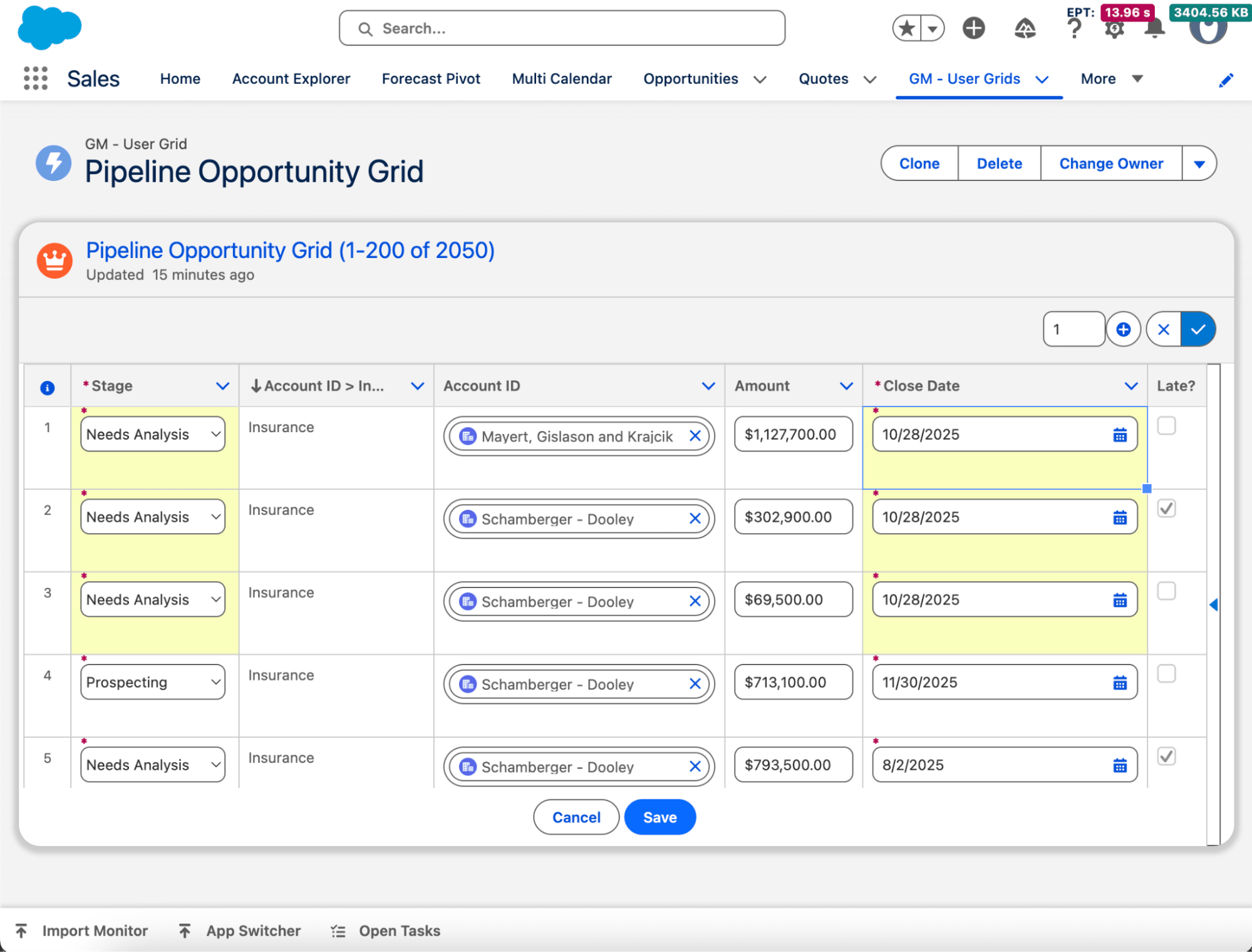
- 360° context: Work in a single pane of glass with related records visible and editable, without switching tabs.
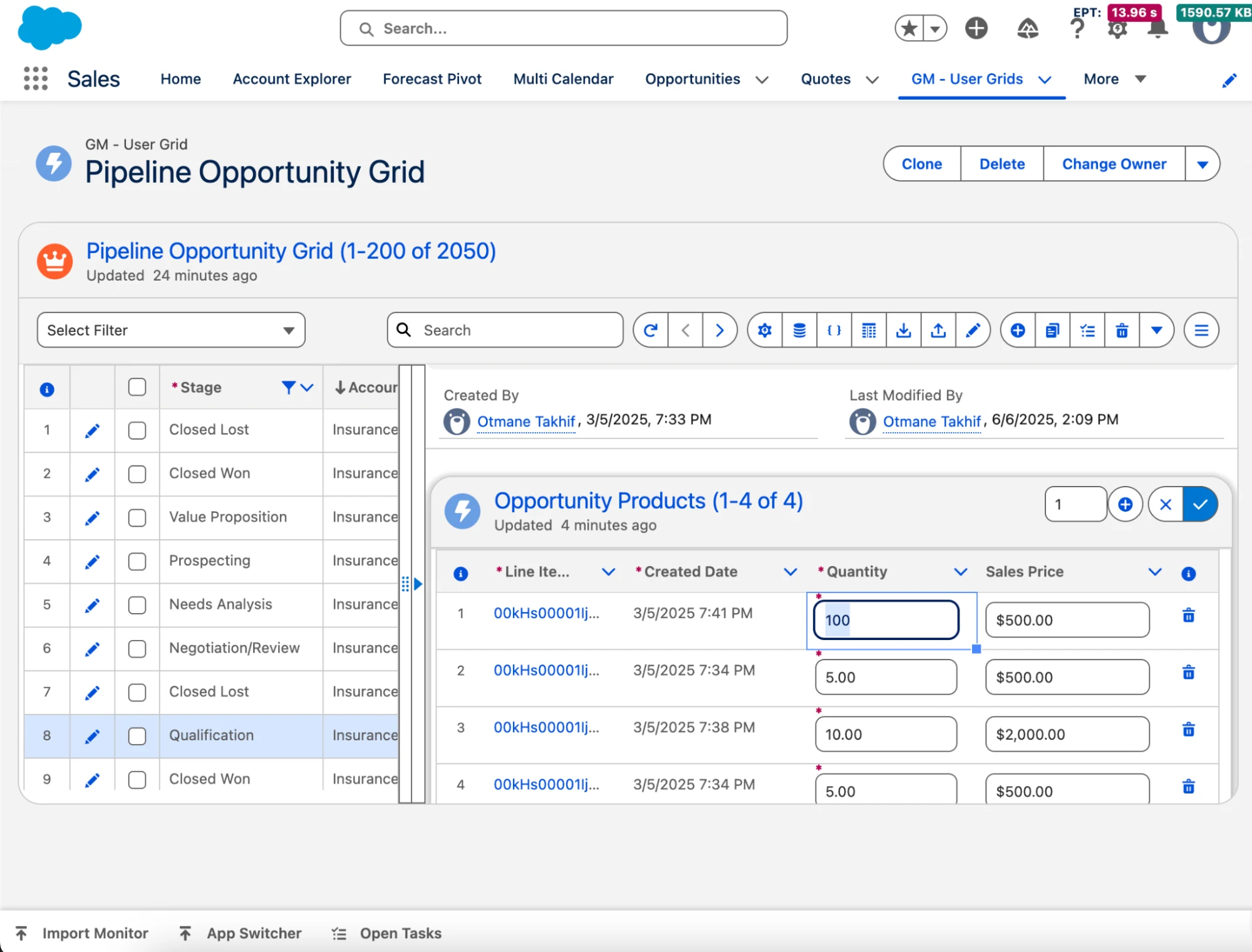
- Filtering, grouping, and sorting: Four levels of filtering, multi-grouping, and multi-sorting make it easy to drill into exactly the data you need.
- Bulk actions & flow triggers: Carry out mass updates, approvals, rejections, and more, or trigger flows like mass email directly from the grid.
- Import/export: Import or export tens of thousands of records with validation, insert/update/upsert rules, and error handling built in.
- Performance at scale: Up to 3x faster record loads and 93% fewer clicks on routine tasks, even with large data volumes.
- Control & flexibility: Configure fields, layouts, formulas, and conditional coloring with clicks, not code.
Building a Complete Workspace
Many tools stop at grids and tables. Teams, however, often want to consolidate more work inside Salesforce and reduce app sprawl. That is where a broader, Lightning‑native UI and UX suite helps.
In addition to grids, GridMate offers a broader scope of components such as Multi Calendar, Single Calendar, Compact Calendar, Map List, Kanban Board, File Explorer, and Gantt Chart. These components extend the grid-first workspace into planning, scheduling, mapping, pipeline management, delivery, and content operations, while keeping people inside the platform they already trust and invest in.
Final Thoughts
AppExchange grid solutions are no longer a “nice to have”. They are the fastest way to create a Salesforce grid view that people actually use, with inline editing, advanced filtering and grouping, and a 360‑degree context in a single pane of glass. If you are exploring a Salesforce Lightning grid, use the checklist above. Look for a native feel that follows Salesforce SLDS grid patterns, true inline editing, context-rich visibility, admin control with clicks, and robust data operations at scale.
When you are ready to see the concepts in practice, explore GridMate’s grid suite and broader components through a free trial. Start with a high-friction area, bring related context into the same view, and measure the impact on clicks, time to update, and adoption. The right grid should help your teams adopt Salesforce faster, utilize it more fully, and win on productivity.