

Ensuring that leads are actioned promptly, either by sales or sales development reps, is important for companies of all sizes and industries. It’s vital to ensure that Leads don’t go cold and help empower your team to advance the sales pipeline. Within Salesforce, this is now all powered by Salesforce’s flagship AI tool, Agentforce!
In this post, we’ll delve into how Agentforce for Sales helps you build pipelines with ease and how to get started, from setting it up to tailoring it to your organization’s needs, with clicks, not necessarily code.
Agentforce for Sales to the Rescue
Agentforce has seen tremendous growth across all Salesforce clouds as well as other products such as Slack, despite only being announced in September of 2024.
Agentforce for Sales has been generally available since December 2024 but has already been enhanced with significant improvements since then. Sales Agents can be used by Salesforce customers who purchase the Agentforce 1 editions, the add-on Agentforce SKU, or those who opt in to the free Salesforce Foundations offering, which is part of Salesforce’s effort to democratize key functionality across different clouds.
It should come as no surprise that Agentforce pricing also falls within the consumption-based model, alongside Data Cloud and a few other features. With the recently announced pricing changes for Agentforce and moving from Conversations to Flex Credits, the consumption aspect has become easier to manage and much more transparent.
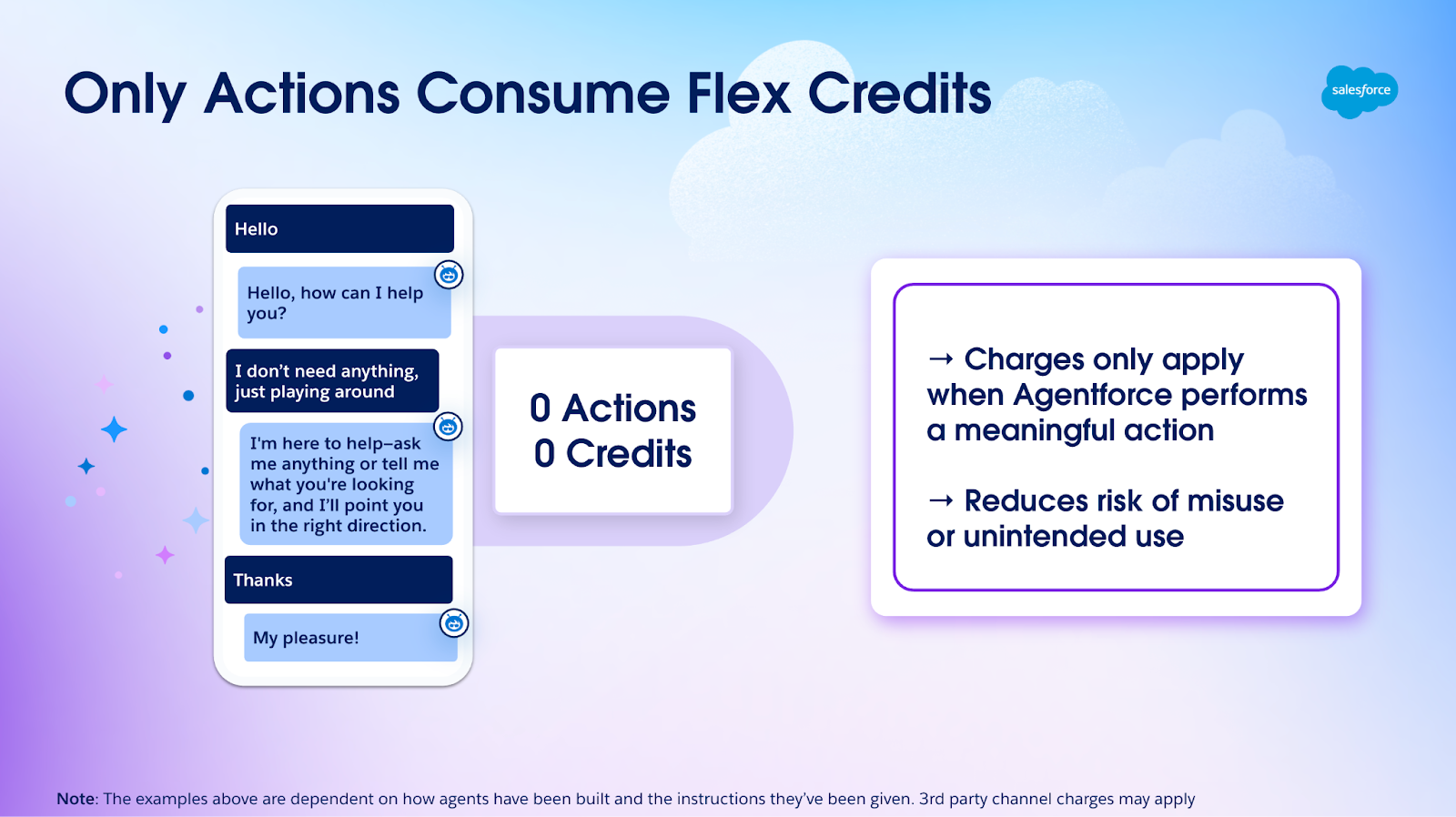
Each action taken by Agentforce, including the first email sent by the SDR Agent, consumes either one Conversation or 20 Flex Credits from your entitlement. The overall functionality is now available for Leads, Contacts, and Person Accounts – this means that customers can extend the use of the SDR agent across all the key Salesforce objects that have interactions with their business.
100k Flex Credits are included in Salesforce Foundations, which you can use to test out the functionality before buying, giving your organization a solid initial volume to start the agentic journey with.
As mentioned above, the credits are consumed per Action, meaning that your team can have conversations with the agent. But as long as the agent isn’t prompted to ‘do’ anything, then no credits will be consumed.
Additionally, make sure to take a look at the Agentforce ROI Calculator to assess exactly what potential impact implementing any of the available Agents in your company would have.
As the name suggests, Agentforce’s goal in this context is to act just as a sales development representative would, by performing the initial inbound nurturing of Leads coming into Salesforce – whether it’s via marketing events, imports, or manual creation.
If the record is no longer a Lead but already a Contact or Person Account, the mechanism works in the same manner.
There has been a significant shift; instead of simply assisting human reps in their tasks, Agentforce will be able to work autonomously, around the clock, within pre-established guardrails. It can conduct external communications, all while considering the customer’s intent every step of the way.

From answering initial questions to booking meetings, Agentforce goes through records at lightning speed while looping in your team in time to take an engaged customer or prospect further and seamlessly continue the conversation.
Powered by Salesforce’s Atlas Reasoning Engine, and with your data fully protected by the Einstein Trust Layer, agents could provide the perfect way for your company to fully automate the initial stages of the funnel with confidence, and at scale. Let’s dive into setting this up for your instance!
Complete the Prerequisites
Once you have access to Agentforce for Sales, either through Foundations or the dedicated SKUs, it’s time to get started via the new Agentforce SDR Setup page. The first step is then to ensure all dependent features are turned on and configured properly before proceeding.
These are Einstein Generative AI, Einstein Copilot, Einstein Activity Capture, Sales Engagement, Salesforce Inbox, Automated Actions, and last but not least, Data Cloud. A frequently asked question here is whether Data Cloud is really needed – the short answer is yes, and it makes the experience so much better, as you will discover when we get to the Agentforce Builder.
While the focus is definitely on setting up the new agent, this may also be a great time for you to consider some prerequisite functionality and perhaps expand their use beyond this step.
For example, Sales Engagement enables your users to build step-by-step cadences to optimize their outreach tasks. Einstein Activity Capture (on top of the actual email and meeting capture) has very handy functionality that allows your team to establish insights in the form of keywords and phrases to be tracked across email communications.
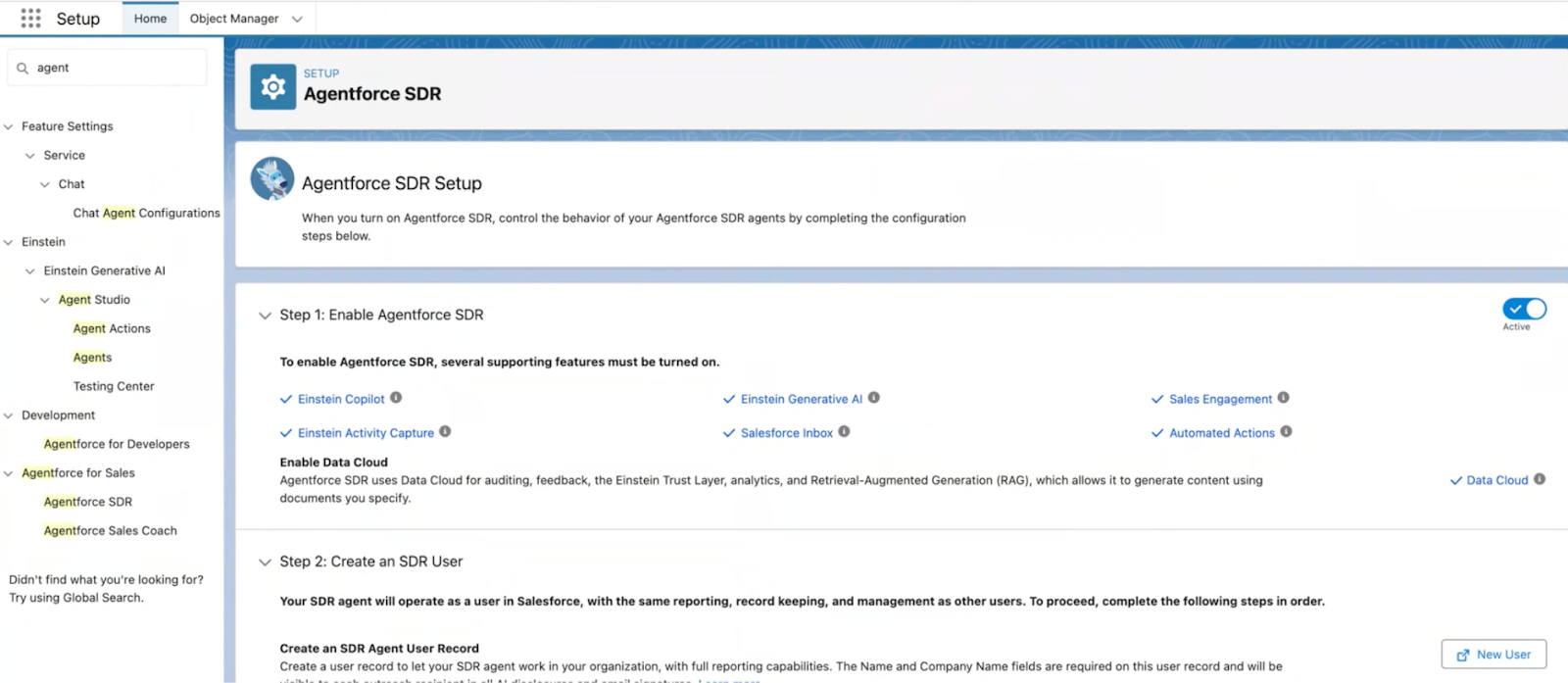
Once all required supporting features are enabled, it’s time to actually create the user record for the Agent. While, in some ways, this will be just like any other Salesforce user – in the sense that a license, profile, and permissions will be needed – Salesforce provides a new Einstein Agent license type, as well as an out-of-the-box Einstein Agent User Profile that your user should be assigned to.
The Agentforce SDR Agent permission set also has to be assigned, and you have the option to do so directly from this page by clicking the button and selecting your Agent user to assign the permission set. In addition to permissions, don’t forget to create an Einstein Activity Capture configuration (if you haven’t already) and add the user.

Next, you should also consider what your team can do when it comes to the agent. Here, you can assign the Configure Agentforce SDR Agent, Sales Engagement Cadence Creator, and Automated Actions User permission sets, which will enable certain users to make changes to the agent. You can also extend the ability for users to assign Leads to the agent.

While there is a fourth step highlighted, this concludes the actions you can take on this page, since, as of now, the true interactive part begins, which is completing the one-time setup experience directly in Agent Builder, where you will be redirected with the click of a button.

Make Agentforce SDR Agent Your Own
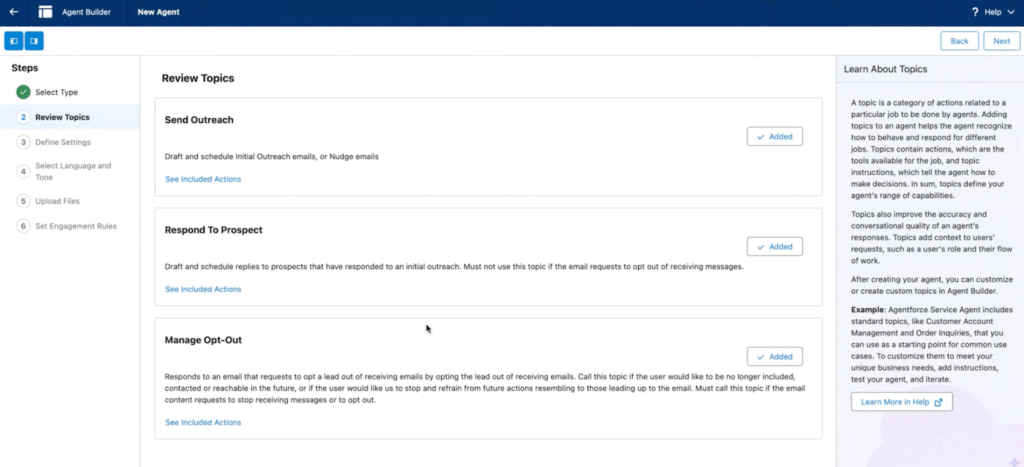
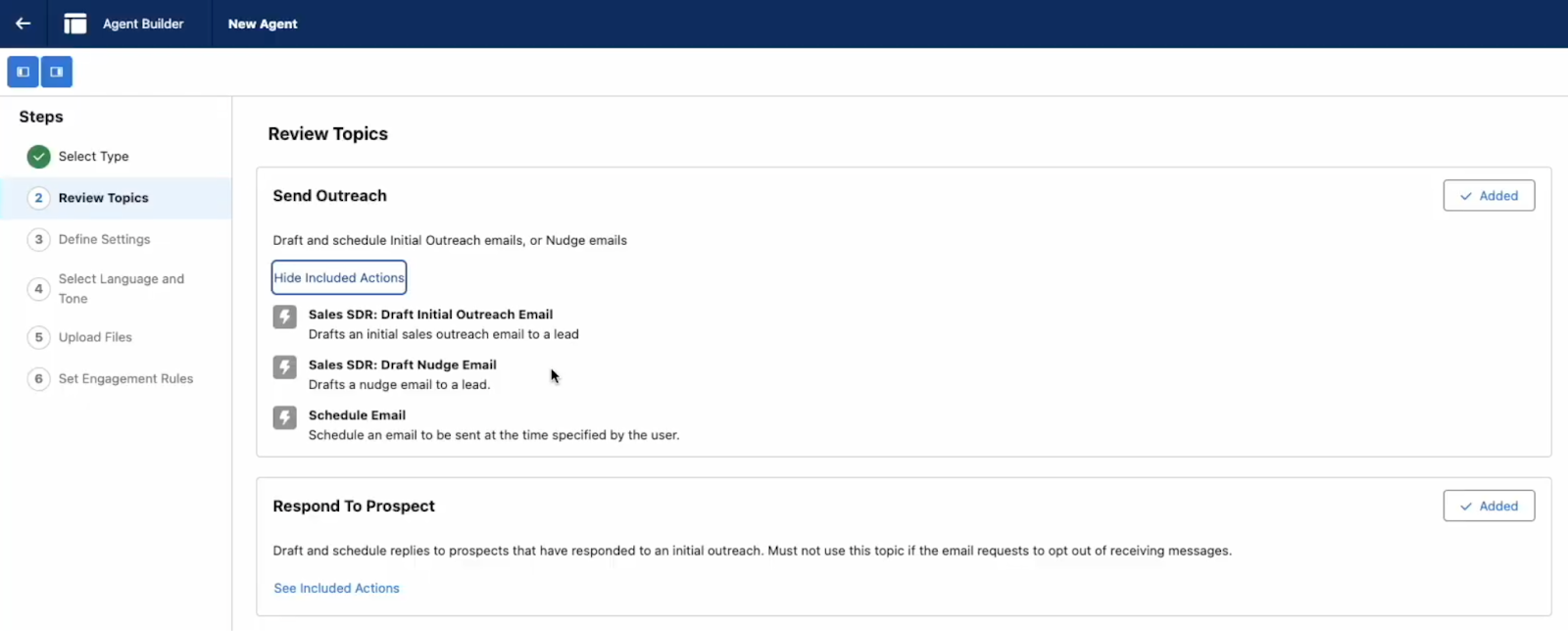
As promised, Salesforce makes setting up Agentforce easy from start to finish, and this includes the part of configuration happening within the Agent Builder. You will have to go through each step of the way and input or choose the options according to your particular use case and criteria, and it starts with reviewing the out-of-the-box Topics and related Actions.
Topics and Actions go hand in hand for each agent – they represent the jobs to be done, alongside the practical steps required for these jobs to be completed. Ultimately, a Topic can have one or multiple Actions assigned, and the agent will reason based on the input it receives, which Topic, and more specifically, which Action will be taken, considering the context. Clear instructions are vital to ensure the agent has enough information to make the right decision each time.
The following step is where you will need to consider the agent’s role and share more information about your company so that the agent can start learning more about your business. Ultimately, it will represent your business, just as a human SDR does during customer conversations. Don’t forget to also select the dedicated user you created before continuing!
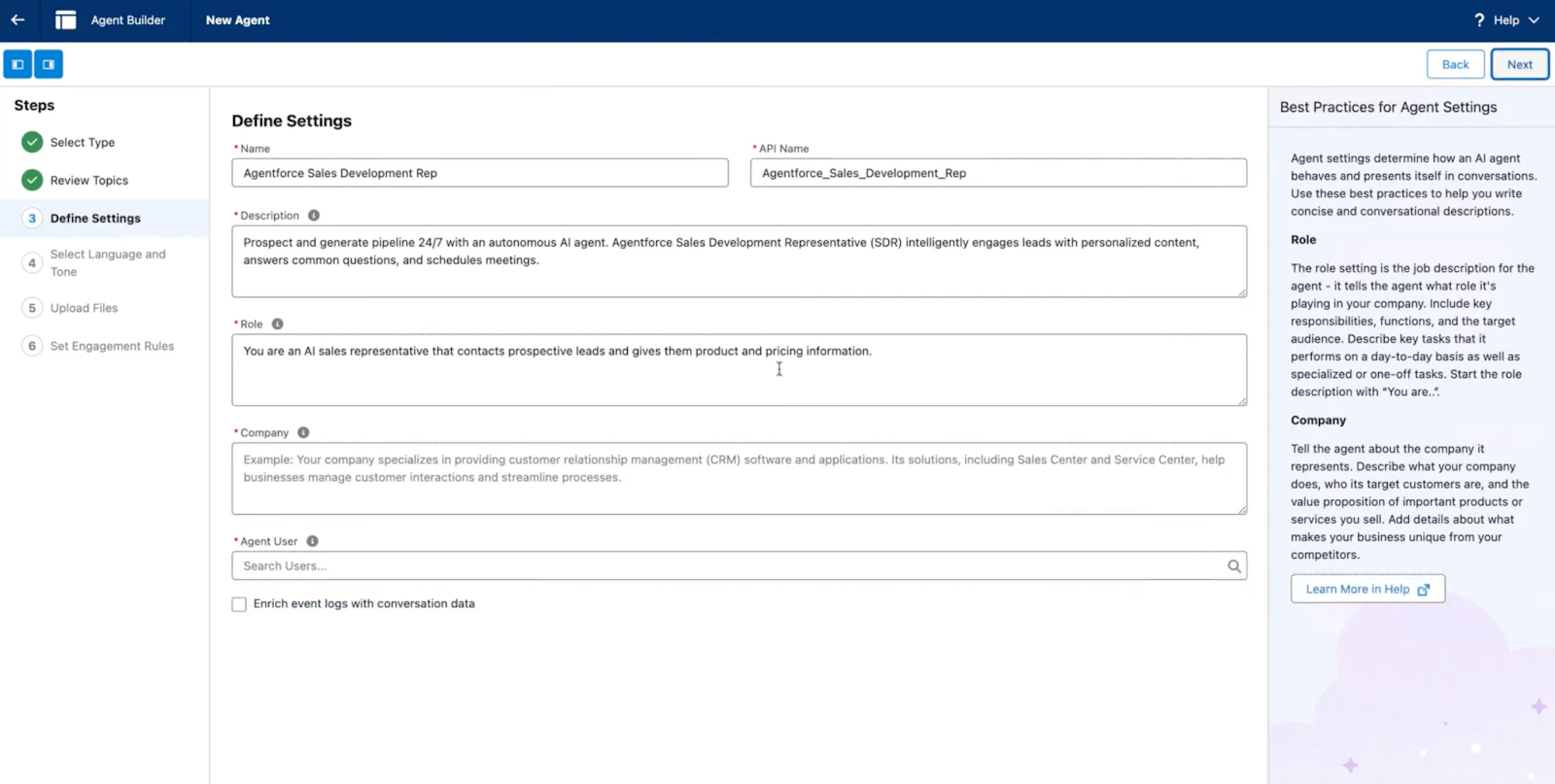
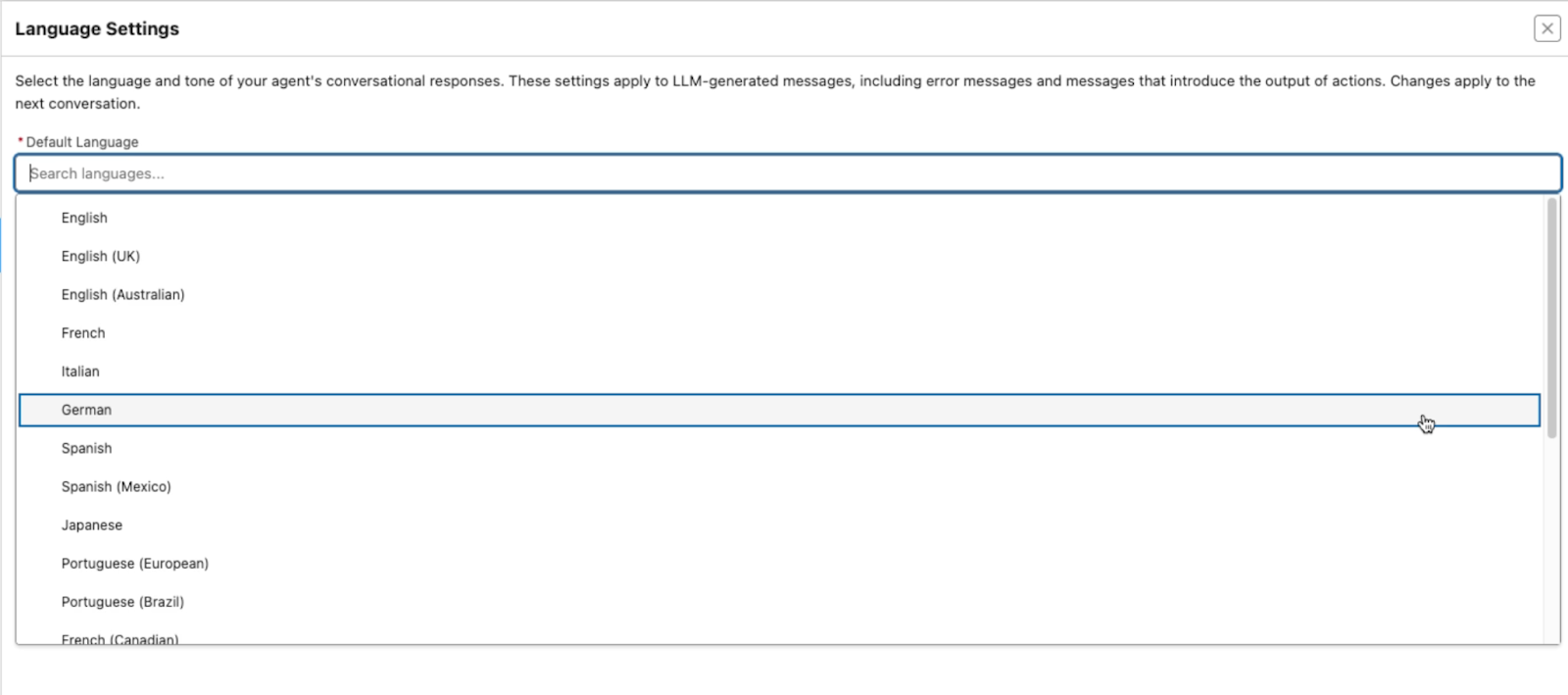
Another handy attribute you will be able to determine is the language. English used to be the only supported one, but as of earlier this year, Salesforce has also enabled support for French, Japanese, Italian, Portuguese, German, and Spanish to allow customers to localize their agents for more markets across their portfolio.
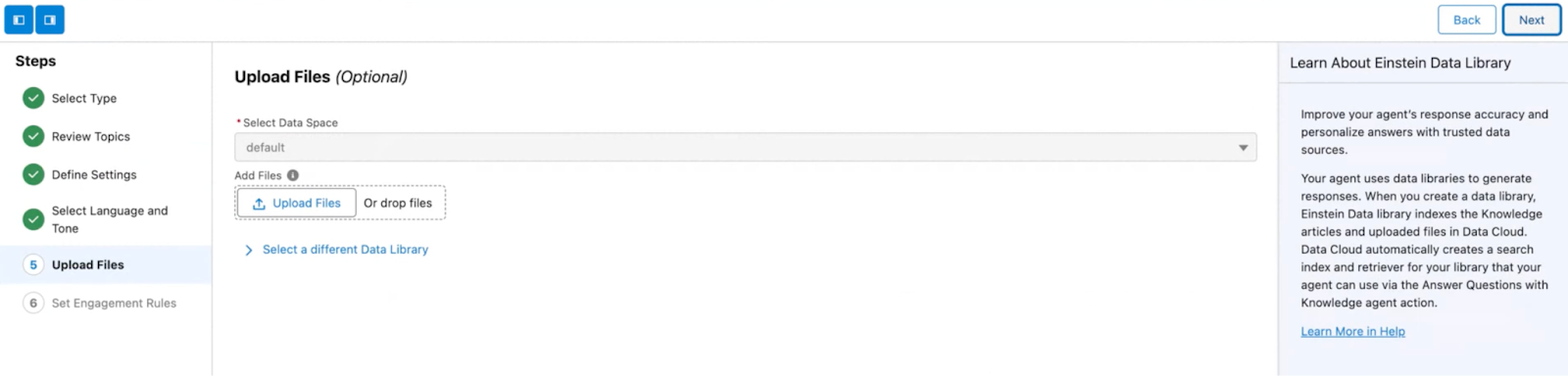
If you have been wondering what Data Cloud has to do with your agent, this is where you can grasp the positive impact it will have when enabled and used to educate your agent on internal processes, as with a human rep.
Through the use of Einstein Data Libraries and retrieval augmented generation (RAG), the same documents and knowledge articles you are already using for your internal teams can be processed. This means that the agent has a lower chance of hallucinating while being grounded in your company’s particularities, processes, and best practices.
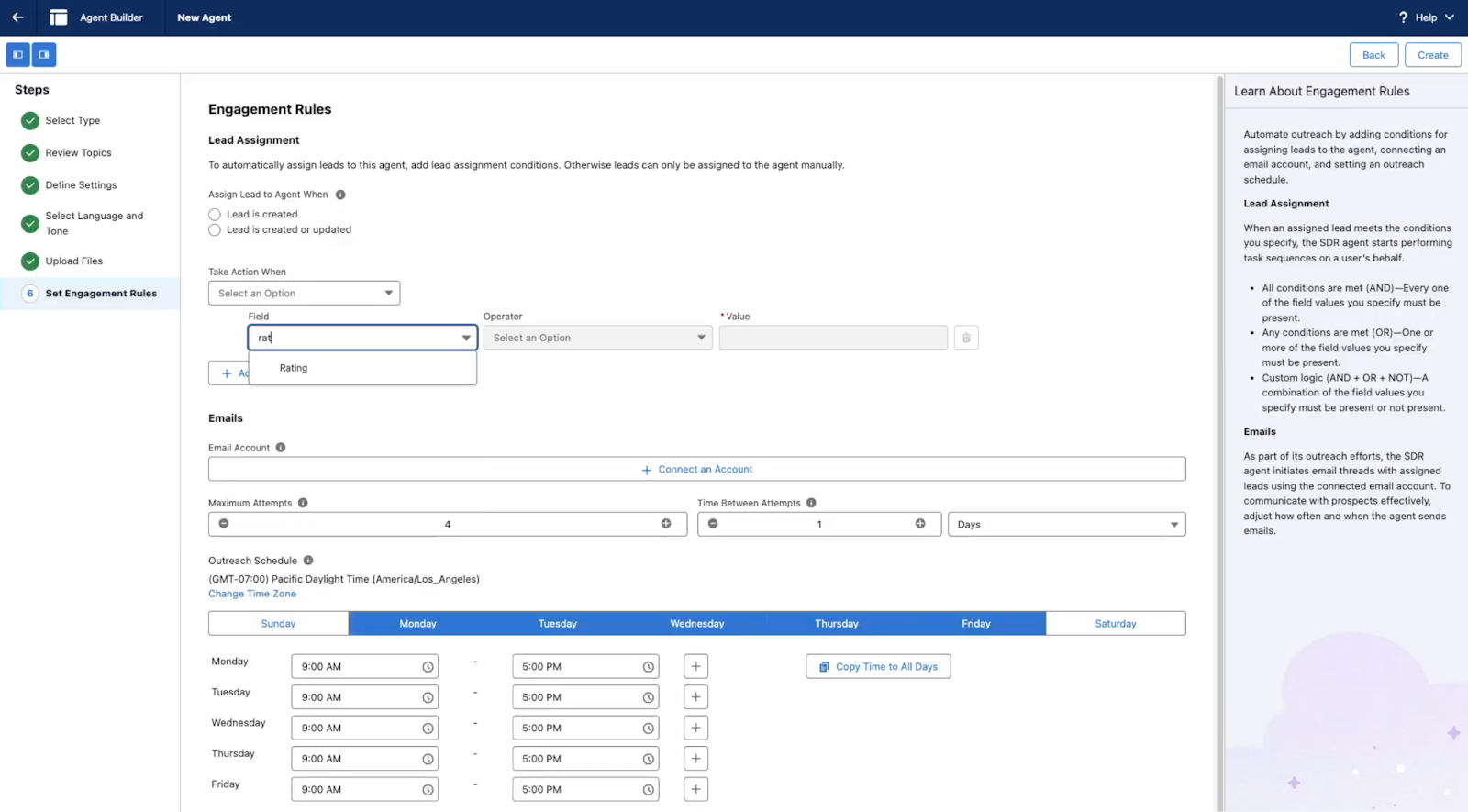
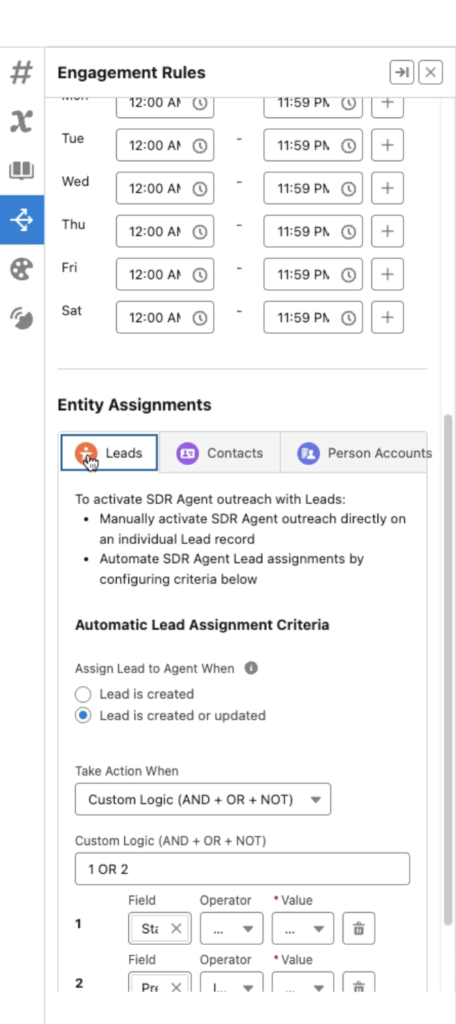
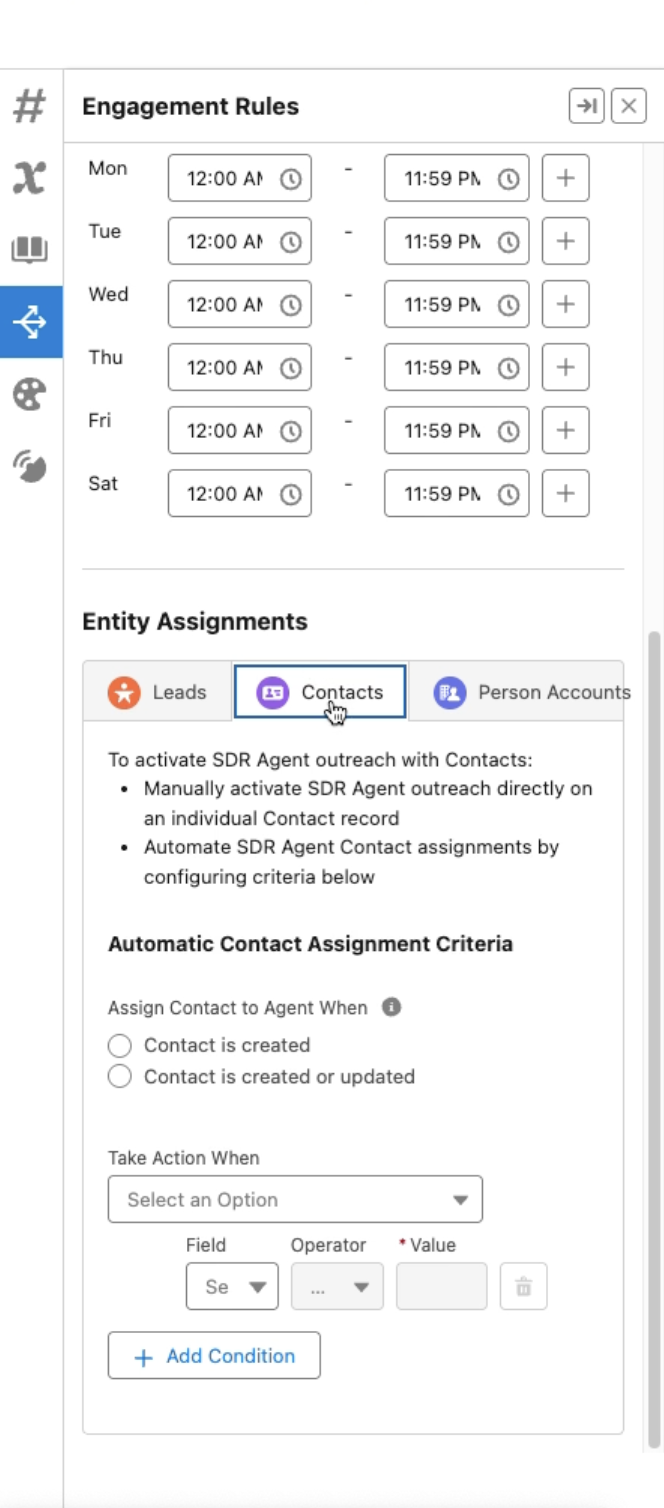
If you’re already familiar with Lead or Case assignment rules, the Agent Engagement Rules are, to an extent, very similar, as this is where you can decide exactly which records (unless assigned manually if users are permitted) will be passed to the agent to work on.
The Owner field, however, will not be changed – allowing the team to keep track and report on all of the Leads, Contacts, or Person Accounts they own. As with a flow, you can choose if you’d like these to be triggered upon Creation or Creation and Update, and determine the criteria using fields from the record, and even custom filter logic if needed.
This is also where you will have to connect the email account the agent will be using, as well as its working hours and the occurrence of outreach attempts.
Then you can create your agent! You can always go back to Agent Builder to make changes to your initial customization after the one-time setup experience.
Test and Further Customize the Agent
As with any other process or new feature in Salesforce, it’s paramount to test your agent. The more you test, the easier you can spot any inconsistencies and amend the instructions.
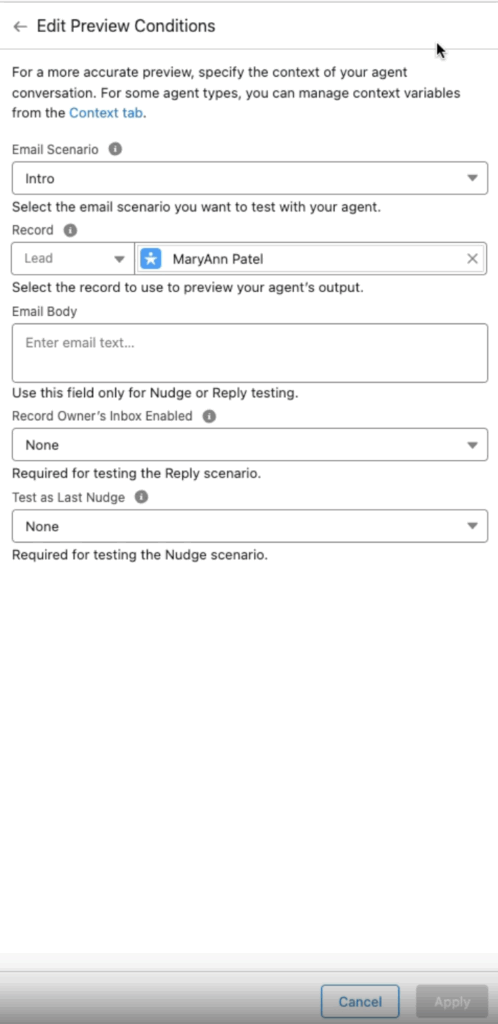
A new addition to Agentforce Builder when customizing your SDR Agent is the ability to preview the outreach directly within the conversation panel. As soon as your Topics and Actions are defined, you can choose the record and a few more context variables within the preview conditions, before engaging with the agent to see the response.
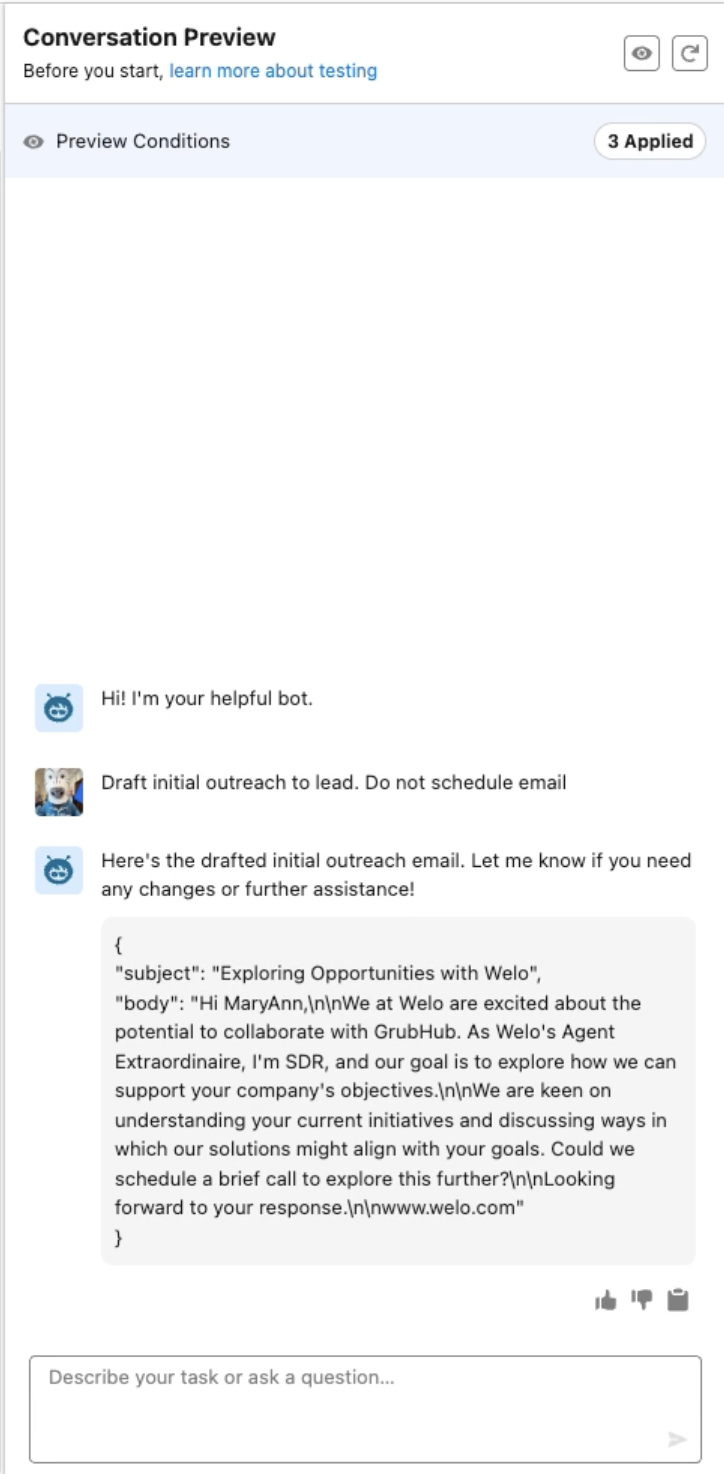
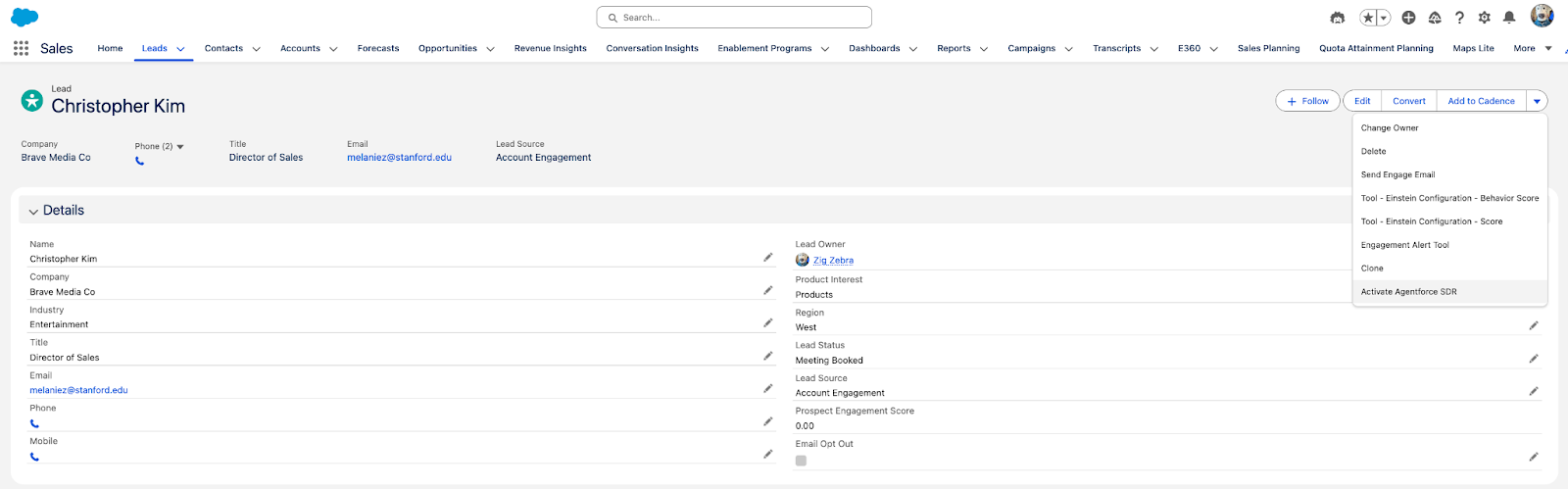
You can also test the full end-to-end interaction with the agent by manually activating it on a Lead record, for example, through the “Activate Agentforce SDR” action and replying to it via email. Both these options, however, are manual and should be used for spot checking.
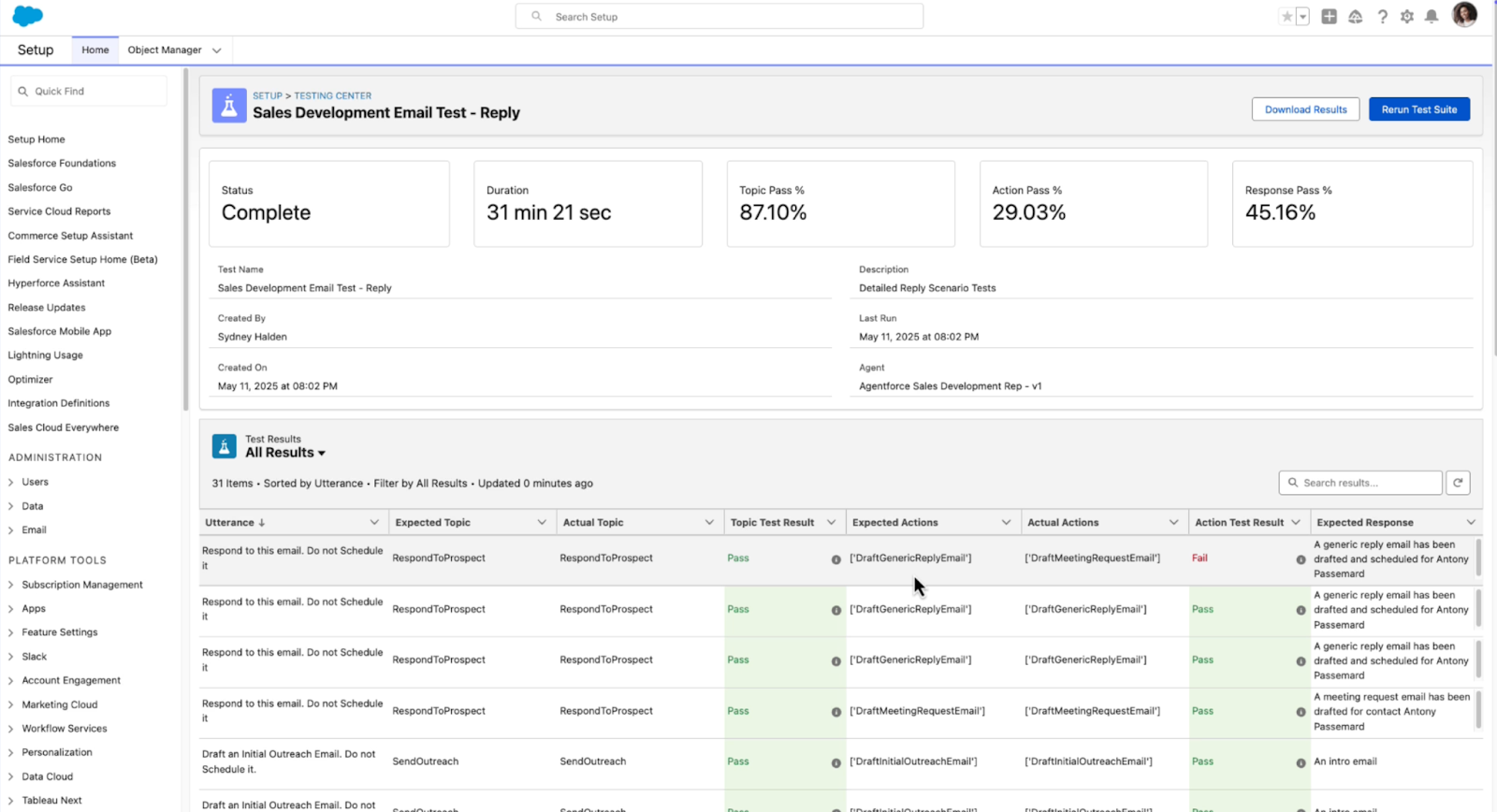
In order for you to truly test your Agents at scale before having them engage with your records, Salesforce developed Testing Center, which is now generally available to Agentforce customers.
With Testing Center, you can have the peace of mind that the agent behaves as expected, identifies the topics correctly, and generates a suitable response. When creating a test, you can make use of Context Variables, but most importantly, provide a file with the expected test cases, which will be evaluated.
Keep in mind that Testing Center consumes credits and Einstein Requests, so it is upon you to ensure that you test enough records to obtain a meaningful view but with minimal impact on your entitlements. While this feature is available in all orgs that have Agentforce enabled, testing should happen in a sandbox environment in order to avoid any impact on production data.
Even though batch testing has an associated cost, thoroughly testing Agents can ensure that once deployed into production, they work and behave as expected, providing a seamless experience to your customers and saving time for your internal teams.
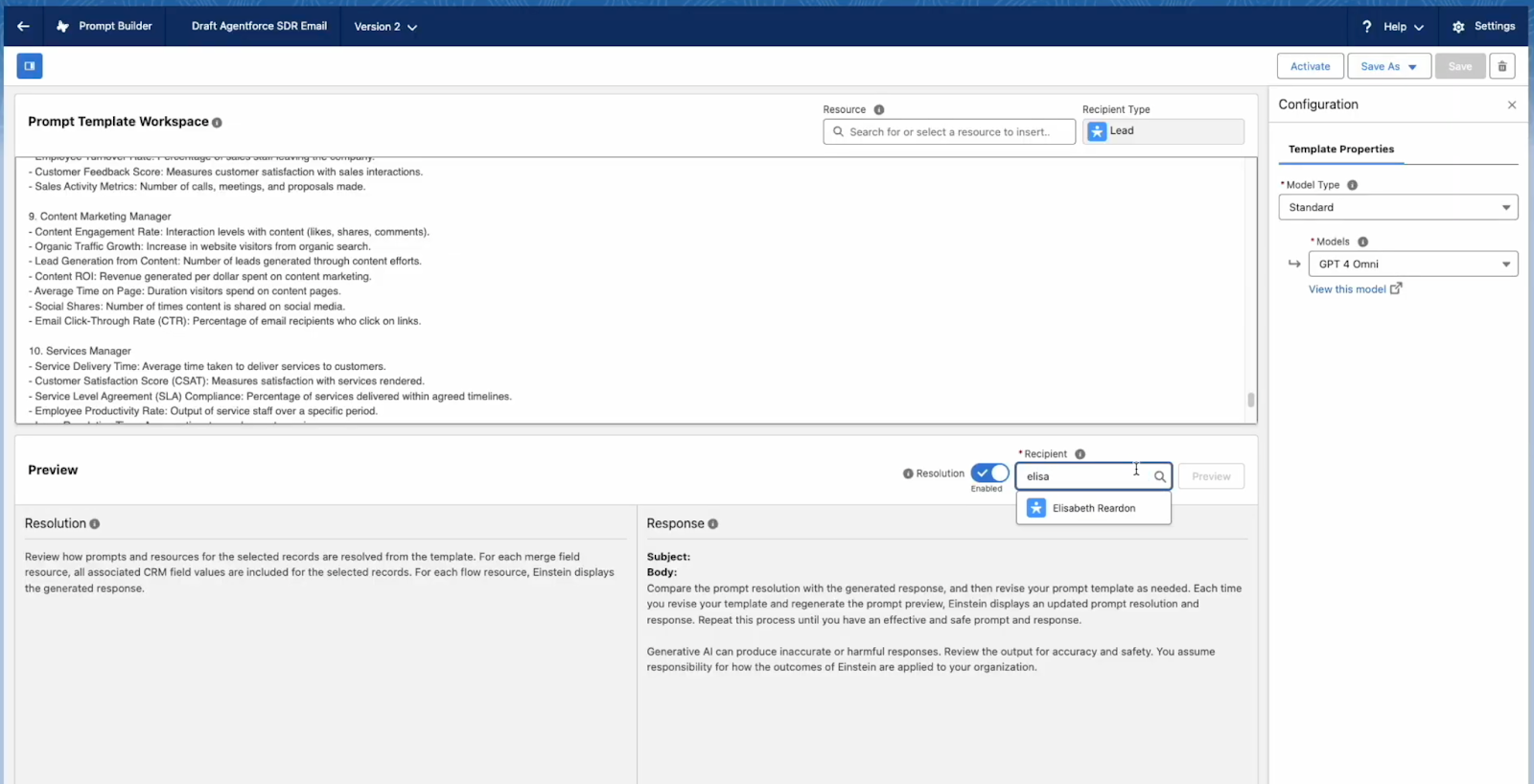
You should also customize and test the Prompt Templates. Even though the out-of-the-box Prompt Templates provided by Salesforce help you get started, you should still review the instructions and data available in the Prompt Template Workspace and amend them to make sense for your context.
Whether it’s the formatting, the CRM data it’s grounded in, or even the model for that matter, here is where you can make those changes and test the output with as many records as needed. Note that each available object, Leads, Contacts, and Person Accounts, has its own personalized templates to help you separate the output and personalize accordingly.
Once happy that all Prompt Templates are updated per your requirements and work as intended, you can go back to Agentforce Builder and activate your own autonomous SDR Agent!
Review Agent Activity and Usage
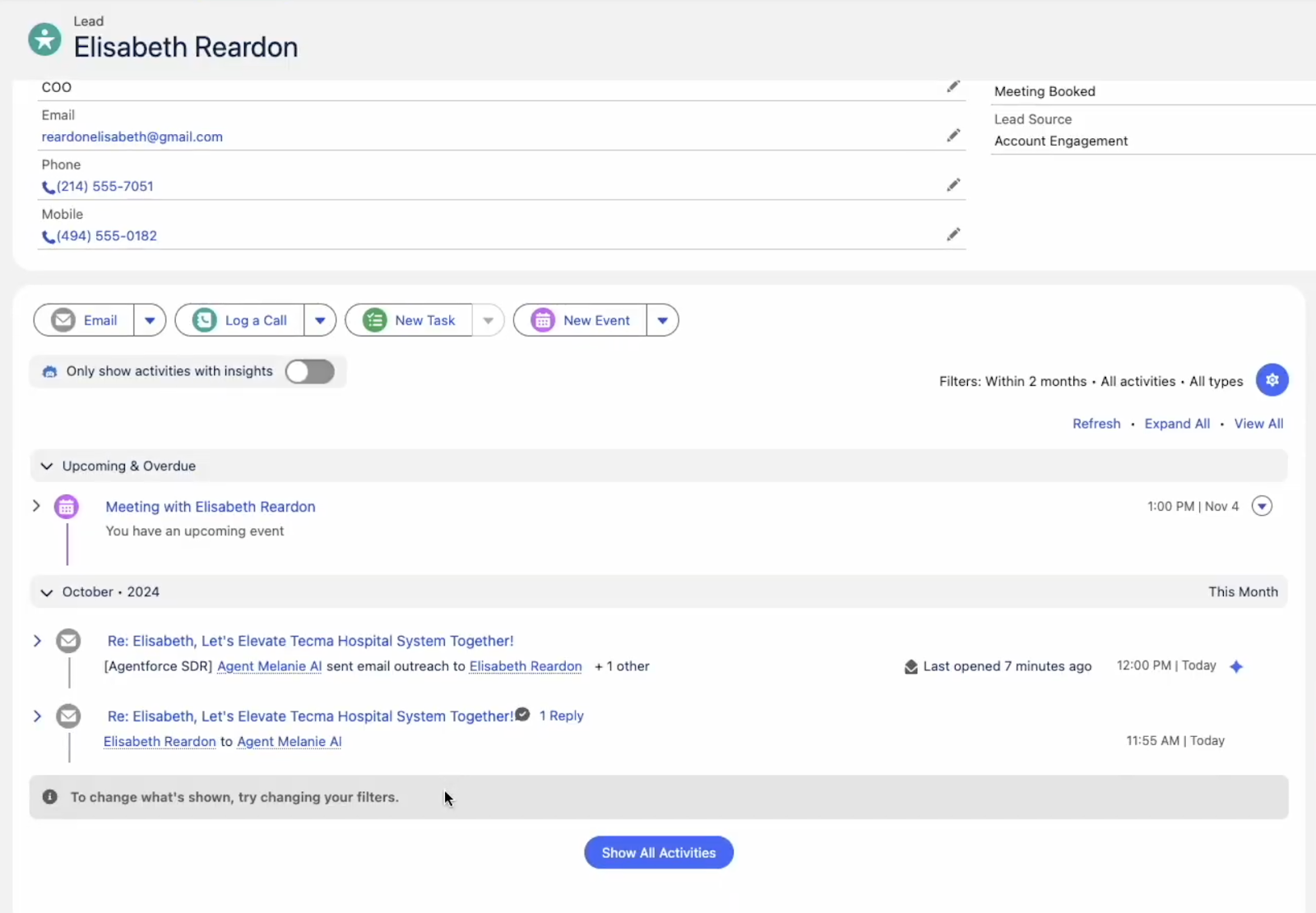
With your agent up and running, sales teams can still intervene at any time or directly join the meeting if one is scheduled. As you would expect, with a little help from Einstein Activity Capture and Inbox, the entire history of emails, replies, and meetings will be available in the Activity History on the record.
This way, as soon as the human representative jumps in, they have the full context of the conversation, and can seamlessly take over and further qualify the Lead, develop a meaningful relationship with the prospect, and ideally convert it into a new Opportunity!
Realistically speaking, that’s not what will happen every time, as there will be Leads who will not engage or will prefer to opt out of communications. However, the sales team will get the chance to focus on warmer Leads from the start, while Agentforce can filter out the uninterested ones for them.
Additionally, if the Owner decides to take over the Lead, Contact, or Person Account before all Agentforce activities are completed, they have the option to do so by simply canceling outreach, which will be possible on the next scheduled email visible in the Activity Timeline.
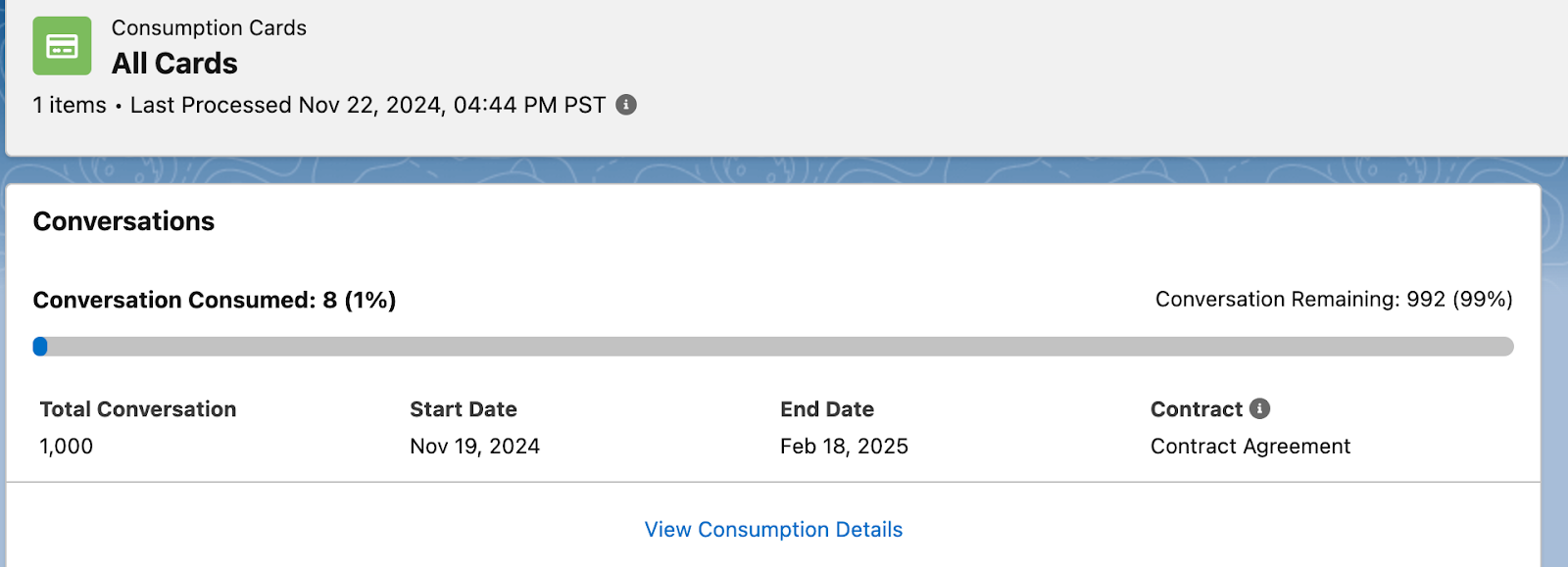
From an administrative perspective, don’t forget to familiarize yourself with the consumption cards, which you can find in Your Account App.
Usage is available in Digital Wallet, where you will be able to review how many credits were consumed, how many Einstein Requests, and of course, how many Data Services Credits are left.
Monitor Activity With Control Center
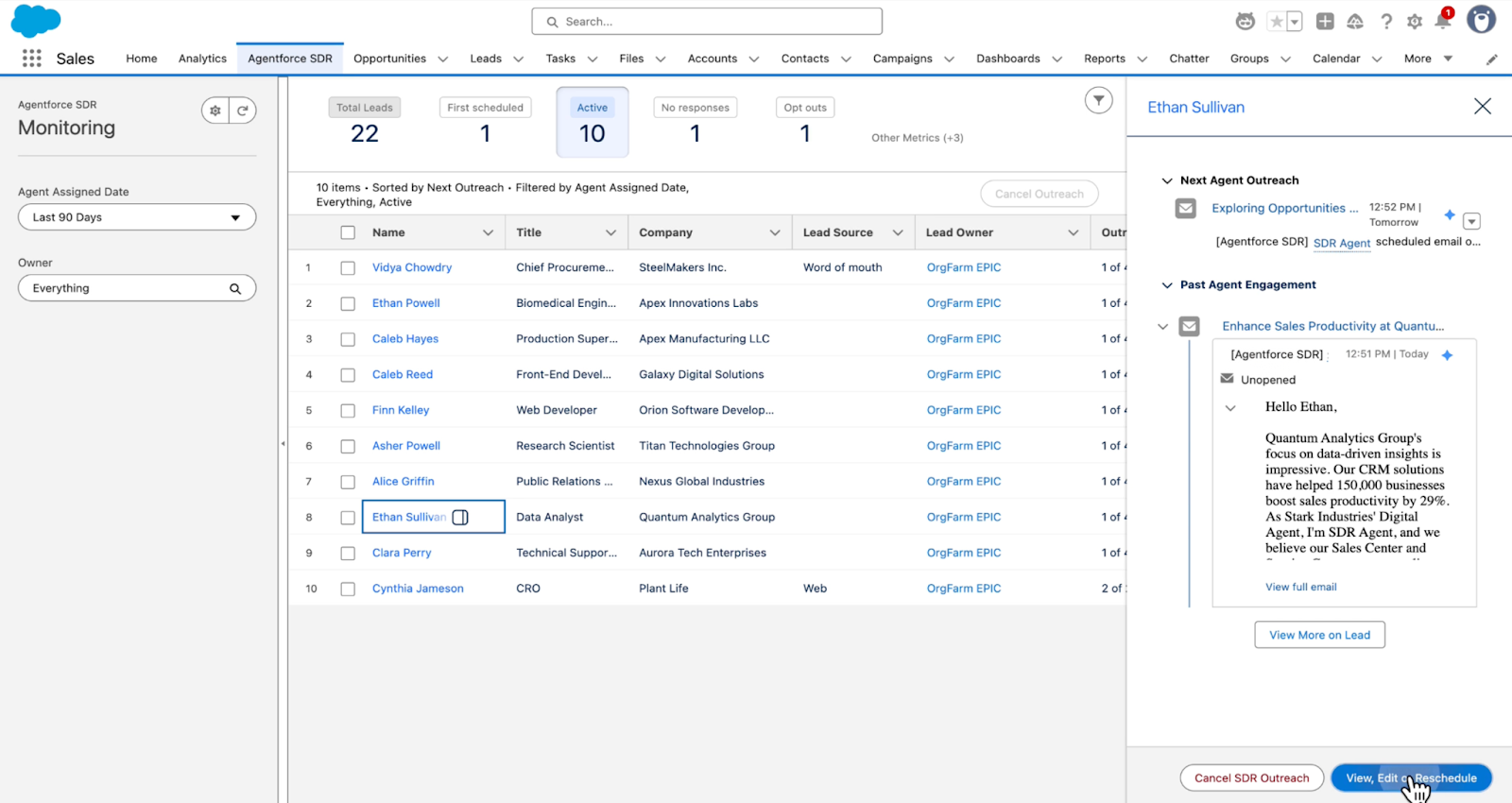
As you would expect, enhancements are by no means slowing down, and of course, checking individual records is not the only way to review the agent’s activity. Control Center, now also generally available, unlocks a new way for Sales and Sales Development teams to assess how the agent is engaging with their records, either at a high level or by deep diving into individual ones.
Through a readily available side panel when clicking into the record, your team can quickly review past and future engagements, with the option to view, edit, and even reschedule as needed. The list can also be filtered to narrow down the records of interest, as well as based on when the record was assigned to the agent.
Final Thoughts
It is clear that Agentforce will fundamentally shift both users’ ways of working within Salesforce and their expectations of the implementation. In a context where the use of generative AI is more and more prevalent in driving successful business outcomes, SDR Agent seems to be a promising first step for organizations in becoming familiar with and uncovering the true potential of the collaboration between agents and humans, all while ensuring no Lead gets cold due to lack of outreach.
Are you looking forward to getting hands-on with Agentforce for Sales? Let us know your thoughts in the comments below!