

Salesforce Experience Cloud is an external-facing platform that enables your customers and partners to securely log in, access self-service options, and engage directly with your company, creating a seamless and personalized digital experience. Implementing Experience Cloud follows the same foundational principles as any other software project, regardless of the methodology you choose. You still need a well-defined set of user stories to build it from the ground up.
However, the key difference between implementing Salesforce for your internal users versus your external users (customers or partners) lies in the focus on experience. With external audiences, the emphasis extends beyond functionality to how your brand is represented and how intuitive and engaging the user journey feels.
This makes Experience Cloud implementation not just a technical project, but also a creative one. It often involves collaboration with UI/UX designers, marketing teams for branding and messaging, and depending on your industry, even legal teams, especially in regulated sectors such as government.
Use Project Artefacts to Build User Story Inventory
Depending on your team structure, you will be generating project artefacts such as designs in Figma, Adobe XD, or Miro, which are popular tools among UI/UX designers. If you do not work with UI/UX designers, you could also quickly prototype an Experience Cloud site to show what a future state could look like – giving your stakeholders an early idea of what the journey could look like.
Let’s say you have a UI/UX designer and they present beautiful designs – now break each part of that experience down into components. Create a sheet with each of those, describe their function (i.e. what purpose they serve), and look for options to implement them. Typically, you will classify them into out-of-the-box, AppExchange apps, or custom Lightning Web Components (LWC). This will give you an idea of how much customization you are taking on, and you can weigh the pros and cons of each approach.
Branding Stories
Over the years, I’ve learned that one of the most critical aspects of any Experience Cloud implementation is how the company wants to showcase its brand to customers and partners. While capturing this in the form of user stories might seem overly technical, it’s essential work that requires close collaboration, such as aligning on fonts, logos, color palettes, footer content, and other visual elements. Whether your team chooses to track this effort as a task or a user story, it’s important to assign time estimates, track dependencies, and ensure all branding assets are finalized before the build phase begins.
Too often, I’ve seen this step overlooked because it doesn’t easily fit the standard user story template: “As a [user], I need the ability to [action] so that [outcome].” However, with a little creativity, it can be framed effectively, for example: “As a partner, I need the site to reflect the company’s brand so that I can identify with and strengthen my connection to the organization I represent.”
Stories for Often Overlooked Features
When planning an Experience Cloud implementation, it’s easy to focus on the big-ticket items such as data visibility, integrations, and automation, and miss the smaller yet equally important details that shape the user experience. These are the kinds of stories that don’t always fit neatly into the traditional user story format, but their absence can leave a site feeling incomplete.
For instance, teams often overlook simple yet essential experiences such as providing a profile menu for external users to manage their personal information. A story like “As a partner, I need the ability to update my personal details in the portal so that the company always has my most accurate information” might sound minor, but it directly impacts user trust and satisfaction.
Other commonly missed elements include defining navigation menus (and tailoring them for different user groups), customizing the login page with logos and favicons, custom domains, and searchable objects by the search bar. These stories might seem trivial at first glance, yet together they define how professional, cohesive, and user-friendly your Experience Cloud site feels.
While the choice of template: Aura or Lightning Web Runtime (LWR) will influence how these elements are implemented, recognizing and capturing them early ensures a smoother build, giving developers/consultants enough time within a sprint to build all the essential features and a far better end-user experience.
Journey or Process Maps
Not every requirement in an Experience Cloud project stems from branding elements or visible portal components. Some of the most critical features emerge from understanding the end-to-end business process rather than just the interface. Creating detailed journey maps or process flows can help uncover these hidden needs.
For example, a partner opportunity that has been sitting dormant for more than 10 days might need to trigger an automated alert to the partner or customer, notifying them that the opportunity will be marked as Closed Lost if no action is taken. Similarly, when a partner submits a deal registration, the system could automatically send a confirmation email summarizing the details and next steps, ensuring transparency and reinforcing trust in the process.
Another example of this is how internal and external users interact, and maybe you have a functionality where the internal user must let the external user know when they need more details on the case to further assist them. Such requirements go into not just the external user experience, but also touch on the internal user and the steps they need to take to provide world-class customer service.
When you conduct discovery sessions, documenting these insights as process maps is invaluable. They not only surface overlooked requirements but also serve as a foundation for guiding development sprints and prioritizing what truly matters to the user journey.
User Stories for Permissions
It’s critical to define not only what data your external users should see, but also what they must not see. During your planning sessions, have open, plain-language discussions about data visibility: for instance, what records should be visible to users even if they don’t own them.
Using all the artefacts gathered during discovery, create a comprehensive list of objects and prepare to review each one in terms of access levels, sharing rules, and visibility requirements. This exercise ensures you have user stories around permission sets or permission set groups and that your data model aligns with both business intent and security best practices.
Example user stories:
“As an unauthenticated user (guest user), I need the ability to view knowledge articles so that I can fix my issues without needing support”.
“As an authenticated customer, I need the ability to view all the assets related to my account so that I readily know what I own.”
Language Requirements
Do your users interact with Salesforce in multiple languages? If so, your Experience Cloud site must be prepared to support multilingual experiences. This requires planning early in the project to ensure your user stories reflect language requirements rather than treating them as an afterthought.
Whether it’s enabling multilingual support through declarative configuration or ensuring your custom components handle translations correctly, each element of your portal should align with your localization strategy.
Example user story:
“As a French user accessing the Broker Portal, I need the ability to view claim articles in French so that I can easily understand the content without having to translate it myself.”
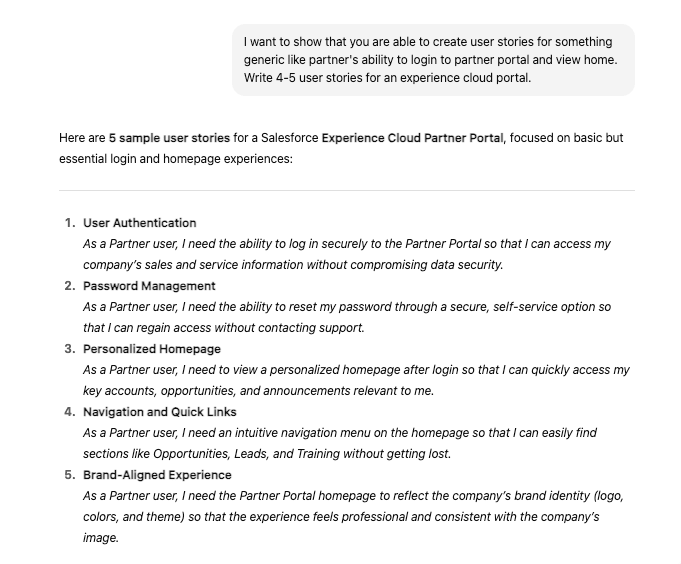
Use of AI for Generic User Stories
AI tools have proven effective at analyzing meeting notes and transcripts to extract key requirements and translate them into well-structured user stories. Similarly, when provided with a clear prompt, AI can generate draft user stories that serve as a strong starting point, significantly improving productivity. You can then review and refine these outputs to ensure they align with your project goals and context.
This approach is particularly valuable when a dedicated business analyst is not available, allowing teams to accelerate the initiation phase and reduce the overhead associated with manually creating user stories under tight timelines.
Read More
- How to Gather Security Requirements in Salesforce
- How to Have a Great First Experience With Experience Cloud
- Lost in Translation? Make Your Experience Cloud Site Multilingual
Summary
Crafting user stories for an Experience Cloud project is a different and slightly heavier lift when compared to implementing Salesforce for your internal users. It’s about designing meaningful, branded, and intuitive digital experiences for your external users. From capturing overlooked stories like navigation menus and user profile access, to defining processes and multilingual readiness, every story contributes to shaping how customers and partners perceive and interact with your brand.
Whether you’re building on Aura or Lightning Web Runtime (LWR), treat it like a creative endeavour wherein success lies in collaboration between designers, developers, business stakeholders, and marketing teams and in the discipline of translating every idea, need, and experience into a clear, actionable story. In the end, a well-crafted user story doesn’t just describe functionality; it reflects empathy for the user and ensures that your Experience Cloud site truly delivers on its promise of connection, personalization, and trust.