






When it comes to Salesforce apps, the phrase ‘native’ can mean different things to different people.
In theory, ‘native’ is a fairly strict definition. But in practice, there are several non-native and semi-native apps that use the term more liberally. By that, we mean that they’re not really native at all.
So how do you know the difference?
When Is a Native Salesforce App Actually Native?
The difference between native and semi-native Salesforce apps might seem superficial, but it runs much deeper than you might think.
In fact, a native app is different from a semi- or non-native one in several fundamental ways. To be considered genuinely native, an app should:
- Be built within Salesforce, using Apex and Lightning Components.
- Not depend on external servers, separate databases, or API-based syncs for its core functionality.
- Ensure data does not leave your existing Salesforce environment.
- Work within Salesforce’s built-in security/compliance framework.
These differences are important for reasons we’ll discuss in the next section. Crucially, they don’t apply to semi- or non-native apps. Instead, these use external APIs and integrations to appear native, without actually delivering on the fundamentals.
However, there’s an important caveat. A fully native app can still use APIs and external reference data for specific functions. An example might be using an external service to validate address and contact details. But the important difference here is that it doesn’t rely on that service for its core functionality.
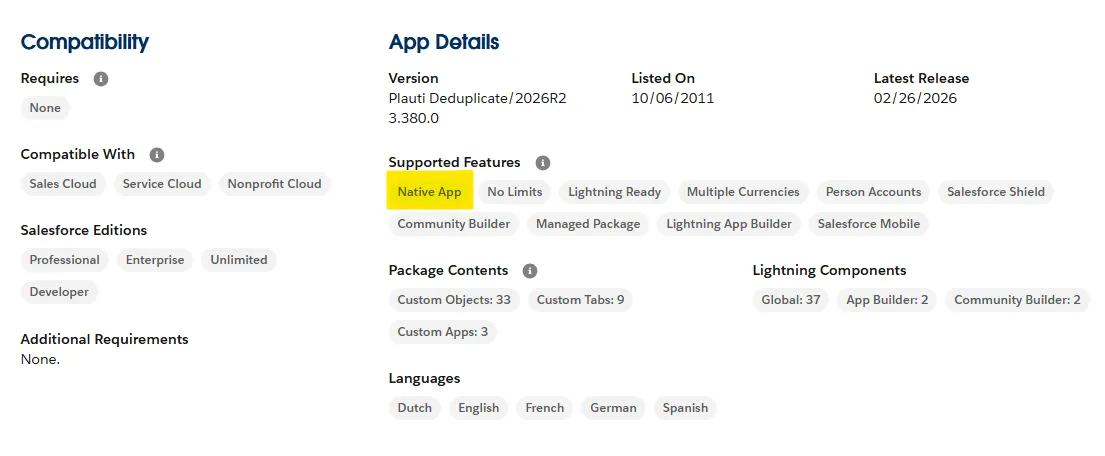
So how do you know the difference? The only reliable way to confirm is to look for the native app certification badge on the AppExchange listing. You can see this under ‘More Details’ on the bottom half of the AppExchange page:
Native vs. Non-Native: Why The Difference Really Matters
The difference between real native apps and those masquerading as them isn’t theoretical. In fact, it affects how your app functions in many fundamental ways:
1. One Login, One Environment, One Release Cycle
The most fundamental difference between a native and non-native Salesforce app is this: Native apps live entirely inside your existing Salesforce organization. This means non-native tools require an entirely different set of credentials, permissions, and updates. Ultimately, this just creates more confusion and manual work for your admins and IT teams.
This also creates a particular issue when it comes to Salesforce updates, which happen three times a year. When this happens, there’s a risk that the data pipelines that connect Salesforce with the non-native app will break.
In practice, this requires regular regression testing to ensure the integration still works. If not, the vendor will need to patch the issue, and you’re often dependent on them to release the patch before these issues can be solved.
2. Salesforce Data Stays in Salesforce
Non-native tools generally create an external copy of your data. This creates a significant challenge because it means you have to work out how to sync the external copy with the authoritative dataset in Salesforce. This is possible – but it’s a complex problem to solve.
Real-time syncing is difficult to enable and expensive to maintain in the long term. In practice, organizations often have to accept that external data is hours or even days out of date. This makes it difficult or impossible to rely on that information.
In contrast, a native app exists entirely within your Salesforce environment and works from the most up-to-date information – just as any other function in Salesforce would. No sync delays, no stale records, and no need for cumbersome data reconciliation.
3. Salesforce Native Automation Rules Apply
Salesforce automations (e.g. Salesforce Flow or Apex triggers) also struggle to interact effectively with non-native apps. Often, they require webhooks, external orchestration platforms, or middleware APIs to extend the automation to the non-native tool.
This creates similar problems to those we discussed in the last section. With automation logic split across two systems, you’ll inevitably suffer from latency and errors. It also creates issues if the outdated data in your external app conflicts with the more up-to-date information within Salesforce.
At the same time, updates and outages from external tools can cause automations to fail – often without you knowing about it. And when data inside and outside of Salesforce conflicts, there’s a real risk of creating operational issues when automations are triggered on outdated or incorrect data.
Native apps don’t encounter these problems. Instead, automations work just like they do in Salesforce, without the need for webhooks or external orchestration. They also work off a single, authoritative dataset, reducing the risk of automations relying on stale data.
4. Extra API Consumption Is Limited
When a non-native tool makes a call to read or write Salesforce data, it uses up valuable API calls. This is why real-time syncing can be so difficult and expensive: The more calls that need to be made, the quicker you hit your API limit.
If the external tool doesn’t need to be real-time, this is less of an issue. But the more data you have, and the more often you need to sync it, the more expensive this problem becomes. Often, it can end up accounting for the majority of an organization’s API budget.
If you’ve read the rest of this article, you probably know the score by now. Native apps bypass this issue by operating entirely within Salesforce. This difference is particularly important at scale. While they might use API credits for specific functions, this is significantly less resource-intensive than constantly syncing your entire CRM.
5. No External Data = No Additional Compliance
Salesforce data is subject to a number of built-in compliance controls. These are governed by Salesforce’s data protection certifications: GDPR, ISO 27001, SOC 2, and HIPAA.
But the moment data is replicated outside of Salesforce, these controls no longer apply. Non-native tools generally transmit, store, and process your data inside a third-party environment that sits outside Salesforce’s compliance controls.
This means you’re now responsible for data compliance. As part of that, you’ll need a Data Processing Agreement (DPA) with the vendor. You’ll also need to ensure the data is stored within your jurisdiction, which is particularly important for GDPR.
It’s easy to overlook this. In fact, many organizations often don’t even know when data has left Salesforce in the first place.
Native apps eliminate this issue because the data stays within Salesforce. Therefore, compliance controls apply within the app just as they do with built-in Salesforce functionality.
Plauti: Fully Native Data Quality Tools, Built in Salesforce
At Plauti, our goal is to make it as easy as possible for you to ensure effective data governance in Salesforce, at scale. To do this, we offer several native Salesforce apps through the Salesforce AppExchange, including:
- Plauti Deduplicate: Our flagship product enables you to find, clean, and prevent duplicates entirely within Salesforce.
- Plauti Verify: Ensure vital Salesforce information is up-to-date and correct, including emails, phone numbers, and addresses.
- Plauti Context: Our brand new tool to enable AI readiness, enabling you to understand your Salesforce data quality before launching AI initiatives, running major reports, or executing large clean-up projects.
Crucially, our tools are fully native, available on the Salesforce AppExchange, and available in just a few hours. No need for external integrations, separate logins, or data being replicated outside of Salesforce.
Check out our website to find out more about Plauti – or get in touch with our team to get started.





Comments: