

You can’t report on growth if your CRM can’t see it.
That’s the reality many teams are facing as they shift focus from acquisition to retention and expansion. With tighter budgets and rising customer acquisition costs, teams are under increasing pressure to drive more revenue from existing customers.
This shift is changing what teams track and prioritize. Metrics like Net Revenue Retention (NRR) have become front and center, reflecting not just how much you’ve retained, but how much recurring revenue you’ve grown (or lost) over time.
And yet, few teams feel confident in the numbers.
According to the 2025 Traction Complete CRO Survey, retention and expansion are top priorities for CROs, but only 2 in 10 revenue leaders believe that their Salesforce data is clean and actionable.
That’s no surprise. Salesforce was originally designed to support top-of-funnel sales motions. Many Salesforce environments are still shaped by that acquisition-first thinking, leaving teams (and data) ill-equipped to retain and expand existing accounts.
The result? Usage data, expansion signals, and early signs of churn stay buried across disconnected records, making it nearly impossible to spot upsell opportunities and prevent false churn.
To shift from net-new growth to driving more value from existing customers, you need to re-architect Salesforce around how your customers actually operate, and give GTM teams the full picture.
“Data needs to be up-to-date and, most importantly, actionable. We drive metrics & decisions based off of our CRM, so it needs to be a single source of truth for decision-making.”
Respondent in Traction Complete’s CRO survey
What Is Net Revenue Retention (NRR)?
Net Revenue Retention (NRR) is a performance metric that measures how much recurring revenue your business keeps from existing customers over time, factoring in upgrades, downgrades, churn, and expansion.
In plain terms, it tells you how well you’re retaining and growing revenue from the customers you’ve already closed.
NRR is often treated as synonymous with Net Recurring Revenue, but they tell different stories:
- Net Recurring Revenue is a static number that measures how much recurring revenue you have at a moment in time, regardless of whether it came from new or existing customers.
- Net Revenue Retention is a dynamic metric that tracks how your existing customer revenue changes over time.
To sum it up, Net Recurring Revenue is what you have earned. Net Revenue Retention tells how well you’re earning over time.
An NRR above 100% means you’re growing revenue from your existing customer base through expansions, cross-sells, and add-ons. Below 100%, churn and contraction are eroding your revenue, putting more pressure on new logo acquisition to fill the gap.
That’s why high-performing companies, especially those aiming for an Initial Public Offering, often target NRR between 100% and 115%. Anything lower, and sustainable growth becomes a much harder game to win.
Why You Should Care About Net Revenue Retention
Hunting for new logos used to be the default path to growth. But as acquisition costs rise and budgets tighten, relying on net-new alone has become a riskier (and pricier) bet.
The math backs it up: retaining a customer is up to 25 times cheaper than acquiring a new one, and the win rate for existing accounts can reach 70%.
That shift in economics – and expectations – is forcing go-to-market (GTM) strategies to evolve.
An acquisition-centric model that worked when pipelines were cheap and plentiful can falter when tech stacks consolidate. And if your GTM motion is still geared toward landing new deals, you risk burning resources on one-and-done customers.
Instead of treating customers as one-time conversions, teams need to focus on how to grow the relationships they’ve already earned. And that shift shows up everywhere, from how you measure performance to how teams operate.
Marketing doesn’t stop at acquisition; it extends into nurturing existing customers through activities like:
- Product education
- Adoption campaigns
- Customer communities
- Loyalty programs
These activities are all aimed at driving upsells and cross-sells.
Sales teams still focus on closing new deals, but they’re increasingly responsible for driving growth within existing accounts by:
- Assigning dedicated account managers to drive expansion.
- Giving reps access to product usage and support history across account hierarchies.
- Surfacing early expansion signals ahead of renewal cycles.
That means Sales can’t operate in isolation. They need connected data and tighter collaboration to successfully act on growth opportunities.
Customer Success has evolved from a reactive support function into a proactive revenue driver by:
- Leading adoption and engagement across the customer lifecycle.
- Flagging churn risks early.
- Identifying expansion potential based on outcomes.
- Partnering with Sales and Marketing to grow account value over time.
Together, these changes represent a departure from linear, pre-sale focused motions to a lifecycle GTM model, one where long-term customer value becomes the primary revenue driver.
It also reflects a core truth of an NRR-driven approach: the customer journey post-sale is just as important as pre-sale.
Why Measuring NRR in Salesforce Isn’t Always Straightforward
For companies selling into large, complex organizations, NRR isn’t just about one account – it’s about the entire customer footprint. Enterprise NRR requires visibility across all subsidiaries, departments, and business units tied to the same parent company.
Calculating NRR is a simple formula on paper. But getting an accurate pulse from Salesforce can be surprisingly difficult in practice.
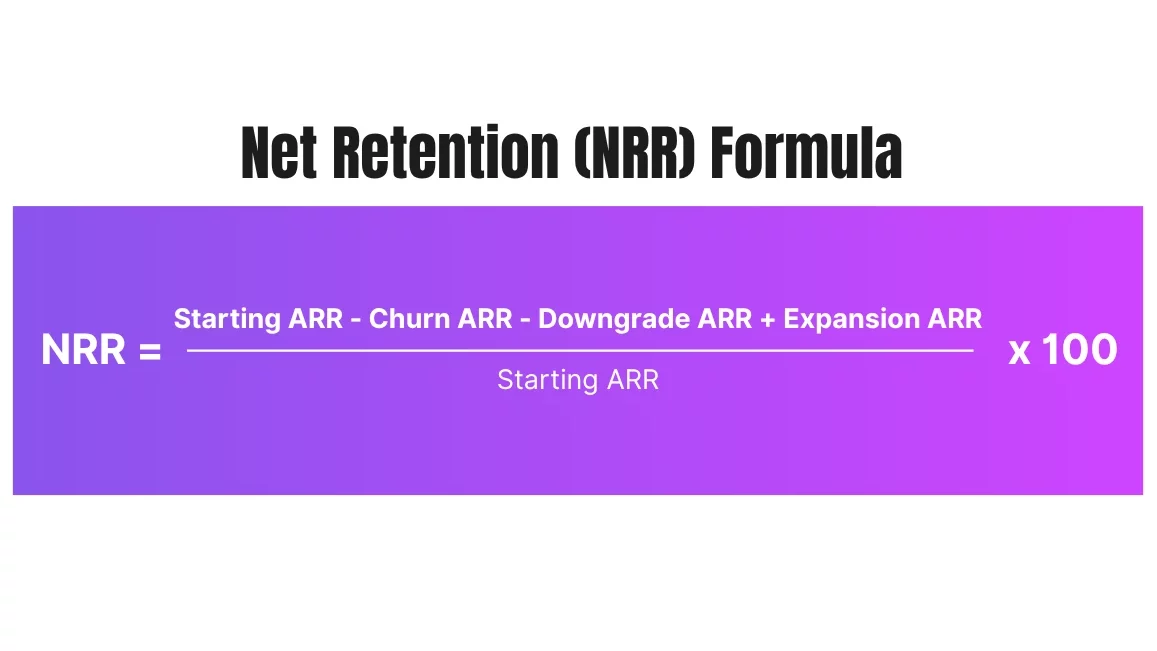
The culprit isn’t the math itself, but the messy and disconnected data that the calculation relies on.
Below are three structural data issues that will skew your NRR tracking in Salesforce, and why these hidden saboteurs are far more common than you might think.
1. Dirty and Disconnected Data Skews Your NRR Baseline
Even when your formula is correct, garbage in will lead to garbage out.
Instead of showing real churn and expansion, faulty data can paint a picture that sends teams barreling down the wrong direction:
- Duplicate accounts: These can show the same churn twice or split expansion revenue across multiple records, distorting your real customer trajectory.
- Inconsistent naming and missing field data: Without consistency in ARR, status, or segment data, cohort tracking breaks down, making it hard to see what you’re retaining, expanding, or losing.
- Unlinked records across subsidiaries: You might log churn for “Acme US” and expansion for “Acme eComm,” but if those two aren’t connected, your Salesforce environment will misclassify the net-zero movement as both a loss and a win.
2. Fragmented Accounts Obscure Whitespace
Your biggest customer might actually be hidden as a dozen “smaller” accounts within your Salesforce environment. Just ask your ops teams how many enterprise companies in your CRM are split into 10+ separate account records.
That’s your expansion opportunity — and retention risk — hiding in plain sight. And when it comes to measuring NRR, this fragmentation quickly distorts your numbers:
- Revenue gets split across disconnected accounts: Instead of seeing $150k in expansion from one enterprise, you might see a $100k deal with “Enterprise HQ” and a $50k “new logo” from “Enterprise eComm” as two separate events.
- Churn gets misclassified: If “Enterprise West” churns but “Enterprise East” grows, disconnected records make it look like one customer left and another one joined, skewing your NRR with false churn and false expansion.
- You can’t roll up usage or ARR to the global parent: Without connected account hierarchies, metrics like ARR, case volume, and product usage stay trapped at the subsidiary level, making it hard to understand total customer health and whitespace.
- Sales motions get messy: Reps may unknowingly hunt after “new logos” that are already part of existing accounts, or miss out on strategic cross-sell plays because they can’t see who owns what across a family of accounts.
To understand how fragmented accounts mislead your NRR calculations, let’s look at a hypothetical scenario of an internal reorganization.
Suppose one of your large customers, The Walt Disney Company, decides to shuffle its business: it moves the services and budget from one (say, Hulu, LLC) over to another subsidiary (Fox Entertainment).
In reality, Disney’s total spending with you hasn’t changed at all; it’s purely an internal transfer. But without account hierarchies linking those subsidiaries, your records might interpret this as a massive loss and an unrelated win:
- Hulu, LLC. Suddenly churns and drops from $100k ARR to $0, a catastrophic customer loss.
- Fox Entertainment. Adds Hulu’s drop in ARR ($100k) as new business, appearing as a huge expansion or logo win.
This is obviously misleading. It paints a volatile picture that’s not true, with reports showing you lost a major customer and won a big new deal, when in fact nothing materially changed for the Disney family’s net revenue.
Your NRR for that period gets skewed as a result, showing an artificial dip (from the “churned” Hulu account) and an artificial boost from the (Fox Entertainment account expansion) at the same time.
3. Limited Hierarchy Views
The two previously mentioned structural data issues highlight why you need connected account hierarchies to track NRR correctly.
But even companies that recognize this need can still run into trouble, because Salesforce’s native hierarchy tools are extremely limited. Here’s why:
- You only get one static hierarchy. Salesforce relies on a single “Parent Account” field, leaving you limited to one version of a hierarchy. This limitation isn’t a big deal for basic rollups, but it’s not practical in reality.
- You can’t see accounts from multiple angles. Being limited to only one static hierarchy view also means you can’t view the same customer across different lenses, like region, business unit, product line, or segment. This makes it harder to identify where expansion is happening, where churn is spiking, and which areas are driving the most revenue.
- Manual building is fragile and time-consuming. Building hierarchies manually is not only slow, but also breaks easily when:
- Accounts are missing (like through a new sub-brand or acquisition).
- Records have missing links or no assigned parent.
- A parent-child connection is wrong or outdated due to internal reorganization.
- There’s no built-in roll-up reporting: Out of the box, Salesforce doesn’t automatically aggregate metrics like ARR, product usage, or support cases across parent-child accounts. You have to build that manually or use a tool to enable it.
- And when you do build it manually, rollups break if the hierarchy chain is incomplete: If one account is missing or is linked incorrectly, all your data stops rolling up to the parent, impacting your NRR reporting accuracy.
How To Improve NRR Reporting With Account Hierarchies
To solve the challenges above and get a clearer, more accurate view of your NRR, you need to restructure your data foundation. In practice, that means leveraging better account hierarchies to connect the dots.
Below are three strategies to improve both your NRR baseline as well as reporting visibility using a hierarchy-driven approach:
1. Automatically Connect Related Account Records for Better Visibility
A pivotal first step toward accurate NRR reporting is making sure all accounts belonging to the same customer are connected in your CRM.
In many orgs, an enterprise client may be split into dozens of separate account records (one per subsidiary, region, or department), with no links between them. This fragmentation makes it impossible to understand your largest customers’ true value and health.
Automated hierarchy management tools solve this by:
- Automatically building and maintaining parent-child relationships: Every related account gets accurately linked in real time, so you don’t have to manually build out each hierarchy yourself or conduct ongoing cleanup.
- Supporting multiple hierarchy perspectives: Whether you’re viewing by legal structure, business unit, or location, flexible hierarchy views help you track customer value based on the lens that matters most to your GTM strategy.
- Reducing false churn and expansion signals: By tying internal movements to the same customer family, teams avoid misunderstanding these as churn or new business.
Let’s return to the example of The Walt Disney Company reallocating budget and services between its two subsidiaries, Hulu, LLC and Fox Entertainment, both operating under the same Master Service Agreement (MSA).
In reality, Disney’s total spend hadn’t changed at all. But if these subsidiaries aren’t connected, Salesforce misreads the internal movement as churn and net-new business.
With a unified hierarchy view, this reallocation gets captured correctly:
- Hulu, LLC. Shows a $100k reduction in ARR, recorded as a decrease in revenue at the child level.
- Fox Entertainment. Displays a $100k increase in ARR, reflecting the allocated budget.
- The Walt Disney Company. The parent record sees no net change, since roll-up fields aggregate ARR across all its subsidiaries.
This connected view lays the groundwork for everything that follows.
With all related accounts linked and ARR rolled up to the parent level, you can start tracking how revenue shifts month to month, spot early churn signals, and surface expansion opportunities across the broader account family. We’ll unpack this further down.
2. Detect Churn and Expansion Trends at the Hierarchy Level
Standard Salesforce reporting only reflects activity at the individual account level. But real churn, expansion, and contraction unfold across the entire customer family.
If your reporting stops short at the subsidiary, it’s easy to miss the bigger revenue picture or misclassify revenue shifts (as we’ve outlined above).
Here’s how a hierarchy management tool can take you beyond isolated snapshots by rolling up critical signals that would otherwise stay buried:
- Rolling up signals across child accounts: From product usage and engagement drop-offs to support case spikes and license reductions, aggregating activity across subsidiaries helps you catch churn and expansion signals early.
- Tracking ARR movement holistically: When ARR shifts from one subsidiary to another (like Hulu and Fox under Disney), it’s recognized as an internal shuffle rather than misclassified as churn or net-new revenue.
- Mapping performance trends to parent accounts: Instead of analyzing 10 accounts in isolation, you can see total ARR, engagement, and health indicators in one unified view.
- Uncovering cross-account risk and opportunity: Rollups reveal whether value is growing, shrinking, or plateauing across the customer lifecycle, helping teams prioritize outreach and retention efforts where they’ll matter most.
Hierarchy-level reporting gives your team the clarity to stop reacting to misleading signals and start executing proactively on real trends.
3. Identify Whitespace by Comparing Linked Subsidiaries
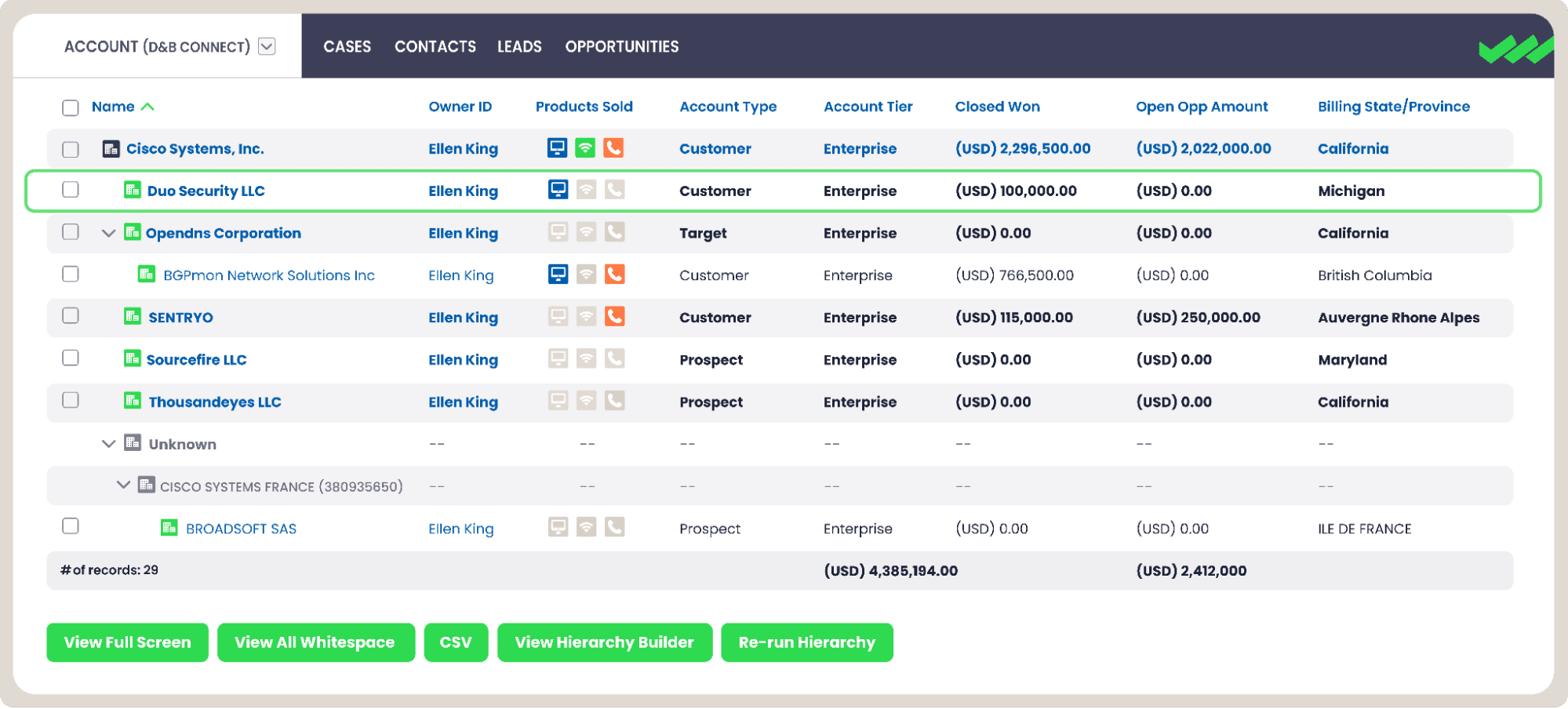
After connecting related accounts and rolling up activity, the next opportunity is zooming in on what’s missing, not just what’s moving.
We know whitespace isn’t always obvious when accounts live in silos. But when you bring everything together, these blind spots come into focus: areas where product usage is low, licenses haven’t been adopted, or regions that remain untouched.
Even in your largest, most complex accounts, these overlooked pockets often point to your next expansion opportunity.
- Compare adoption across sibling accounts: Quickly spot which subsidiaries, regions, and departments have strong product usage and which don’t. This lets you prioritize outreach where penetration is low but potential is high.
- Use custom criteria to define whitespace: Filter by field-level signals like missing product SKUs, inactive licenses, or zero recent support interactions to build dashboards that flag expansion-ready segments.
- Highlight under-engaged areas: Easily identify subsidiaries that aren’t seeing the same level of product engagement, usage, or support activity as their sibling accounts, even if they’ve never been touched by Sales.
These untouched accounts might not be in your pipeline yet, but they’re part of the same customer family and often have similar needs, budget access, and internal champions. - Automatically surface underpenetrated accounts using custom logic: Quickly flag accounts that lack product usage, haven’t purchased key SKUs, or show lower license counts compared to sibling records in the same customer family.
Once flagged, you can route these accounts to the right owner, add them to targeted outreach sequences, or prioritize them for expansion campaigns.
How to Track NRR in Salesforce
Tracking NRR starts with comparing how much recurring revenue you earned from existing customers over two points in time. And that’s exactly what Complete Hierarchies helps you do.
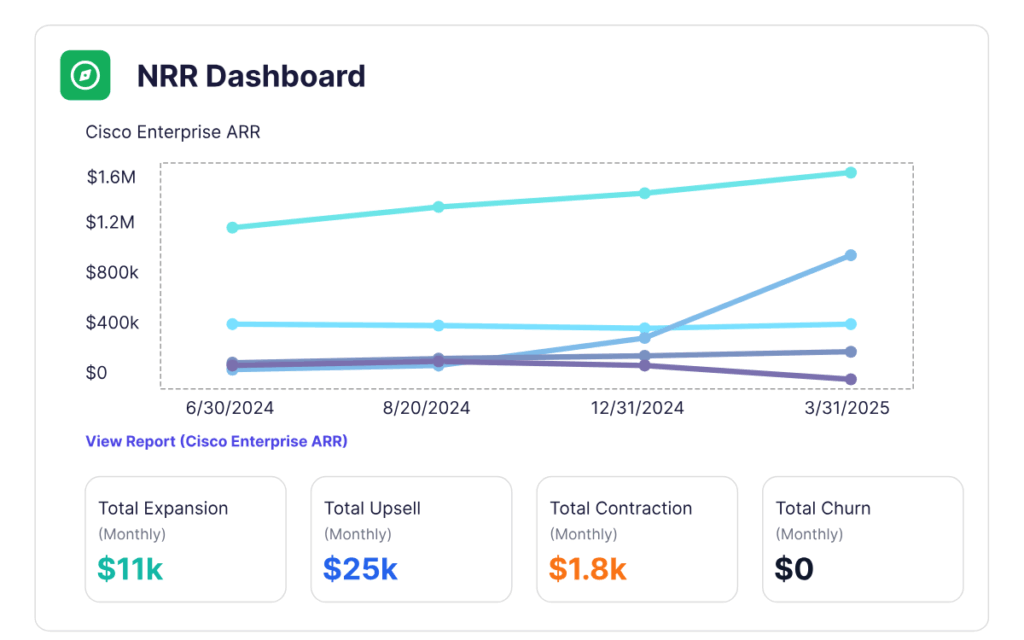
It works by rolling up ARR from all related accounts into a single parent record, giving you a clear and holistic view of customer value. Then, using monthly ARR snapshots stored in a KPI object, you can track how that value changes over time.
This helps you break down NRR into meaningful components:
- Total expansion and upsell: See how much ARR grew from add-ons, cross-sells, or increased usage across the entire hierarchy.
- Contraction and churn: Identify where recurring revenue dropped, whether it’s due to reduced licenses or full customer loss.
- Net revenue change: Get an accurate view of how much revenue was gained or lost across the entire customer family, not just one record.
Because the data lives in Salesforce and rolls up automatically, you don’t need to build custom logic or pull data into spreadsheets.
Turn NRR Into a Strategic Growth Lever With Complete Hierarchies
Accurate NRR reporting helps you grow smarter by closing the loop between data and strategy.
When your CRM can surface not just where revenue exists today, but where it should be tomorrow, you unlock a smarter way to grow, without hunting after net-new leads.
So if you’re looking for next steps to operationalize NRR, we’ve got two:
- Get the 2025 CRO Survey to see how high-growth revenue leaders are rethinking retention, expansion, and data readiness in today’s economic climate.
- Watch our on-demand NRR demo with Traction Complete CRO Jayme Smithers and Product Expert Zach Cantwell to learn how teams are using Complete Hierarchies to uncover revenue you already own, but can’t yet see.
The revenue is there. Now it’s time to reveal it, report on it, and grow with it.