








Have you ever inherited someone else’s work?
A pipeline may have been designed by an implementation partner, a developer who moved to another project, or a team assembled for the original Salesforce rollout. Months or years later, responsibility for keeping it running sits with the people who own Salesforce today.
The challenge is not necessarily technical knowledge. The problem is that the new owner did not make the original implementation decisions. Taking ownership starts with recovering that context: what exists, how it behaves, what it depends on, and where the risks are.
Why the Ownership Gap Happens
There is rarely a formal moment when someone says, “You own this pipeline now.” Responsibility usually moves gradually as teams, projects, and priorities change.
Three factors make that especially common in Salesforce environments.
Salesforce Teams Are Small and Multidisciplinary
Salesforce environments rarely have a dedicated specialist for every part of the stack. The SF Ben Architect Survey 2026 found that 69.6% of surveyed architects worked in teams of 2–19 people, while the most common structure included several developers, a few admins, and one architect.
In such teams, responsibilities may overlap. Integration ownership may fall to whoever manages the broader architecture rather than a dedicated data engineering team.
External Teams Perform a Significant Part of Salesforce Development
Many teams rely on consultants and implementation partners. In the same survey, 76.4% of respondents said they use external partners or system integrators for some or all development work.
A partner may build an integration, complete the project, and move on. The pipeline stays in production, while the internal team becomes the practical owner.
Integrations Outlive Their Original Owners
A reorganization, expired consulting contract, or employee departure can separate a working pipeline from the people who understand it. The integration may keep running while knowledge about mappings, dependencies, credentials, and failure behavior gradually disappears.
What Actually Breaks in an Inherited Pipeline
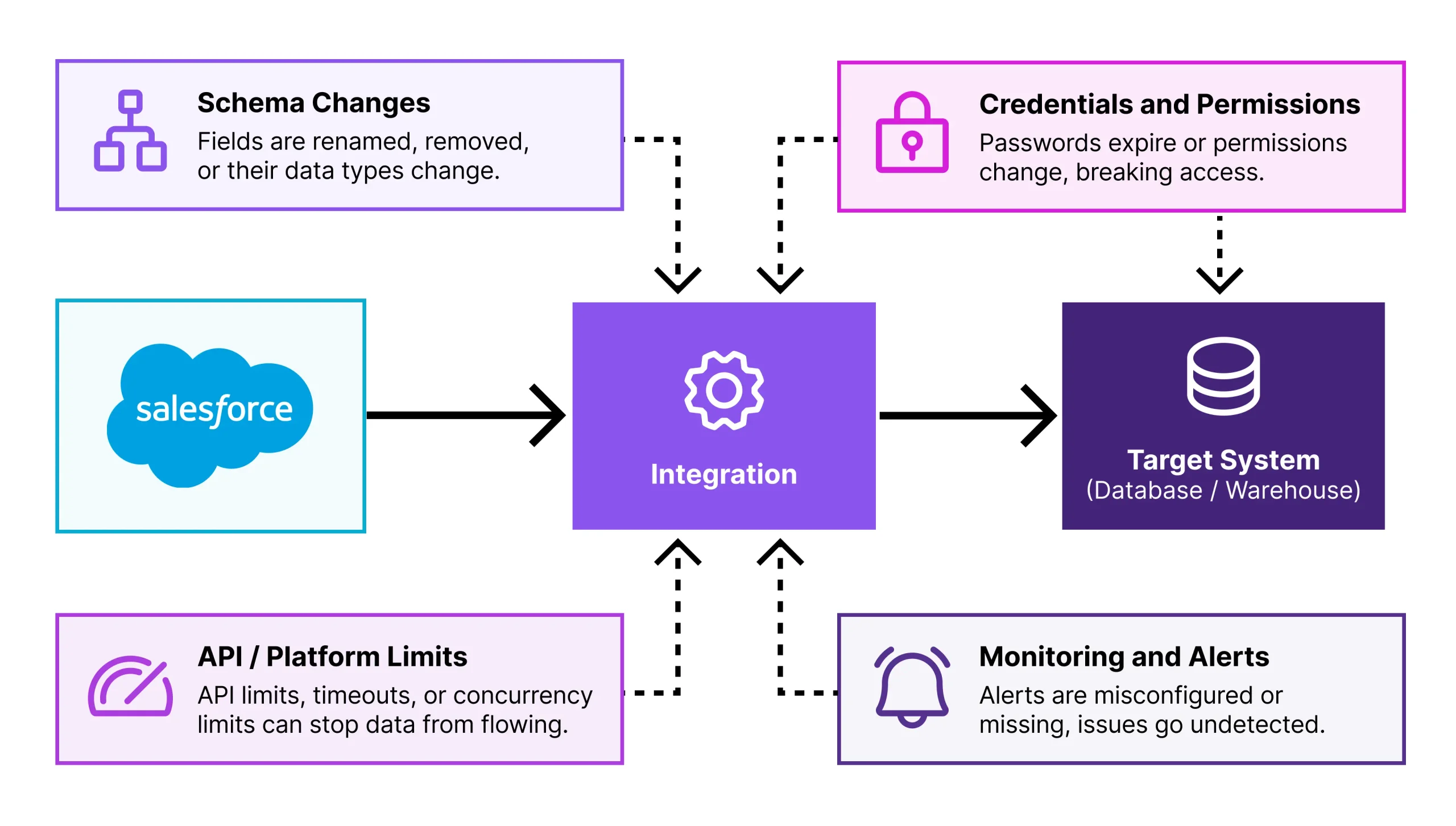
Most inherited integrations do not suddenly fail because someone edits the integration itself. More often, something around it changes.
A few patterns appear repeatedly.
Schema Changes
A Salesforce Admin adds, renames, removes a field, or adds a new picklist value. The pipeline may still depend on the old metadata, so mappings break, transformations receive unexpected values, or the target returns errors.
Credentials and Permissions
Passwords change, OAuth tokens expire or get revoked, permissions change, and service accounts may belong to people who have left. You need to know not only whether a connection works today, but also which identity it uses and who owns it.
API and Platform Limits
Data volumes grow, and more applications use the same API. A pipeline that once ran without problems may eventually hit limits, causing late data, failed runs, or partially completed workloads.
Notifications
A pipeline can fail quietly. A job stops, or a few records fail every run, but nobody notices because alerts still go to the original consultant. The integration may be monitored technically while remaining invisible to its current owner.
Taking Ownership: Audit the Pipeline
Do not start by changing the pieces that look questionable. First, understand what you inherited.
1. Find Where the Integration Lives
Identify what actually runs the integration. It may be an integration platform, scheduled application, server-side script, cloud service, or infrastructure maintained by another team.
Find where the configuration lives, who can access it, and where execution information is stored. If it is script-based, locate the repository and deployment process.
2. Map What It Moves
Establish the source and destination, direction of data movement, Salesforce objects, important fields, filters, mappings, and transformations.
Understand which records are included and how values change on the way to the target. The goal is to explain what the integration does without relying on its original author.
3. Check How and When It Runs
Document what starts the pipeline. It may follow a schedule, run after another job, respond to an event, or require manual execution.
Record the frequency, time zone, dependencies, and execution conditions. Then compare the intended schedule with the actual run history and note the most recent successful execution.
4. Identify Its Connections and Credentials
For every system, determine which account or connection the pipeline uses. Check that it still exists, authentication works, permissions are present, ownership is clear, and access is not unnecessarily tied to one employee.
The key outcome is knowing who maintains each connection and what happens when access changes.
5. Find the Monitoring and Alerts
Locate execution history and error details. Make sure the logs provide enough information to understand whether runs succeed and where failures occur.
Then check who receives alerts. Monitoring only helps if information reaches an active owner, team, or operational channel.
6. Review the Documentation
Look for notes, diagrams, service tickets, emails, or comments inside the integration, and compare them with what you found during the audit.
At minimum, document the purpose, source and destination, important mappings, schedule, connection ownership, dependencies, monitoring location, alert recipients, and current owner.
The Inherited Pipeline Checklist
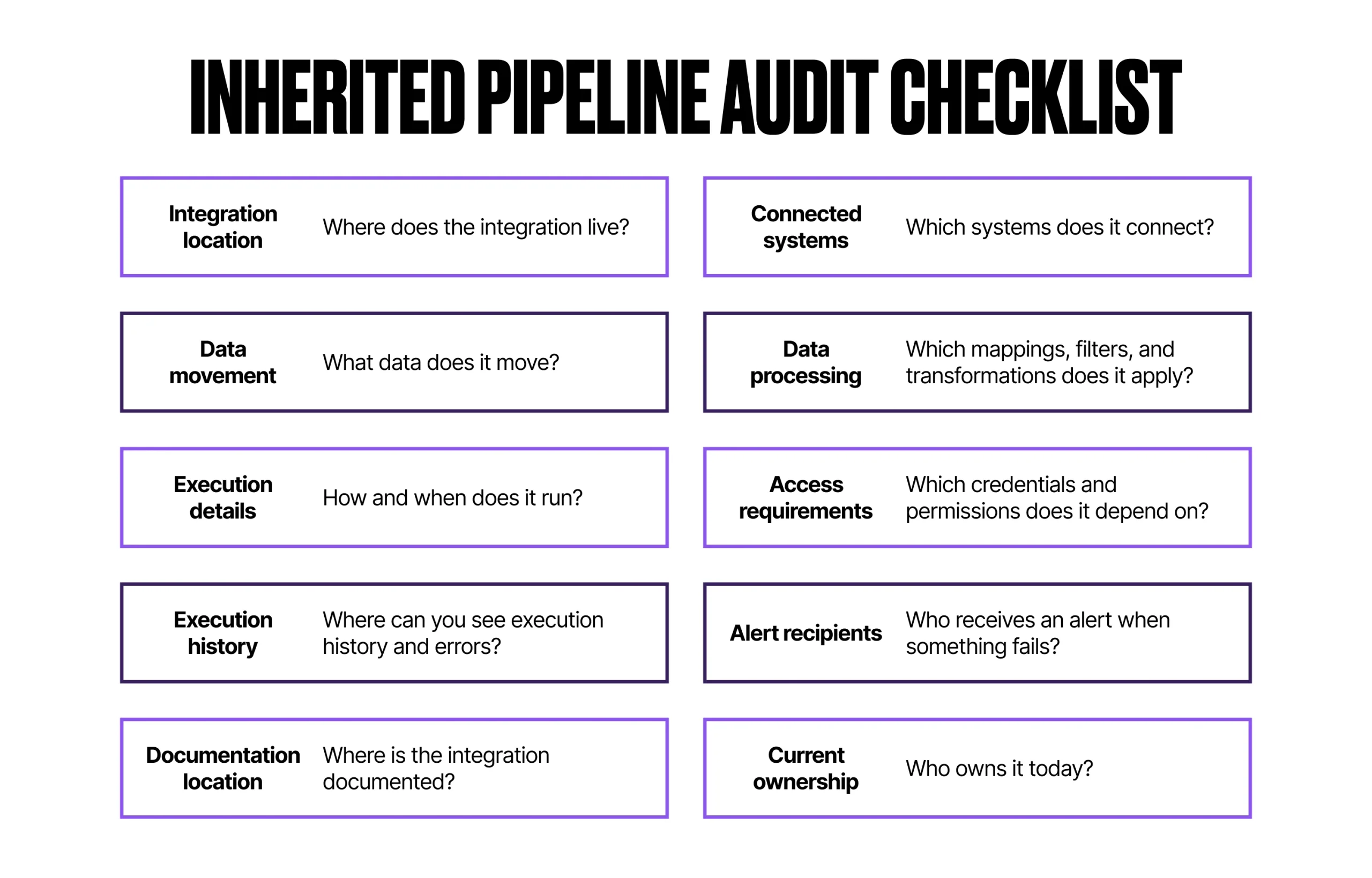
Aggregate your investigation into a checklist and keep it as documentation for future changes.
- Where does the integration live?
- Which systems does it connect?
- What data does it move?
- Which mappings, filters, and transformations does it apply?
- How and when does it run?
- Which credentials and permissions does it depend on?
- Where can you see execution history and errors?
- Who receives an alert when something fails?
- Where is the integration documented?
- Who owns it today?
With these answers, the pipeline stops being a complete mystery. You may still need technical help, but you know what you are dealing with and where to start.
How a No-Code Platform Can Reduce the Ownership Gap
A custom script can be well engineered and still become difficult to own if the current team cannot easily see its data flow, mappings, dependencies, and execution state. This is one area where a visual, no-code platform such as Skyvia can help.
Integration Logic
Skyvia provides visual configuration instead of requiring the whole implementation to live in custom code. Data Flow supports pipelines with transformations and multiple stages, while Control Flow defines how operations run together, including their sequence and dependencies.
For a new owner, this makes the integration logic easier to inspect without reconstructing somebody else’s application or script.
Schema Changes
Skyvia keeps selected fields, mappings, queries, and source and target settings in integrations, so you can see which parts of a pipeline depend on a changed field. Although you still need to select or map fields in case of changes, Skyvia informs you in case of discrepancies in metadata.
Mapping
Skyvia keeps mapping logic visible in the integration configuration and supports direct mappings, expressions, constants, and lookups. For supported Salesforce migration and synchronization scenarios, predefined mapping templates can also provide a starting point if the integration needs to be rebuilt.
No-Code Does Not Mean Non-Technical
Visual configuration does not remove the technical complexity of schemas, mappings, credentials, limits, or monitoring.
What matters for an inherited pipeline is how easily the current team can see and manage that complexity. Skyvia keeps much of the integration logic, from mappings and transformations to schedules and execution settings, accessible through its configuration rather than buried entirely in custom code.
For a new owner, that can reduce the amount of implementation knowledge that has to be recovered before the integration can be confidently maintained or changed.
Final Thoughts
You may not have chosen to take on this pipeline, but you can decide to make it better than it was when you got it.
The work you just did to map what the pipeline moves, when it runs, and who it depends on is not a one-time favor to your future self. It is what separates someone who just ends up with this integration from someone who truly takes ownership.
That shift matters more than any single fix. The next reorganization, the next departure, the next consultant who moves on – someone will inherit what you’re maintaining today. Whether that handoff is a crisis or a five-minute conversation depends on how you use what you just learned.
If your audit reveals that maintaining the pipeline still depends heavily on undocumented scripts or knowledge held by one person, a more visible integration model may be worth evaluating.
You can explore Skyvia’s Salesforce integration capabilities or start a free Skyvia trial and test the approach with one of your own integration scenarios.