

A customer reports a bug. The complaint lands in Salesforce; the fix happens in Jira. And by default, nothing connects the two. Support asks engineering for updates in Slack, engineering asks support for context. Somewhere in between, the customer waits.
Research shows that inefficiencies like these can cost companies up to 20-30% of their annual revenue. So every team running both platforms eventually faces the same decision – write a custom integration or buy a ready-made Salesforce-Jira connector.
Three years ago, the answer depended mostly on budget and patience. Now that AI writes half the code, the question deserves a fresh look.
Why the Build Is Bigger Than It Looks on the Surface
The very first step – OAuth 2.0 setup for both platforms – takes, on average, 24-32 hours. That’s the entry ticket.
Field mapping is where the real hours go. A Salesforce Case and a Jira Issue describe the same bug for two different teams, and the fields show it. Salesforce has a case status of “escalated”. Jira doesn’t. Someone has to decide what “escalated” becomes on the Jira side and write the logic for it. Then the support team changes their escalation process, and that logic gets rewritten. In fact, most mapping code gets rewritten several times in its first year.
Two-way sync adds write conflicts. An agent edits a case, an engineer transitions the linked issue, both at the same time. Which value wins? There is no universal answer. Status fields need one rule, text fields another, and dependent picklists a third.
Webhooks fail. In production, things like timeouts, endpoint downtime, and payload limits happen weekly, and a failed event with no retry queue is just gone. The records drift, quietly, until a support agent tells a customer the bug is fixed, and the customer says it isn’t. Every one of those layers is its own line in the estimate:
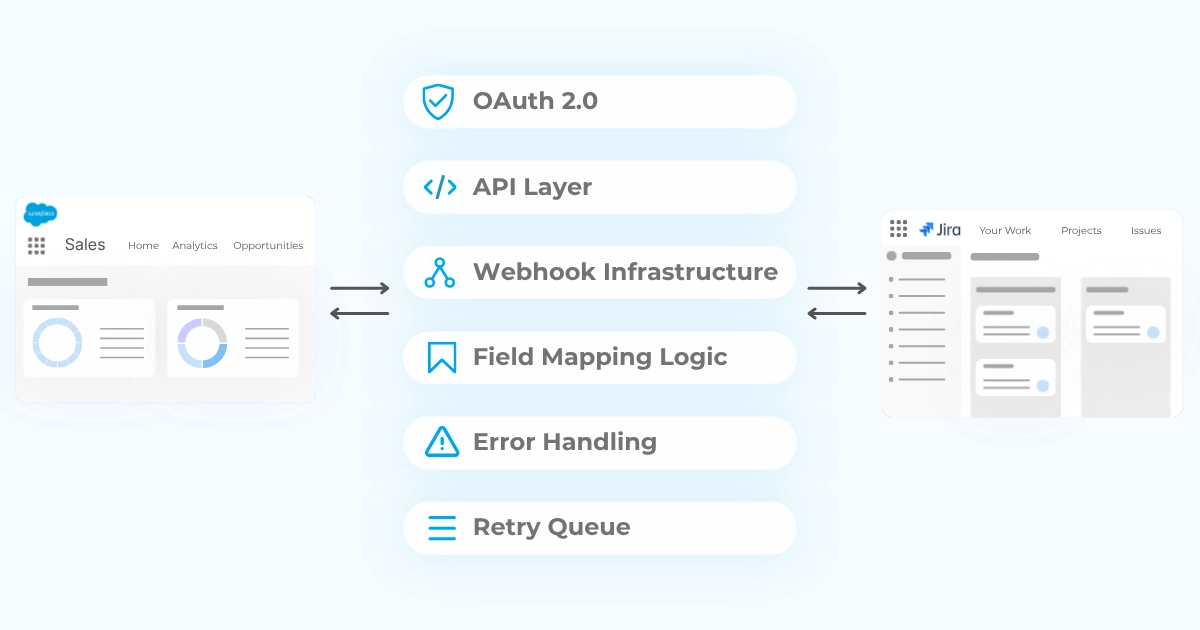
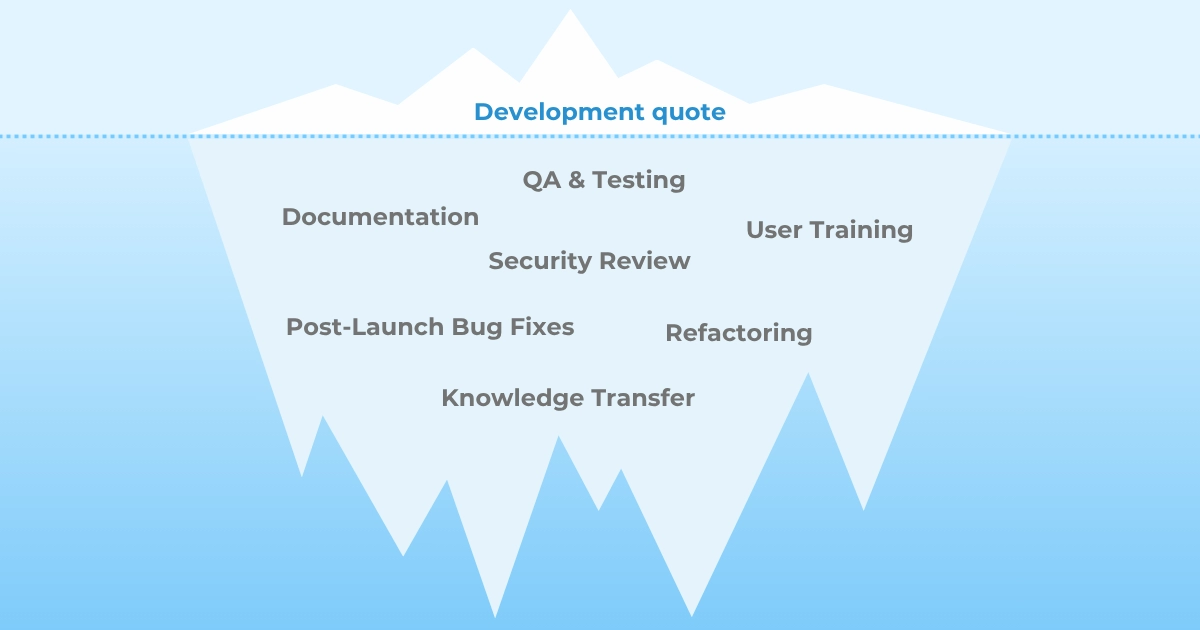
Adding it all up, we’re looking at 100-140 hours for a minimum viable integration, and 470-680 hours for full parity with a production-grade connector. At $100-150/hour for Salesforce expertise, that math lands anywhere between $10,000 for the barest MVP and $100,000+ for the full build. This quote covers code. QA, documentation, and post-launch fixes usually don’t make it in, which is why actual costs often run 30-50% over the estimate. Teams scoping their own project can run these numbers against their specific requirements in a free Integration Calculator tool to see where their estimate lands.
Let’s talk about some of the costs that many teams forget to consider.
The Bill After Launch
Salesforce ships three major releases per year. Jira releases on its own schedule (read: you can’t plan and prepare for them).
Each release means compatibility review and testing, whether the team planned for it or not.
Annual maintenance for a custom Salesforce-Jira integration runs 112-240 hours per year; at the same rates, that is $11,000-$36,000 annually. That’s the cost your company takes every year, indefinitely.
There is also the engineer or the team who have built the integration and understand how it works. When they leave, that understanding leaves with them. “Nobody knows how this works” is the standard condition of any undocumented custom integration after some months in use.
All things considered, you end up with the original dev quote being a way lesser, sometimes nearly-insignificant part of the full equation:
What AI Changed, and What It Didn’t
Coding got faster, of course. Tools like Copilot produce boilerplate, standard API calls, repetitive and sync patterns quicker than any developer typing from scratch. For most teams, a realistic estimate of the saving is 20-30% of active coding time.
But think about where the hours in the estimates above actually go. A large share of them is decisions, and AI doesn’t make those:
- Which value wins a write conflict.
- How the event queue should be structured.
- Whether to build against Jira Cloud or Data Center, because those two run different APIs and that choice can’t be revised later.
AI will happily generate code for whatever architecture you specify, but calling the shots and making those choices is still someone’s job.
And what about the business logic? The same goes here. The knowledge of which fields map where, under what conditions, with which exceptions, lives in the heads of people who understand your teams’ processes. No model has the context until humans write it down.
And then, not to state the obvious too much, but AI doesn’t pick up the phone when something stops working. So someone has to own the integration after launch. There’s monitoring, debugging, testing against the next release, and any number of things in between.
So the coding got faster and cheaper, but ironically, the scope and overall cost remained almost exactly what they were before AI.
When to Choose Custom Development Anyway
Truth is, custom development still earns its cost in specific situations, for instance:
- Multiple Salesforce orgs with a middleware layer in between.
- Data residency requirements that rule out third-party SaaS entirely.
- Proprietary logic that no configurable product can express.
- Organizations where vendor dependency itself is a strategic concern.
If one or several of these describe your environment, building custom could be the way. Just be sure to budget the maintenance honestly and document as you go.
But if none of them do, let’s face it: you will be paying senior engineering rates for infrastructure that isn’t your product. Frankly, your developers probably have better things to build.
Where a Ready-Made Connector Fits
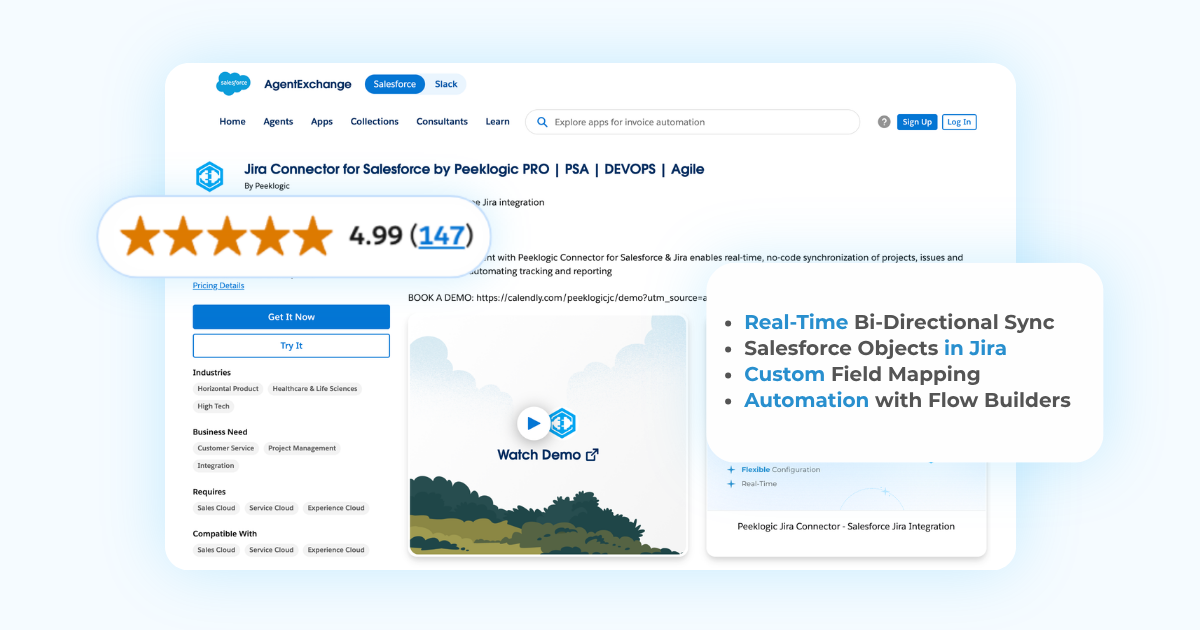
Peeklogic Salesforce-Jira Connector ships with the full foundation already built for you: authentication, bidirectional sync, webhook handling, error management, field mapping. Installation from AppExchange takes about 7 minutes; a complete setup takes a few hours to a few days.
That’s a staggering difference in effort and cost to launch, but the biggest difference shows in setting up real workflows. Seven use cases collected from actual Peeklogic customer deployments, including status notifications, conditional comment sync, and cross-system field updates, took 12-18 hours to configure in total.
The same seven built from scratch, foundation included, would take between 560 and 790 hours for most dev teams. That constitutes a 30-65x gap between the connector and custom build before the first workflow even goes live.
Another often-overlooked benefit that saves teams hundreds of hours is that both Salesforce and Jira updates are handled entirely by Peeklogic. Your team tracks neither release schedule and doesn’t need to do anything at all following the releases.
And the market has already run this comparison. Peeklogic Jira Connector holds a 4.99/5 rating on AppExchange, across 147 reviews from verified customers. AppExchange scores don’t inflate easily; every review there is downstream of real implementation. A rating that close to perfect means the teams who installed the connector stayed happy long after the setup was done.
Book a demo to see the connector against your own workflow, or start with the 30-day trial on AppExchange.